
RyanEmslie@RyanEmslie
RyanEmslie/prompt-posse
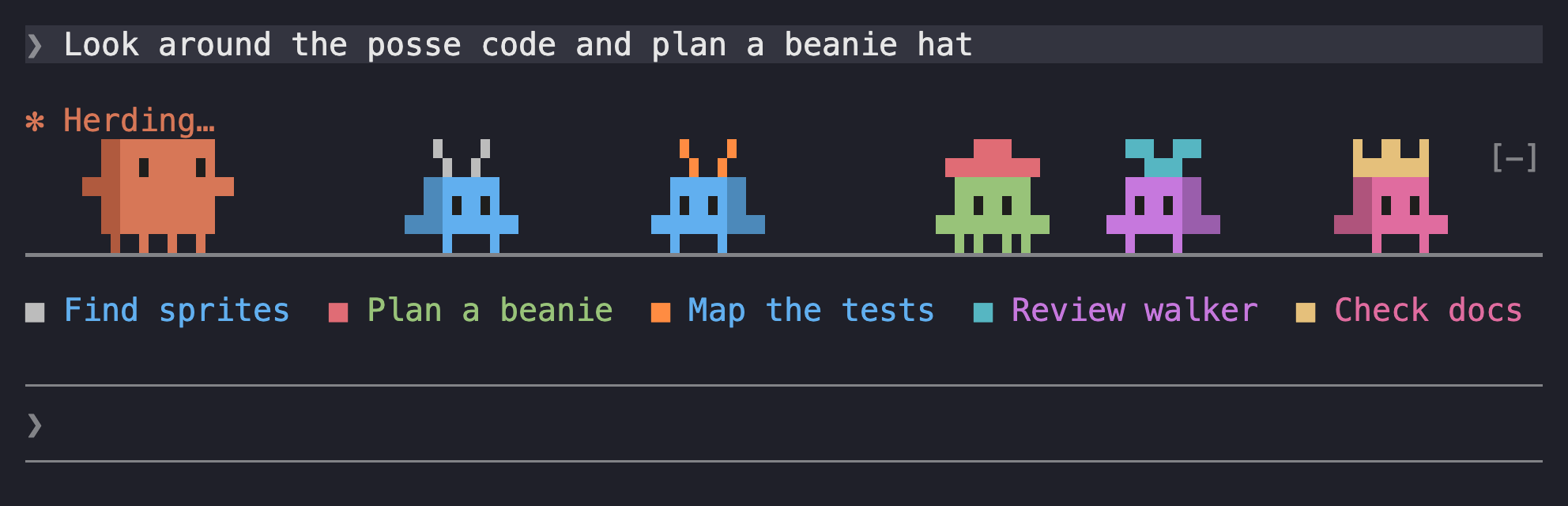
一个Claude Code模组,当Claude工作时,它会在你的提示上方放置一个小游行。老板来回走动,每一个副特工Claude开始都作为自己的生物加入。
RyanEmslie/prompt-posse
Prompt-posse 在 Claude Code 提示上方绘制一条动画条:一个在回合运行时走完整宽度的 Boss,以及每个运行子代理的较小生物,其头饰、身体和帽子颜色取决于子代理类型(探索、计划、通用、Claude、叉子或自定义)。图例行以其生物的颜色列出每个子代理的任务,修剪最长的任务以适应并将溢出总结为 +N more。生物的行走速度取决于代理最近输出的令牌,步伐之间的缓和性,背景子代理在主回合结束后继续行走。命令包括 /posse、/posse on|off、/posse legend 和 /posse demo。需要Claude Code 2.1.289+;可在终端(以文本字符重新绘制 20xQXZKQZXIQ)和桌面应用程序(自动画 SVG)中运行;不支持 VS Code 和移动设备。通过克隆存储库并传递 --plugin-dir 或添加 CLAUDE_CODE_PLUGIN_DIRS 的路径来安装。麻省理工学院许可的粉丝项目,不隶属于 Anthropic。
自述文件还记录了自定义点(hooks/walker.ts 中的 TICK_MS、hooks/pace.ts 中的速度阈值、hooks/looks.ts 中的查找、hooks/sprite.ts 中的精灵、hooks/svg.ts 中的 SVG 绘图)和已知限制,例如固定 RGB 颜色、 [-] 折叠扣重叠头戴,队友在 10 分钟报跑后退场。
请先查看作者 README 确认 marketplace 和插件名称;命令可能随仓库结构改变。
claude plugin marketplace add RyanEmslie/prompt-posse
claude plugin install prompt-posse
A Claude Code mod that puts a little parade above your prompt while Claude works. The boss walks back and forth, and every subagent Claude starts joins in as a creature of its own.
The whole lineup, as text:
  █▜██▜█      ▝▖▗▘        ▗▄██▄▖        ▀▙▟▀         ▙▟▙▟         ▝▀▀▘
 ▀██████▀     █▜▛█         █▜▛█         █▜▛█         █▜▛█         █▜▛█
  ▜▀▛▜▀▛     ▀▛▛▜▜▀       ▀▛▛▜▜▀       ▀▛▛▜▜▀       ▀▛▛▜▜▀       ▀▛▛▜▜▀
▔▔▔▔▔▔▔▔▔▔▔▔▔▔▔▔▔▔▔▔▔▔▔▔▔▔▔▔▔▔▔▔▔▔▔▔▔▔▔▔▔▔▔▔▔▔▔▔▔▔▔▔▔▔▔▔▔▔▔▔▔▔▔▔▔▔▔▔▔▔▔▔
From left to right: the boss, the biggest of them, then the creatures for Explore, Plan, general-purpose, claude and fork subagents. The boss is drawn after Claude Code's mascot. Every creature has dark eyes and a darker side at its back, which flips when it turns; when one stops to face you, it stands square on.
The boss appears when a turn starts and walks the full width of the prompt. At each edge it stops, looks at you, and turns around. It blinks now and then. It leaves once the turn has ended and no subagent is still walking.
Each running subagent gets its own, smaller creature. Its headwear, body color and headwear color depend on the subagent's type:
| Subagent type | Headwear | Body | Headwear color |
| --- | --- | --- | --- |
| main turn (the boss) | none; bigger than everyone else | orange, with a darker side at its back and dark eyes | — |
| Explore | antennae | blue | light gray |
| Plan | top hat | green | red |
| general-purpose | propeller cap | purple | cyan |
| claude | crown | pink | gold |
| fork | halo | peach | pale yellow |
| any other type | ears, horns, a mohawk or a sprout | picked from the type's name | picked from the type's name |
A custom type always gets the same look, never headwear a built-in type wears, and never a hat the color of its body.
No two creatures on the strip wear the same hat color. When a hat color is already taken, often by another agent of the same type, the newcomer keeps its body and headwear but wears a spare color, and keeps it until it leaves.
While subagents walk, a legend row under the ground lists each one's task, as the Agent call described it, in the order they joined. Each entry starts with a mark in its creature's hat color, and the task is written in its body color. When the row is too narrow, the longest tasks are cut short first, down to 10 characters, so that more of them fit. What doesn't fit even then is counted at the end as +N more.
The boss always walks at the same pace: 10 columns a second at the default speed. Each subagent's creature gets one of six speeds of its own, from 7 to 12 columns a second, picked from the subagent's id. How fast it actually walks follows how hard its agent is working: the output tokens its model wrote over the last 10 seconds. An agent waiting on a tool strolls at half its own speed; one writing 50 tokens a second or more runs at one and a half times it. A creature eases into a new pace over about a second. In the desktop app, a creature's SVG is drawn again once its pace has changed by a tenth or more, setting out from where it already is, so it never jumps; one pausing at an edge waits to walk on first. In the terminal, when two meet, they stop briefly and turn around. In the desktop app they walk past each other.
Subagents running in the background keep walking after the main turn ends, with the boss leading them. The strip disappears when the last one finishes.
The mod checks which subagents are running whenever one starts, whenever a turn ends, and every half second while anything is walking. So a creature can arrive or leave up to half a second after its subagent starts or finishes.
The strip steps aside while Claude Code is showing a survey, when there are fewer than 4 free rows above the prompt (the legend row needs a fifth, and is the first to go), or when it's under 8 columns wide, too narrow for the boss. It comes back when there's room again.
/posse switches the posse on or off. The setting is remembered across sessions./posse on and /posse off pick one./posse legend shows which creature is which./posse demo brings the whole posse out for 20 seconds, even while Claude isn't working: the boss, a creature for each kind of agent, and a second Explore in a spare hat, with the legend naming each one. Each walks at a different pace, as agents doing more or less work would. It starts no agents and uses no tokens. Run it again to end it sooner.The command runs right away, even while Claude is working and the posse is walking.
In the terminal, the creatures are drawn in text characters and repainted 20 times a second. In the desktop app, they're one SVG that animates itself, so nothing is sent per frame. It's redrawn when a creature arrives or leaves, when a creature's pace changes by a tenth or more, when a turn starts or ends, and when the window is resized. A resize changes how far each creature has to walk, so the creatures jump to new spots.
Clone the repo:
git clone https://github.com/RyanEmslie/prompt-posse.git
The steps below write the folder this makes as /path/to/prompt-posse. Use its absolute path instead, such as /Users/you/code/prompt-posse.
To try it in one session, point Claude Code at the folder:
claude --plugin-dir /path/to/prompt-posse
To load it in every session, add the folder's absolute path to the env block of ~/.claude/settings.json:
{
  "env": {
    "CLAUDE_CODE_PLUGIN_DIRS": "/path/to/prompt-posse"
  }
}
If CLAUDE_CODE_PLUGIN_DIRS already names other plugin folders, keep them and add this one to the list, separated by : (; on Windows):
"CLAUDE_CODE_PLUGIN_DIRS": "/path/to/another-plugin:/path/to/prompt-posse"
Sessions the desktop app starts read the same setting.
Interactive terminal sessions watch the folder, so edits reload in sessions that are already open. Desktop sessions only do that when CLAUDE_CODE_PLUGIN_DIR_WATCH is also set to 1. Otherwise edits show up in new sessions.
Start a new session and run /posse demo. The whole posse walks above the prompt box for 20 seconds. Or send any prompt: the boss walks while Claude works, and leaves when the turn ends. /posse legend lists who's who. If nothing shows, check that the strip has room: it needs at least 4 free rows above the prompt and 8 columns.
Pull the latest version into the folder:
git -C /path/to/prompt-posse pull
Terminal sessions that watch the folder pick it up on their own. Other sessions show it once restarted.
To hide the posse but keep it installed, run /posse off. It stays off in new sessions until you run /posse on.
To remove it, take its path out of CLAUDE_CODE_PLUGIN_DIRS (or stop passing --plugin-dir), start a new session, and delete the folder.
TICK_MS in hooks/walker.ts. Lower is faster.hooks/pace.ts sets how an agent's work moves its creature's pace: WINDOW_MS is how far back its output tokens count, FULL_RATE the tokens a second for the fastest pace, and MIN_PACE and MAX_PACE the slowest and fastest pace as a share of the creature's own speed.hooks/looks.ts. Headwear is two text rows of 12 characters, with # for a filled pixel. Colors are 0xRRGGBB values.hooks/sprite.ts, drawn the same way, with % for a pixel of the shaded side and o for an eye. The shade is a darker version of the body color unless the look sets shadeColor, and the eyes are near black unless it sets eyeColor.hooks/svg.ts turns the same sprites into the animated SVG.claude plugin validate .
claude plugin test .
What changed in each version is in CHANGELOG.md.
[-] collapse button sits on the strip's top row, so near the right edge it briefly covers a creature's headwear.MIT. See LICENSE.
This is an unofficial fan project, not affiliated with or endorsed by Anthropic. Claude and Claude Code are trademarks of Anthropic.

文档生成、漂移检测和 API 文档自动化插件,同时作为 function-hook 防护,拒绝包含机密的文档写入或 worker 调度。

Claude 桌面应用的状态栏。它显示在提示符上方,展示会话质量、上下文填充量、缓存倒计时,以及 5 小时和每周限额,并让 Clawd 演示会话正在进行的操作。

一个 Claude Code 插件 mod,提供 /databricks-pane:按照 databricks CLI,以树状结构展示 Databricks 工作区、Unity Catalog、计算资源、作业、管道、应用和仪表板,并支持实时高亮、配置文件切换和复制 CLI 参数。
