
Chrisutina@Chrisutina
Chrisutina/claude-progress-band
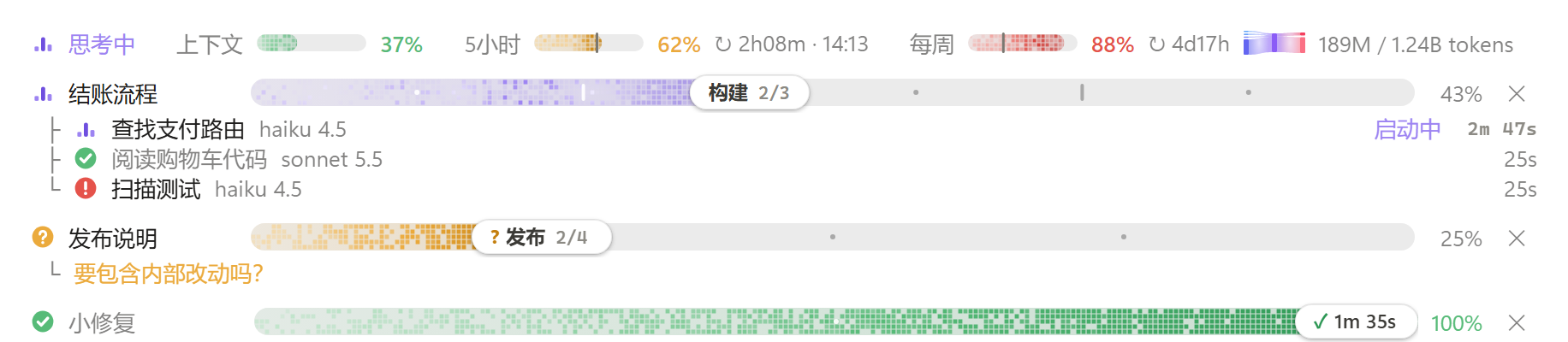
Claude Code 模组:在输入框上方的频段里,实时显示上下文 / 5 小时 / 每周用量,以及 Claude 把任务拆成阶段和步骤后的极光进度条和它的子代理。界面文字可选中文或英文。
Chrisutina/claude-progress-band
Band above the Claude Code prompt: context, 5-hour and weekly usage with the week's tokens, plus live aurora progress bars for Claude's tasks and their subagents. Features usage meters with green/amber/red levels and reset countdowns, a session/week token Sankey, a quota alert at 85% of the 5-hour window, an aurora task progress bar with stages and steps, subagent rows with model and effort, light/dark theme support, reduced-motion handling, a terminal text fallback, and Chinese (default) or English UI. Requires Claude Code v2.1.286 or later; install via /plugin marketplace add Chrisutina/claude-progress-band, /plugin install progress-band@progress-band, /reload-plugins. No network, file access or processes; state stored in plugin storage. MIT licensed, verified against 30 tests on Claude Code 2.1.288.
请先查看作者 README 确认 marketplace 和插件名称;命令可能随仓库结构改变。
claude plugin marketplace add Chrisutina/claude-progress-band
claude plugin install progress-band
Claude Code 模组:在输入框上方的频段里,实时显示上下文 / 5 小时 / 每周用量,以及 Claude 把任务拆成阶段和步骤后的极光进度条和它的子代理。界面文字可选中文或英文。
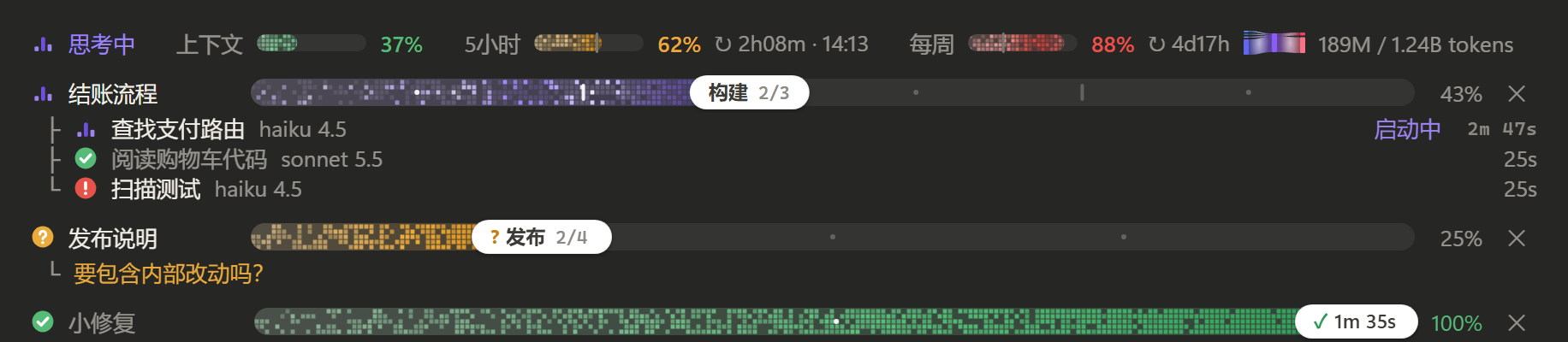
<sub>预览为中文界面的静态截图,还是 0.3 的像素样式;实际使用时极光在管道里流动,状态图标里的电子绕核转。</sub>
用量
当前状态(和用量表同一排,排在最前)
任务进度条
子代理
适配
需要 Claude Code v2.1.286 或更新(桌面版 Code 标签页或终端均可)。如果在 v2.1.286 上模组没有加载,设置环境变量 CLAUDE_CODE_ENABLE_FUNCTION_HOOKS=1(可以写进 ~/.claude/settings.json 的 env)后重启。
仓库名是 claude-progress-band,插件名和 marketplace 名均为 progress-band。
在 Claude Code 里依次运行:
/plugin marketplace add Chrisutina/claude-progress-band
/plugin install progress-band@progress-band
/reload-plugins
不安装、直接从本地目录加载:
claude --plugin-dir /path/to/claude-progress-band
Windows PowerShell 示例:
claude --plugin-dir "D:\Plugins\claude-progress-band"
桌面版没有命令行参数可用时,把目录的绝对路径写进 ~/.claude/settings.json 的 env.CLAUDE_CODE_PLUGIN_DIRS。
模组和 Claude Code 同权限运行、没有沙箱。安装前请先看一遍
hooks/register.tsx。
界面文字默认中文,可切换成英文(en)。给 Claude 看的规则和工具返回本来就是英文,不受影响。
/config,把 progress-band 的 Language 改成 en,模组会自动重载。/config:在 ~/.claude/settings.json 里加下面这段,然后新开会话或运行 /reload-plugins。{
"pluginConfigs": {
"progress-band@progress-band": { "options": { "language": "en" } }
}
}
用 --plugin-dir 或 CLAUDE_CODE_PLUGIN_DIRS 从本地目录加载时,键名换成 progress-band。
plan_progress,并在系统提示词里加一小段规则:需要多于约 3 次编辑或命令的任务,Claude 先建一条进度条,之后用短操作推进,例如 {id, next:true}、{id, done:[...], active:"..."}、{id, failed:"...", note}、{id, state:"needs_input", note}。名字不存在的步骤会被拒绝,并返回该进度条的步骤列表。克隆仓库后直接运行 Claude Code 自带的验证和测试,不需要 npm install 或单独构建:
git clone https://github.com/Chrisutina/claude-progress-band.git
cd claude-progress-band
claude plugin validate .
claude plugin validate .claude-plugin/plugin.json
claude plugin test .
第一条验证 marketplace;第二条验证插件清单、hooks 和状态类型。测试覆盖进度操作、会话恢复、并发保存、用量统计、额度提醒、英文界面以及桌面 / 终端渲染边界;本次发布在 Windows、Claude Code 2.1.288 上通过 30 项测试。
模组从这个目录加载一次之后,Claude Code 会写出 .claude-plugin/types/(已加入 .gitignore),tsconfig.json 会用到它;也可以在会话里运行 /plugin-types 生成类型。
生成类型用于编辑器提示,不随仓库发布;运行上述测试无需先生成它们。仓库中的 types/index.d.ts 是插件自身的状态类型,需要保留。
A Claude Code mod. The band above the prompt shows context, 5-hour and weekly usage (with the week's tokens), and a live aurora progress bar for each task Claude splits into stages and steps, with its subagents listed under it. The band speaks Chinese (default) or English: set language to en, see Language below.
<sub>The screenshots above show the Chinese UI, frozen, still in the 0.3 pixel look; in use, aurora light flows down the pipes and electrons circle in the state icons.</sub>
Features
Install (Claude Code v2.1.286 or later; if the mod does not load on v2.1.286, set CLAUDE_CODE_ENABLE_FUNCTION_HOOKS=1 and restart):
The repository is claude-progress-band; the plugin and marketplace are both named progress-band.
/plugin marketplace add Chrisutina/claude-progress-band
/plugin install progress-band@progress-band
/reload-plugins
To load it from a local folder instead, run claude --plugin-dir /path/to/claude-progress-band, or, in the desktop app, put the folder's absolute path in env.CLAUDE_CODE_PLUGIN_DIRS of ~/.claude/settings.json.
The band's words are Chinese by default. What Claude reads (the rules, tool results) is English either way.
/config and set progress-band's Language to en; the mod reloads by itself./config): add this to ~/.claude/settings.json, then start a new session or run /reload-plugins.{
"pluginConfigs": {
"progress-band@progress-band": { "options": { "language": "en" } }
}
}
When the mod loads from a local folder (--plugin-dir or CLAUDE_CODE_PLUGIN_DIRS), the key is progress-band.
Development (no separate build or npm install):
git clone https://github.com/Chrisutina/claude-progress-band.git
cd claude-progress-band
claude plugin validate .
claude plugin validate .claude-plugin/plugin.json
claude plugin test .
Release verification: 30 tests passed on Windows with Claude Code 2.1.288, the quota alert and the English UI included. Generated .claude-plugin/types/ files support editor types and are ignored by Git; the test runner does not require them. The plugin's own types/index.d.ts is included.
The desktop UI has been used on Windows. Terminal rendering and the English UI have automated tests and screenshot checks; macOS, VS Code and mobile have not been tested manually. The mods API is early and may change with Claude Code updates.
How it works
plan_progress tool and adds a short rule to the system prompt, so Claude creates a bar for multi-step work and moves it with short ops.The task-progress logic and the self-running clock are adapted from zycck/claude-mods plan-progress (MIT). The usage-meter idea comes from HolyGrail/claude-mods; its code is not reused.
License: MIT

文档生成、漂移检测和 API 文档自动化插件,同时作为 function-hook 防护,拒绝包含机密的文档写入或 worker 调度。

Claude 桌面应用的状态栏。它显示在提示符上方,展示会话质量、上下文填充量、缓存倒计时,以及 5 小时和每周限额,并让 Clawd 演示会话正在进行的操作。

一个 Claude Code 插件 mod,提供 /databricks-pane:按照 databricks CLI,以树状结构展示 Databricks 工作区、Unity Catalog、计算资源、作业、管道、应用和仪表板,并支持实时高亮、配置文件切换和复制 CLI 参数。
