
alex2481kobe@alex2481kobe
alex2481kobe/claude-mods/tree/main/plugins/peek
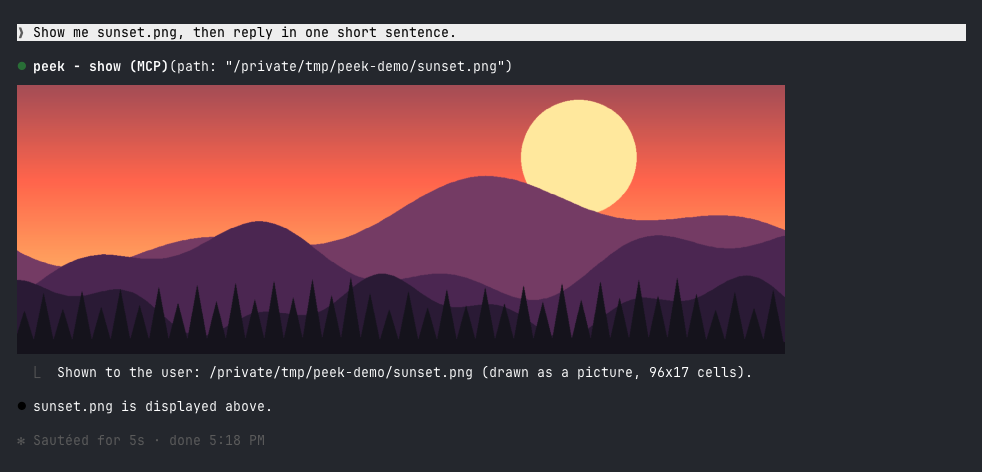
Claude Code 外掛,讓 Claude 在終端機中直接顯示它產生或找到的圖片:在 kitty 與 Ghostty 中以真實像素呈現,其他終端機則以彩色區塊預覽。
alex2481kobe/claude-mods/tree/main/plugins/peek
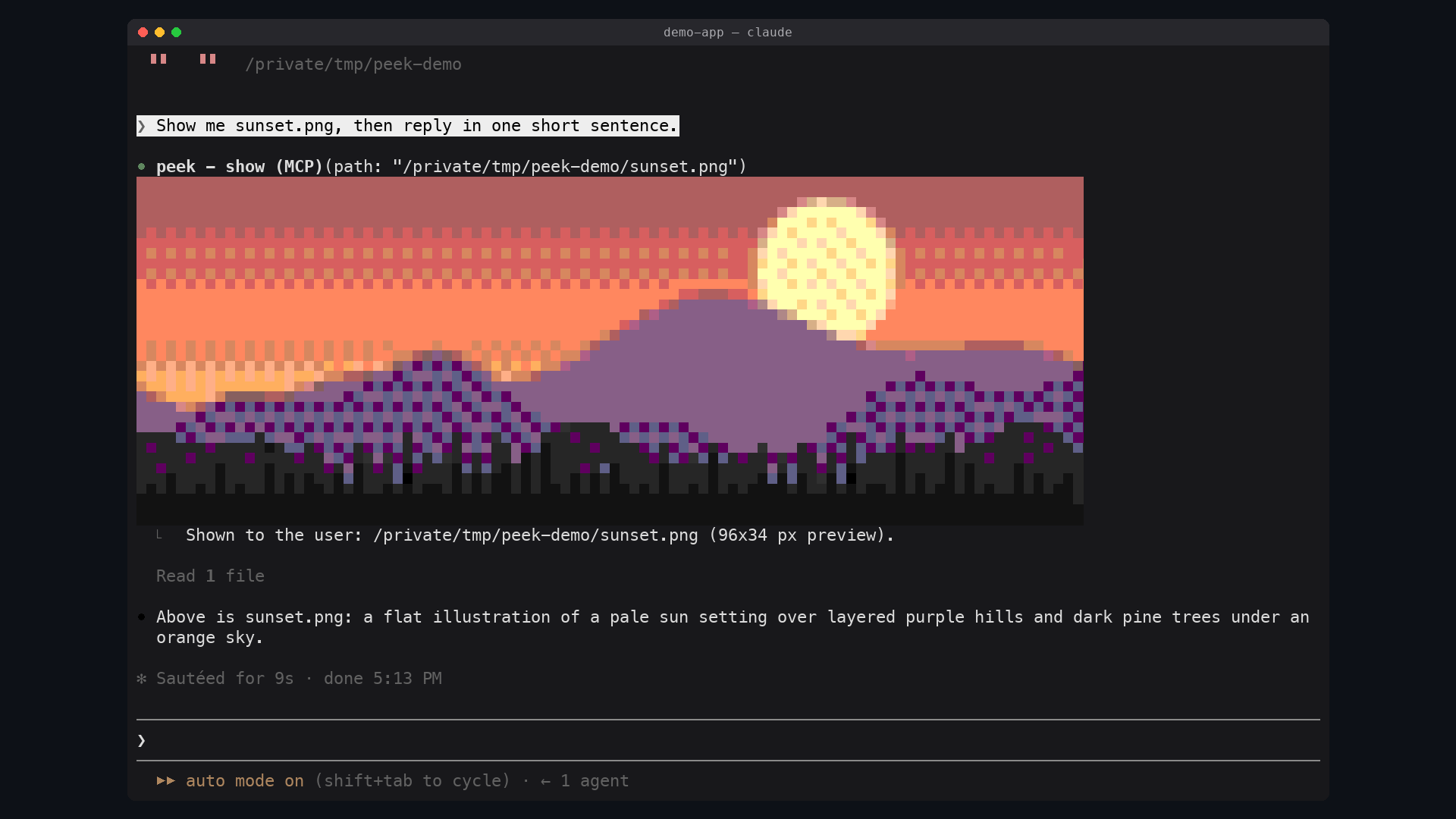
peek 會在 Claude 的工具呼叫列下方內嵌顯示圖片,無需開啟瀏覽器或手機。在 Ghostty 或 kitty 中透過 kitty 圖形協定繪製真實圖片(先將影像複製為 PNG 置於 $TMPDIR/peek/),在其他終端機(Apple Terminal、iTerm2、WezTerm、VS Code 終端機、tmux)則以半塊字元 ▀ 搭配自行對應的 256 色調色盤與輕度抖動,產生約 160x96 像素的彩色區塊預覽;Claude Code Desktop 與行動應用僅顯示工具列。需求為支援 mods 的 Claude Code(於 2.1.287 測試)與 macOS(使用內建的 sips 轉換影像)。安裝方式為 /plugin marketplace add alex2481kobe/claude-mods 與 /plugin install peek@claude-mods,可透過自然語言請 Claude 呼叫 show 工具,或使用 /peek ~/Desktop/screenshot.png 手動顯示。實作包含 $.tool.register 註冊 show 工具、prompt.compose hook 補充系統提示、ui.render hook 在工具列下方繪圖,並以 CIE Lab 最近色與四分之一強度 Floyd-Steinberg 抖動產生區塊預覽。限制包括區塊預覽較粗略、平面區域會出現輕微抖動紋理、tmux 中一律使用區塊預覽、僅支援 macOS,且每個顯示的圖片會在 $TMPDIR/peek/ 留下 PNG 複本。
请先查看作者 README 确认 marketplace 和插件名称;命令可能随仓库结构改变。
claude plugin marketplace add alex2481kobe/claude-mods
claude plugin install peek
Images in the terminal. When Claude makes, downloads, captures or finds an image you should look at, it shows it to you inline, under its tool call, without you opening a browser or your phone.
In Ghostty or kitty it is the real picture:
In other terminals it is a colored-block preview:
| Terminal | What peek draws | | --- | --- | | Ghostty, kitty | The real picture, in pixels | | Apple Terminal, iTerm2, WezTerm, VS Code's terminal, anything inside tmux | A colored-block preview, about 160x96 pixels at most | | Claude Code Desktop, the mobile app | Nothing: the tool row only |
The reason is what a terminal can draw. Every terminal draws text: a grid of cells, each one character with a text and a background color. A real picture needs the terminal to implement a graphics protocol, a way for a program to hand it pixels. Claude Code draws a mod's pictures through the kitty graphics protocol, which kitty and Ghostty implement. Apple Terminal implements none, and Claude Code does not promise pictures in the others.
Elsewhere peek fakes the picture with text: each cell is an upper half block
▀ whose text color paints one pixel and whose background paints the one
below it, so a cell holds two pixels. Claude Code draws these in the 256-color
palette even where the terminal has more, so peek picks the palette colors
itself, by how close they look, and lightly dithers between them.
sips, which ships with it/plugin marketplace add alex2481kobe/claude-mods
/plugin install peek@claude-mods
Ask for an image the way you would anyway ("show me the screenshot", "make a
chart of this and let me see it"). Claude calls the show tool on its own.
You can also show one yourself:
/peek ~/Desktop/screenshot.png
Any format macOS opens works: PNG, JPEG, HEIC, GIF, TIFF, BMP.
$.tool.register adds the show tool (mcp__peek__show). Claude Code may
defer a plugin's tool, which hides its description until it is loaded, so a
prompt.compose hook also adds a short section to the system prompt: to let
you see an image, call show. Reading an image shows it only to Claude.TERM_PROGRAM=ghostty, or KITTY_WINDOW_ID set) the
picture is an Image element over a PNG copy of the image in
$TMPDIR/peek/. The terminal reads that file itself at every redraw, and
Claude Code refuses a file on a network or device path, so the copy keeps the
picture working when the original moves or lives on a mounted volume.sips scales the image and writes an uncompressed BMP, which peek
decodes, fits to the 256-color palette (nearest in CIE Lab, then
Floyd-Steinberg at a quarter strength) and draws as a Raster of half
blocks.ui.render hook on the tool's row, and on /peek's output row, draws the
picture under it.The dither strength was measured, not guessed: on live captures of a 256-color terminal, a quarter strength cut the error you see at a glance by 8-22% against no dithering, without the checkerboard that stronger dithering leaves in this palette.
$TMPDIR/peek/,
which macOS clears with the rest of the temporary folder.claude plugin validate plugins/peek
claude plugin test plugins/peek
claude --plugin-dir plugins/peek

文档生成、漂移检测和 API 文档自动化插件,同时作为 function-hook 防护,拒绝包含机密的文档写入或 worker 调度。

Claude 桌面应用的状态栏。它显示在提示符上方,展示会话质量、上下文填充量、缓存倒计时,以及 5 小时和每周限额,并让 Clawd 演示会话正在进行的操作。

一个 Claude Code 插件 mod,提供 /databricks-pane:按照 databricks CLI,以树状结构展示 Databricks 工作区、Unity Catalog、计算资源、作业、管道、应用和仪表板,并支持实时高亮、配置文件切换和复制 CLI 参数。
