ClaudeMods
☰
ZH-CN
● — 人在线 · 浏览 — 次
赞助提交作品
GitHub 仓库 · 发布者 Anton Martyniuk

微软悄悄发布了 99 个现成 .NET 技能,供 AI 代理使用

X 帖子推广 Microsoft 的开源 dotnet/skills 仓库——14 个插件和 99 个技能,可在 Claude Code、Codex、Copilot 和 Cursor 中使用——并简短介绍五个推荐插件,附上作者博客指南的链接,说明如何编写自己的 Claude 技能。

A
Anton Martyniuk@AntonMartyniuk

1/

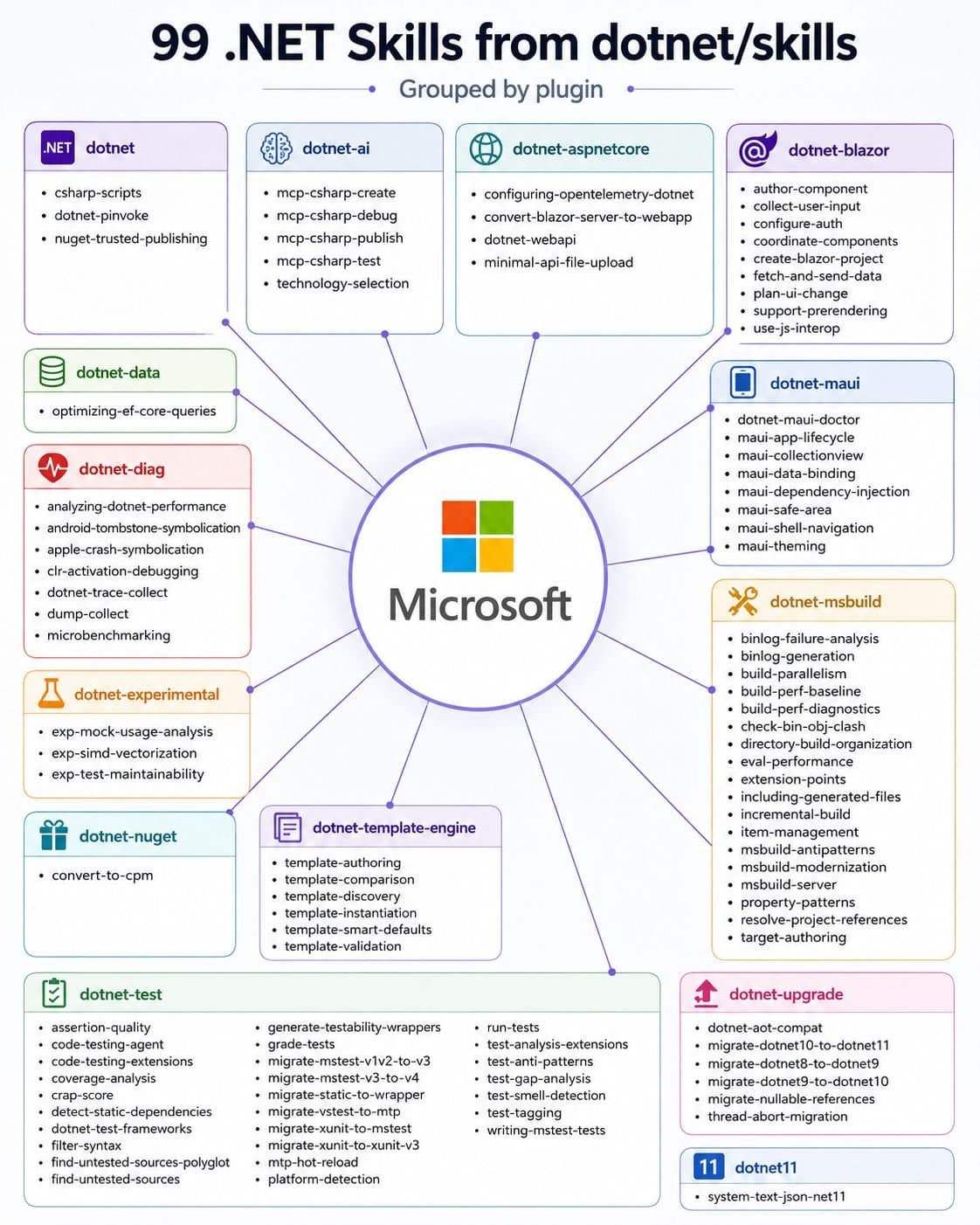
Microsoft quietly published 99 ready-made .NET skills for AI Agents. Most .NET developers have no idea they exist 👇 These skills are official and open source. They work in Claude Code, Codex, GitHub Copilot and Cursor. A skill is a folder with instructions. Your AI agent loads it only when a task needs it. You write the steps once, and the agent follows them every time. Microsoft keeps them in the dotnet/skills repo: 14 plugins, 99 skills. A plugin is a group of related skills. You install a plugin and get all its skills at once. Here are 5 I'd install first, in this order: 𝟭. 𝗱𝗼𝘁𝗻𝗲𝘁-𝘂𝗽𝗴𝗿𝗮𝗱𝗲 Moves a project from .NET 8 to 10 and turns on nullable reference types. 𝟮. 𝗱𝗼𝘁𝗻𝗲𝘁-𝗱𝗮𝘁𝗮 The optimizing-ef-core-queries skill catches N+1 queries, picks the right tracking mode and removes common EF Core performance traps. 𝟯. 𝗱𝗼𝘁𝗻𝗲𝘁-𝗮𝘀𝗽𝗻𝗲𝘁 Builds Web API endpoints and file-upload endpoints in Minimal APIs the right way. 𝟰. 𝗱𝗼𝘁𝗻𝗲𝘁-𝘁𝗲𝘀𝘁 The biggest plugin: 22 skills to run tests, filter them and move between test frameworks. 𝟱. 𝗱𝗼𝘁𝗻𝗲𝘁-𝗮𝗶 Builds, debugs and tests MCP servers with the C# SDK. These skills know .NET. They don't know YOUR project. They can't tell where you keep your entities, that you don't use repositories, or that your handlers return Result<T>. Your own skills fill this gap: → Microsoft's skills handle general .NET tasks → Your skills handle your house rules and conventions Use both, and your AI agent knows the framework and your style. 2 tips before you install: → Don't install all 99. Every skill adds its description to the agent's context, so pick the plugins that match your stack → Name the skill in your prompt instead of letting the agent guess which one to use In my article, I explain the full setup: → What a skill is and what's inside one → How to write a description so the skill triggers at the right time → How to turn your conventions into skills: rich entities, no repositories, full features → How to use the Skill Creator to bundle your real code files → How to install Microsoft's dotnet/skills in 4 steps 👉 Read the full step-by-step guide here: ↳ https://antondevtips.com/blog/creating-claude-skills-for-dotnet-apps?utm_source=twitter&utm_medium=social&utm_campaign=newsletter&utm_content=12-11-2026
图片1

2/

📌 You don't read my newsletter. I explain .NET and Architecture based on my 13+ years of experience. For each topic, I present the pros, cons, and trade-offs, and you get a checklist for when to use each approach and when not to. AI won't teach you this! Every Tuesday, I send an article to 28,000 people learning to master .NET. 📌 This week's blog on New Features in .NET 11 and C# 15 (you need to read this): https://antondevtips.com/blog/new-features-in-dotnet-11-and-csharp-15?utm_source=twitter&utm_medium=social&utm_campaign=newsletter&utm_content=12-11-2026 👉 Join us (and share with your friends and colleagues) → https://antondevtips.com?utm_source=twitter&utm_medium=social&utm_campaign=newsletter&utm_content=12-11-2026

已翻译

关于这个 mod

微软悄悄发布了 99 个现成 .NET 技能,供 AI 代理使用。

大多数 .NET 开发者完全不知道它们存在 👇

这些技能是官方且开源的。

它们可在 Claude Code、Codex、GitHub Copilot 和 Cursor 中使用。

技能就是一个包含说明的文件夹。

你的 AI 代理只会在任务需要时加载它。

你只需编写一次步骤,代理每次都会遵循。

Microsoft 将它们放在 dotnet/skills 仓库中:14 个插件、99 个技能。

插件是一组相关技能。你安装一个插件,就能一次获得其所有技能。

以下是我会优先安装的 5 个,顺序如下:

  1. dotnet-upgrade 将项目从 .NET 8 移到 10,并开启可空引用类型。

  2. dotnet-data optimizing-ef-core-queries 技能会捕获 N+1 查询、选择正确的跟踪模式,并移除常见的 EF Core 性能陷阱。

  3. dotnet-aspnet 以正确方式在 Minimal APIs 中构建 Web API 端点和文件上传端点。

  4. dotnet-test 最大的插件:22 个技能,用于运行测试、筛选测试,并在测试框架之间切换。

  5. dotnet-ai 使用 C# SDK 构建、调试和测试 MCP 服务器。

这些技能懂 .NET。

它们不懂“你的”项目。

它们无法得知你把实体放在哪里、你没有使用存储库,或你的处理程序会返回 Result<T>。

你自己的技能可以填补这个缺口: → Microsoft 的技能处理一般 .NET 任务 → 你的技能处理你的团队规则和约定

两者并用,你的 AI 代理就会同时了解框架和你的风格。

安装前的 2 个提示: → 不要安装全部 99 个。每个技能都会将其描述加入代理的上下文,因此请挑选符合你技术栈的插件 → 在提示中指定技能,而不是让代理猜测该用哪一个

在我的文章中,我说明完整设置:

→ 技能是什么,以及技能内部有什么 → 如何编写描述,让技能在正确时机触发 → 如何将你的约定转成技能:丰富实体、不使用存储库、完整功能 → 如何使用 Skill Creator 打包你真实的代码文件 → 如何用 4 个步骤安装 Microsoft 的 dotnet/skills

在这里阅读完整的逐步指南: https://antondevtips.com/blog/creating-claude-skills-for-dotnet-apps

安装

安装方法请查看原始来源。

原文 / README

Microsoft quietly published 99 ready-made .NET skills for AI Agents.

Most .NET developers have no idea they exist 👇

These skills are official and open source.

They work in Claude Code, Codex, GitHub Copilot and Cursor.

A skill is a folder with instructions.

Your AI agent loads it only when a task needs it.

You write the steps once, and the agent follows them every time.

Microsoft keeps them in the dotnet/skills repo: 14 plugins, 99 skills.

A plugin is a group of related skills. You install a plugin and get all its skills at once.

Here are 5 I'd install first, in this order:

𝟭. 𝗱𝗼𝘁𝗻𝗲𝘁-𝘂𝗽𝗴𝗿𝗮𝗱𝗲 Moves a project from .NET 8 to 10 and turns on nullable reference types.

𝟮. 𝗱𝗼𝘁𝗻𝗲𝘁-𝗱𝗮𝘁𝗮 The optimizing-ef-core-queries skill catches N+1 queries, picks the right tracking mode and removes common EF Core performance traps.

𝟯. 𝗱𝗼𝘁𝗻𝗲𝘁-𝗮𝘀𝗽𝗻𝗲𝘁 Builds Web API endpoints and file-upload endpoints in Minimal APIs the right way.

𝟰. 𝗱𝗼𝘁𝗻𝗲𝘁-𝘁𝗲𝘀𝘁 The biggest plugin: 22 skills to run tests, filter them and move between test frameworks.

𝟱. 𝗱𝗼𝘁𝗻𝗲𝘁-𝗮𝗶 Builds, debugs and tests MCP servers with the C# SDK.

These skills know .NET.

They don't know YOUR project.

They can't tell where you keep your entities, that you don't use repositories, or that your handlers return Result<T>.

Your own skills fill this gap: → Microsoft's skills handle general .NET tasks → Your skills handle your house rules and conventions

Use both, and your AI agent knows the framework and your style.

2 tips before you install: → Don't install all 99. Every skill adds its description to the agent's context, so pick the plugins that match your stack → Name the skill in your prompt instead of letting the agent guess which one to use

In my article, I explain the full setup:

→ What a skill is and what's inside one → How to write a description so the skill triggers at the right time → How to turn your conventions into skills: rich entities, no repositories, full features → How to use the Skill Creator to bundle your real code files → How to install Microsoft's dotnet/skills in 4 steps

👉 Read the full step-by-step guide here: ↳ https://antondevtips.com/blog/creating-claude-skills-for-dotnet-apps?utm_source=twitter&utm_medium=social&utm_campaign=newsletter&utm_content=12-11-2026

📌 You don't read my newsletter.

I explain .NET and Architecture based on my 13+ years of experience. For each topic, I present the pros, cons, and trade-offs, and you get a checklist for when to use each approach and when not to. AI won't teach you this!

Every Tuesday, I send an article to 28,000 people learning to master .NET.

📌 This week's blog on New Features in .NET 11 and C# 15 (you need to read this): https://antondevtips.com/blog/new-features-in-dotnet-11-and-csharp-15?utm_source=twitter&utm_medium=social&utm_campaign=newsletter&utm_content=12-11-2026

👉 Join us (and share with your friends and colleagues) → https://antondevtips.com?utm_source=twitter&utm_medium=social&utm_campaign=newsletter&utm_content=12-11-2026
获取徽章

这是你的项目吗?把这个徽章放进 README 或网站,链接回本页。

Featured on ClaudeMods
尺寸
配色
Markdown
HTML

更多类似作品