
鹿野 壮 Takeshi Kano@tonkotsuboy_com
1/
ペーストした画像をプレビューできるようになるClaude Code mod、便利すぎでしょ…🚃 標準機能に入れてほしい https://github.com/jarrodwatts/claude-image-view

Claude Code 模组,可将粘贴的图片以缩略图预览在提示框上方,而不是只显示 `[Image #n]` 标签。
ペーストした画像をプレビューできるようになるClaude Code mod、便利すぎでしょ…🚃 標準機能に入れてほしい https://github.com/jarrodwatts/claude-image-view
Claude Image View 是一个 Claude Code 模组,会在提示框上方的区域渲染粘贴图片的缩略图,替换单独的 [Image #n] 标签。它每 200ms 轮询提示框中的 [Image #n] 标签,找到会话缓存的 PNG 文件,从 PNG 标头读取尺寸,并使用 Claude Code 的 Image 元素绘制图片,因此图片数据不会经过该模组。缩略图会在粘贴后立即出现,保持宽高比,自动适应可用空间,并在发送时清除。它仅在本地运行,不发出网络请求,也不写入文件;需要 Claude Code v2.1.287+、macOS 或 Linux,以及支持 kitty 图形协议的终端,例如 Ghostty 或 kitty。通过 /plugin marketplace add jarrodwatts/claude-image-view 安装,然后执行 /plugin install image-view 和 /reload-plugins。
请先查看作者 README 确认 marketplace 和插件名称;命令可能随仓库结构改变。
claude plugin marketplace add jarrodwatts/claude-image-view
claude plugin install image-view
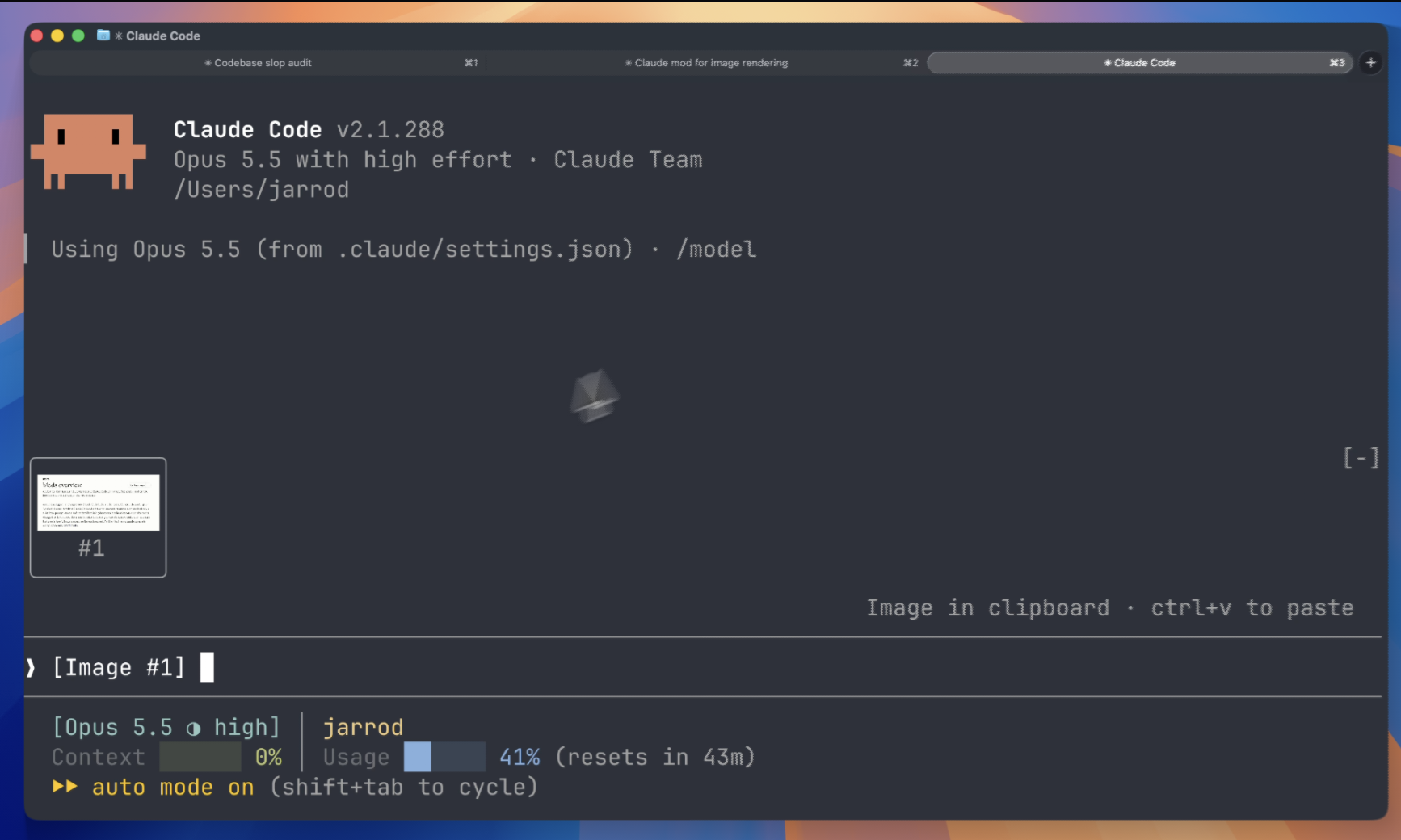
A Claude Code mod that shows the images you paste, so you see thumbnails above your prompt instead of bare [Image #1] tags.

Inside Claude Code, run:
/plugin marketplace add jarrodwatts/claude-image-view
/plugin install image-view
/reload-plugins
That's it. Paste an image into the prompt and its thumbnail appears above the input.
<details> <summary><strong>Prefer the terminal?</strong></summary>claude plugin marketplace add jarrodwatts/claude-image-view
claude plugin install image-view@claude-image-view
Then run /reload-plugins inside a session, or start a new one.
Paste one or more images and a row of thumbnails sits above the prompt, each labelled with the number of its tag:
╭────────────────────────╮ ╭────────────╮
│                        │ │            │
│      (screenshot)      │ │  (photo)   │
│                        │ │            │
│           #1           │ │     #2     │
╰────────────────────────╯ ╰────────────╯
❯ why is the header misaligned here [Image #1] vs [Image #2]
Claude Code saves every pasted image to a cache folder for the session, as <tmp>/<project>/<session>/images/<n>.png, and puts an [Image #n] tag in the prompt. Claude Image View is a mod:
[Image #n] tags. It checks on a timer because pasting an image doesn't raise an edit event.Image element. The terminal reads the file itself, so the image data never passes through the mod.Claude Image View is local-only. It makes no network requests and writes no files. It reads the prompt box, lists Claude Code's temp folder to find the current session's image cache, and reads the first bytes of each pasted image. If CLAUDE_CODE_TMPDIR isn't set, it runs id -u once to find the default temp folder.
Run claude plugin validate on the repo to see every event it hooks and every call it makes.
Other terminals show [Image #n] in each tile instead of the picture. The Claude Desktop app already previews pasted images, so the mod draws nothing there.
Nothing appears when I paste. Run /plugin and check the dim line under the tabs lists image-view as an active mod. If it isn't listed, run /reload-plugins.
The tile says "no preview". The mod couldn't find the cached file. Claude Code may have moved where it stores pasted images. Please open an issue with your Claude Code version.
The tile shows [Image #1] text instead of the picture. Your terminal doesn't support the kitty graphics protocol. See Requirements.
The tile shows [Image #1] text in agent view or a background session, even in Ghostty or kitty. Claude Code turns terminal images off for background sessions. If you attach from a terminal with the kitty graphics protocol, turn them back on in the env block of ~/.claude/settings.json, then start a new session:
"env": { "CLAUDE_CODE_FORCE_TERMINAL_IMAGES": "1" }
git clone https://github.com/jarrodwatts/claude-image-view
cd claude-image-view

# Load it for one session without installing
claude --plugin-dir .

# Check it and run the tests
claude plugin validate .
claude plugin test .
Claude Code writes the API types into .claude-plugin/types/ the first time it loads the mod, and tsc -p . type-checks it from then on.
MIT. See LICENSE.
Showcase: ペーストした画像をプレビューできるようになるClaude Code mod、便利すぎでしょ…🚃 標準機能に入れてほしい
https://github.com/jarrodwatts/claude-image-view 貼上圖片後可在 Claude Code 裡預覽

文档生成、漂移检测和 API 文档自动化插件,同时作为 function-hook 防护,拒绝包含机密的文档写入或 worker 调度。

Claude 桌面应用的状态栏。它显示在提示符上方,展示会话质量、上下文填充量、缓存倒计时,以及 5 小时和每周限额,并让 Clawd 演示会话正在进行的操作。

一个 Claude Code 插件 mod,提供 /databricks-pane:按照 databricks CLI,以树状结构展示 Databricks 工作区、Unity Catalog、计算资源、作业、管道、应用和仪表板,并支持实时高亮、配置文件切换和复制 CLI 参数。

