
blackpaw-studio@blackpaw-studio
blackpaw-studio/claude-plugins/tree/main/plugins/github-actions-pane
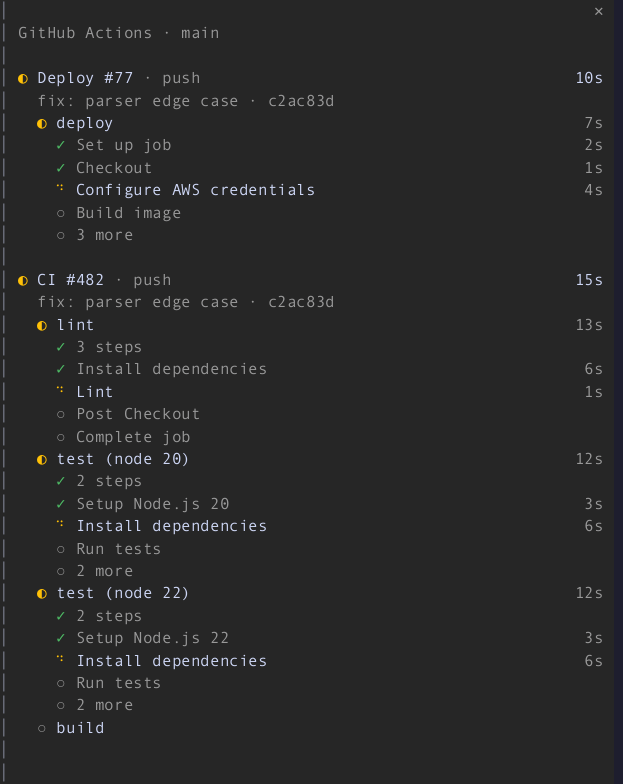
一个 Claude Code mod(函数钩子插件),会在运行期间在记录旁边的一个窗格中显示您的 GitHub Actions 运行,像 GitHub 的运行视图一样绘制:每次运行及其作业、正在运行的作业的步骤、状态图标以及实时跳动的持续时间。
blackpaw-studio/claude-plugins/tree/main/plugins/github-actions-pane
一个 Claude Code mod,会在记录旁边的一个窗格中显示实时 GitHub Actions 运行。当您的分支上开始运行时,该窗格会自动打开,显示每次运行及其作业、正在运行的作业的步骤、状态图标和实时持续时间。失败的作业会折叠到失败的步骤,完成的运行会短暂停留,当没有可显示的内容时,该窗格会自行关闭。在窗格无法放置的地方,会回退为状态行。需要 Claude Code 2.1.296+、已登录的 gh CLI,以及具有 GitHub 远程仓库的检出。通过 /plugin marketplace add blackpaw-studio/claude-plugins 安装,然后 /plugin install github-actions-pane@blackpaw-plugins。命令:/actions、/actions commit、/actions branch、/actions repo。设置包括范围、停留秒数、活动/空闲轮询秒数以及自动打开。
请先查看作者 README 确认 marketplace 和插件名称;命令可能随仓库结构改变。
claude plugin marketplace add blackpaw-studio/claude-plugins
claude plugin install github-actions-pane@blackpaw-plugins
A Claude Code mod (function-hook plugin) that shows your GitHub Actions runs in a pane beside the transcript while they are running, drawn like GitHub's run view: each run with its jobs, the running job's steps, status icons, and durations that tick live.
The pane opens by itself when a run starts on your branch. Finished runs stay for a short linger, and the pane closes itself once nothing is left to show. A failed job collapses to the step that failed.
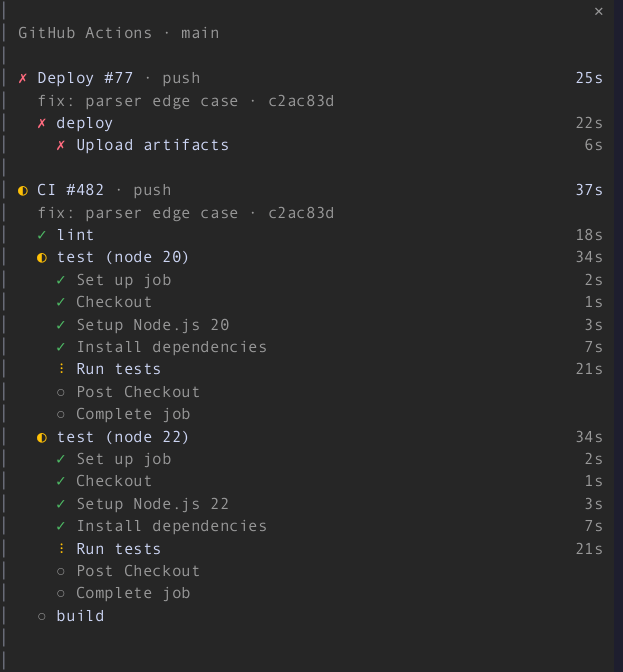

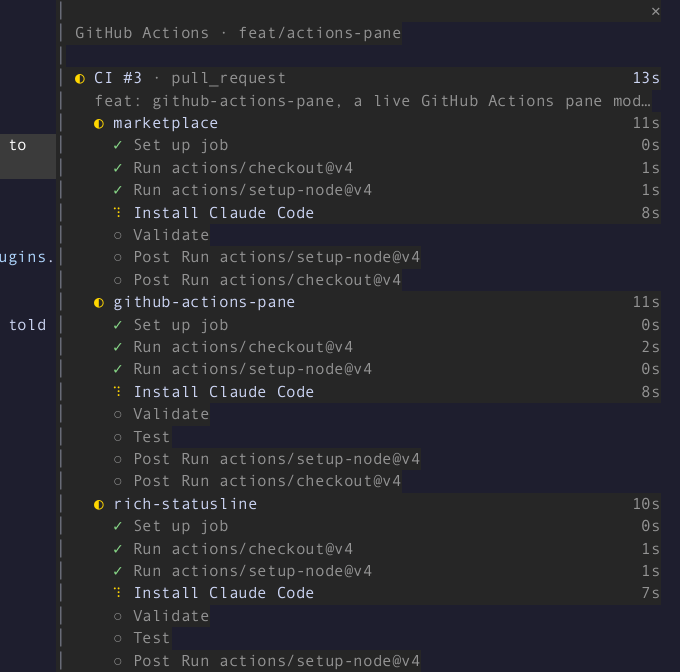
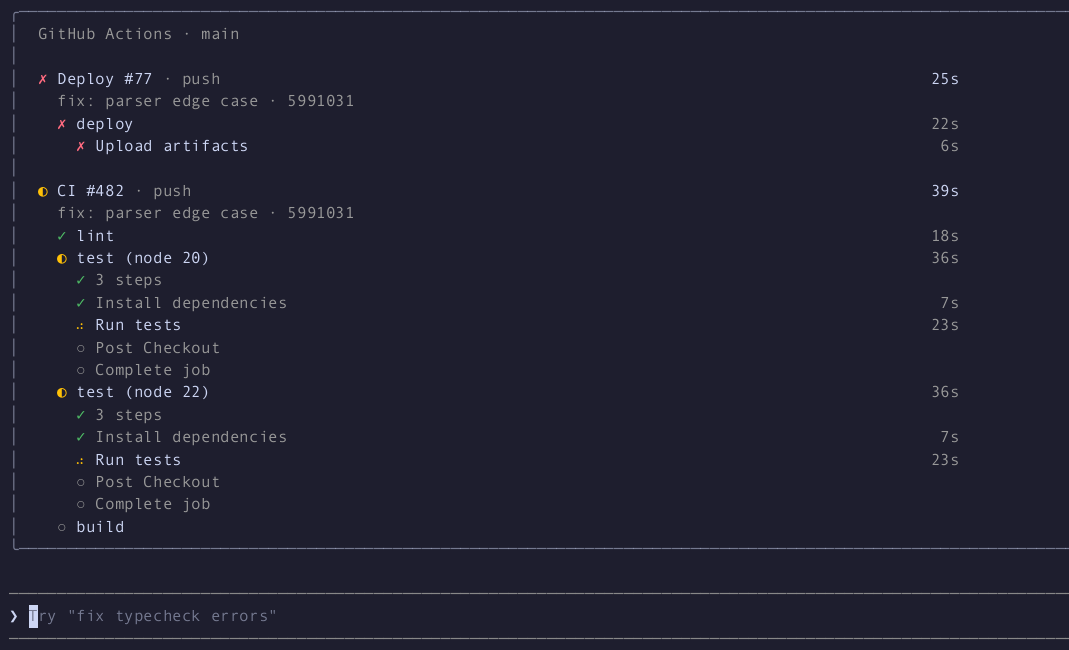
In the main-screen layout (CLAUDE_CODE_NO_FLICKER=0) the pane sits above
the prompt:
Where the pane cannot seat, the status line says what is running:

gh, logged in (gh auth login), and a
checkout with a GitHub remote.From this marketplace:
/plugin marketplace add blackpaw-studio/claude-plugins
/plugin install github-actions-pane@blackpaw-plugins
There is nothing to run. Push, or start a workflow, and the pane opens on the next poll.
| Command | |
|---|---|
| /actions | Open the pane by hand, or close it. Opened by hand, it stays until you close it, and with nothing running it shows the latest run. |
| /actions commit | Watch the runs for HEAD only, for this session. |
| /actions branch | Watch the runs on the current branch, for this session. |
| /actions repo | Watch every active run in the repository, for this session. |
Click a run's name to open it on github.com (gh run view --web).
If you close the pane, it stays closed for the runs already in flight, and a new run opens it again.
These are the plugin's options. Set them when you enable it, or in settings.json under
pluginConfigs["github-actions-pane"].options (scope, lingerSeconds,
activePollSeconds, idlePollSeconds, autoOpen).
| Setting | Default | |
|---|---|---|
| Scope | branch | commit (HEAD), branch (falls back to the commit on a detached HEAD) or repo |
| Linger seconds | 30 | How long finished runs stay before the pane closes; 0 closes at once |
| Active poll seconds | 10 | Poll interval while a run is active; at least 5 |
| Idle poll seconds | 60 | Poll interval while nothing is active; at least 15 |
| Open automatically | on | Off: no pane opens by itself, and the status line shows what is running |
gh run list (20 runs, filtered to the
scope), plus one gh run view --json jobs for each active run shown. When
those 20 are all newer than a run still going, two more lists
(--status in_progress, --status queued) find it. A run that is
waiting, requested or pending and older than the newest 20 is not
found until it moves to queued or in progress. A
finished run's jobs are read once and then cached. A git push,
gh workflow run, gh pr create or gh run rerun through Claude's Bash
tool polls at once, then at the active rate for two minutes.git rev-parse reads
the remote-tracking ref of the branch in scope (its push target, else
origin/<branch>, re-read on every poll and on every look while it is only
guessed, so a first git push -u <remote> is seen; under repo scope the
current branch's). When it moves,
the same kick happens: a poll at once, then the active rate for two
minutes. No GitHub calls are made while idle, and the watch is off when
there is no repository or the HEAD is detached.◐ 2 running · ✗ 1 failed instead. A pane
you open with /actions seats at any width. In the main-screen layout it
draws inline above the prompt, with the body capped at 96 columns.gh drops polling to the idle rate, and
the header shows rate limited until a poll succeeds. When the data is
more than two polls old, the header shows stale · 40s.gh, logged out of
gh, or with no GitHub remote, nothing opens and gh is not polled.
/actions says which one applies. A Bash cd into a repository starts
watching again.gh says completed, so a run's header can keep
ticking for up to one poll after its last job finished.gh run view --web
rather than a link.claude plugin validate plugins/github-actions-pane
claude plugin test plugins/github-actions-pane
CI (.github/workflows/ci.yml) runs both, plus the marketplace validation,
on every pull request. It skips tsc, because the declarations below need a
logged-in session to be written.
Type-checking needs the declarations the engine lays into
.claude-plugin/types/ when it loads the mod from a folder you own (a
--plugin-dir or the session's mods folder). Run tsc -p on the
plugin folder.
gh fixtures in src/testing/gh-fixtures.ts are real gh output from
cli/cli. dev/capture-fixtures.sh refreshes them with read-only calls.
The screenshots and GIF come from a real Claude Code session. That session
watches a scripted timeline that a fake gh (dev/demo/bin/gh) replays: CI
#482 with four jobs, and Deploy #77 failing at "Upload artifacts". Nothing
reaches GitHub. The demo polls at the floors (5 s active, 15 s idle).
dev/demo/record.sh full150 fullscreen 150 40 100   # also: main, other sizes
dev/demo/render.py still full150 42 docs/failure.png --crop 86,0,150,30
dev/demo/render.py gif full150 -12 92 docs/demo.gif --crop 86,0,150,35 --speed 2
record.sh runs Claude in a throwaway tmux session inside a scratch repository,
records it with asciinema, and saves tmux capture-pane -e frames each
second under dev/demo/out/<name>/. render.py turns a recording into
stills and a GIF with agg and ffmpeg.

文档生成、漂移检测和 API 文档自动化插件,同时作为 function-hook 防护,拒绝包含机密的文档写入或 worker 调度。

Claude 桌面应用的状态栏。它显示在提示符上方,展示会话质量、上下文填充量、缓存倒计时,以及 5 小时和每周限额,并让 Clawd 演示会话正在进行的操作。

一个 Claude Code 插件 mod,提供 /databricks-pane:按照 databricks CLI,以树状结构展示 Databricks 工作区、Unity Catalog、计算资源、作业、管道、应用和仪表板,并支持实时高亮、配置文件切换和复制 CLI 参数。
