
mpolatcan@mpolatcan
mpolatcan/flowpane
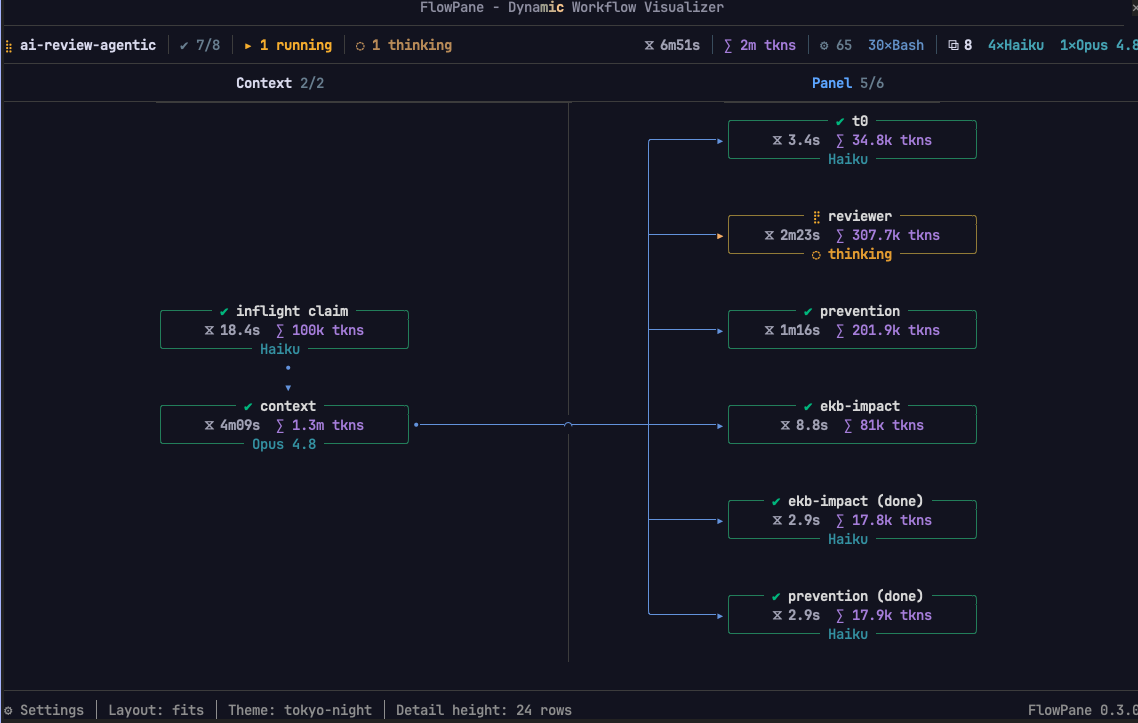
一个用于 Claude Code 的实时工作流面板,用逐阶段图形或时间线替换默认的 Workflow 进度列表,显示每个 agent 的状态、计时、token 消耗、工具调用和提示词。
mpolatcan/flowpane
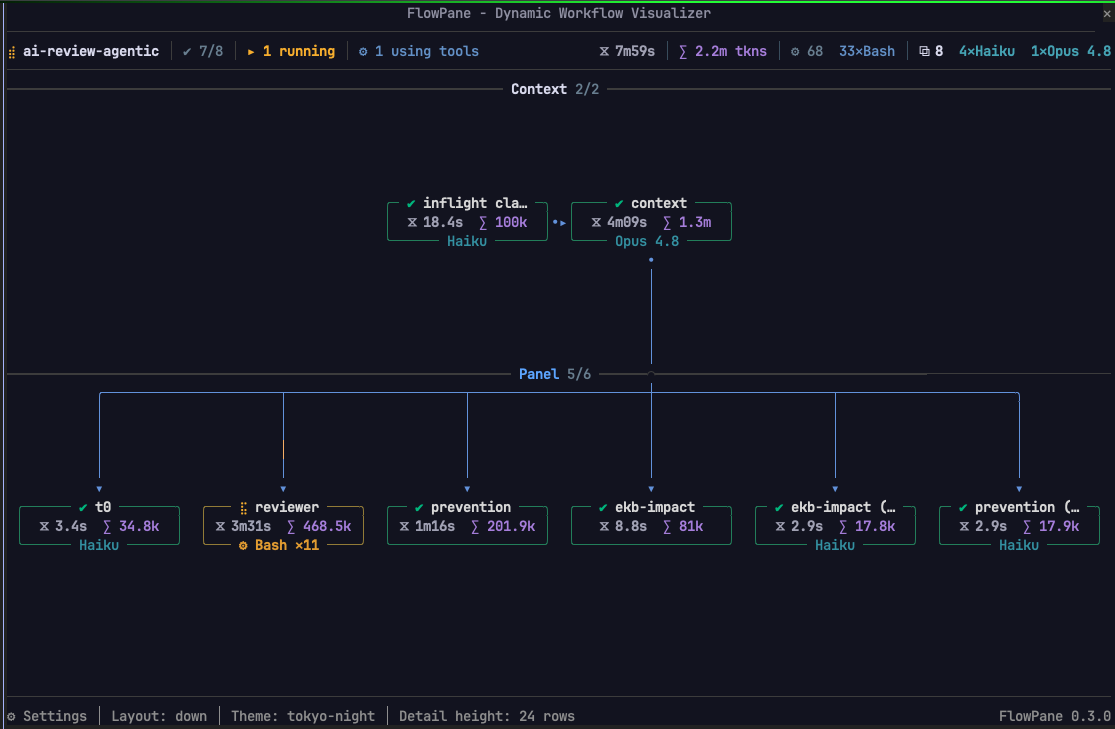
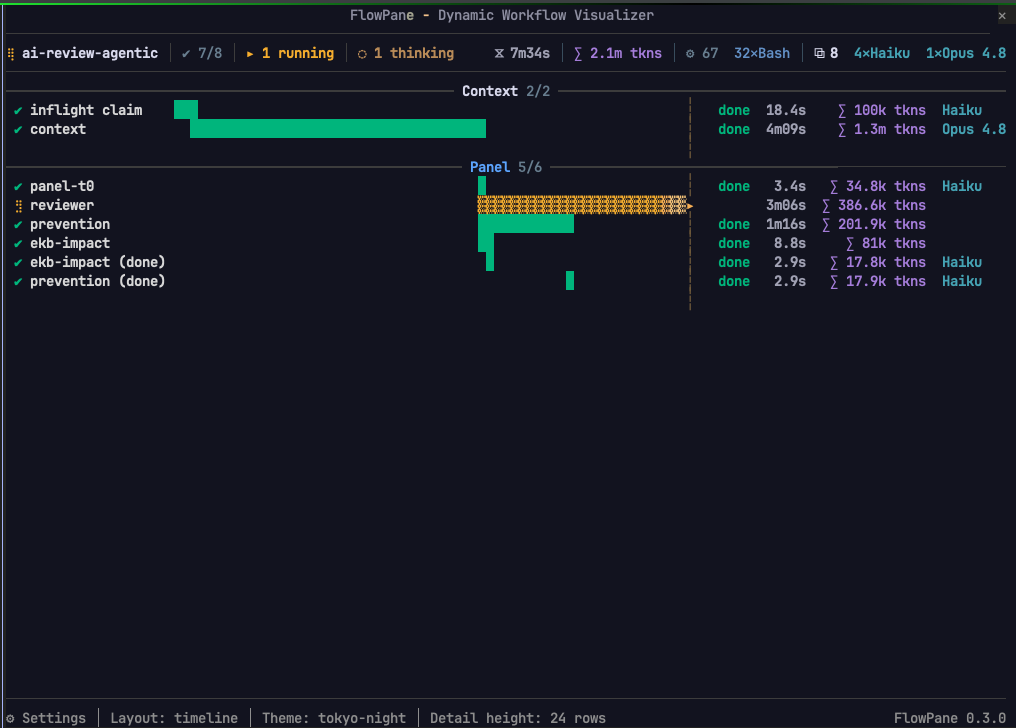
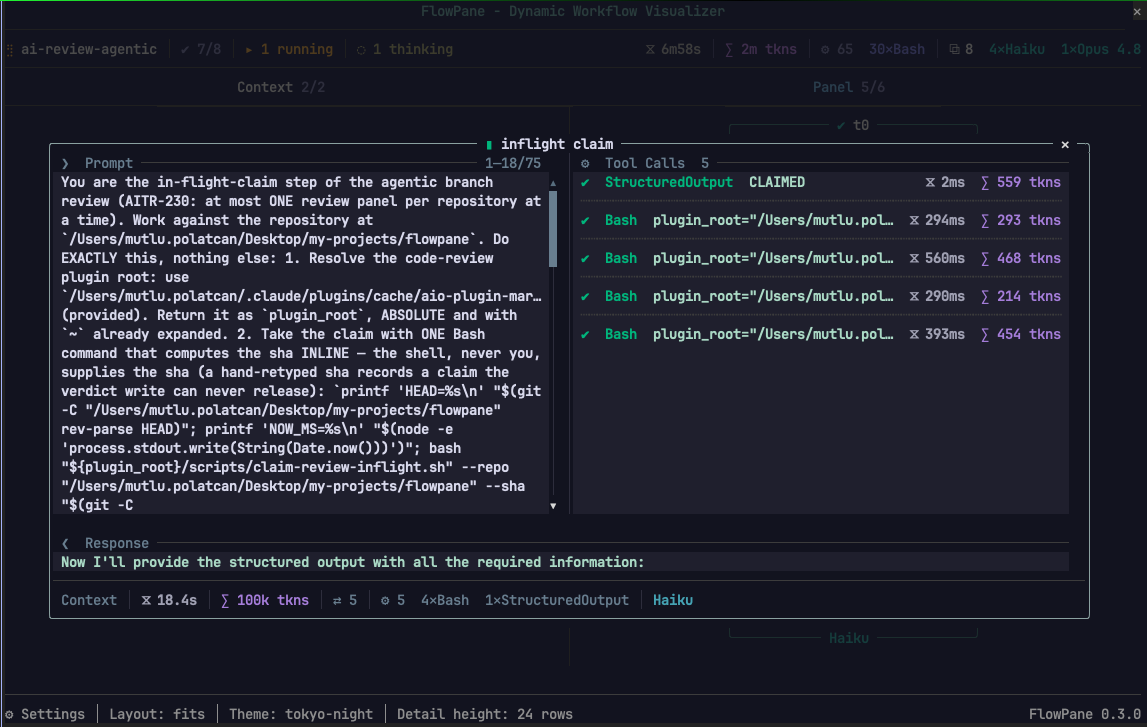
基于 Claude Code 函数钩子(早期访问插件 API),flowpane 将工作流运行绘制为图形:每个阶段一列,agent 作为节点,屏障和携带作为边,在运行期间每秒重绘约八次。它显示按状态(完成/运行中/失败/中断)框出的 agent,附带名称、持续时间、消耗和模型;运行的形状,包括扇出、循环、提前停止的链和跳过的阶段;实时活动,例如活跃连线上的移动光点、agent 正在调用的工具,以及 token、工具调用和模型的运行总数。按下节点会打开一个对话框,显示其提示词、每个工具调用和输入,以及其结果。通过运行菜单支持会话中的其他运行,嵌套工作流展开为各自的 agent,四种布局(横向、纵向、时间线、列表)和十二种调色板。通过 /plugin marketplace add mpolatcan/cc-plugins 安装,然后 /plugin install flowpane;函数钩子需要 CLAUDE_CODE_ENABLE_FUNCTION_HOOKS=1 和 /tui fullscreen 才能使用停靠面板。开发用的演示审计工作流包含在 dev/ 下。需要 Claude Code 2.1.272;面板读取的任何内容都不会离开本机。
请先查看作者 README 确认 marketplace 和插件名称;命令可能随仓库结构改变。
claude plugin marketplace add mpolatcan/flowpane
claude plugin install flowpane@flowpane
Claude Code runs a workflow as a list of agents ticking over. flowpane draws it instead: one column per phase, an agent as a node, the barriers and carries between them as edges, repainted about eight times a second while the run is live.
Built on Claude Code function hooks (Claude Mods), the early-access plugin API from anthropics/claude-code#91870.
| Phases across | Phases down |
| --- | --- |
| |  |
|
| Timeline | A node's detail |
| --- | --- |
|  |
|  |
|
From the marketplace, inside Claude Code:
/plugin marketplace add mpolatcan/cc-plugins
/plugin install flowpane
Or from a clone, which is also how you work on it:
git clone https://github.com/mpolatcan/flowpane.git
CLAUDE_CODE_ENABLE_FUNCTION_HOOKS=1 claude --plugin-dir ./flowpane
Then run any workflow. The pane opens on launch; /flowpane toggles it
afterwards.
Two things to know before it draws anything:
CLAUDE_CODE_ENABLE_FUNCTION_HOOKS=1 is
required./tui default a pane never draws. Run /tui fullscreen, which docks
the pane beside the transcript from 110 columns; below that it sits inline
above the prompt.Everything sits under the drawing. Click a button, or Tab to it and press Enter.
| Control | What it does |
| --- | --- |
| A node's label | opens that agent's detail dialog; click again to close |
| ⚙ Settings | opens the settings dialog over the drawing |
| flowpane 0.10.0 | the name at the right-hand end of the bottom row: opens what the pane is, what presses it, and where it reads from |
| A setting's value | unrolls that setting's list where it stands; press it again to roll the list up |
| The graph, with any dialog open | takes no presses — it is pushed back behind the dialog until the dialog shuts |
| Layout | across, down, timeline, list, or fits the shape — picked by name |
| Detail height − + | rows the detail dialog takes, 5 to 32; grey at either end of the range |
| Theme | twelve palettes, nine dark and three light — each listed beside three cells of its own |
| ✕ (in a dialog) | closes it, from the dialog's own top corner |
| A tab in the detail dialog | shows that pane across the dialog's whole width; which tab is open is kept from node to node |
| A pass number on a node's row | opens that attempt's detail: ✔ 1 ✔ 2 ✖ 3 is one row and three presses |
| The ▸ on a nested run's name, or its ▸ 23 agents | unfolds that run into its own agents, each one pressable — in any layout. The count on the run's own card takes the same press as the mark on its band. The mark turns ▾ while it is open |
| ▴ / ▾ (in a dialog) | scrolls the open pane three lines. Grey at either end |
| ▴ / ▾ ◂ / ▸ (at the pane's edges) | scrolls the drawing, where it is larger than the pane. A live run is drawn with the window on the phase it is working in, so scrolling away is a peek: it goes back when the run enters a new phase |
| The wheel, over the pane | moves the drawing, or the open dialog while one is open |
| The wheel, over the rail along the foot | moves the drawing sideways — as does the wheel anywhere over a drawing that only goes that way |
| The run's name | opens the session's other runs as a menu under it, once there is more than one; grouped by state, most recent first, each with the second it started on, and opening on the run the pane is drawing. Picking one moves the drawing to it, live or finished |
| ▴ / ▾ (down a run list) | scrolls the runs three rows, in the menu or on the idle pane, with a thumb saying whereabouts in the list they are. The wheel over an open list moves it too |
| A run on the idle pane | draws it. With nothing running the pane lists the session's runs in place of the graph, grouped and timed the same way |
/plugin configure flowpane, or pluginConfigs in settings.json:
| Field | Values | What it does |
| --- | --- | --- |
| orientation | horizontal, vertical, timeline, list, or auto (default) — the last spelled fits in /flowpane and in the settings | horizontal runs the phases across the pane, vertical runs them down it, auto follows the pane's proportions. A node is the same size in every one of them at every size of pane: the drawing is laid out whole and the pane is a window on it, so what it cannot hold it scrolls to and the rails say which way. list draws a row per agent under each phase with no edges between them, which is the compact reading of a long run. timeline swaps the graph for a trace view: a ruled time axis, one bar per agent on it, grouped by phase and indented under the nested runs they belong to, with a marker where now is. |
| detailRows | 5–32 (default 24) | Rows the detail dialog takes when a node is selected, capped at what the pane can inset. |
| paneRows | 6–80 (0 = let the surface decide) | Rows the pane asks for. A dock beside the transcript usually picks its own height. |
| theme | tokyo-night (default), catppuccin, gruvbox, nord, dracula, solarized, monokai, vscode-dark, insider-one, github-light, solarized-light, insider-one-light | The palette everything is drawn in, its ground included. The pane always paints on that ground, footer and all, so the drawing reads the same in every terminal rather than against whatever the terminal happens to be; the ground stops at the drawing's own right edge — see the note under the tree below. |
The repository keeps one run, dev/audit.workflow.js, so there is something to
watch while working on the pane. It is a development tool rather than part of
the plugin: it is not installed with flowpane and it is not offered as a
skill. Run it from a checkout with bun dev/dryrun.ts for the stubbed pass, or
hand the script to the Workflow tool for the real one.
It is a read-only audit of the repository it is run in: two to five minutes, twenty to thirty agents, nothing written to disk. It is shaped to put every case the pane can draw in front of it at once — a branch, a loop, a chain that stops early, a phase never entered, a fan-out, three models, four kinds of tool call and an edge too long to thread between the bands. See docs/demo-workflow.md.
claude plugin test .                  # the test suite
bunx tsc --noEmit                     # typecheck
bun dev/preview.ts                    # the pane, drawn to the terminal, no session needed
bun dev/shot.ts --journal <dir>       # the pane, working, in a browser
bun dev/lines.ts                      # every line of every run at every size
bun dev/audit.ts                      # every run, layout and size: nothing throws, every cell legible
docs/development.md has the rest of the tools and what
each test measures. CLAUDE.md has the constraints and conventions a change
has to keep.
The drawing is a long argument with itself, and the reasoning is kept where the decision is. Each of these says what the pane does, what it did before, and why it changed:
| Document | What it covers | | --- | --- | | docs/pane.md | Which seat the pane takes, and the idle pane | | docs/controls.md | Every control, the bottom row, and the dialogs | | docs/settings.md | The four settings, and how a theme becomes a palette | | docs/header.md | The run line, the phase names, and what moves | | docs/nodes.md | What a node says, and the four states | | docs/graph.md | What the files state, what the pane infers, and how each is drawn | | docs/detail.md | The dialog a node opens | | docs/data.md | The files a run writes, and recovering a run already going | | docs/demo-workflow.md | The audit run under dev/ | | docs/engine.md | What the function-hooks API allows, and what it does not | | docs/development.md | The dev tools, and what the tests measure |
Loads and runs on Claude Code 2.1.272: hooks register, /flowpane lists, the launch
hook fires and reads the journal. 361 tests run over the engine with claude plugin test .; dev/lines.ts checks every line of every run on disk at twelve
widths and ten heights. Nothing the pane reads leaves the machine.
MIT. See LICENSE.

文档生成、漂移检测和 API 文档自动化插件,同时作为 function-hook 防护,拒绝包含机密的文档写入或 worker 调度。
Repowise 推出 Lens,这是一个能实时可视化已索引代码库的 Claude Code mod:Claude 搜索、读取和编辑文件时,文件会亮起,导入方和反向依赖也会高亮。它还包含一个显示受影响文件和覆盖测试的 Flow 标签页,以及一个带健康度变化和运行建议测试按钮的审查行。


Claude 桌面应用的状态栏。它显示在提示符上方,展示会话质量、上下文填充量、缓存倒计时,以及 5 小时和每周限额,并让 Clawd 演示会话正在进行的操作。