
cjavdev@cjavdev
cjavdev/mods/tree/main/context-meter
cjavdev/mods/tree/main/context-meter
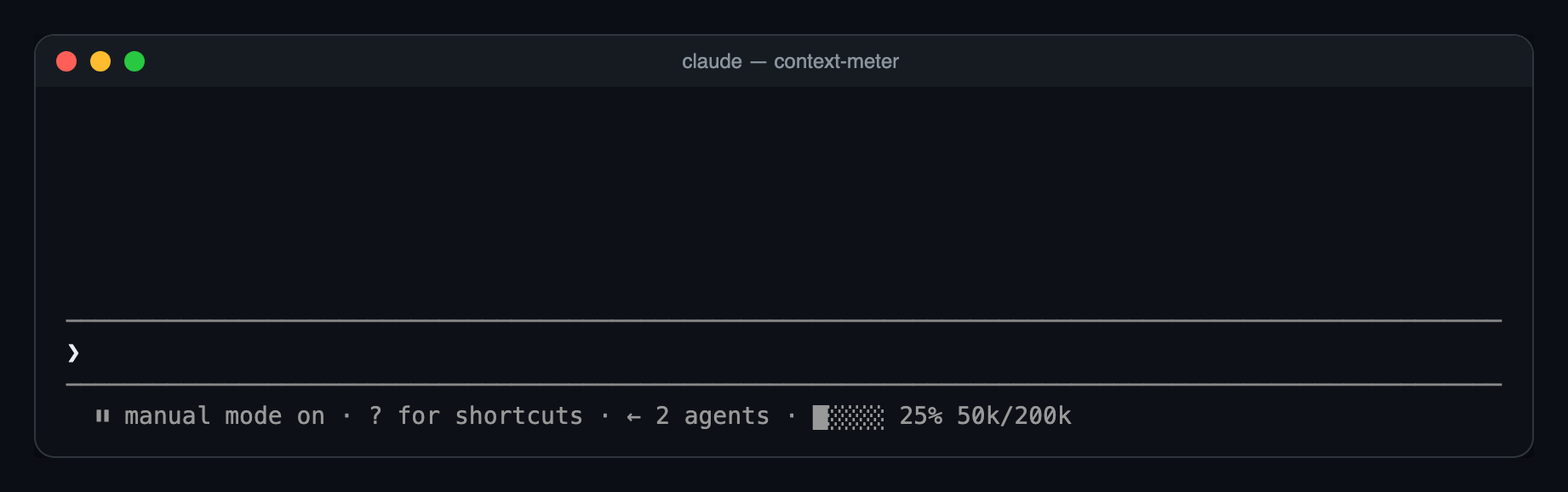
context-meter 是一个 Claude Code plugin,会在提示符提示栏中渲染一个小型仪表,显示上下文窗口用量:五个格子、已用百分比(与状态列的 used_percentage 匹配)以及 token 数量。它会在工作阶段开始、工具调用完成、session.measure 和 3 秒计时器触发时刷新,因此能捕捉模型切换、/compact 和 /clear。需要 Claude Code 2.1.287+,通过 --plugin-dir 或 CLAUDE_CODE_PLUGIN_DIRS 安装,并可在 /config 中使用 enabled 选项切换。
请先查看作者 README 确认 marketplace 和插件名称;命令可能随仓库结构改变。
claude plugin marketplace add cjavdev/mods
claude plugin install context-meter
A Claude Code mod that shows how full your context window is, as a tiny meter in the bar under the prompt. You can see a /compact coming before it happens.
⏵⏵ auto mode on · ████░ 76% 152k/200k
used_percentage.49k/1M.Nothing shows until the first response of a session, or the first one after /compact or /clear, because there's no reading yet.
You need Claude Code 2.1.287 or newer.
git clone https://github.com/cjavdev/mods.git ~/mods
claude --plugin-dir ~/mods/context-meter
To load it in every session, add the folder to CLAUDE_CODE_PLUGIN_DIRS in the env block of ~/.claude/settings.json (separate several folders with :):
{ "env": { "CLAUDE_CODE_PLUGIN_DIRS": "~/mods/context-meter" } }
It shares the bar with cache-shot-clock: the meter comes first, then the clock.
In /config, or under pluginConfigs["context-meter"].options in settings:
| Option | Default | |
| --- | --- | --- |
| enabled | true | Turns the meter off without unloading the mod. |
Near the top, Claude Code shows its own warning, such as 93% context used, while the meter reads 84%. Claude Code measures against the auto-compact threshold, which is a little below the full window. context-meter measures against the full window. As a result, auto-compact usually fires while the meter reads around 85–90%.
The mod is one hooks module, hooks/register.tsx:
$.session.usage() reads the window's fill. The plain call doesn't count tokens, so it costs nothing.$.state, declared in types/index.d.ts). The bar redraws whenever the reading changes.session.measure fires; the engine pushes it after each turn/compact or /clear between turnsui.render hook on the PromptHint component adds the meter as the hint line's tail. The terminal draws that line dim, so the meter has no color of its own. Other surfaces don't draw the tail yet.The bar and token formatting are pure functions in hooks/meter.ts.
claude plugin validate ~/mods/context-meter   # manifest and hooks check
claude plugin test ~/mods/context-meter       # runs tests/*.test.tsx
The screenshot is a real capture of Claude Code running the mod in tmux (tmux capture-pane -p -e), turned into a page with scripts/ansi2html.py and screenshotted.

文档生成、漂移检测和 API 文档自动化插件,同时作为 function-hook 防护,拒绝包含机密的文档写入或 worker 调度。

Claude 桌面应用的状态栏。它显示在提示符上方,展示会话质量、上下文填充量、缓存倒计时,以及 5 小时和每周限额,并让 Clawd 演示会话正在进行的操作。

一个 Claude Code 插件 mod,提供 /databricks-pane:按照 databricks CLI,以树状结构展示 Databricks 工作区、Unity Catalog、计算资源、作业、管道、应用和仪表板,并支持实时高亮、配置文件切换和复制 CLI 参数。
