
rodbegbie@rodbegbie
rodbegbie/rod-claude-mods/tree/main/plugins/context-bar
rodbegbie/rod-claude-mods/tree/main/plugins/context-bar
Rod Begbie 为 Claude Code 编写的插件,发布在插件市场中。
添加市场,然后安装你想要的插件:
/plugin marketplace add rodbegbie/rod-claude-mods
/plugin install context-bar@rod-claude-mods
/plugin install pro-limits@rod-claude-mods
/plugin install sportsball@rod-claude-mods
如果要从本机签出试用市场,改为指向该文件夹:
/plugin marketplace add /path/to/rod-claude-mods
| 插件 | 功能 | | --- | --- | | context-bar | 提示栏上方的堆叠上下文窗口条形图 | | pro-limits | 提示栏上方的 5 小时及每周使用限制仪表 | | sportsball | 提示栏上方的关注球队即时比分 |
在提示栏上方绘制上下文窗口为堆叠条形图,每个类别用一种颜色,如同 /context 所示。图例列出每个类别的令牌数及其在窗口中的比例,然后显示总计。
用 /context-bar 切换。默认开启,在工作阶段开始及每回合后刷新。
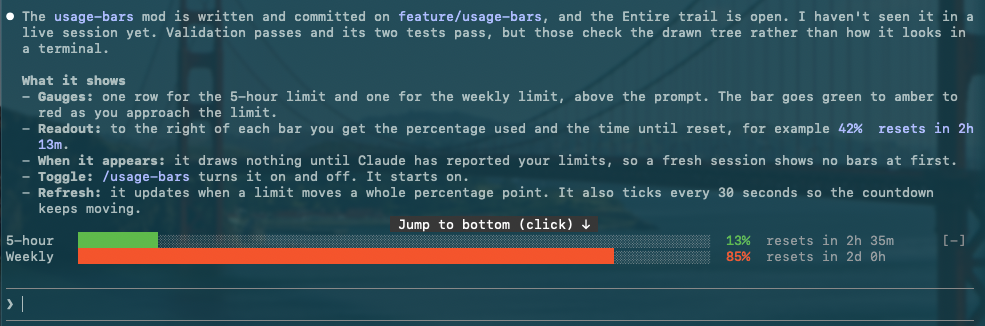
在提示栏上方为每个订阅限制(5 小时及每周)绘制一个仪表。每条形图随着接近限制从绿色转为琥珀色再转为红色,后面接着使用百分比及该时间窗口重置的时间。只有在 Claude 报告这些窗口后才会显示,API 密钥账户上不会显示任何内容。

每次时间窗口超过 20%、40%、60%、80%、90% 或 95% 时弹出通知。达到 100% 时百分比变为两个骷髅。工作阶段开始时看到的数值不会弹出通知,只有之后的变化才会。
用 /pro-limits 切换。默认开启,每当限制变化超过整个百分点时刷新,每 30 秒检查一次以保持倒数计时准确。
关注一支队伍并在提示栏上方绘制其即时比赛:运动表情符号、两队名、比分、比赛状态及赛事,显示在一行上。「Powered by SportScore」的署名链接到 sportscore.com,位于该行右侧。无论显示多少支队伍,它只出现一次在最后一个游戏行上,只有在终端太窄时才会掉到下方单独一行。当队伍没有即时比赛时该条形图是空的。
<!-- 屏幕截图占位符 -->/follow-team <name> 关注一支队伍,例如 /follow-team golden state valkyries 或 /follow-team club atletico tigre。它同时搜索篮球及美式足球。如果名称符合多于一支队伍,即使完全相同,也会询问是哪一支。每个选项显示运动表情符号、队名及其最新比赛的联盟(当查询失败或队伍没有比赛时省略)。最多在问题对话框中提供四支队伍。超过四支时打开一个列表窗格,这样都不会被截断。关闭两者之一会不关注任何球队并保留你目前的球队。符合单支队伍的名称会直接被关注。当 SportScore 的查询为某支队伍返回不同的队伍时(如格拉斯哥流浪者队),该队伍会被排除并在回复中命名。/unfollow-team [name] 停止关注。/sportsball 显示或隐藏条形图。关注的球队无论哪种方式都会在工作阶段间保存。当比赛进入新时期(例如「半场」或「第 4 节」)及终场时弹出通知,每次都附上比分。美式足球中,比分变化也会弹出(「进球 60'」或比分未被认定时的「比分变化」),如果有的话还附上比赛分钟数。篮球的分数变化太频繁,所以那里只有时期弹出。加载后的第一次读取是无声的,所以在比赛进行中启动 Claude 不会弹出通知。关闭 /sportsball 会将通知静音而不会失去追踪。
美式足球比赛也在状态旁边显示比赛分钟数,例如 2nd half 84'。它来自每次轮询的第二个请求,所以查询失败只会将分钟数留空。
在比赛进行中每 30 秒轮询一次,否则每 5 分钟轮询一次。如果轮询失败,上一次的比分会在屏幕上保持暗淡最多 10 分钟。支持篮球及美式足球。
比分来自 SportScore 公开 API,它要求显示「Powered by SportScore」链接,因此有署名行。不支持超链接的终端会在名称旁边显示 URL。
队名的颜色来自它们的徽标。为此插件在你的机器上执行一个简短的 Python 3 脚本(仅限标准库),每个徽标一次,并缓存结果。这是可选的:没有 python3 的情况下名称只会以默认颜色绘制。关于它有两件事要知道:
在没有命令行工具的 Mac 上,插件会跳过脚本而不是触发安装对话框。
每个插件都在 plugins/ 下自己的文件夹中,并在 .claude-plugin/marketplace.json 中列出。用以下方式检查所有项目:
claude plugin validate .
claude plugin validate plugins/<mod-name>
claude plugin test plugins/<mod-name>
请先查看作者 README 确认 marketplace 和插件名称;命令可能随仓库结构改变。
claude plugin marketplace add rodbegbie/rod-claude-mods
claude plugin install context-bar
Rod Begbie's mods for Claude Code, published as a plugin marketplace.
Add the marketplace, then install the mods you want:
/plugin marketplace add rodbegbie/rod-claude-mods
/plugin install context-bar@rod-claude-mods
/plugin install pro-limits@rod-claude-mods
/plugin install sportsball@rod-claude-mods
To try the marketplace from a local checkout, point at the folder instead:
/plugin marketplace add /path/to/rod-claude-mods
| Mod | What it does | | --- | --- | | context-bar | Stacked context-window bar above the prompt | | pro-limits | 5-hour and weekly usage-limit gauges above the prompt | | sportsball | Live score of a followed team above the prompt |
Draws the context window as a stacked bar above the prompt, with one
colour per category as in /context. A legend underneath lists each
category's tokens and share of the window, then the total.
Toggle it with /context-bar. It starts on, and refreshes at session
start and after every turn.
Draws one gauge per subscription limit (5-hour and weekly) above the prompt. Each bar shifts from green through amber to red as you approach the limit, followed by the percentage used and the time until that window resets. Windows only appear once Claude has reported them, so nothing shows on API-key accounts.
A toast pops up each time a window passes 20%, 40%, 60%, 80%, 90% or 95%. Hit 100% and the percentage turns into two skulls. Readings seen at session start never toast, only crossings after that.
Toggle it with /pro-limits. It starts on, refreshes whenever a limit
moves a whole point, and ticks every 30 seconds to keep the countdown
honest.
Follows one team and draws its live game above the prompt: a sport emoji, both team names, the score, the game status and the competition, on a single line. A "Powered by SportScore" credit, linking to sportscore.com, sits at the right of that row. It appears once, on the last game row, however many teams are shown, and drops to a row of its own underneath only when the terminal is too narrow for both. The band is empty when the team has no live game.
<!-- screenshot placeholder -->/follow-team <name> follows a team, for example
/follow-team golden state valkyries or /follow-team club atletico tigre. It searches basketball and football together. If the name
matches more than one team, even exactly, it asks which. Each choice
shows a sport emoji, the team name and the league of its latest game
(left off when the lookup fails or the team has no games). Up to four
teams are offered in a question dialog. More than that opens a pane
with a list, so none are cut off. Dismissing either follows nothing
and keeps your current team. A name that matches a single team is
followed straight away. A team is left out, and named in the reply,
when SportScore's lookup for it returns a different team, as it does
for Rangers F.C. (Glasgow)./unfollow-team [name] stops following./sportsball shows or hides the band. The followed team is kept
across sessions either way.A toast appears when the game moves to a new period (for example
"Half time" or "4th quarter") and at full time, each with the score.
In football, a change of score also toasts (Goal 60', or Score change
if a goal is ruled out), with the match minute when there is one.
Basketball scores change too often, so only periods toast there.
The first reading after a load is silent, so starting Claude mid-game
doesn't toast. /sportsball off mutes toasts without losing track.
Football games also show the match minute next to the status, for
example 2nd half 84'. It comes from a second request per poll, so a
failed lookup just leaves the minute off.
It polls every 30 seconds while a game is live and every 5 minutes otherwise. If a poll fails, the last score stays on screen, dimmed, for up to 10 minutes. Basketball and football are supported.
Scores come from the SportScore public API, which asks for a visible "Powered by SportScore" link, hence the credit row. Terminals without hyperlink support show the URL next to the name.
Team names are coloured from their logos. To do that the mod runs a
short Python 3 script (standard library only) on your machine, once per
logo, and caches the result. This is optional: without python3 the
names simply draw in the default colour. Two things to know about it:
On a Mac without the Command Line Tools the mod skips the script rather than trigger the install dialog.
Each mod lives in its own folder under plugins/ and is listed in
.claude-plugin/marketplace.json. Check the lot with:
claude plugin validate .
claude plugin validate plugins/<mod-name>
claude plugin test plugins/<mod-name>

Substrate plugin for Ruflo memory: AgentDB controller bridge (15 agentdb_* MCP tools), RuVector ONNX embeddings (10 embeddings_* tools incl. RaBitQ 32x quantization), and WASM HNSW pattern router (3 ruvllm_hnsw_* tools). As a mod (ADR-445): opt-in safe recall into the prompt, a write guard that keeps secrets out of memory, /agentdb, and a status file the console shows

Fabric Data App plugin in the data-goblin/power-bi-agentic-development Claude Code plugin marketplace, described as a pane that follows the rayfin CLI.


Finish What You Start - Sessions that last, AI that learns, Features that ship. Context engineering + Theory of Mind + Knowledge Graph + Loop Mode + Task Mode. Features Project Knowledge Graph (unified search, experiential memory), unified workflow orchestration, auto-update on session start, ToM-based verification checkpoints, bilateral modeling, quality detection, enhanced context markers, and Loop Mode. 92% token reduction with proven strategies. Based on Riedl & Weidmann 2025 Human-AI Synergy research.