
IKnowJot@IKnowJot
IKnowJot/clawd-plugins/tree/main/plugins/clawd-tracker

IKnowJot/clawd-plugins/tree/main/plugins/clawd-tracker
提示符上方的 Domino's 风格订单追踪器。Clawd 会在诚实的进度条旁演示每一步,并显示学习得到的预计到达时间、送货收据、计划使用量和送达提示音。主题包括披萨、咖啡、火箭和施工。
请先查看作者 README 确认 marketplace 和插件名称;命令可能随仓库结构改变。
claude plugin marketplace add IKnowJot/clawd-plugins
claude plugin install clawd-tracker
Your Claude Code task, tracked like a pizza order.
A bar above the prompt walks through five stages, Reading → Prepping → Cooking → Taste test → Delivered, while Clawd acts out exactly what Claude is doing right now. Underneath: the current step, a live ETA, elapsed time, tokens, context fill, estimated cost and your plan usage. When it's done you get a receipt and a ding.
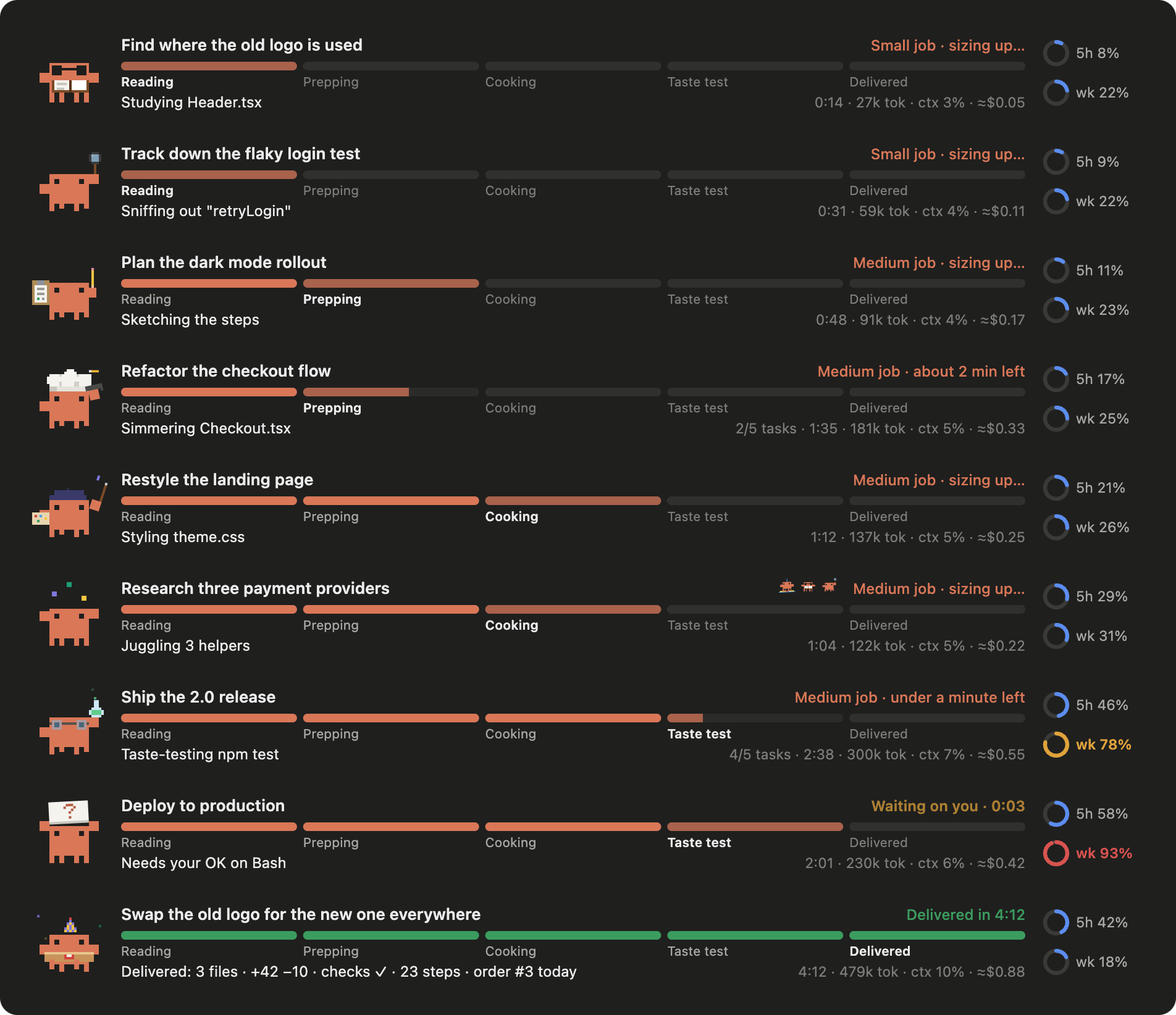
| Claude is… | Clawd… | Stage |
| --- | --- | --- |
| Starting your request | holds up the order ticket | Reading |
| Reading a file | puts on reading glasses, turns the pages | Reading |
| Searching code (Grep) | sweeps a detective's magnifier | Reading |
| Listing files (Glob) | ties on a bandana, scans with a spyglass | Reading |
| On the web / in a browser | rides a surfboard | Reading |
| Writing a task list or plan | scribbles on a clipboard | Prepping |
| Thinking between steps | gets a thought bubble | (stays put) |
| Editing code | flips an omelette in a chef's hat | Cooking |
| Creating a file | swings a hammer in a hard hat | Cooking |
| Editing CSS / SVG | paints in a beret, the brush changes color | Cooking |
| Editing docs (.md, .txt) | writes with a quill | Cooking |
| Editing config / other tools | turns a wrench, a gear spins | Cooking |
| Installing packages | hauls a parcel on its head | Cooking |
| Running subagents | juggles, while a mini Clawd per helper shows what each is doing | Cooking |
| Running tests, builds, linters | swirls a bubbling flask in lab goggles | Taste test |
| Running other commands | types on a tiny laptop | (stays put) |
| Using git / gh | delivers a stamped envelope in a mail cap | (stays put) |
| Asking you a question, or waiting for your OK | holds up a "?" sign; the bar says "Waiting on you" | (stays put) |
| Done | party hat, confetti, pizza box | Delivered |
| A step fails | drops the pizza: "Bash hit a snag. Regrouping…" | (stays put) |
| Interrupted | drops the pizza | Stopped |
Each activity has a few verbs that rotate ("Simmering ThemeToggle.tsx", "Seasoning api.ts"), so the line never reads the same twice.
Claude Code can't know how far along a task is, so the bar only moves on real events:
TodoWrite or the task tools), the fill is the share of tasks done and slides forward each time one finishes.git and other shell commands don't move it.The top right shows the job size (Small, Medium or Large, from the task count or steps so far) and an estimate:
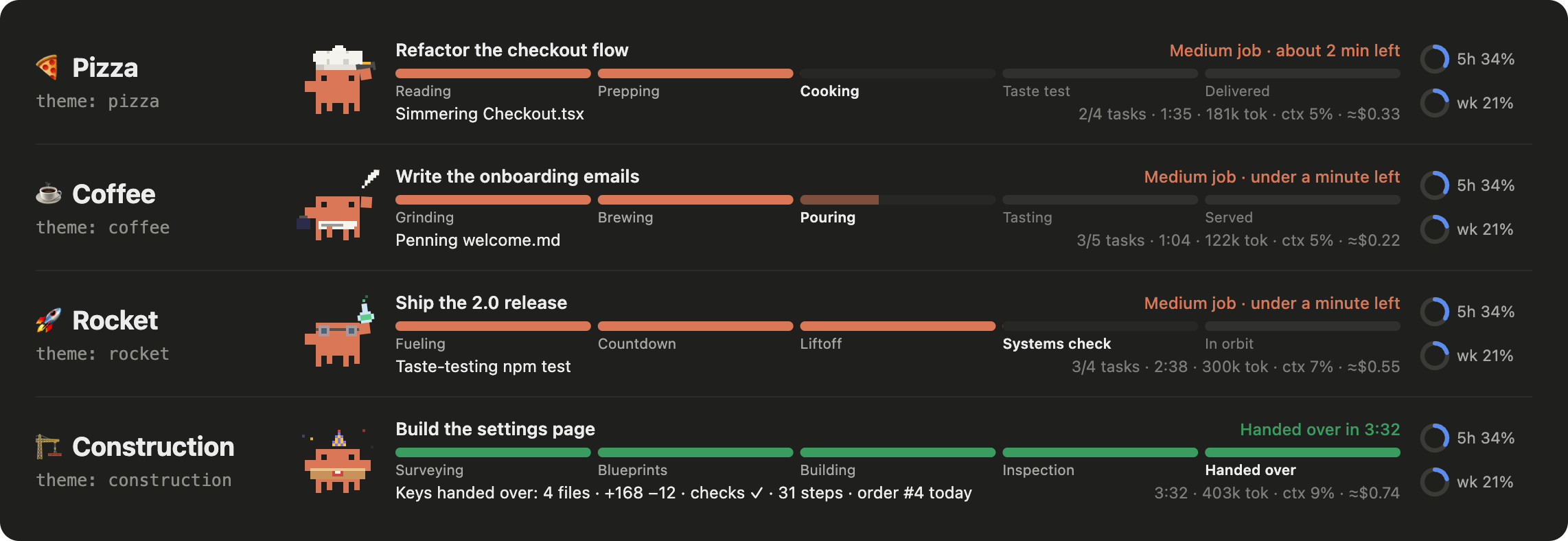
Same Clawd, different shop. Pick one in settings:
| Theme | Stages |
| --- | --- |
| pizza (default) | Reading → Prepping → Cooking → Taste test → Delivered |
| coffee | Grinding → Brewing → Pouring → Tasting → Served |
| rocket | Fueling → Countdown → Liftoff → Systems check → In orbit |
| construction | Surveying → Blueprints → Building → Inspection → Handed over |
Change them in Claude Code's /config menu, or in settings.json under pluginConfigs:
| Setting | Default | What it does |
| --- | --- | --- |
| theme | pizza | Stage names: pizza, coffee, rocket or construction |
| sound | on | The delivery ding |
| showCost | on | Show the ≈$ estimate |
| showPlanUsage | on | Show the 5h / weekly usage and the 90% heads-up |
/tracker: show or hide the tracker. The ✕ on the bar hides it too; /tracker brings it back./tracker stats: today's orders, time spent, steps, tokens and the longest job.Works in the desktop app (animated SVG) and in the terminal (text version with an emoji per activity).

The tracker only watches; it never blocks, rewrites or answers anything for Claude Code. Every hook passes the event on unchanged.
| Event | What the tracker does with it |
| --- | --- |
| session.start | Registers /tracker, loads your past job times (for the ETA) and starts a 1-second clock while a job runs |
| prompt.submit | Keeps the first line of your prompt as the order's title |
| turn.start / turn.complete | Opens and delivers the order; a subagent's turn adds or removes its mini Clawd |
| tool.call | Picks Clawd's costume and the stage from the tool and its arguments, and counts lines for the receipt. Before a step runs it asks Claude Code's permission rules, read-only, whether the step will stop for your OK, so the band can say "Waiting on you". It never makes or changes that decision |
| turn.step | Adds up tokens and the estimated cost, reads how full the context is, and shows the thought bubble between steps |
| session.measure | Reads your 5-hour and weekly plan usage for the rings |
| command.run (/tracker) | Shows or hides the band, or prints /tracker stats |
| ui.render (AbovePrompt) | Draws the band |
It stores two things: whether the band is hidden (this session only) and your last 60 job times (to learn the ETA). It reads no files, makes no network calls and keeps no credentials. The delivery ding is synthesized in code, so the plugin ships no audio files.
claude plugin validate plugins/clawd-tracker
claude plugin test plugins/clawd-tracker

文档生成、漂移检测和 API 文档自动化插件,同时作为 function-hook 防护,拒绝包含机密的文档写入或 worker 调度。

A status bar for the Claude desktop app. It draws above your prompt and shows session quality, context fill, cache countdown, and your 5-hour and weekly limits, with Clawd acting out what the session is doing.

一个 Claude Code 插件 mod,提供 /databricks-pane:按照 databricks CLI,以树状结构展示 Databricks 工作区、Unity Catalog、计算资源、作业、管道、应用和仪表板,并支持实时高亮、配置文件切换和复制 CLI 参数。
