
redemptionnn@redemptionnn
redemptionnn/clawd-friend/tree/main/plugin
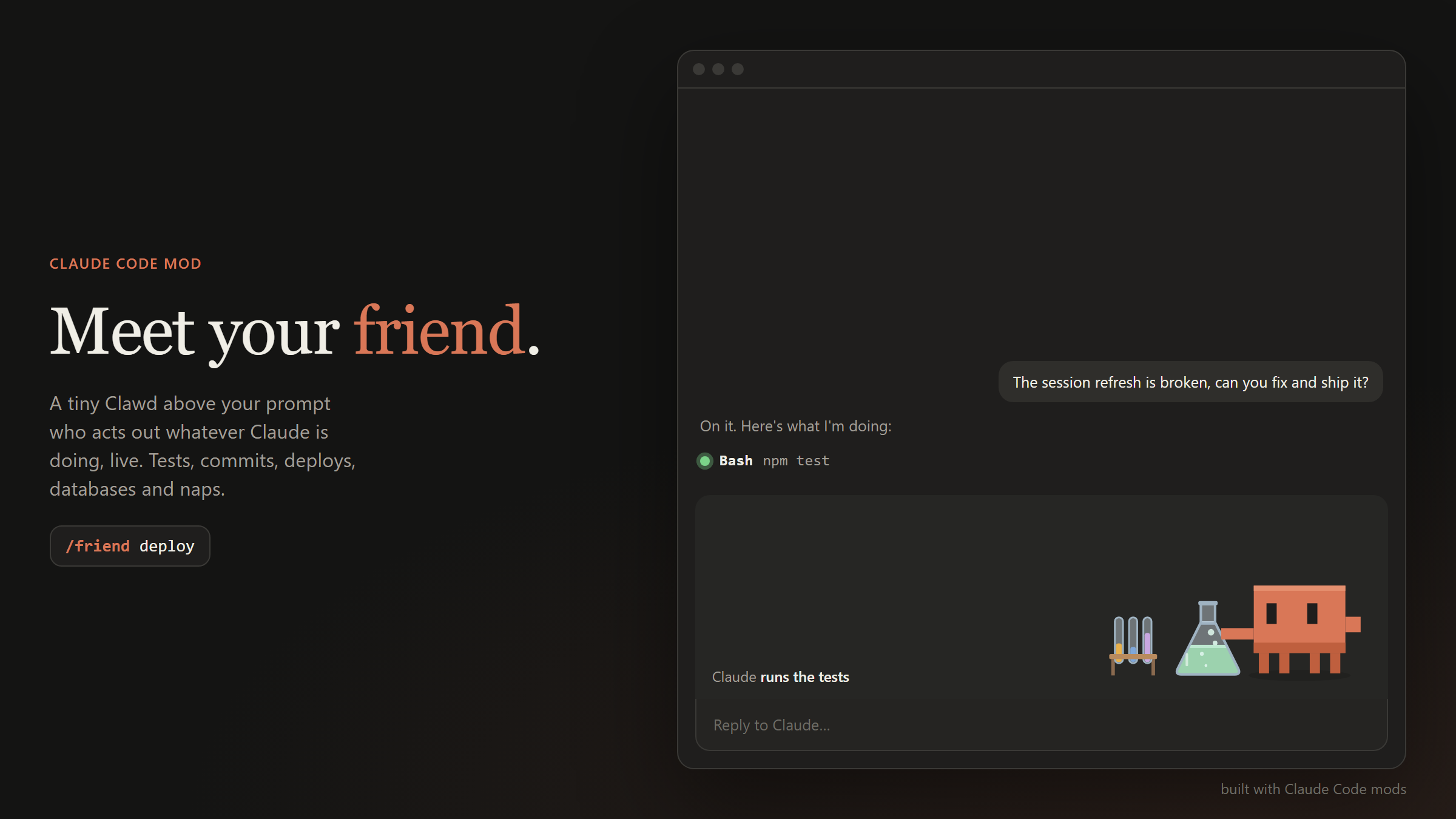
一个 Claude Code mod,在提示列上方显示会随 Claude 活动实时反应的微型 Clawd 动画角色,包含 23 个不同场景和 15 个可自定义外观。
redemptionnn/clawd-friend/tree/main/plugin
Claude Friend 是一个 Claude Code mod,提供一个住在提示列上方的小型动画角色 Clawd,让它实时演示 Claude 正在做的事情。它包含由工具调用和 shell 命令触发的 23 个场景(编程、网页搜索、测试、提交、部署、构建、数据库操作、调试、设计工作、记忆写入、子代理、规划、浏览、查询、权限提示、完成、错误、放松和打盹),以及 15 个会跨工作阶段保留的外观(帽子和手持物品)。命令包括 /friend、/friend menu、/friend skins、/friend name、/friend scenes、/friend pane、/friend stage 和 /friend stats。它使用 turn.step hook 观察流式模型输出,使用 tool.call hook 确认场景,并使用 ui.render hook 绘制基于 SVG 的动画。需要 Claude Code 2.1.286 或更高版本;不会发起网络请求,不使用 token 或图片资源。
请先查看作者 README 确认 marketplace 和插件名称;命令可能随仓库结构改变。
claude plugin marketplace add redemptionnn/clawd-friend
claude plugin install clawd-friend
A tiny Clawd who lives above your prompt in Claude Code and acts out whatever Claude is doing, live.
He taps away at a laptop while Claude codes, reads the newspaper during a web search, watches a flask bubble while your tests run, stamps a parcel on every commit, launches a rocket when you deploy, chases a bug with a net, and nods off when you go quiet.
In Claude Code, run:
/plugin marketplace add redemptionnn/clawd-friend
/plugin install clawd-friend
Then start a new session (or run /reload-plugins) and your friend shows up above the prompt.
Or from a shell:
claude plugin marketplace add redemptionnn/clawd-friend
claude plugin install clawd-friend
To update later:
claude plugin marketplace update clawd-friend
Requirements: Claude Code 2.1.286 or newer. Mods are an early-access Claude Code feature, so the API may change between releases. The full animated character is drawn in the Claude Code desktop app (and the VS Code extension); the terminal shows a compact text version.
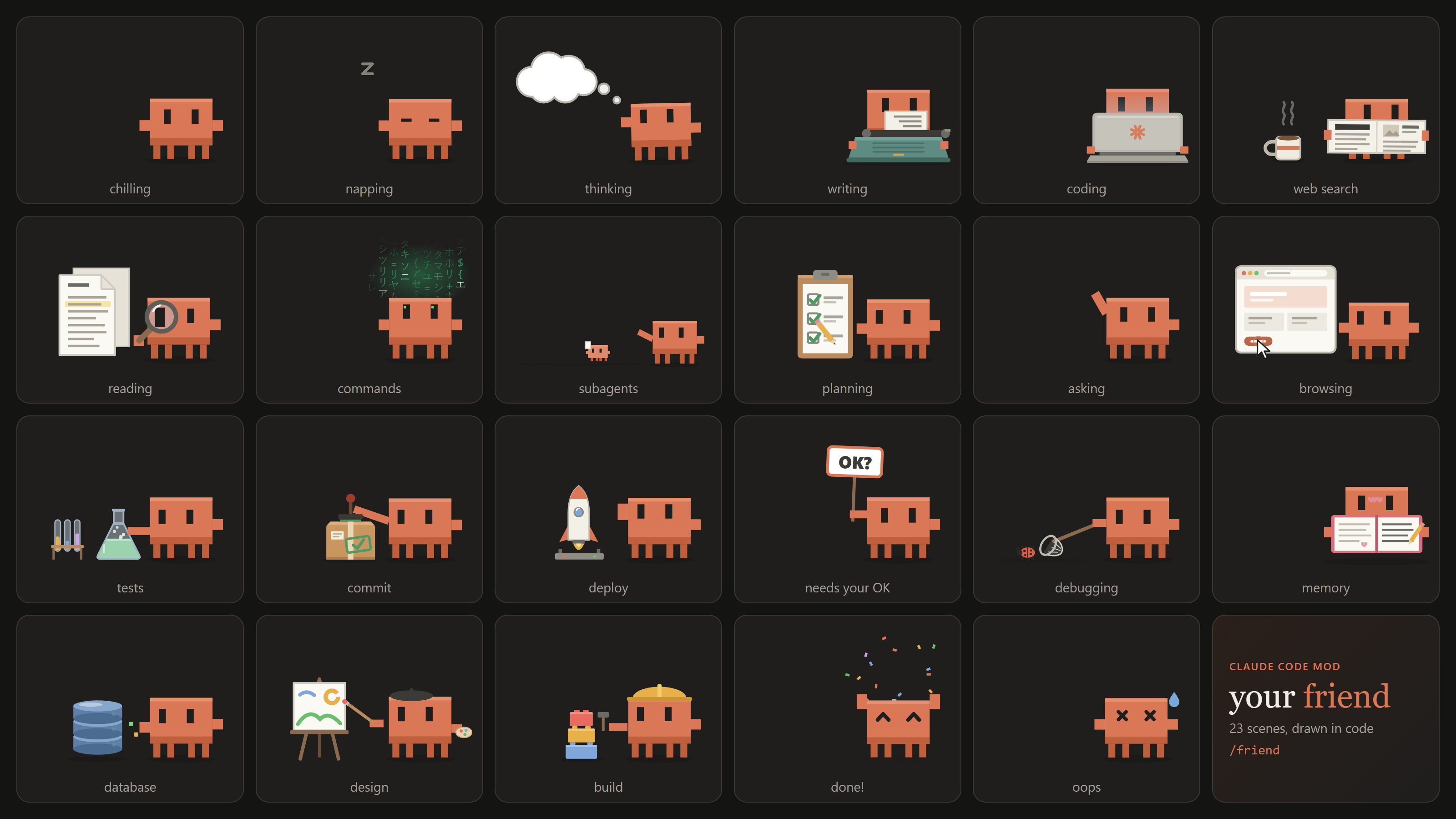
He picks a scene from what Claude is actually doing, as it happens:
| Scene | When |
| --- | --- |
| 💭 Thinking | Claude is thinking, or reading a tool's result before its next move |
| ⌨️ Writing | Claude is writing its reply, or editing .md / .txt docs (a typewriter that faces him) |
| 💻 Coding | Editing or writing code (a laptop, lid turned toward him) |
| 📰 Web search | WebSearch, WebFetch and search or docs MCP tools (he reads the paper with a coffee) |
| 🔍 Reading | Read, Grep, Glob (a magnifying glass over the docs) |
| ⚡ Commands | Any other shell command (green hacker glyphs rain above him) |
| 🧪 Tests | npm test, pytest, vitest, jest, go test, cargo test, ... |
| 📦 Commit | git commit |
| 🚀 Deploy | git push, vercel, npm publish, npm run deploy, deploy MCP tools |
| 🧱 Build | npm run build, tsc, cargo build, docker build, make, ... |
| 🗄️ Database | psql, prisma migrate, Supabase / SQL MCP tools, .sql files and migrations |
| 🐞 Debugging | node --inspect, pdb, gdb, debugging skills |
| 🎨 Design | .css / .svg / Tailwind config edits, Figma and design MCP tools |
| 📔 Memory | Writing CLAUDE.md or Claude's memory files |
| 🐾 Subagents | Claude sends out subagents (tiny Clawds march off with their tasks) |
| 📋 Planning | Todo and task list updates |
| 🌐 Browsing | Browser automation tools |
| 👋 Asking | Claude asks you a question |
| 🪧 Needs your OK | A tool call is waiting for your permission |
| 🎉 Done | A turn finished: he jumps, confetti flies |
| 💧 Oops | A turn ended on an error |
| 😌 Chilling | Nothing going on |
| 💤 Napping | Two quiet minutes in a row |
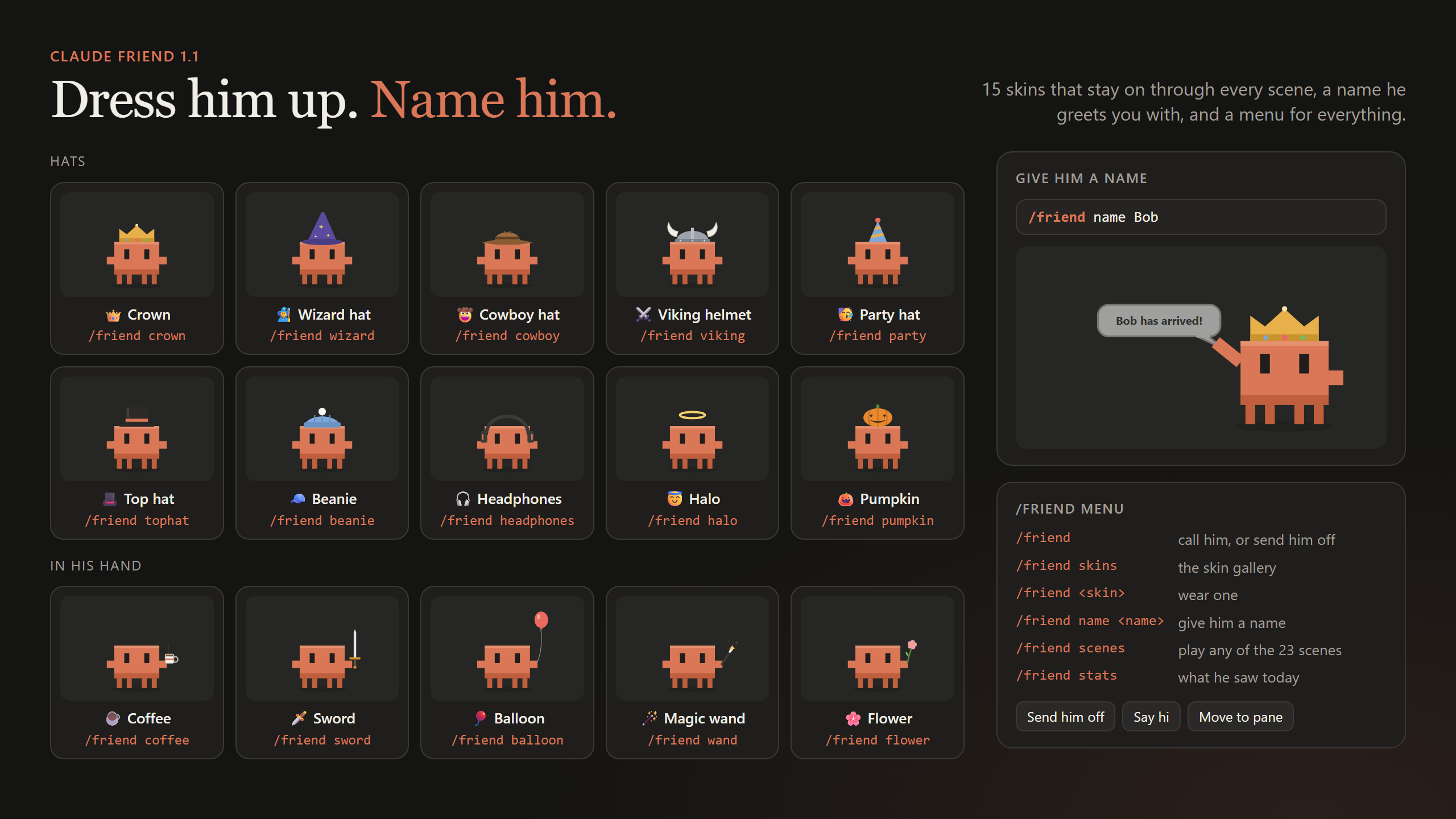
Dress him up. A skin stays on through every scene and is remembered across sessions. When a scene brings its own hat (the hard hat while building, the beret while designing) that one wins for a moment, and he only holds an item while his hand is free.
| Hats | | Items in hand | |
| --- | --- | --- | --- |
| 👑 /friend crown | 🎩 /friend tophat | ☕ /friend coffee | 🪄 /friend wand |
| 🧙 /friend wizard | 🧢 /friend beanie | 🗡️ /friend sword | 🌸 /friend flower |
| 🤠 /friend cowboy | 🎧 /friend headphones | 🎈 /friend balloon | |
| ⚔️ /friend viking | 😇 /friend halo | | |
| 🥳 /friend party | 🎃 /friend pumpkin | | |
/friend skins shows them all in a gallery (click one to put it on), and /friend noskin takes it off.
/friend name Bob
From then on he greets you with a little speech bubble, "Bob has arrived!", whenever you call him or start a session.
Not sure what's there? /friend menu lists everything, with buttons in the desktop app.
| Command | What it does |
| --- | --- |
| /friend | Call your friend, or send him off if he's already here (remembered across sessions) |
| /friend menu | Every command, with buttons |
| /friend skins | The skin gallery; click one to wear it |
| /friend <skin> | Wear a skin, e.g. /friend crown or /friend sword |
| /friend noskin | Take the skin off |
| /friend name <name> | Give him a name (up to 16 characters) |
| /friend scenes | Every scene, with buttons to play them |
| /friend <scene> | Play any scene for a few seconds, e.g. /friend deploy or /friend build |
| /friend pane | Move him into a side pane |
| /friend stage | Put him back above the prompt |
| /friend stats | What he saw today: file edits, reads, commands, web lookups, helpers, finished turns |
Claude Friend is a Claude Code mod: a plugin whose behaviour is a TypeScript module of function hooks.
turn.step hook watches the model's response as it streams: thinking, visible text, and the start of each tool call, whose arguments it reads as they arrive, so the scene changes before the tool even runs. A tool.call hook confirms the scene while the tool runs, and a tool.check hook notices when a call needs your permission.plugin/hooks/classify.ts maps tool names, shell commands and file paths to scenes: git commit is a commit, npm test is tests, a .css edit is design, an MCP tool named execute_sql is the database.ui.render hook draws the band above the prompt. Every scene is an SVG built in code in plugin/hooks/scenes.ts, animated with CSS. There are no image files.Clone the repo and load the plugin straight from disk; saving a file hot-reloads it.
git clone https://github.com/redemptionnn/clawd-friend.git
claude --plugin-dir ./clawd-friend/plugin
In the desktop app, where you can't pass flags, add the folder to the env block of ~/.claude/settings.json:
{
  "env": {
    "CLAUDE_CODE_PLUGIN_DIRS": "/absolute/path/to/clawd-friend/plugin"
  }
}
If you also installed it with /plugin install, disable that copy (claude plugin disable clawd-friend) so it doesn't load twice.
Check and test it against the engine:
claude plugin validate ./plugin
claude plugin test ./plugin
The tests in plugin/tests/scenes.test.ts run real tool calls through Claude Code's engine, draw the band while each call is in flight, and check that the right scene shows. plugin/tests/skins.test.ts covers skins, names and the menu cards.
.claude-plugin/marketplace.json   lets /plugin find and install the plugin
plugin/
  .claude-plugin/plugin.json      name, version, metadata
  hooks/hooks.json                points at the hooks module
  hooks/register.tsx              the hooks: what Claude is doing, commands, drawing
  hooks/classify.ts               tool calls to scenes
  hooks/scenes.ts                 the 23 scenes, drawn as SVG in code
  hooks/skins.ts                  hats and items in hand
  types/index.d.ts                the plugin's state contract
  tests/                          claude plugin test
media/                            the demo GIF and screenshots

文档生成、漂移检测和 API 文档自动化插件,同时作为 function-hook 防护,拒绝包含机密的文档写入或 worker 调度。

Claude 桌面应用的状态栏。它显示在提示符上方,展示会话质量、上下文填充量、缓存倒计时,以及 5 小时和每周限额,并让 Clawd 演示会话正在进行的操作。

一个 Claude Code 插件 mod,提供 /databricks-pane:按照 databricks CLI,以树状结构展示 Databricks 工作区、Unity Catalog、计算资源、作业、管道、应用和仪表板,并支持实时高亮、配置文件切换和复制 CLI 参数。
