
cjavdev@cjavdev
cjavdev/mods/tree/main/cache-shot-clock

一个 Claude Code mod,为提示缓存设置倒计时:它会显示缓存何时过期,以及下一轮何时需要再次把整个对话写入缓存。
cjavdev/mods/tree/main/cache-shot-clock
cache-shot-clock 是一个用于显示提示缓存 TTL 的 Claude Code mod。它会在提示框下方的横条中显示一个小钟,在最后 15 秒显示大型琥珀色/红色 LED 时钟,并在缓存过期时用蜂鸣器提示下一轮需要重新写入的 token 数量。TTL(5m 或 1h)从会话转录中读取;空闲缓存还剩 60 秒时会显示 toast 警告。可以通过 /config 设置 enabled、bigAt、ttl、warnSeconds 和 testTtlSeconds 等选项。需要 Claude Code 2.1.287+,可通过 --plugin-dir 或 CLAUDE_CODE_PLUGIN_DIRS 安装。
请先查看作者 README 确认 marketplace 和插件名称;命令可能随仓库结构改变。
claude plugin marketplace add cjavdev/mods
claude plugin install cache-shot-clock
A Claude Code mod that puts a shot clock on your prompt cache: how long until it expires and your next turn pays to write the whole conversation into the cache again.
<sub>The terminal half is a real capture of the mod counting down to the buzzer. The player is fictional.</sub>
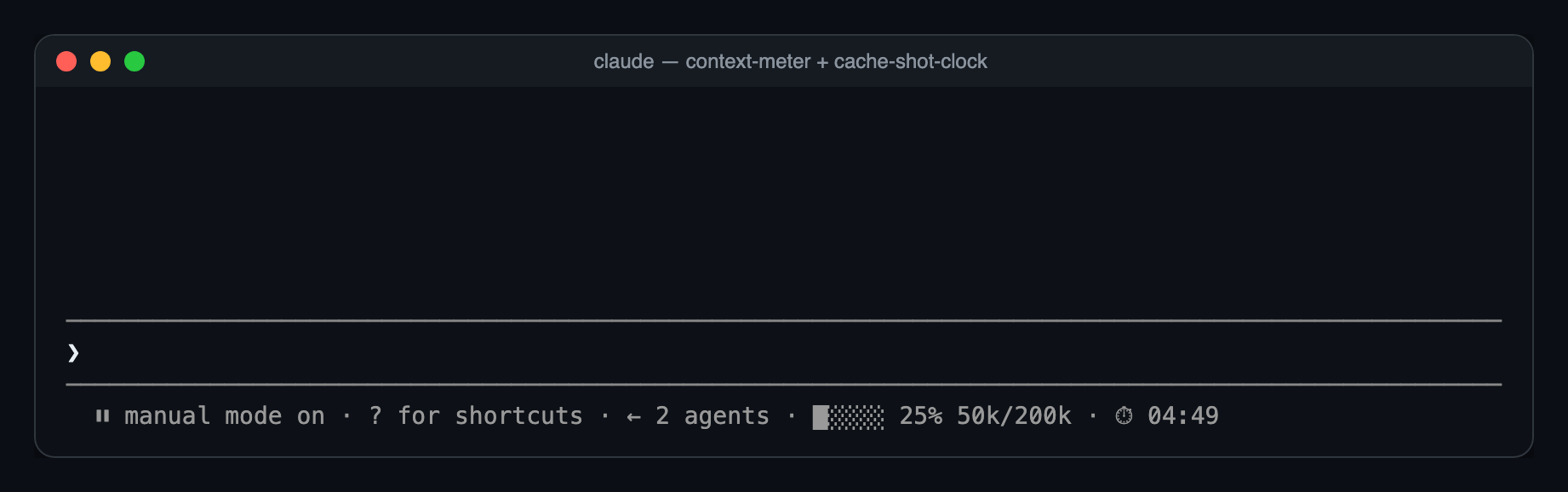
Most of the time, just a small clock at the end of the bar under the prompt:
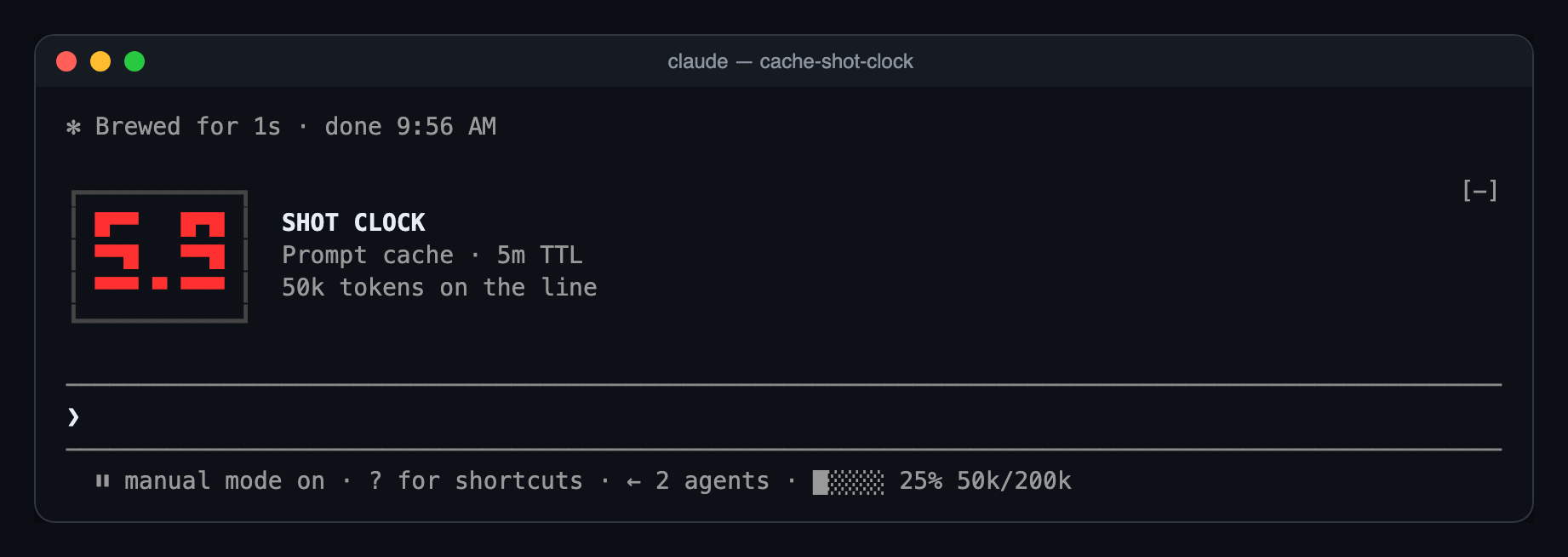
With 15 seconds left, the big LED clock appears above the prompt. It counts whole seconds in amber, then tenths in red for the last ten:
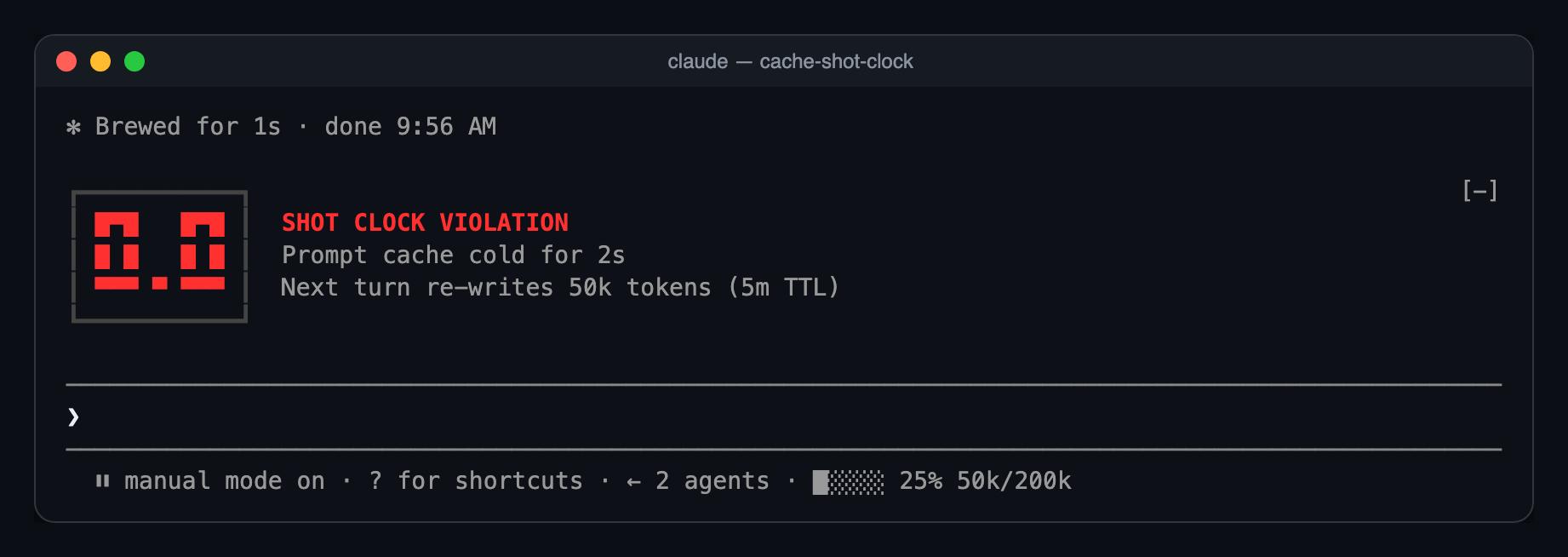
At zero, the buzzer:
Ten seconds later it folds back into the bar as ⏱ 00:00, until your next turn restarts it.
A model switch, /compact or /clear resets the clock, because the new prefix has nothing cached yet.
You need Claude Code 2.1.287 or newer.
git clone https://github.com/cjavdev/mods.git ~/mods
claude --plugin-dir ~/mods/cache-shot-clock
To load it in every session, add the folder to CLAUDE_CODE_PLUGIN_DIRS in the env block of ~/.claude/settings.json (separate several folders with :):
{ "env": { "CLAUDE_CODE_PLUGIN_DIRS": "~/mods/cache-shot-clock:~/mods/context-meter" } }
It shares the bar with context-meter, and the big clock stacks under anything else above the prompt.
The bar under the prompt is drawn by the terminal only for now. In the desktop app you get the big clock for the last 15 seconds and nothing before it.
In /config, or under pluginConfigs["cache-shot-clock"].options in settings:
| Option | Default | |
| --- | --- | --- |
| enabled | true | Turns the clock off without unloading the mod. |
| bigAt | 15 | Seconds left when the big LED clock appears. 0 keeps the clock in the bar. |
| ttl | auto | auto, 5m or 1h. Forces the countdown length instead of reading it from the transcript. |
| warnSeconds | 60 | When to toast before an idle cache expires. 0 turns the toast off. |
| testTtlSeconds | 0 | For testing: count down from this many seconds instead of the real TTL. 0 is off. |
testTtlSeconds makes the clock count down from any number of seconds. This runs a 40-second clock, so you see the big clock and the buzzer in under a minute:
claude --settings '{"pluginConfigs":{"cache-shot-clock":{"options":{"testTtlSeconds":40}}}}'
testTtlSeconds and ttl only change what the clock counts. They don't change how long Anthropic keeps your cache. To get a real 5-minute cache for a session, start Claude Code with FORCE_PROMPT_CACHING_5M=1; the clock picks that up by itself.
turn.step hook reads each main-thread response's usage and restarts the clock.model.fork hook restarts it when another mod's fork reads the main prefix, such as cache-saver.classic.Stop hook tails the transcript after each turn and reads the newest cache_creation bucket to find the TTL.$.clock.every tick redraws the clock and raises the warning. The last ten seconds tick every 100ms.ui.render hook on PromptHint adds the small clock as the hint line's tail.ui.render hook on AbovePrompt draws the LED panel for the last seconds.The parsing, formatting and LED font are pure functions in hooks/clock.ts.
claude plugin validate ~/mods/cache-shot-clock
claude plugin test ~/mods/cache-shot-clock
The tests run a whole countdown on a mocked clock: the bar clock, the big clock taking over at 15 seconds, tenths, the buzzer, and folding back.

文档生成、漂移检测和 API 文档自动化插件,同时作为 function-hook 防护,拒绝包含机密的文档写入或 worker 调度。

Claude 桌面应用的状态栏。它显示在提示符上方,展示会话质量、上下文填充量、缓存倒计时,以及 5 小时和每周限额,并让 Clawd 演示会话正在进行的操作。

一个 Claude Code 插件 mod,提供 /databricks-pane:按照 databricks CLI,以树状结构展示 Databricks 工作区、Unity Catalog、计算资源、作业、管道、应用和仪表板,并支持实时高亮、配置文件切换和复制 CLI 参数。
