
iamomiid@iamomiid
iamomiid/cache-countdown
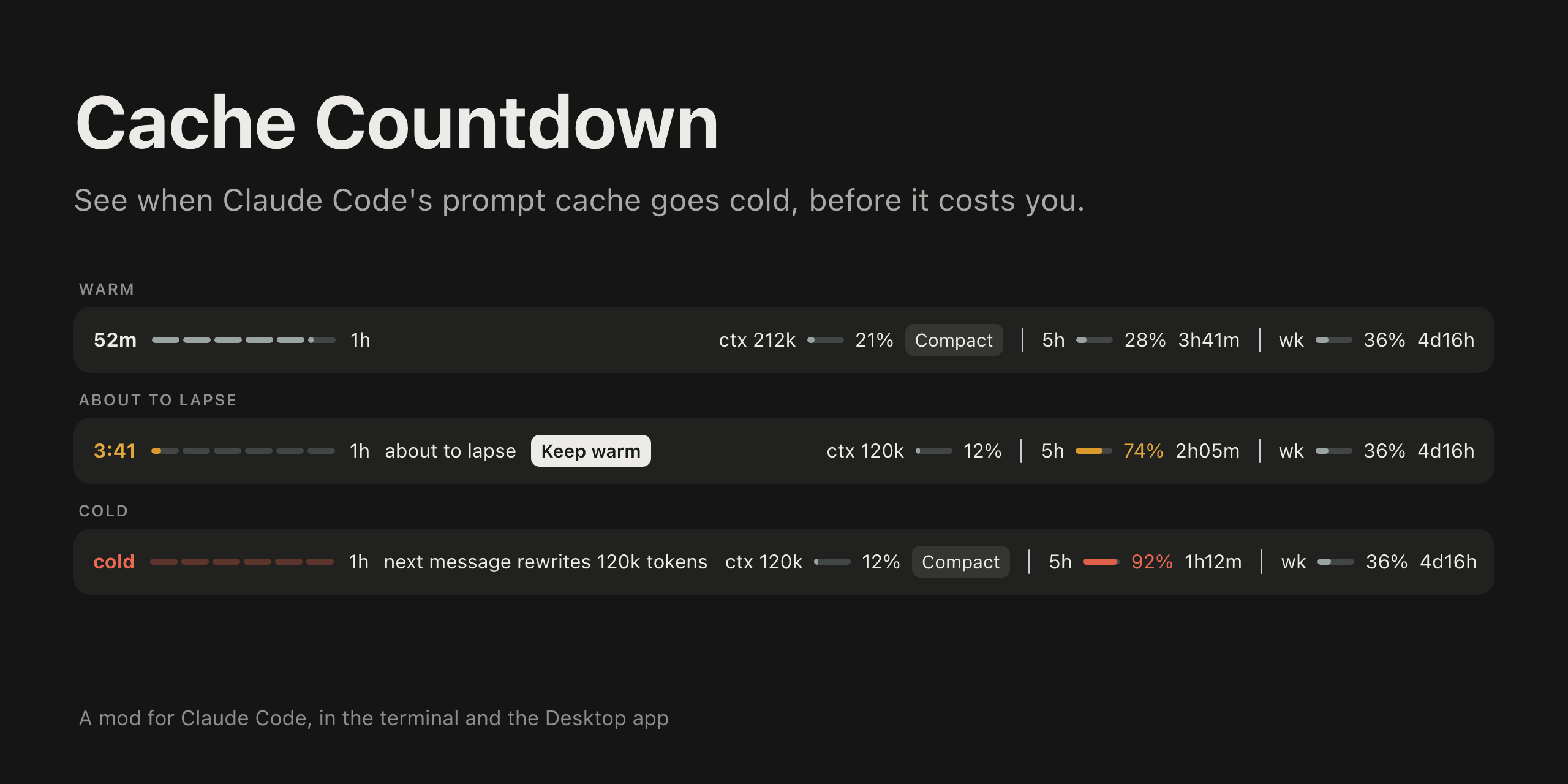
一个 Claude Code mod,在提示框上方以引线显示提示缓存还能保持热状态多久。它会在终端和 Claude Desktop 应用的 Code 标签页中绘制。
iamomiid/cache-countdown
一个 Claude Code mod,在提示框上方以引线显示提示缓存还能保持热状态多久。它会在终端和 Claude Desktop 应用的 Code 标签页中绘制。
Anthropic 的提示缓存有两种有效期:5 分钟和 1 小时,价格不同。主对话的每个请求都会刷新缓存条目。有效期一过,下一个请求就要再次付费,把整个上下文写入缓存。这个 mod 会显示还剩多少时间,以及时间耗尽时会产生什么费用。
需要 Claude Code v2.1.287 或更高版本。通过 /plugin marketplace add iamomiid/cache-countdown 和 /plugin install cache-countdown@cache-countdown 安装,也可以使用 claude --plugin-dir ./cache-countdown 载入目录。
提示框上方的一列信息:燃烧引线显示剩余时间、当前使用的有效期(5m 或 1h)、about to lapse 或 next message rewrites 212k tokens 等警告,以及上下文和速率限制计量器。到期前不久和到期时都会显示提示消息;/cache-countdown 会以文字输出这些数字,供没有提示栏的界面使用。
Keep warm 会提出一个简短问题来读取并刷新缓存条目;当对话超过 200k tokens 或缓存处于冷状态时,Compact 会在上下文计量器旁运行 /compact。
ttl(auto、5m、1h)和 toast(true、false)可通过 /plugin configure 或 /config 面板设置。采用 MIT 许可。
请先查看作者 README 确认 marketplace 和插件名称;命令可能随仓库结构改变。
claude plugin marketplace add iamomiid/cache-countdown
claude plugin install cache-countdown
A Claude Code mod that shows how long the prompt cache stays warm, as a fuse above the prompt. It draws in the terminal and in the Code tab of the Claude Desktop app.
Anthropic's prompt cache has two lifetimes, 5 minutes and 1 hour, priced differently. Every request of the main conversation refreshes the entry. Once it lapses, the next request pays to write the whole context to the cache again. This mod shows how long you have left, and what it costs when the time runs out.
Requires Claude Code v2.1.287 or later.
In a Claude Code session:
/plugin marketplace add iamomiid/cache-countdown
/plugin install cache-countdown@cache-countdown
Or from your shell:
claude plugin marketplace add iamomiid/cache-countdown
claude plugin install cache-countdown@cache-countdown
To try it for one session without installing, clone the repository and load the folder:
claude --plugin-dir ./cache-countdown
The band appears after the first reply of a conversation.
A mod runs with your permissions. To see what this one hooks and calls before loading it, run claude plugin validate on the cloned folder. It reads the session transcript, runs tail on it, and makes a model request only when you press Keep warm.
One row above the prompt. In the Desktop app:

In a terminal:
52m ━━━━━━━━━━━━━━━━━━━━━─── 1h ctx 212k 21% │ 5h 28% 3h41m │ wk 36% 4d16h
Both images on this page are illustrations drawn to match the app, with example figures.
The row holds:
5m or 1h.about to lapse in the last five minutes (1h) or last minute (5m), next message rewrites 212k tokens once the cache is cold, and last request rewrote 203k tokens after a request that missed the cache.5h, wk, and any other) with the share used and the time until it resets.Nothing is colored while all is well. The time and fuse take the warning color when the cache is about to lapse and the error color when it is cold. A meter takes the warning color at 70% and the error color at 90%.
It also shows a toast shortly before the cache lapses and when it does, for conversations of 20k tokens or more. /cache-countdown prints the figures as text, for surfaces that draw no band (VS Code, claude -p).
If another mod draws above the prompt too, its row stays, under this one.
/compact, as if you had typed it, with no confirmation step. Pressed while a turn is running, it waits for the turn to end. Compacting a cold conversation still reads the whole context once, as any next message would; what it saves is carrying that context into every message after.Set them with /plugin configure cache-countdown@cache-countdown, or in the /config panel.
| Option | Values | Default | What it does |
| :- | :- | :- | :- |
| ttl | auto, 5m, 1h | auto | Which lifetime to count down. auto reads it from the transcript. |
| toast | true, false | true | Toasts before and at expiry. |
ephemeral_5m_input_tokens and ephemeral_1h_input_tokens. Until that is known, the fuse counts the 5 minute lifetime first and the 1 hour lifetime after it, and says so.tail. Where tail is missing, as on Windows, the whole file is read, which works up to 4 MiB. Past that, the lifetime stays unconfirmed unless ttl is set./resume and /branch the countdown starts from the resumed conversation's last response.Load the folder with --plugin-dir, or name it in CLAUDE_CODE_PLUGIN_DIRS under env in ~/.claude/settings.json for sessions the Desktop app starts. Claude Code reloads the mod when a file changes.
claude plugin validate .
claude plugin test .
MIT. See LICENSE.

文档生成、漂移检测和 API 文档自动化插件,同时作为 function-hook 防护,拒绝包含机密的文档写入或 worker 调度。

Claude 桌面应用的状态栏。它显示在提示符上方,展示会话质量、上下文填充量、缓存倒计时,以及 5 小时和每周限额,并让 Clawd 演示会话正在进行的操作。

一个 Claude Code 插件 mod,提供 /databricks-pane:按照 databricks CLI,以树状结构展示 Databricks 工作区、Unity Catalog、计算资源、作业、管道、应用和仪表板,并支持实时高亮、配置文件切换和复制 CLI 参数。
