
sebi75@sebi75
sebi75/agent-canvas
sebi75/agent-canvas
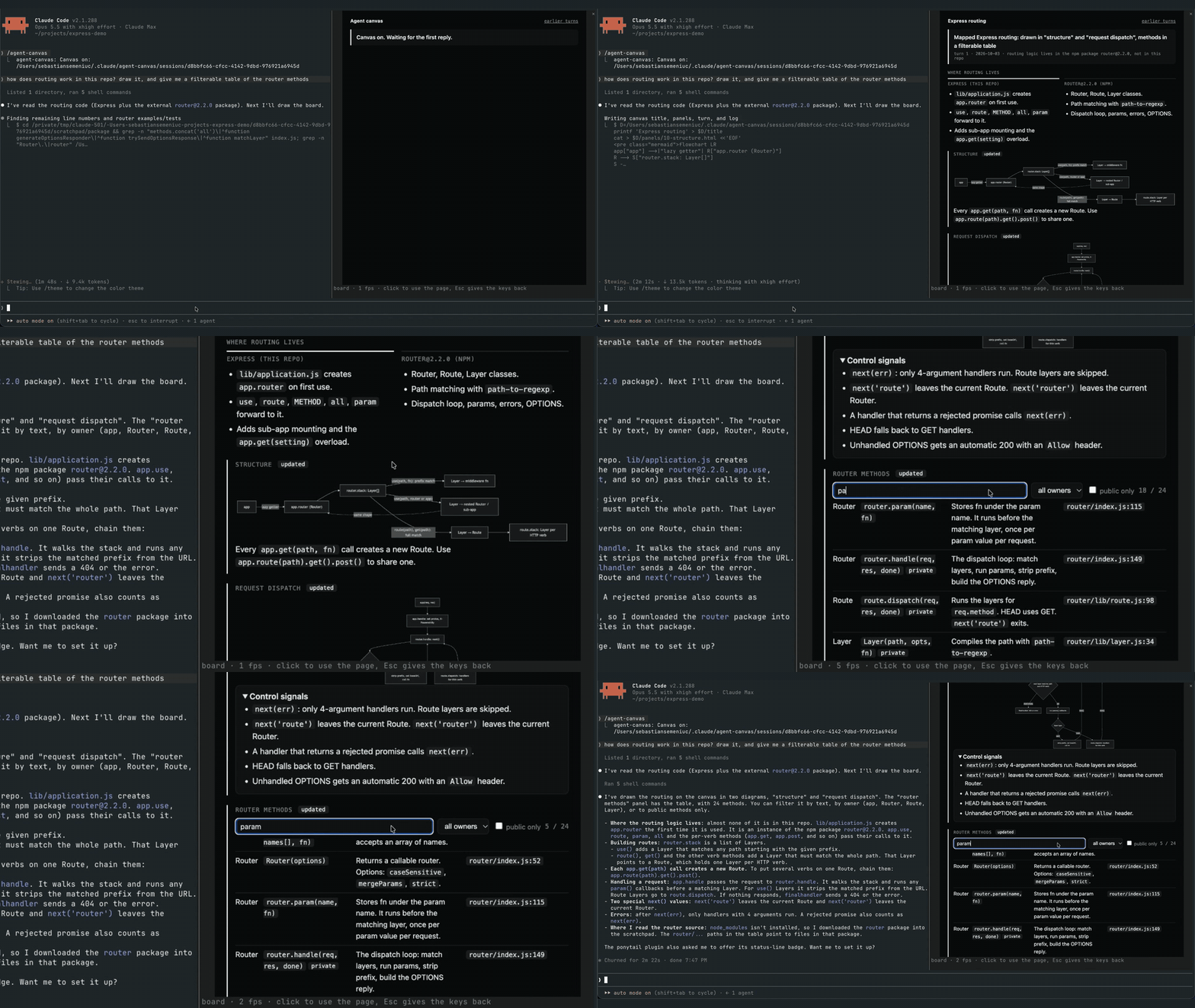
agent-canvas 是一个 Claude Code mod,为每个工作阶段在转录旁的面板中提供实时看板。代理会在每次回复时通过重写 turn.html、编辑 panels/<name>.html,并在 ~/.claude/agent-canvas/sessions/<session id>/ 下追加 log.txt 来保持看板更新。一个钩子会在代理结束一轮却没有写入 turn.html 时阻止 Stop 事件。桥接程序(bridge/bridge.mjs)构建 board.html,通过管道运行没有开放端口的无头 Chrome,并发出 PNG 画帧,mod 使用 Image 元素绘制这些画帧,再通过 $.ui.blit 交换。Client 区域会将点击、按键和面板大小转发给 Chrome,滚轮负责滚动。需要 Claude Code 2.1.287+、支持图像的终端(Ghostty、kitty 或 WezTerm)、Chrome/Chromium 和 Node.js 18+。通过 /plugin marketplace add sebi75/agent-canvas 安装。已知限制:页面上的文字无法选择,Desktop 应用和 VS Code 扩展缺少 Image 元素。
请先查看作者 README 确认 marketplace 和插件名称;命令可能随仓库结构改变。
claude plugin marketplace add sebi75/agent-canvas
claude plugin install agent-canvas
A live board for each Claude Code session, in a pane beside the transcript. The agent keeps it current every reply, with diagrams, tables, charts and the state of the work. The board is a real web page drawn by headless Chrome, so you can click, type, hover and scroll in it. Nothing opens in a browser tab, and the board belongs to the session that made it.
It is a Claude Code mod: a plugin whose hooks run inside Claude Code.
turn.html (this reply's news), edits the panels that changed (panels/<name>.html, kept across turns) and appends a line to log.txt. The files live in ~/.claude/agent-canvas/sessions/<session id>/.turn.html after its last tool call, the mod blocks the Stop event and tells it why.bridge/bridge.mjs builds board.html from those files, runs headless Chrome on it over a pipe (no open port), and writes each frame as a PNG. Panels written this turn come first, marked "updated". Every turn keeps a snapshot, linked from "earlier turns".Image element and swaps each new one in with $.ui.blit. A Client region laid over the picture sends clicks, keys and the pane size back to Chrome, and the mouse wheel scrolls the page.From a Claude Code session:
/plugin marketplace add sebi75/agent-canvas
/plugin install agent-canvas@agent-canvas
Or clone the repository and load the folder in every session by adding CLAUDE_CODE_PLUGIN_DIRS with the clone's path to the env block of ~/.claude/settings.json.
| command | what it does |
|---|---|
| /agent-canvas | turns the board on and opens its pane; when it shows another page, goes back to the board |
| /agent-canvas off | turns the board off and closes the pane |
| /agent-canvas <url or path> | shows that page instead, for example a local dev server |
Click the page to type into it. Esc gives the keyboard back to Claude Code. The board stays on across a plugin reload, and AGENT_CANVAS_OPEN=1 turns it on when a session starts.
Claude Code turns images off when the terminal reports itself as "libghostty", which Herdr does. Its own switch turns them back on: set CLAUDE_CODE_FORCE_TERMINAL_IMAGES=1 in the shell that starts claude inside Herdr, for example in ~/.zshrc when HERDR_ENV is set.
Use Herdr 0.9 or later. On Herdr 0.9.3 an animated page measured about 42 frames per second on screen, against about 53 in plain Ghostty. Herdr 0.7 drew about 3; there, set AGENT_CANVAS_FPS=4 so frames do not queue up.
| variable | default |
|---|---|
| AGENT_CANVAS_FPS | 60 |
| AGENT_CANVAS_SCALE | 2 device pixels per CSS pixel |
| AGENT_CANVAS_CHROME | the first Chrome or Chromium found |
| AGENT_CANVAS_OPEN | unset; 1 turns the board on at session start |
Image element. The pane says so there.agent-canvas started as herdr-canvas, which rendered the same kind of board to a static image in a Herdr pane next to the agent. Claude Code mods made it possible to put a live, clickable page inside Claude Code itself.
node test/board.test.mjs
MIT

文档生成、漂移检测和 API 文档自动化插件,同时作为 function-hook 防护,拒绝包含机密的文档写入或 worker 调度。

Claude 桌面应用的状态栏。它显示在提示符上方,展示会话质量、上下文填充量、缓存倒计时,以及 5 小时和每周限额,并让 Clawd 演示会话正在进行的操作。

一个 Claude Code 插件 mod,提供 /databricks-pane:按照 databricks CLI,以树状结构展示 Databricks 工作区、Unity Catalog、计算资源、作业、管道、应用和仪表板,并支持实时高亮、配置文件切换和复制 CLI 参数。
