
mikhin@mikhin
mikhin/claude-iphone-cam
Continuity Camera를 통해 iPhone에서 프레임을 가져와 다음 메시지에 첨부하는 Claude Code mod입니다.
mikhin/claude-iphone-cam
Claude iPhone Cam은 Claude Code 프롬프트 위에 📷 snap 버튼을 추가합니다. 버튼을 누르면 ffmpeg/avfoundation으로 iPhone 카메라에서 한 프레임을 캡처합니다(Continuity Camera를 통해 Mac 웹캠으로 노출됨). 다시 찍기/버리기 컨트롤이 있는 썸네일을 표시하고, 보낼 때 prompt.submit hook이 JPEG 경로를 덧붙여 Claude가 이미지를 대화의 일부로 읽게 합니다. /plugin marketplace add mikhin/claude-iphone-cam, /plugin install iphone-cam, /reload-plugins로 설치합니다. macOS Ventura+, iOS 16+, iPhone XR 이상, ffmpeg, 두 기기에서 같은 Apple ID가 필요합니다. mod는 로컬에서 ffmpeg를 실행해 장치를 나열하고 프레임을 캡처하며, frame-<n>.jpg/png를 $TMPDIR/claude-cam/에 쓰고 네트워크 연결은 열지 않습니다.
먼저 작성자의 README에서 marketplace와 플러그인 이름을 확인하세요. 저장소 구조에 따라 명령어가 달라질 수 있습니다.
claude plugin marketplace add mikhin/claude-iphone-cam
claude plugin install iphone-cam
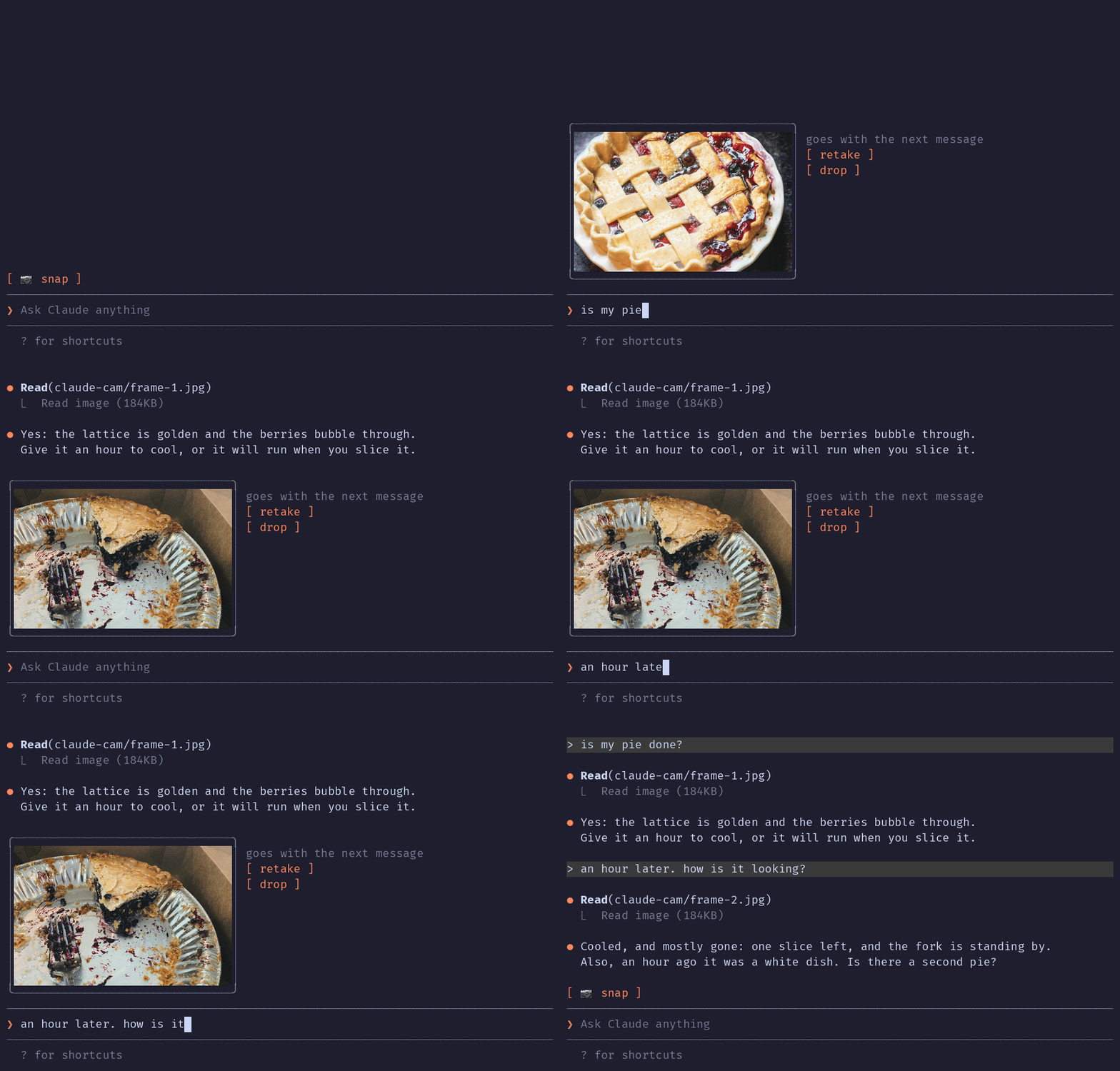
A Claude Code mod that lets Claude see what your iPhone camera sees. Press 📷 snap above the prompt, check the thumbnail, type your question, send.
The terminal in the demo is drawn, the pies are real: photos by Joe Dumas and Debby Hudson on Unsplash. The demo and its build script live in the demo branch, so installing the plugin doesn't download them.
No AirDrop, no Telegram-to-yourself, no saving files. The iPhone is already a Mac webcam through Continuity Camera; this mod grabs one frame from it.
Inside Claude Code, run:
/plugin marketplace add mikhin/claude-iphone-cam
/plugin install iphone-cam
/reload-plugins
ffmpeg (brew install ffmpeg)[ 📷 snap ]
❯ _
After a snap:
╭──────────────╮ goes with the next message
│   (frame)    │ [ retake ]
│              │ [ drop ]
╰──────────────╯
❯ is my pie done?
ffmpeg -f avfoundation -list_devices finds the device named … iPhone … Camera (Desk View is skipped).ffmpeg run waits 1.5 s for exposure, then writes a full JPEG and a 640 px PNG thumbnail to $TMPDIR/claude-cam/.Image element.prompt.submit hook adds the JPEG's path to the message context, and Claude reads it.A mod can only add text to a message, not image bytes, so Claude opens the frame with one Read call.
The mod runs only when you press snap, retake or drop, and when you send a message.
ffmpeg -hide_banner -f avfoundation -list_devices true -i "" lists the cameras, to find the iPhone by nameffmpeg … -i "<iPhone camera>" -ss 1.5 -frames:v 1 <frame>.jpg -ss 1.5 -frames:v 1 -vf scale=640:-2 <frame>.png takes one frame (the full command is captureArgs in hooks/camera.ts)mkdir -p $TMPDIR/claude-cam makes the folder the frames go toTMPDIR environment variable, checks that /opt/homebrew/bin/ffmpeg exists, and writes frame-<n>.jpg and frame-<n>.png to $TMPDIR/claude-cam/. It never deletes them; macOS clears that folder.prompt.submit, only for a message you typed, and only while a frame is waiting, it adds one line of context: the path of the JPEG and a request to read it. Nothing else in the message changes.MIT

입력하는 동안 프롬프트의 문법을 검사하고 번체 중국어로 설명합니다. Enter를 누르기 전에 수정 내용이 프롬프트 상자 위에 표시됩니다.


localvoxtral이 세션에 연결되어 있는지 보여 주고 받아쓴 텍스트를 프롬프트 상자에 넣으며 프롬프트 위에 받아쓰기 내용을 표시하고 음성 중지 문구로 턴을 끝내는 Claude Code 플러그인입니다. hooks 모듈을 로드하는 Claude Code 빌드가 필요합니다.
macOS에서 프롬프트 마커에 붙여 넣은 이미지를 미리 봅니다. Ghostty를 지원하며 시작 오버라이드로 iTerm2와 Herdr도 실험적으로 지원합니다. Claude Code 2.1.287+。