karanb192@karanb192
karanb192/claude-code-mods/tree/main/plugins/image-peek
macOS에서 프롬프트 마커에 붙여 넣은 이미지를 미리 봅니다. Ghostty를 지원하며 시작 오버라이드로 iTerm2와 Herdr도 실험적으로 지원합니다. Claude Code 2.1.287+。
karanb192/claude-code-mods/tree/main/plugins/image-peek
텍스트 커서를 붙여 넣은 [Image #1] 마커 위로 옮기면 이미지가 표시되고, 벗어나면 숨겨집니다. 너비가 넓은 창에서는 이미지가 어두운 캔버스 중앙에 놓인 큰 미리보기 창을 사용합니다. 좁은 창에서는 프롬프트 위 영역을 사용합니다. 키보드 포커스는 프롬프트에 남습니다.
이 첫 버전은 macOS와 Ghostty를 대상으로 하며 Claude Code 2.1.287 이상이 필요합니다. 실제 Claude CLI에서 커서 선택, 네이티브 붙여넣기, 다시 로드, 정리를 점검했습니다. 사용자가 제공한 Ghostty 스크린샷으로 큰 이미지와 어두운 미리보기 캔버스도 확인했습니다.
iTerm2와 로컬 Herdr 세션도 인식되며, 아래의 시작 오버라이드를 사용할 수 있습니다. 두 환경의 이미지 픽셀은 아직 엔드투엔드 시각 확인이 필요합니다.
셸에서 실행한 뒤 Ghostty에서 새 Claude 세션을 시작합니다.
claude plugin marketplace add karanb192/claude-code-mods
claude plugin install image-peek@claude-code-mods
마켓플레이스를 이미 추가했다면 설치하기 전에 claude plugin marketplace update claude-code-mods로 업데이트합니다. Image Peek 변경 사항이 마켓플레이스의 main 브랜치에 병합되면 이 항목을 사용할 수 있습니다.
브라우저, 컴파일러, 별도 Mac 앱 또는 API 키는 필요하지 않습니다. Claude가 모드를 로드하고 macOS가 클립보드 리더를 제공합니다. Claude Code 2.1.287+에서는 모드가 기본으로 활성화됩니다.
설치하지 않고 로컬 체크아웃을 시험하려면 저장소 루트에서 실행합니다.
claude --plugin-dir ./plugins/image-peek
Ghostty 안에서 iTerm2 3.7.3+ 또는 Herdr 0.9.1+를 사용합니다. 이미지 렌더러를 활성화하고 새 Claude 프로세스를 시작합니다.
CLAUDE_CODE_FORCE_TERMINAL_IMAGES=1 claude
로컬 체크아웃에서는 저장소 루트에서 실행합니다.
CLAUDE_CODE_FORCE_TERMINAL_IMAGES=1 claude --plugin-dir ./plugins/image-peek
Claude Code 2.1.287의 렌더러는 그래픽 쿼리에 응답이 온 뒤에도 터미널이 보고한 이름을 Kitty 및 Ghostty와 비교합니다. iTerm2와 Herdr는 이 이름 확인에 실패할 수 있습니다. 이 프로세스별 오버라이드는 이름 확인과 이미지 파일 기능 탐색을 건너뜁니다. 셸 설정을 바꾸거나 다른 앱을 설치하지 않습니다. Claude가 모드가 시작되기 전에 이 기능을 초기화하므로 모드를 다시 로드하는 것만으로는 부족합니다.
iTerm2 3.7.3은 Claude가 사용하는 Unicode 이미지 자리 표시자의 렌더링을 수정합니다. Herdr 0.9.1은 파일 기반 Kitty 이미지와 Unicode 배치를 지원합니다. terminal.kitty_graphics 설정의 기본값은 true입니다(설정 참고: https://github.com/herdrdev/herdr/blob/v0.9.1/docs/next/website/src/data/config-reference.json). 비활성화했다면 다시 활성화하고 Herdr의 다시 시작/재연결 안내를 따릅니다. 이 미리보기 경로에는 로컬 Mac 세션과 그래픽을 지원하는 외부 터미널이 필요합니다. 호환되지 않는 터미널이나 전송 방식에 오버라이드가 그래픽 지원을 추가해 주지는 않습니다.
미리보기는 마우스 오버가 아니라 텍스트 커서를 따라갑니다. 대화는 미리보기 옆이나 위에 계속 보입니다. 이미지 전체를 사용 가능한 너비와 높이에 맞추고 레이블에 한 행을 남겨 둡니다. 창은 창 너비의 약 72%까지 요청하며 이미지 비율에 맞춰 조정합니다. Claude가 이전에 선택한 너비를 유지할 수 있으므로 창이 너무 좁으면 구분선을 드래그합니다.
인라인 폴백이 더 작은 이유는 Claude가 프롬프트와 아래쪽의 다른 내용을 포함해 프롬프트 위 영역을 터미널 높이의 대략 절반으로 제한하기 때문입니다. 확대나 떠 있는 오버레이는 없습니다. 창을 닫으면 커서가 마커를 벗어날 때까지 다시 나타나지 않습니다.
Claude는 자체 테마로 창의 바깥 프레임을 그립니다. 어두운 터미널에서 Light Claude 테마를 사용하면 어두운 캔버스 주변에 밝은 띠가 남습니다. 주변 프레임도 어둡게 하려면 Claude의 /theme 메뉴에서 Dark를 선택합니다. 그러면 Claude의 모든 UI 색상이 바뀝니다. Image Peek은 테마를 변경하지 않습니다.
/image-peek off는 새 캡처를 중지하고 미리보기를 숨깁니다. /image-peek on은 새로 붙여 넣는 이미지의 캡처를 재개합니다. /image-peek은 현재 설정을 보고합니다. 이 명령은 모델을 호출하지 않습니다.
Claude의 프롬프트 API는 마커와 커서를 노출하지만 초안 첨부 파일의 바이트는 제공하지 않습니다. 따라서 Image Peek은 새 네이티브 이미지 마커를 감지하면 Mac 클립보드를 읽습니다. 120 ms마다 초안을 확인하고 그 시점의 클립보드 이미지를 한 번 저장합니다.
저장소 루트에서 실행합니다.
claude plugin validate plugins/image-peek --strict
claude plugin test plugins/image-peek
Claude Code 2.1.287의 엄격한 검증기는 다음을 보고했습니다.
  ❯ types ./types/index.d.ts declares on $: nothing (no EngineInterface member)
  ❯ types ./types/index.d.ts declares state: image-peek.session
  ❯ ./register.ts hooks: session.start, prompt.edit, prompt.fill, command.run{command=image-peek}, session.end, session.compact, ui.render{component=AbovePrompt}, ui.render{component=Pane, requestId=image-peek}, ui.close{id=image-peek}
  ❯ ./register.ts calls: $.clock.every, $.command.register, $.env.get, $.process.run, $.prompt.read, $.session.id, $.state.get, $.state.set (via save), $.ui.close, $.ui.invalidate, $.ui.log, $.ui.open (via update), $.ui.panes, $.ui.resolve
  ❯ ./register.ts env writes: nothing
  ❯ ./register.ts env reads: CLAUDE_CODE_FORCE_TERMINAL_IMAGES, GHOSTTY_RESOURCES_DIR, HERDR_ENV, TERM_PROGRAM
  ❯ ./register.ts state writes: image-peek.session
  ❯ ./register.ts state reads: image-peek.session
테스트는 커서 경계, 별도 캡처, 모호한 붙여넣기, 입력한 마커 대체, 지원되지 않는 터미널, 활성화/비활성화, 캡처 실패, 캐시 퇴출, 정리 실패를 다룹니다. 실제 CLI 점검에서는 네이티브 이미지 붙여넣기, 마커에서 벗어났다가 돌아오기, 핫 리로드, 정상 종료 정리도 실행했습니다. 해당 터미널은 Image 요소의 대체 텍스트를 렌더링했으므로 이미지 픽셀은 확인하지 못했습니다. 이 점검 중 모델 턴은 제출되지 않았습니다.
실제 CLI에서 진행한 제어 레이아웃 프로브는 두 표면에 동일한 180-column, 48-row 터미널을 사용했습니다. 인라인 영역은 15 rows로 안정되었고 가로 이미지는 50 by 14 cells에 맞았습니다. 요청한 128-column 창은 128 by 40 cell body를 제공했고 이미지가 126 by 34 cells에 맞았습니다. 이는 사용 가능한 레이아웃 공간을 확인한 것이며 렌더링된 픽셀이나 색상을 확인한 것은 아닙니다.
전체 상호작용을 점검하려면 Ghostty에 서로 다른 이미지 2개를 붙여 넣고 각 마커를 선택한 뒤 창 크기를 바꿉니다. 더 큰 어두운 미리보기가 나타났다 사라지고 키보드 포커스가 움직이지 않는지 확인합니다. 대화 출력이 프롬프트 위에 있는 상태에서도 반복합니다. 다시 로드하면 플러그인이 이전 레이아웃에서 남은 창을 닫습니다.
L2 도달: 로컬 프로세스를 시작하고 임시 이미지 파일을 씁니다.
구현은 Claude의 엔진 인터페이스와 네이티브 인터페이스 요소를 사용합니다. 생성된 엔진 선언은 로컬 개발 파일이며 배포물에 포함되지 않습니다。
먼저 작성자의 README에서 marketplace와 플러그인 이름을 확인하세요. 저장소 구조에 따라 명령어가 달라질 수 있습니다.
claude plugin marketplace add karanb192/claude-code-mods
claude plugin install image-peek
Move the text cursor onto a pasted [Image #1] marker to see its image. Move away to hide it. Wide windows get a large preview pane with the image centered on a dark canvas. Narrow windows use the area above the prompt. Keyboard focus stays in the prompt.
This first version targets macOS and Ghostty with Claude Code 2.1.287 or later. Cursor selection, native paste, reload and cleanup have been exercised in the actual Claude CLI. A user-provided Ghostty screenshot confirms the large image and dark preview canvas.
iTerm2 and local Herdr sessions are also recognized, with the startup override below. Their image pixels still need an end-to-end visual check.
Run in your shell, then start a new Claude session in Ghostty:
claude plugin marketplace add karanb192/claude-code-mods
claude plugin install image-peek@claude-code-mods
If you already added the marketplace, update it with claude plugin marketplace update claude-code-mods before installing. This entry becomes available when the Image Peek change is merged into the marketplace's main branch.
No browser, compiler, separate Mac app or API key is needed. Claude loads the mod and macOS supplies the clipboard reader. Mods are enabled by default in Claude Code 2.1.287+.
To try a local checkout without installing, run from the repository root:
claude --plugin-dir ./plugins/image-peek
Use iTerm2 3.7.3+ or Herdr 0.9.1+ inside Ghostty. Start a new Claude process with the image renderer enabled:
CLAUDE_CODE_FORCE_TERMINAL_IMAGES=1 claude
For a local checkout, from the repository root:
CLAUDE_CODE_FORCE_TERMINAL_IMAGES=1 claude --plugin-dir ./plugins/image-peek
Claude Code 2.1.287's renderer checks the terminal's reported name against Kitty and Ghostty even after a graphics query receives a reply. iTerm2 and Herdr can fail this name check. This per-process override bypasses that check and the image-file capability probe. It does not change your shell settings or install another application. A mod reload is insufficient because Claude initializes these capabilities before the mod starts.
iTerm2 3.7.3 fixes rendering of the Unicode image placeholders that Claude uses. Herdr 0.9.1 supports file-backed Kitty images and Unicode placements. Its terminal.kitty_graphics setting defaults to true; if you disabled it, enable it and follow Herdr's restart/reattach instructions. This preview route requires a local Mac session and a graphics-capable outer terminal. The override cannot add graphics support to an incompatible terminal or transport.
[Image #N] marker. The preview appears automatically.This follows the text cursor, not mouse hover. The conversation remains visible beside or above the preview. The whole image fits within the available width and height, reserving one row for its label. The pane requests up to about 72% of the window's width, adjusted for the image's proportions. Claude may retain a width you previously chose; drag the divider if that makes the pane too narrow.
The inline fallback is smaller because Claude limits the above-prompt area to roughly half the terminal height, including the prompt and other bottom content. There is no zoom or floating overlay. Closing the pane dismisses it until the cursor leaves the marker.
Claude draws the pane's outer frame using its own theme. A Light Claude theme in a dark terminal leaves bright strips around the dark canvas. Choose Dark in Claude's /theme menu to make the surrounding frame dark too; this changes all Claude UI colors. Image Peek does not change your theme.
/image-peek off stops new captures and hides the preview. /image-peek on resumes capture for new pastes. /image-peek reports the current setting. These commands do not call a model.
Claude's prompt API exposes the marker and cursor but does not provide the draft attachment bytes. Image Peek therefore reads the Mac clipboard when it detects a new native image marker. It checks the draft every 120 ms and saves that clipboard image once.
claude-image-peek/.Run from the repository root:
claude plugin validate plugins/image-peek --strict
claude plugin test plugins/image-peek
The strict validator on Claude Code 2.1.287 reported:
  ❯ types ./types/index.d.ts declares on $: nothing (no EngineInterface member)
  ❯ types ./types/index.d.ts declares state: image-peek.session
  ❯ ./register.ts hooks: session.start, prompt.edit, prompt.fill, command.run{command=image-peek}, session.end, session.compact, ui.render{component=AbovePrompt}, ui.render{component=Pane, requestId=image-peek}, ui.close{id=image-peek}
  ❯ ./register.ts calls: $.clock.every, $.command.register, $.env.get, $.process.run, $.prompt.read, $.session.id, $.state.get, $.state.set (via save), $.ui.close, $.ui.invalidate, $.ui.log, $.ui.open (via update), $.ui.panes, $.ui.resolve
  ❯ ./register.ts env writes: nothing
  ❯ ./register.ts env reads: CLAUDE_CODE_FORCE_TERMINAL_IMAGES, GHOSTTY_RESOURCES_DIR, HERDR_ENV, TERM_PROGRAM
  ❯ ./register.ts state writes: image-peek.session
  ❯ ./register.ts state reads: image-peek.session
Tests cover cursor boundaries, separate captures, ambiguous pastes, typed marker substitutes, unsupported terminals, enable/disable, failed capture, cache eviction and cleanup failure. A live CLI check also exercised native image paste, leaving and returning to the marker, hot reload and normal-exit cleanup. That terminal rendered the Image element's alternative text, so it did not verify image pixels. No model turn was submitted during these checks.
A controlled layout probe in the actual CLI used the same 180-column, 48-row terminal for both surfaces. The inline area settled at 15 rows and fitted a landscape image into 50 by 14 cells. A requested 128-column pane provided a 128 by 40 cell body and fitted that image into 126 by 34 cells. This verifies available layout space, not rendered pixels or colors.
For a full interaction check, paste two distinct images in Ghostty, select each marker, resize the window, and confirm the larger dark preview appears and disappears without moving keyboard focus. Repeat with conversation output above the prompt. On reload, the plugin closes any pane left from its earlier layout.
Reach L2: starts local processes and writes temporary image files.
/usr/bin/uname -s to check the platform and /usr/bin/osascript -l JavaScript with the bundled clipboard helper. Fixed argument arrays are used; prompt text never becomes a shell command.$.process.run, so review the helper as well as the hooks module.hooks/register.ts: detects marker selection, captures new images and draws the preview.hooks/clipboard.js: macOS clipboard capture and temporary-file cleanup.hooks/selection.ts: marker boundaries and image sizing.types/index.d.ts: the plugin's session-state shape.tests/register.test.ts: Claude's native mod tests.The implementation uses Claude's engine interface and native interface elements. Generated engine declarations are local development files and are not shipped.

입력하는 동안 프롬프트의 문법을 검사하고 번체 중국어로 설명합니다. Enter를 누르기 전에 수정 내용이 프롬프트 상자 위에 표시됩니다.


localvoxtral이 세션에 연결되어 있는지 보여 주고 받아쓴 텍스트를 프롬프트 상자에 넣으며 프롬프트 위에 받아쓰기 내용을 표시하고 음성 중지 문구로 턴을 끝내는 Claude Code 플러그인입니다. hooks 모듈을 로드하는 Claude Code 빌드가 필요합니다.

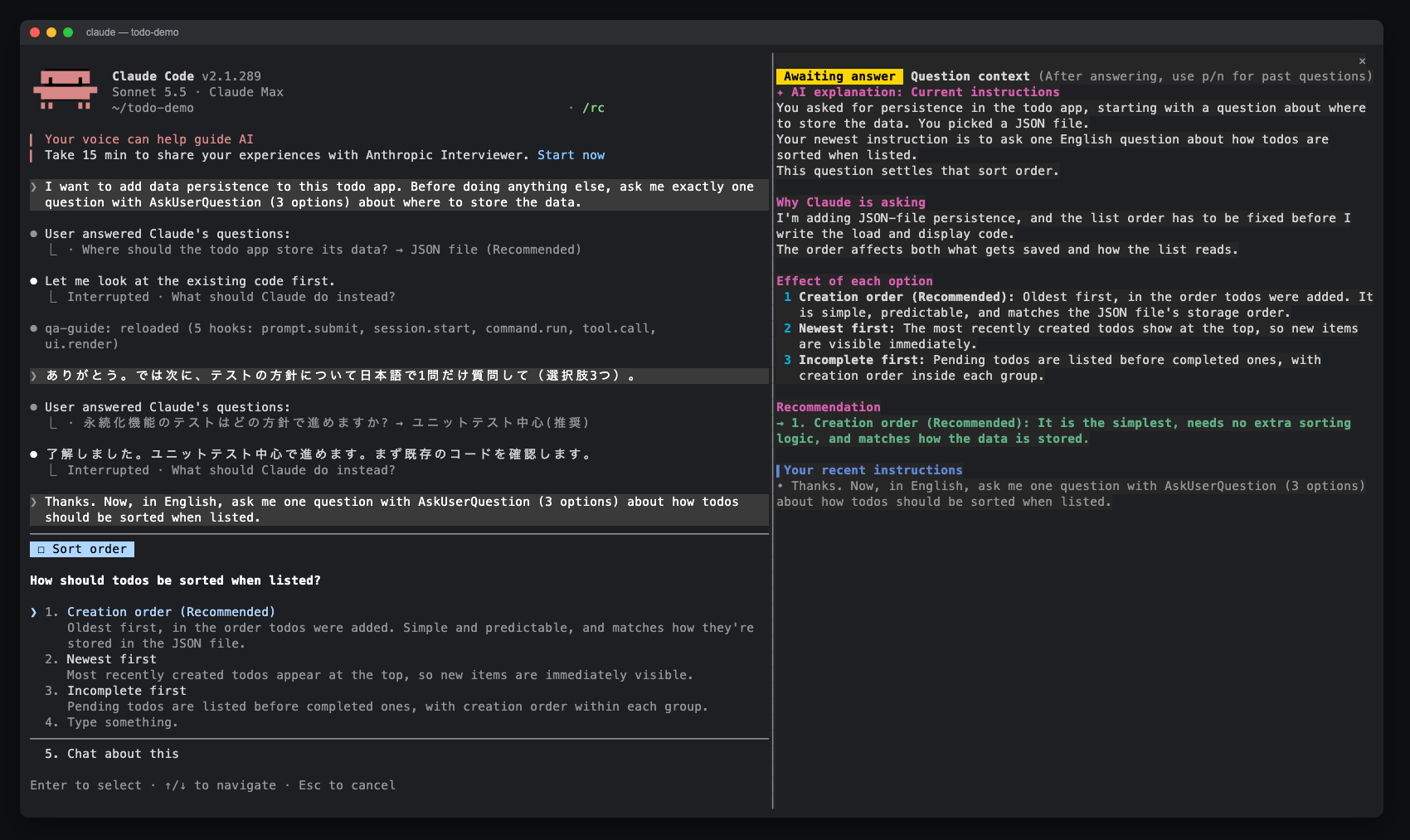
AskUserQuestion 프롬프트에 대한 사이드 창을 열어 AI 설명, 옵션 효과, 최근 지침 및 답변 기록을 표시하는 Claude Code 모드입니다. claude-qamods 마켓플레이스를 통해 설치할 수 있으며, Claude Code 2.1.286 이상 및 조기 액세스 function-hooks 플러그인 API가 필요합니다.