
Vortitron@Vortitron
Vortitron/home-assistant-mcp/tree/main/claude-plugin/vome-health
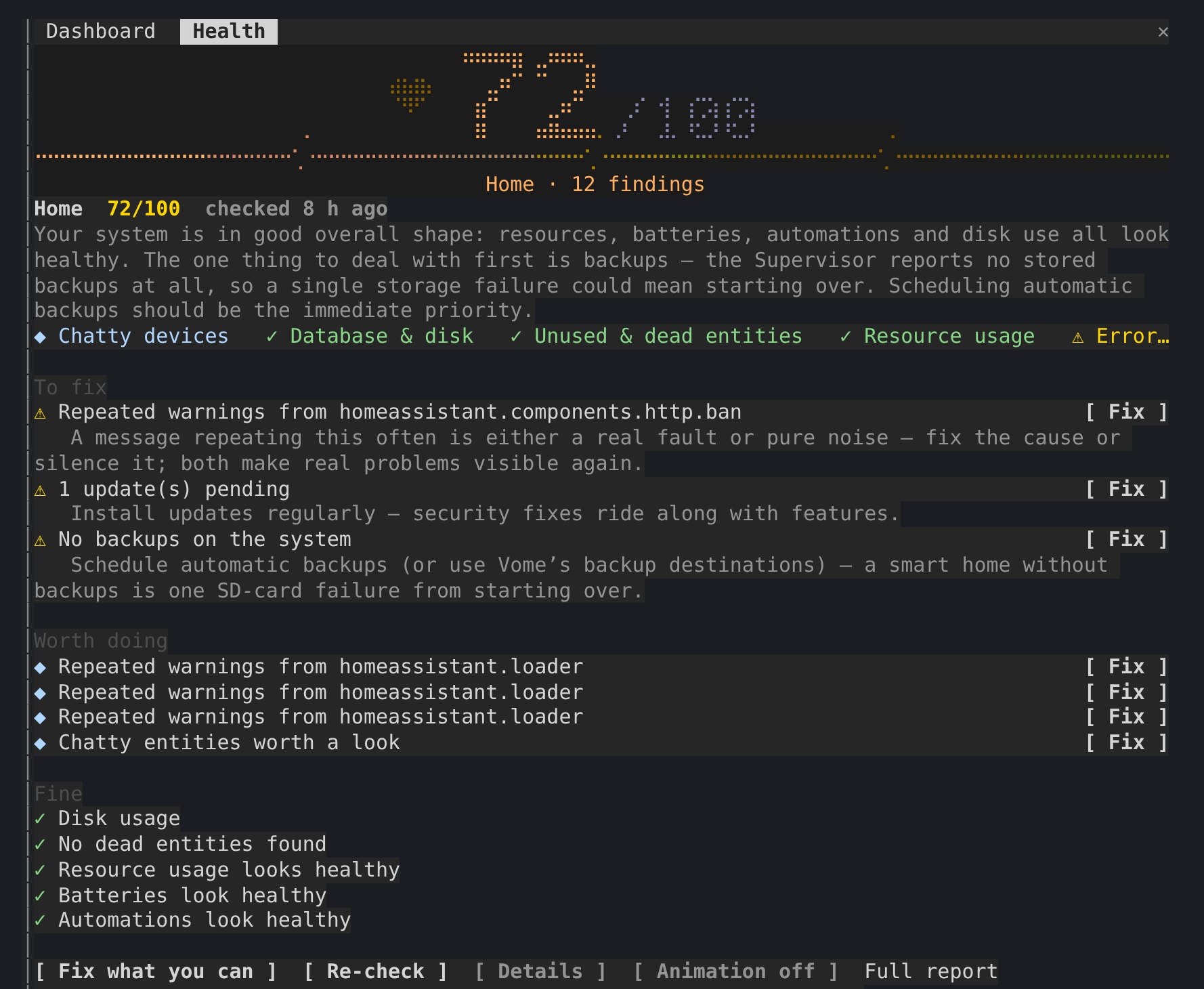
顯示 Home Assistant 健康分數的側邊面板,滿分 100;Claude 處理問題時,檢查找到的所有內容都會留在對話旁邊。
Vortitron/home-assistant-mcp/tree/main/claude-plugin/vome-health
側邊面板會顯示 Home Assistant 的健康分數,滿分 100, 也會在 Claude 處理問題時,把檢查找到的所有內容放在對話旁邊。
透過 /plugin install vome-health --marketplace Vortitron/home-assistant-mcp 安裝。
請先查看作者 README,確認 marketplace 與外掛名稱;指令可能隨儲存庫結構而變動。
claude plugin marketplace add Vortitron/home-assistant-mcp
claude plugin install vome-health
A side pane with Vome's health score for your Home Assistant, out of 100, and everything its check found, kept beside the conversation while Claude works through it.
The pane never fixes anything itself: Claude does, with its own tool calls, which you approve as usual. r only asks Vome for a fresh check.
1. Add the Vome app to Home Assistant, then get a key from it. No sign-up needed.

The button opens your own Home Assistant and adds the app's repository. Pick Vome and Install, open it, and on the Agent tab create a key.
2. Paste these into Claude Code, in a terminal (version 2.1.275 or newer):
/plugin install vome-connect --marketplace Vortitron/home-assistant-mcp
It asks for the key from step 1. Then:
/plugin install vome-health --marketplace Vortitron/home-assistant-mcp
/reload-plugins
Or all four Vome panes at once (automations, ESPHome, health and a working dashboard):
/plugin install vome-panes --marketplace Vortitron/home-assistant-mcp.
3. Ask Claude "How healthy is my Home Assistant? Fix what you can." The pane opens with the score. No score yet? Claude runs the first check, which takes a couple of minutes.
The pane reads the report in the background while a check runs, with the
MCP's read-only vome_health_report; r calls vome_health_check. In auto
mode, Claude Code refuses background calls that no request of yours is behind
unless they're allowed by name, and the pane then shows the exact line. With
vome-connect:
{ "permissions": { "allow": ["mcp__plugin_vome-connect_vome__vome_health_report"] } }
| | |
| --- | --- |
| /health | open the pane and read the latest report |
| r | run a fresh check |
| d | each finding's evidence, not just its title |
| b | the animation off or on (remembered) |
The report is Vome's health check of your own Home Assistant, read from the
sensor the Vome integration keeps it on (sensor.vome_health_score or
similar). The pane reads it through the connection Claude Code already has;
nothing is sent anywhere else.

文件產生、漂移偵測與 API 文件自動化外掛程式,同時作為 function-hook 防護,拒絕含有機密的文件寫入或 worker 派送。

Claude 桌面應用程式的狀態列。它顯示在提示列上方,呈現工作階段品質、內容脈絡填充量、快取倒數,以及 5 小時與每週限額,並讓 Clawd 演出工作階段正在做什麼。

一個 Claude Code 外掛 mod,提供 /databricks-pane:依照 databricks CLI,以樹狀結構呈現 Databricks 工作區、Unity Catalog、計算資源、工作、管線、應用程式和儀表板,並支援即時醒目顯示、設定檔切換和複製 CLI 參數。
