
andrej-kolic@andrej-kolic
andrej-kolic/claude-mods/tree/main/plugins/usage-bar
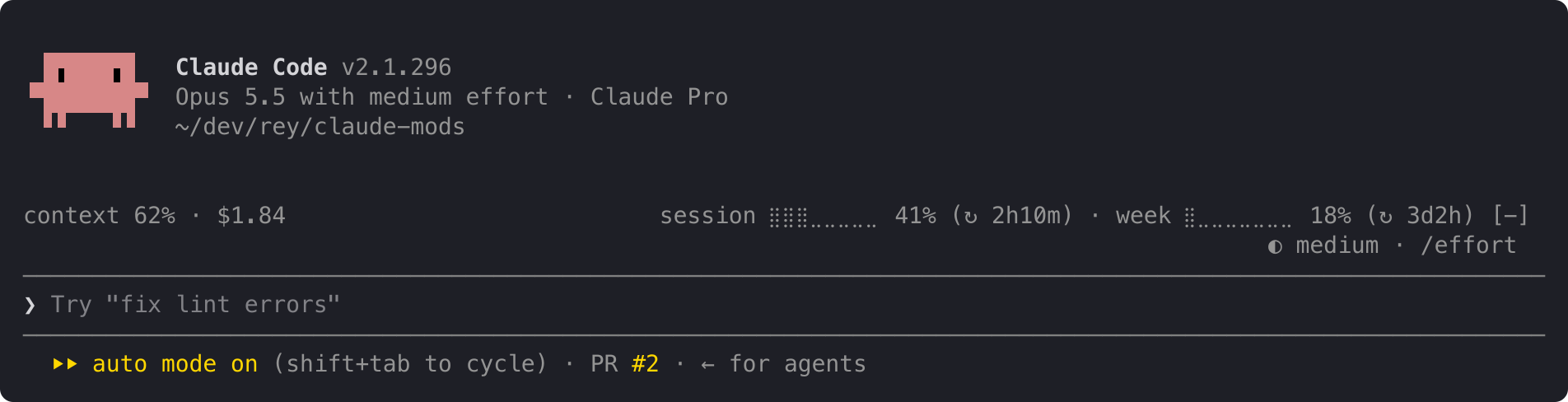
Claude Code 外掛,在提示字元上方以一行安靜的資訊顯示方案用量限制、上下文填充和工作階段費用,並在 50%、80% 和 95% 處提供黃色/紅色閾值警示,每個限制週期重置。
andrej-kolic/claude-mods/tree/main/plugins/usage-bar
usage-bar 在 Claude Code 的提示字元上方新增一行精簡的資訊,是對狀態列的補充而非取代。左側顯示目前對話的上下文視窗填充情況和工作階段費用;右側顯示帳戶的 5 小時工作階段和每週限制用量以及距重置的時間。限制百分比在 50% 時變成黃色,在 95% 時變成紅色,並在 50%、80% 和 95% 閾值處顯示警示,每個限制週期僅顯示一次,並在重新啟動和不同專案之間保持。當空間緊繃時,該行會逐步縮短而不是換行,在首次讀取之前或登出狀態下顯示 "usage: no data yet"。
它只讀取 Claude Code 已提供的數字,不向任何地方傳送任何內容,也不發起網路請求,僅在本機儲存已顯示警示的小記錄。使用 /plugin install usage-bar --marketplace andrej-kolic/claude-mods 安裝;需要 Claude Code 2.1.275 或更高版本,並增加約 0 個 token 的上下文。用量限制需要 Claude 訂閱;使用 API 金鑰時僅顯示上下文和費用。它適用於終端機和桌面應用程式的 Code 索引標籤,不適用於 claude.ai 或 Cowork。
請先查看作者 README,確認 marketplace 與外掛名稱;指令可能隨儲存庫結構而變動。
claude plugin marketplace add andrej-kolic/claude-mods
claude plugin install usage-bar@claude-mods
Your plan's usage limits, context and cost on one quiet line above the prompt, with an alert before you run out. It doesn't replace your status line: it sits above the prompt, so the two work side by side.
On the left, this conversation:
context: how full the context window is.$: what this session has cost.On the right, your account's limits:
session and week: how much of your 5-hour and weekly limits you've used, and after ↻, how long until each resets: 2h10m, 3d2h, or now once it has reset.A limit's percent turns yellow at 50% and red at 95%; the rest of the line stays grey. An alert with the limit and its percent appears at the top right at 50%, 80% and 95%:
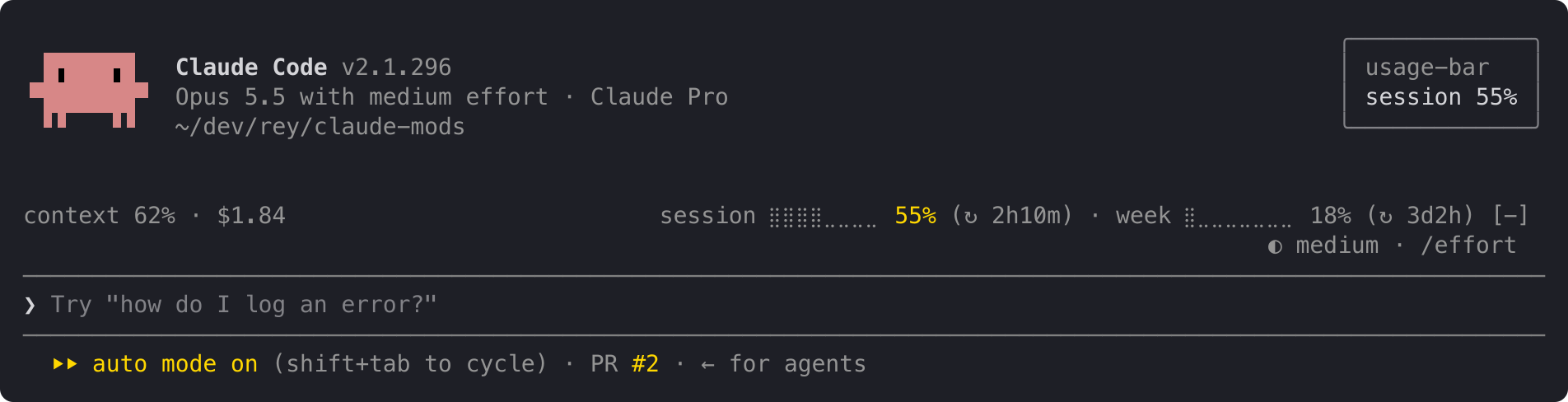
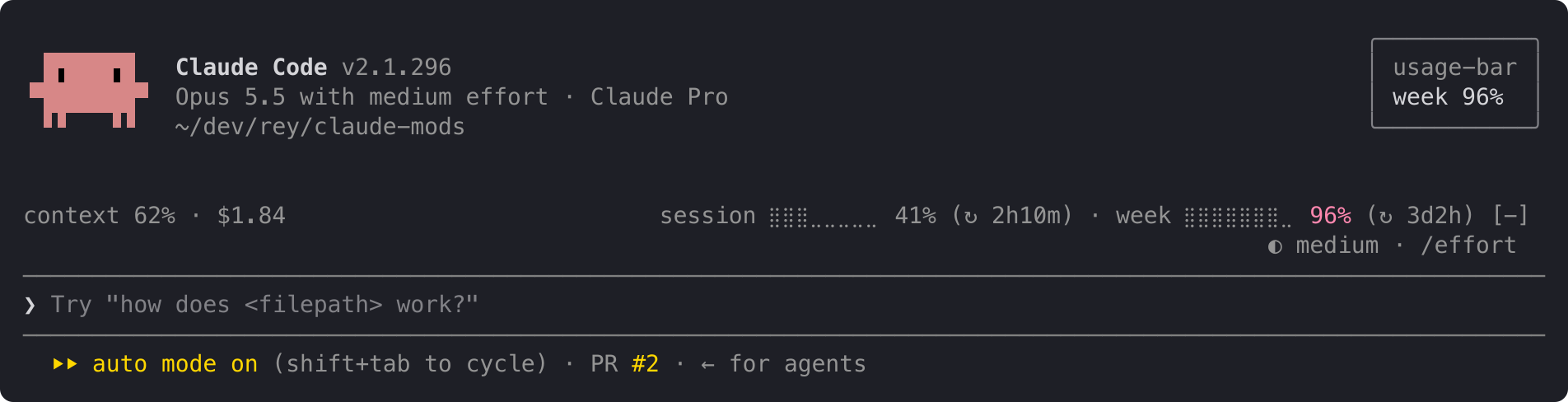
When both limits cross at once, one alert names both: session 62% · week 97%. Each alert shows once per limit period, even across restarts and projects. When a limit resets, its alerts start over.
The line at the top is the full layout. When it doesn't fit, it shortens instead of wrapping, one step at a time:
ctx 62% · $1.84 s ⣿⣿⣿⣀⣀⣀⣀⣀ 41% (↻ 2h10m) · w ⣿⣀⣀⣀⣀⣀⣀⣀ 18% (↻ 3d2h)
ctx 62% · $1.84 s 41% (↻ 2h10m) · w 18% (↻ 3d2h)
ctx 62% · $1.84 s 41% · w 18%
For a few seconds after startup, and for as long as you're not logged in, the line reads:
usage: no data yet
The context shows – until your first reply, because Claude Code measures the context only when it answers.
usage-bar reads only figures Claude Code already has: context fill, session cost and your plan's limits. It sends nothing anywhere and makes no network requests. It stores one small record per limit on your machine, listing the alerts already shown in the current period, so a restart doesn't repeat them.
In Claude Code:
/plugin install usage-bar --marketplace andrej-kolic/claude-mods
The desktop app's Code tab doesn't offer /plugin install: run it once in a terminal, at the user scope, and the line shows in the desktop app's local sessions too.
$, and no alerts.The screenshots use sample readings. The yellow and red follow your Claude Code theme.
The spec has every rule: rounding, colours, widths, and when alerts repeat.

文件產生、漂移偵測與 API 文件自動化外掛程式,同時作為 function-hook 防護,拒絕含有機密的文件寫入或 worker 派送。
Repowise 推出 Lens,這是一個能即時視覺化已建立索引之程式碼庫的 Claude Code 外掛:Claude 搜尋、讀取與編輯檔案時,檔案會亮起,匯入方與反向相依性也會高亮。它還包含顯示受影響檔案與覆蓋測試的 Flow 分頁,以及帶有健康度變化和執行建議測試按鈕的審查列。


Claude 桌面應用程式的狀態列。它顯示在提示列上方,呈現工作階段品質、內容脈絡填充量、快取倒數,以及 5 小時與每週限額,並讓 Clawd 演出工作階段正在做什麼。