
achimala@achimala
achimala/claude-toons
achimala/claude-toons
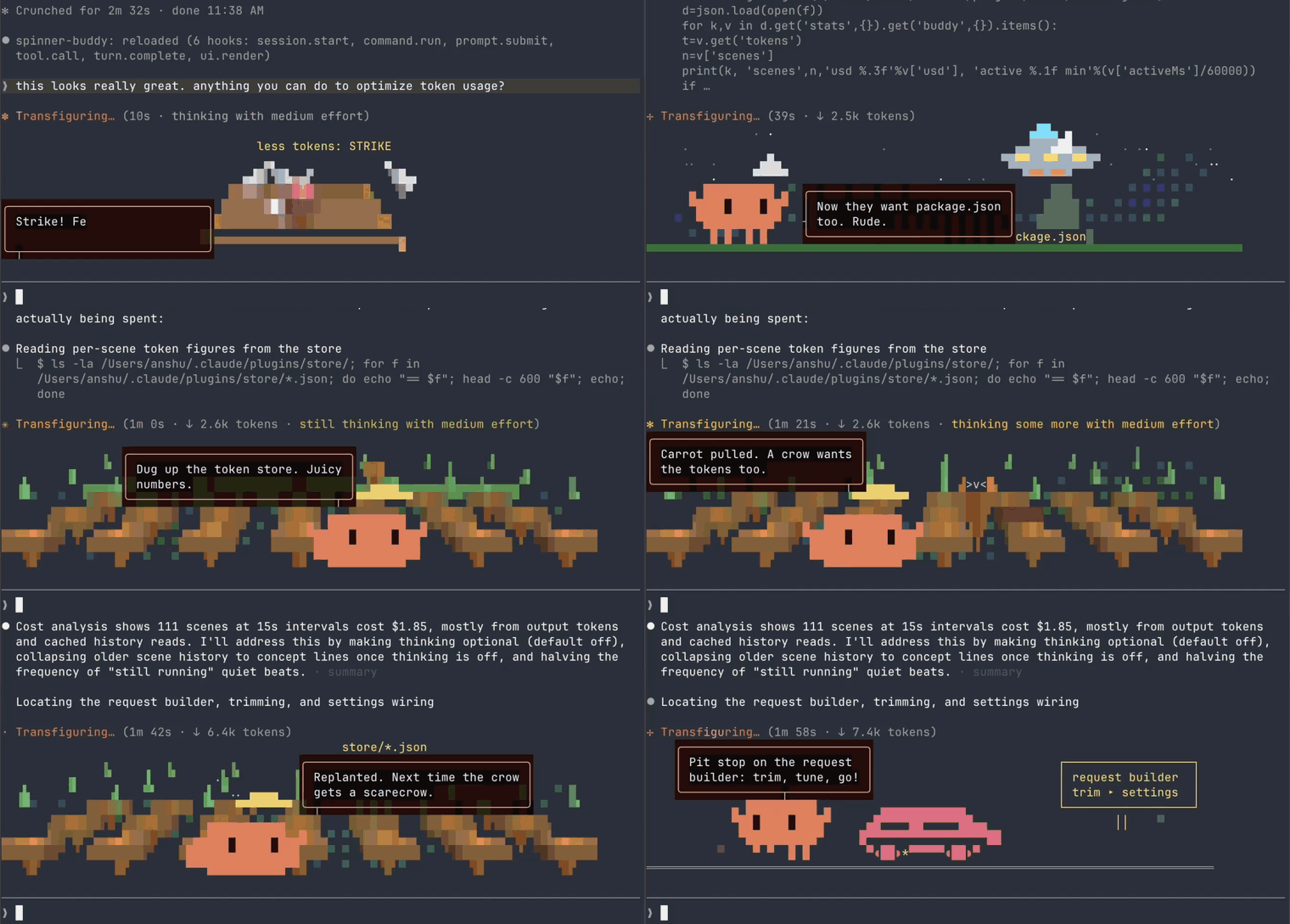
Claude 工作時,在旋轉指示器下方畫出它正在做什麼的小動畫。Claude Code 的吉祥物 Clawd 會在每個場景登場,場景會跟著工作變化:測試變成城堡攻防戰,尋找 bug 變成野外探險,長時間建置變成發射台上的火箭。

這是獨立專案,與 Anthropic 沒有隸屬或背書關係。
使用預設設定時,在 Claude Code 原本的用量上增加約 1 到 3%。
大多數場景來自隨外掛附帶的 138 個現成場景庫,不會產生成本。只有在你開始工作或發生失敗時,才會請模型繪製新場景,而且最多每分鐘一次。按 API 價格計算,每次約 2 到 4 美分。
範圍取決於你的工作方式。長工作通常接近 1%,因為一個新場景可以涵蓋 Claude 工作的幾分鐘。快速、短促的來回通常接近 3%,因為幾乎每則訊息都會開始工作。這些數字假設 Claude Code 本身執行在 Opus 上。使用較便宜的模型時,占比會更高。
請求使用你的 Claude Code 登入資訊,不使用其他東西。使用訂閱時,它們會像其他 Claude 用量一樣計入方案上限;使用 API key 時,費用會算在那個 key 上。Claude 閒置或動畫隱藏時都不會花費。
Scenes 設定會決定場景來源:
| Scenes | Claude Code 之上的額外用量 | |---|---| | 僅現成場景 | 沒有。不會發出請求。 | | Mix(預設) | ~1–3% | | 僅新場景,每 15 秒一個新場景 | ~5–10% | | 僅新場景,盡可能快 | ~15–25% |
有足夠資料可以衡量後,/toons settings 會在 Claude 自己的工作成本旁邊,顯示動畫實際花了多少。
你需要帶有外掛 hook 模組的 Claude Code;這是搶先體驗功能。本專案以版本 2.1.287 建置。
複製儲存庫:
git clone https://github.com/achimala/claude-toons ~/src/claude-toons
在一個工作階段試用:
claude --plugin-dir ~/src/claude-toons
給 Claude 任意工作。它執行時,動畫會出現在旋轉指示器下方。
要在每個工作階段載入,將資料夾的完整路徑加入 ~/.claude/settings.json 的 env 區塊,然後重新啟動 Claude Code:
{
  "env": {
    "CLAUDE_CODE_PLUGIN_DIRS": "/Users/you/src/claude-toons"
  }
}
要更新,請在該資料夾執行 git pull。執行中的工作階段會自行取得變更。要解除安裝,請從 CLAUDE_CODE_PLUGIN_DIRS 移除資料夾並刪除它。
**什麼都沒出現?**執行 claude --debug,尋找 toons 那一行。如果它說 hook 模組已關閉,表示你的 Claude Code 還沒有這項功能。動畫只會在 Claude 工作時、而且只會在終端機中出現。
/toons 顯示或隱藏動畫,即使工作進行中也可以。隱藏代表完全不會請求場景。這個選擇會跨工作階段記住。/toons settings 開啟設定與成本數字。同樣的設定也位於 /config 的 Toons 下。| 設定 | 作用 | |---|---| | Scenes | 僅現成場景免費。預設的 Mix 會為新內容加入新場景;僅新場景則每次都重新繪製,成本會高出數倍。 | | Scene styles | 混合使用,或只使用 3D、像素藝術、文字藝術,也可使用除了 3D 以外的所有樣式。 | | Director model | 繪製新場景的模型。預設為 Sonnet;Haiku 較便宜,Opus 更有創意。 | | New scene | 在僅新場景模式下,可以請求新場景的頻率。 | | Director thinks | 讓模型在每個新場景前先思考。預設關閉,因為思考會增加成本。 |
MIT。請見 LICENSE。
請先查看作者 README,確認 marketplace 與外掛名稱;指令可能隨儲存庫結構而變動。
claude plugin marketplace add achimala/claude-toons
claude plugin install toons
Little animated cartoons of what Claude is doing, drawn under the spinner in Claude Code while it works. Clawd, the Claude Code mascot, stars in every scene, and the scene follows the work: tests become a castle siege, a bug hunt becomes a safari, a long build becomes a rocket on the pad.
An independent project, not affiliated with or endorsed by Anthropic.
On default settings, about 1 to 3% on top of what Claude Code already uses.
Most scenes come from a library of 138 ready-made scenes that ship with the plugin and cost nothing. A model is asked to draw a fresh scene only when you start a task or something fails, and at most once a minute. Each of those costs about 2 to 4 cents at API prices.
The range depends on how you work. Long tasks land near 1%, because one fresh scene covers minutes of Claude's work. Rapid short back-and-forth lands near 3%, because nearly every message starts a task. These figures assume Claude Code itself runs on Opus. On a cheaper model the share is larger.
The requests use your Claude Code login and nothing else. On a subscription they count toward your plan's usage limits like any other Claude use. On an API key they're billed to that key. Nothing is spent while Claude is idle or the cartoons are hidden.
The "Scenes" setting picks where scenes come from:
| Scenes | Extra on top of Claude Code | |---|---| | Ready-made only | Nothing. No requests are made. | | Mix (default) | ~1–3% | | Fresh only, a new scene every 15 seconds | ~5–10% | | Fresh only, as fast as possible | ~15–25% |
/toons settings shows what the cartoons have actually cost you, next to
what Claude's own work costs, once there's enough to measure.
You need Claude Code with plugin hook modules, an early-access feature. This was built on version 2.1.287.
Clone the repo:
git clone https://github.com/achimala/claude-toons ~/src/claude-toons
Try it for one session:
claude --plugin-dir ~/src/claude-toons
Give Claude any task. The cartoons appear under the spinner while it works.
To load it in every session, add the folder to the env block of
~/.claude/settings.json with its full path, then restart Claude Code:
{
  "env": {
    "CLAUDE_CODE_PLUGIN_DIRS": "/Users/you/src/claude-toons"
  }
}
To update, run git pull in the folder. A running session picks up the change
on its own. To uninstall, remove the folder from CLAUDE_CODE_PLUGIN_DIRS and
delete it.
Nothing shows up? Run claude --debug and look for a toons line. If it
says hook modules are turned off, your Claude Code doesn't have the feature
yet. Cartoons only appear while Claude is working, and only in the terminal.
/toons shows or hides the cartoons, even mid-task. Hidden means no
scenes are requested at all. The choice is remembered across sessions./toons settings opens the settings and the cost figures. The same
settings are in /config under "Toons".| Setting | What it does | |---|---| | Scenes | "Ready-made only" is free. "Mix", the default, adds fresh scenes for news. "Fresh only" draws every scene new, at several times the cost. | | Scene styles | A mix, or only 3D, pixel art or text art, or everything but 3D. | | Director model | The model that draws fresh scenes. Sonnet by default. Haiku is cheaper, Opus is more inventive. | | New scene | How often fresh scenes may be requested, in "fresh only". | | Director thinks | Lets the model think before each fresh scene. Off by default, since thinking costs more. |
MIT. See LICENSE.

文件產生、漂移偵測與 API 文件自動化外掛程式,同時作為 function-hook 防護,拒絕含有機密的文件寫入或 worker 派送。

Claude 桌面應用程式的狀態列。它顯示在提示列上方,呈現工作階段品質、內容脈絡填充量、快取倒數,以及 5 小時與每週限額,並讓 Clawd 演出工作階段正在做什麼。

一個 Claude Code 外掛 mod,提供 /databricks-pane:依照 databricks CLI,以樹狀結構呈現 Databricks 工作區、Unity Catalog、計算資源、工作、管線、應用程式和儀表板,並支援即時醒目顯示、設定檔切換和複製 CLI 參數。
