
dukechain2333@dukechain2333
dukechain2333/starfleet-panel/tree/main/plugin
dukechain2333/starfleet-panel/tree/main/plugin
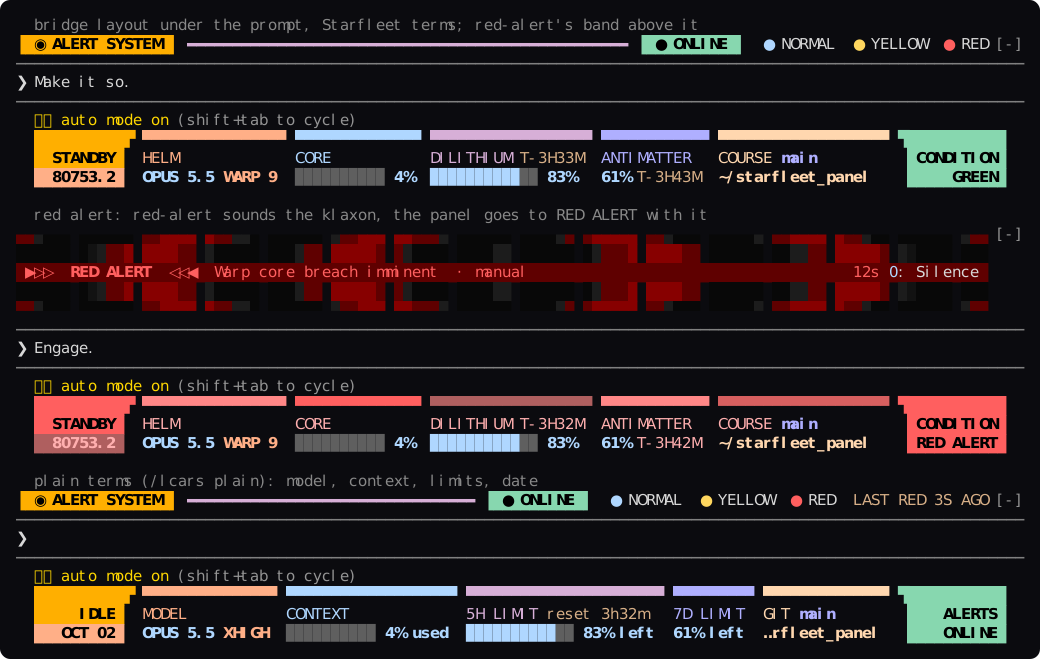
適用於 Claude Code 的 LCARS 狀態面板。 通常位於提示列下方的讀數(模型、推理強度、上下文視窗、速率限制、目錄、git 分支)會以《The Next Generation》的操作主控台形式繪製:兩端有彎角,標題列依讀數切成彩色區段,標籤位於區段下方,數值位於標籤下方。它適合與 red-alert 並排使用。red-alert 發出警報聲時,面板也會一起進入 RED ALERT。

每個讀數都有 Starfleet 名稱和普通名稱,可用 /lcars plain 或 /lcars starfleet 選擇(設定會保存,就像 /config 的 Terminology 列)。普通名稱會顯示日期而不是星曆、CONTEXT 42% used、5H LIMIT 72% left、ALERTS ONLINE。
| Starfleet 名稱 | 普通名稱 | 顯示內容 | | --- | --- | --- | | STANDBY / ENGAGED | IDLE / WORKING | 側欄上方:Claude 是否正在工作 | | stardate | date(OCT 02) | 側欄下方;星曆是 TNG 的播報計時:1987 年節目開始時為 41000,每年增加一千個單位 | | HELM | MODEL | 模型(OPUS 5.5)和曲速推理強度:低 IMPULSE、中 WARP 5、高 WARP 7、xhigh WARP 9、max WARP 9.6 | | CORE | CONTEXT | 已使用的上下文視窗(42%;普通名稱為 42% used)和分段儀表 | | DILITHIUM | 5H LIMIT | 5 小時上限、剩餘量(72% left)、儀表和重設時間(T-2H14M;reset 2h14m) | | ANTIMATTER | 7D LIMIT | 7 天上限、剩餘量和重設時間 | | COURSE / SECTOR | GIT / DIR | git 分支(分離狀態為 @<sha>)和工作目錄;主目錄為 ~,儲存庫外為 SECTOR | | ENV | ENV | 作用中的 conda 環境(不是 base)或 virtualenv,在寬終端機顯示 | | ENERGY | COST | 工作階段成本,在寬終端機顯示(預設關閉) | | CREW | USER | user@host,在寬終端機顯示(可關閉) | | CONDITION | ALERTS | 末端區塊:red-alert 狀態、GREEN(ONLINE)、MUTED、OFFLINE 或警報;沒有 red-alert 時顯示 SHIP TIME(TIME) |
讀數在使用量 60% 時變黃,80% 時變紅。這些是被面板取代的經典 statusLine script 閾值。5 小時和 7 天上限會在 Claude Code 取得讀數後顯示;Pro 或 Max 訂閱會在第一則回應後出現。
安裝兩者後,它們共用一套主控台:red-alert 在提示列上方,本面板在下方,使用同一套 LCARS 色盤。online 顯示 CONDITION / GREEN,muted 顯示 CONDITION / MUTED,offline 顯示 CONDITION / OFFLINE;警報響起時,整個邊框變紅並顯示 RED ALERT。紅色或黃色警報動畫會讓兩個區塊隨警報聲閃爍,直到你以 0 靜音或關閉。未安裝時末端區塊保持 SHIP TIME。
兩個外掛只會繪製、繫結和儲存自己的內容。red-alert 負責提示列上方的色帶、/alert 主控台、alert 工具、0 按鍵和自己的狀態;starfleet-panel 負責提示列下方的提示行和 /lcars,讀取 red-alert 的 link 與 active 但從不寫入。red-alert 記錄新警報時,面板會透過只觀察掛鉤立即得知;將 followRedAlert 設為 false 可忽略它。
git clone https://github.com/dukechain2333/starfleet-panel.git
cd starfleet-panel
./install.sh
外掛會複製到 ~/.claude/skills/starfleet-panel。啟動新的 Claude Code 工作階段後,它會以 starfleet-panel@skills-dir 載入;開發時可用 ./install.sh --link,並用 ./uninstall.sh 移除。儲存庫也是外掛 marketplace:
claude plugin marketplace add dukechain2333/starfleet-panel
claude plugin install starfleet-panel@starfleet-panel
請停用 ~/.claude/settings.json 中的 statusLine,否則同一組數值會在面板上方再繪製一次。安裝程式和 /lcars 都會提醒你。
需求:支援 mod 的 Claude Code(function-hook 外掛;在 2.1.288 上建置並測試),以及支援真彩色、等寬字型和區塊字元的終端機。
面板會每 2 秒重新整理上下文視窗和上限,並在每一輪後及每 30 秒重新讀取目錄、分支、環境和設定。bridge 是三列操作主控台(預設),compact 是單列,off 只顯示 Claude Code 自己的提示行;窄於 64 欄和桌面 app 會從 bridge 退回 compact。
/lcars 會輸出完整報告,內容如下:
LCARS STATUS REPORT 繚 STARDATE 80753.1 繚 22:32

HELM        (model, effort)      OPUS 5.5 繚 xhigh effort (warp 9)
CORE        (context window)     4% used 繚 43K of 1M tokens
DILITHIUM   (5-hour limit)       95% left 繚 resets in 4h18m
ANTIMATTER  (7-day limit)        63% left 繚 resets in 4h28m
ENERGY      (session cost)       $0.35
SECTOR      (working directory)  ~/starfleet_panel
COURSE      (git branch)         main
ENV         (python env)         none
CONDITION   (red-alert)          condition green
可用 /lcars plain | starfleet 切換名稱,/lcars bridge | compact | off 切換本次工作階段配置,/lcars reset 回到設定。
在 /config 或 claude plugin configure starfleet-panel 設定 layout、labels(starfleet 或 plain)、showCost、showUserHost、followRedAlert 和 refreshSeconds。預設值分別為 bridge、starfleet、false、true、true 和 2;starfleet 會顯示 HELM、CORE、DILITHIUM、stardate。
外掛繪製 Claude Code 的 PromptHint 區域,也就是提示列下方的提示行,並與引擎的列一起回傳,所以 mode pill、esc to interrupt 等提示仍保持作用。數值來自 $.session.usage() 和 $.session.model();推理強度由只觀察 turn.step 的掛鉤記錄,第一次請求前則來自設定。
claude plugin validate plugin     # manifest and hooks, as the engine reads them
claude plugin test plugin         # the tests: layouts, red-alert states, /lcars
claude --plugin-dir plugin        # try it; saving a file reloads it
npx -p typescript tsc -p plugin   # type-check, once a session has loaded the mod
                                  # (it lays the types in plugin/.claude-plugin/types)
配置位於 plugin/hooks/register.tsx、plugin/hooks/panel.ts、plugin/hooks/lcars.ts、plugin/hooks/readouts.ts、plugin/types/index.d.ts 和 plugin/tests/。docs/preview.svg 來自真實工作階段,可用 tmux capture-pane -e -p -t <session> > capture.ans 擷取,再以 python3 docs/ansi2svg.py capture.ans docs/preview.svg --rows <first>-<last> 轉換。
面板借用 Michael Okuda 為《Star Trek: The Next Generation》設計的 LCARS 電腦介面外觀。這是非官方粉絲專案;Star Trek 及其標誌歸各自所有者。
請先查看作者 README,確認 marketplace 與外掛名稱;指令可能隨儲存庫結構而變動。
claude plugin marketplace add dukechain2333/starfleet-panel
claude plugin install starfleet-panel
An LCARS status panel for Claude Code. The readouts that usually sit under the prompt (model, effort, context window, rate limits, directory, git branch) are drawn as an ops console from The Next Generation: elbows at both ends, a header bar cut into one colored segment per readout, the labels under their segments and the values under the labels. It's built to sit beside red-alert. When red-alert sounds the klaxon, the panel goes to RED ALERT with it.
Every readout has a Starfleet name and a plain one, and you pick which the
panel uses: /lcars plain or /lcars starfleet (saved, like the
Terminology row in /config). The plain terms read as an ordinary status
line: the date instead of the stardate, CONTEXT 42% used,
5H LIMIT 72% left, ALERTS ONLINE.
| Starfleet term | Plain term | What it shows |
| --- | --- | --- |
| STANDBY / ENGAGED | IDLE / WORKING | the sidebar's upper block: whether Claude is working |
| stardate | date (OCT 02) | the sidebar's lower block; the stardate is TNG's broadcast reckoning: 41000 when the show began in 1987, a thousand units a year |
| HELM | MODEL | the model (OPUS 5.5) and reasoning effort as a warp factor: low IMPULSE, medium WARP 5, high WARP 7, xhigh WARP 9, max WARP 9.6 |
| CORE | CONTEXT | context window used (42%; plain 42% used), with a segmented meter |
| DILITHIUM | 5H LIMIT | the 5-hour limit: how much is left (plain 72% left), a meter, and the time to the reset (T-2H14M; plain reset 2h14m) |
| ANTIMATTER | 7D LIMIT | the 7-day limit: how much is left and the time to the reset |
| COURSE / SECTOR | GIT / DIR | the git branch (or @<sha> when detached) over the working directory, ~ for home; SECTOR outside a repository |
| ENV | ENV | the active conda env (not base) or virtualenv, on wide terminals |
| ENERGY | COST | the session's cost, on wide terminals (off by default) |
| CREW | USER | user@host, on wide terminals (can be turned off) |
| CONDITION | ALERTS | the end block: red-alert's state, GREEN (plain ONLINE), MUTED, OFFLINE or the alert; without red-alert, SHIP TIME (plain TIME) over the clock |
Readings turn yellow at 60% used and red at 80%. These are the thresholds of
the classic statusLine script the panel replaces. The 5-hour and 7-day
limits appear once Claude Code has a reading for them: on a Pro or Max
subscription, after the first response.
Install both and they share one console: red-alert's band above the prompt and this panel below it, in the same LCARS palette.
| red-alert's state | The panel |
| --- | --- |
| online | the end block reads CONDITION / GREEN |
| muted | CONDITION / MUTED |
| offline | CONDITION / OFFLINE |
| an alert is up | the whole frame turns the alert's reds and the end block reads RED ALERT (or the level's title) |
| a red or yellow alert animating | the state block and the end block blink with the klaxon, then hold steady until you silence or dismiss the alert (0, red-alert's key) |
| not installed | the end block keeps SHIP TIME; everything else works the same |
The mods don't conflict because each one draws, binds and stores only what it owns:
| | red-alert | starfleet-panel |
| --- | --- | --- |
| Draws | the band above the prompt, the /alert console, its tool's row | the hint line under the prompt, nothing else |
| Command | /alert | /lcars |
| Tools and system prompt | the alert tool and a short alert policy | none |
| Keys | 0 silences; band items via ctrl+x tab | none: no buttons, no hotkeys |
| State | its own | its own; reads red-alert's link and active, never writes them |
The panel learns of a new alert the moment red-alert records it. It does this
with an observe-only hook on red-alert's state, which passes every value
through exactly as red-alert wrote it. Set followRedAlert to false to
ignore red-alert altogether.
git clone https://github.com/dukechain2333/starfleet-panel.git
cd starfleet-panel
./install.sh
This copies the mod to ~/.claude/skills/starfleet-panel. Start a new
Claude Code session and it loads as starfleet-panel@skills-dir. Use
./install.sh --link to symlink the checkout instead while you work on it,
and ./uninstall.sh to remove it.
The repository is also a plugin marketplace:
claude plugin marketplace add dukechain2333/starfleet-panel
claude plugin install starfleet-panel@starfleet-panel
Retire your statusLine command. If ~/.claude/settings.json has a
statusLine entry, its line keeps drawing above the panel and you see the
same figures twice. Remove the entry to let the panel take over. The panel
tells you once, the installer reminds you, and /lcars mentions it while
one is set.
Requirements: Claude Code with mod support (function-hook plugins; built and
tested on 2.1.288), and a terminal with true color and a monospace font that
has the block elements (▄ ▀ ▌ ▗). Any modern terminal font does.
The panel needs nothing from you. It refreshes the context window and limits every 2 seconds. It re-reads the directory, branch, env and settings after every turn and every 30 seconds.
Layouts: bridge, the three-row ops console (the default);
compact, one row in the style of red-alert's idle strip; off, only
Claude Code's own hint line. Bridge falls back to compact on terminals
narrower than 64 columns and in the desktop app.
/lcars prints a full status report. It lists every reading beside
what its Starfleet name stands for, which makes it a legend too:
LCARS STATUS REPORT · STARDATE 80753.1 · 22:32

HELM        (model, effort)      OPUS 5.5 · xhigh effort (warp 9)
CORE        (context window)     4% used · 43K of 1M tokens
DILITHIUM   (5-hour limit)       95% left · resets in 4h18m
ANTIMATTER  (7-day limit)        63% left · resets in 4h28m
ENERGY      (session cost)       $0.35
SECTOR      (working directory)  ~/starfleet_panel
COURSE      (git branch)         main
ENV         (python env)         none
CONDITION   (red-alert)          condition green
/lcars plain | starfleet switches the terms, and keeps the choice
for new sessions.
/lcars bridge | compact | off switches the layout for this session.
/lcars reset goes back to the setting.
Set these in /config (or claude plugin configure starfleet-panel):
| Setting | Default | |
| --- | --- | --- |
| layout | bridge | bridge, compact or off |
| labels (Terminology) | starfleet | starfleet (HELM, CORE, DILITHIUM, stardate…) or plain (MODEL, CONTEXT, 5H LIMIT, date…); /lcars plain and /lcars starfleet set it too |
| showCost | false | add the ENERGY column (the session's cost) on wide terminals |
| showUserHost | true | add the CREW column (user@host) on wide terminals |
| followRedAlert | true | show red-alert's condition and repaint with its alerts |
| refreshSeconds | 2 | how often the context window and limits are re-read |
The mod draws Claude Code's PromptHint site, the hint line under the
prompt. It returns its own rows together with the engine's line, so the mode
pill (⏵⏵ auto mode on) and hints such as esc to interrupt stay live
above the frame. Its figures come from $.session.usage() and
$.session.model(), which are free in-process calls. The effort is the one
each main-loop request was actually sent with, recorded by an observe-only
turn.step hook that leaves the response stream untouched. Before the first
request, the effort comes from your settings.
claude plugin validate plugin     # manifest and hooks, as the engine reads them
claude plugin test plugin         # the tests: layouts, red-alert states, /lcars
claude --plugin-dir plugin        # try it; saving a file reloads it
npx -p typescript tsc -p plugin   # type-check, once a session has loaded the mod
                                  # (it lays the types in plugin/.claude-plugin/types)
Layout: plugin/hooks/register.tsx (hooks, sensors, drawing),
plugin/hooks/panel.ts (the layouts and the report), plugin/hooks/lcars.ts
(palette and row fitting), plugin/hooks/readouts.ts (stardate, warp
factor, gauges, cell widths), plugin/types/index.d.ts (the state contract),
plugin/tests/.
docs/preview.svg comes from a real session. Capture it with
tmux capture-pane -e -p -t <session> > capture.ans, then convert it with
python3 docs/ansi2svg.py capture.ans docs/preview.svg --rows <first>-<last>.
The panel borrows the look of LCARS, the computer interface designed by Michael Okuda for Star Trek: The Next Generation. This is an unofficial fan project. Star Trek and its marks belong to their respective owners.

文件產生、漂移偵測與 API 文件自動化外掛程式,同時作為 function-hook 防護,拒絕含有機密的文件寫入或 worker 派送。

Claude 桌面應用程式的狀態列。它顯示在提示列上方,呈現工作階段品質、內容脈絡填充量、快取倒數,以及 5 小時與每週限額,並讓 Clawd 演出工作階段正在做什麼。

一個 Claude Code 外掛 mod,提供 /databricks-pane:依照 databricks CLI,以樹狀結構呈現 Databricks 工作區、Unity Catalog、計算資源、工作、管線、應用程式和儀表板,並支援即時醒目顯示、設定檔切換和複製 CLI 參數。
