
r3al1tym@r3al1tym
r3al1tym/claude-review
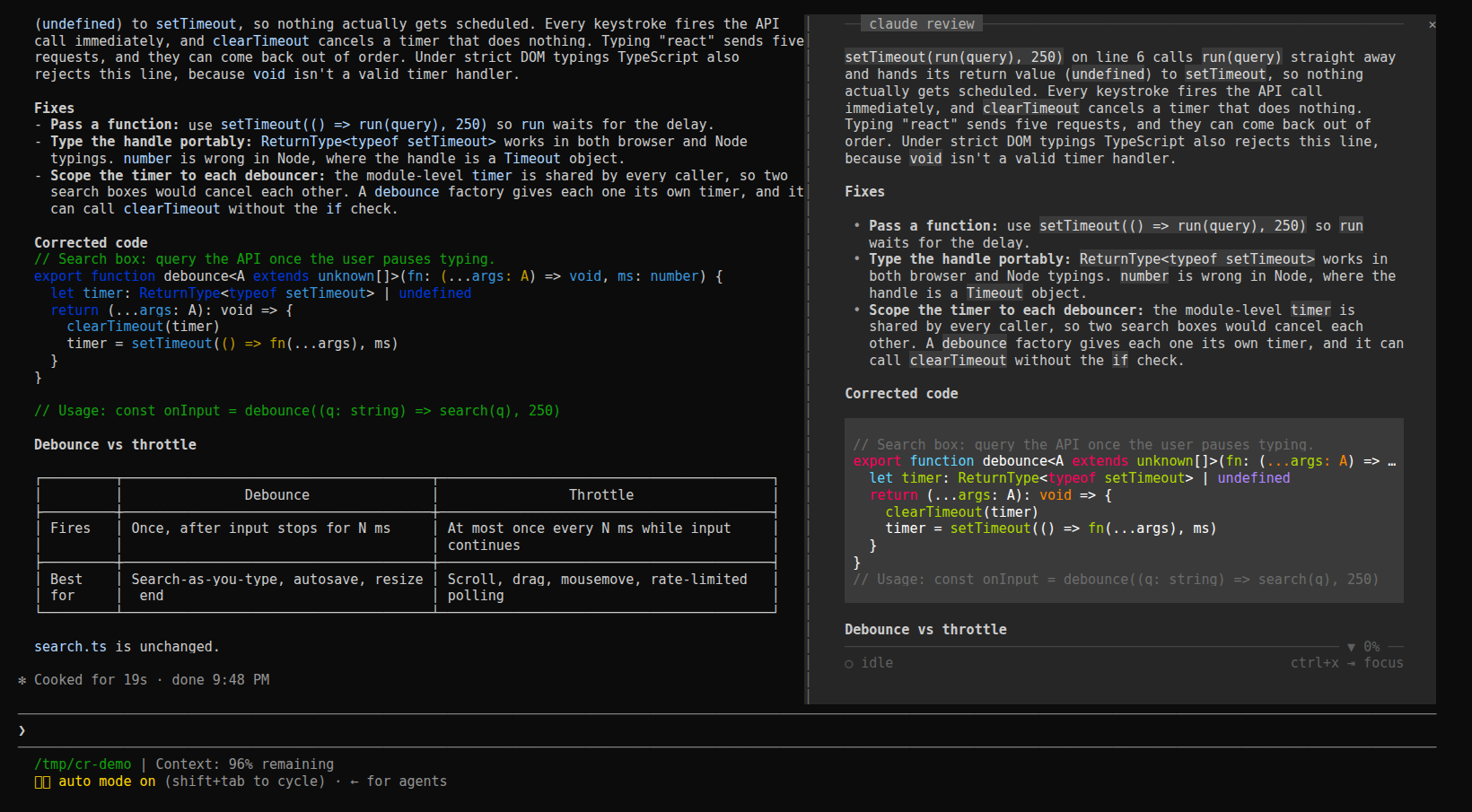
Claude Code 外掛,將閱讀窗格停靠在對話旁,以平靜且留有內距的欄位呈現工作階段最新回覆、規劃、待處理問題與任務清單,並支援鍵盤導覽。
r3al1tym/claude-review
claude-review(review-pane)是以 function hooks 組成、在 Claude Code 內執行的 Claude Code mod,因此不需要同步第二個終端機或記錄路徑。它透過 hooks API($.session.messages())讀取對話,並在各列抵達時重新整理(session.append),隨著 Claude 寫入內容跟著即時回合。按鍵包含 h/l 切換較早/較晚的回合、捲動鍵、f 凍結、r 回到即時狀態、t 循環切換介面(plan、question、response、tasks)、y 複製、m 開啟指南、q 關閉;窗格會在寬度為 144 欄或更寬的終端機中自動開啟,也可以透過 /claude-review 開啟。使用 claude plugin marketplace add r3al1tym/claude-review 與 claude plugin install review-pane@claude-review 安裝,也可以將儲存庫建立符號連結到 ~/.claude/skills/review-pane,或使用 claude --plugin-dir。它不會發出網路請求,也不會寫入工作階段。需求:function hooks 是早期存取介面,已針對 Claude Code 2.1.287 測試。
請先查看作者 README,確認 marketplace 與外掛名稱;指令可能隨儲存庫結構而變動。
claude plugin marketplace add r3al1tym/claude-review
claude plugin install review-pane


Faster than HTML. Calmer than the terminal.
A reading pane docked inside Claude Code, beside the conversation. It shows the session's latest reply, rendered for reading in a padded column, and follows the live turn as Claude writes. Its plan, the question Claude is waiting on, and the task list are one key away.
claude-review is a Claude Code mod: a plugin of function hooks that runs inside Claude Code, so there is no second terminal, no transcript path and nothing to keep in sync.
claude plugin marketplace add r3al1tym/claude-review
claude plugin install review-pane@claude-review
The next session opens the pane by itself once the terminal is 144 columns or wider. At any width, /claude-review opens it and closes it again.
From a clone, link the folder into your skills directory, where Claude Code loads it in every session as review-pane@skills-dir and reloads it when you save a file:
git clone https://github.com/r3al1tym/claude-review ~/src/claude-review
ln -s ~/src/claude-review ~/.claude/skills/review-pane
For one session only: claude --plugin-dir ~/src/claude-review.
The pane follows the live turn. Give it the keyboard with ctrl+x then Tab (until you do, its key row says ctrl+x ⇥ focus), and Esc hands the keys back.
| Keys | What they do |
| --- | --- |
| h l | earlier / later turn; an earlier turn leads with the prompt it answered |
| ↑ ↓ j k, wheel, PgUp PgDn, Home End, g | scroll |
| f | freeze the view while Claude keeps working; again to unfreeze |
| r | back to the live turn |
| t | next surface: plan, question, response, tasks, whichever this turn has |
| y | copy the surface shown |
| m | the guide: every key, plus the session's diagnostics |
| q | close the pane |
A plan waiting for your approval and a pending question lead while Claude waits on them. While the view is frozen or on an earlier turn, new reply lights up in the key row when a reply lands on the live turn.
To change the default, set Open on start in /config (on: the pane opens by itself on a wide terminal; off: only /claude-review opens it). claude plugin disable review-pane@claude-review turns the mod off everywhere, and enable turns it back on.
The mod reads the conversation through the hooks API ($.session.messages()) and refreshes as rows land (session.append), so the pane updates while Claude writes, not only when a turn ends. It writes nothing to the session, makes no network calls and touches no files; y puts text on your clipboard through Claude Code.
In the terminal it lays out its own rows (hooks/markdown.ts, hooks/screen.tsx): a monochrome markdown theme where emphasis comes from weight and only code keeps its syntax colours, a 4-cell gutter, and chrome pinned at the edges. A rule with the claude review label sits at the top, and a rule and one key row sit at the bottom. The rules carry ▲ and ▼ N% when there is more above or below. The desktop app and VS Code draw the same reply with their own Markdown and buttons.
claude plugin validate . and claude plugin test ..m and surfaces are t, and the pane needs the keyboard (ctrl+x then Tab) before they work.claude-review began as a Python TUI you ran in a second terminal pane. The mod replaces it. Its last release, v0.5.3, still installs with pipx install git+https://github.com/r3al1tym/[email protected], and its source lives at that tag.
See CONTRIBUTING.md for the development loop. Security posture and how to report a vulnerability are in SECURITY.md; the project follows a Code of Conduct.
MIT © r3al1tym.

文件產生、漂移偵測與 API 文件自動化外掛程式,同時作為 function-hook 防護,拒絕含有機密的文件寫入或 worker 派送。

Claude 桌面應用程式的狀態列。它顯示在提示列上方,呈現工作階段品質、內容脈絡填充量、快取倒數,以及 5 小時與每週限額,並讓 Clawd 演出工作階段正在做什麼。

一個 Claude Code 外掛 mod,提供 /databricks-pane:依照 databricks CLI,以樹狀結構呈現 Databricks 工作區、Unity Catalog、計算資源、工作、管線、應用程式和儀表板,並支援即時醒目顯示、設定檔切換和複製 CLI 參數。
