
alvaro-hi@alvaro-hi
alvaro-hi/progress-ring
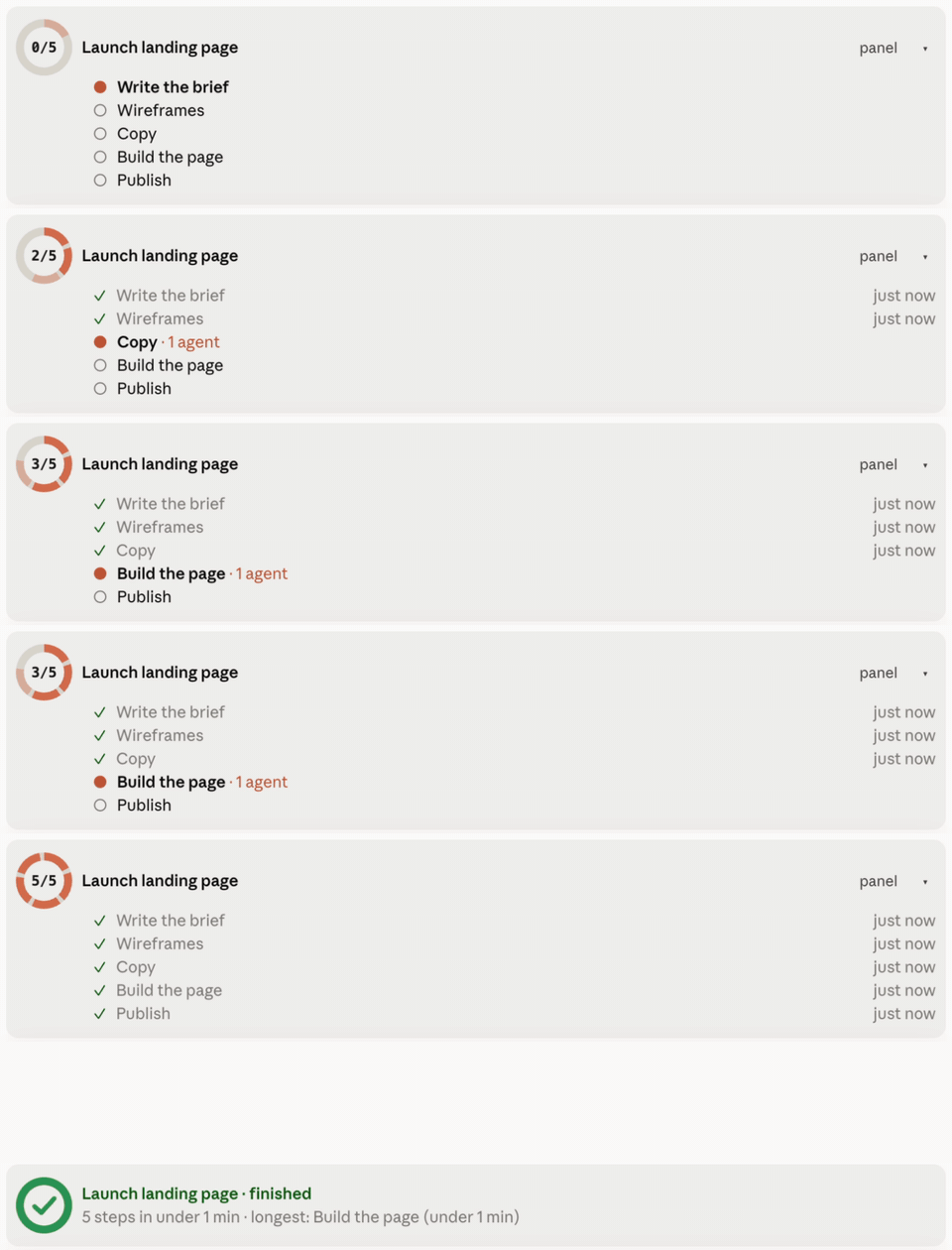
Progress Ring — 查看 Claude Code 在一個長計畫中的進度:提示符上方帶有環形、百分比和目前步驟的環形條,跨對話的 /progress 面板,以及里程碑列。
alvaro-hi/progress-ring
Progress Ring 無需閱讀記錄即可在 Claude Code 中顯示計畫進度。當包含三個或更多步驟的計畫開始時,它會開啟一個進度卡片,並在每個步驟完成時關閉它:提示符上方帶有環形、百分比、目前步驟和計畫狀態的條帶;一個 /progress 面板,列出此聊天和其他聊天中的計畫,並帶有一個跳轉到聊天的按鈕;以及對話中的里程碑列。透過 /plugin install progress-ring --marketplace alvaro-hi/progress-ring 安裝;需要帶有 hooks 模組的 Claude Code 建置、macOS 或 Linux,以及 python3 3.9+。所有內容都保存在本地 ~/.claude/progress 下,無網路流量。
請先查看作者 README,確認 marketplace 與外掛名稱;指令可能隨儲存庫結構而變動。
claude plugin marketplace add alvaro-hi/progress-ring
claude plugin install progress-ring@progress-ring
English · Español
See how far along Claude Code is in a long plan, without reading the transcript. When Claude starts a plan with three or more steps, it opens a progress card and closes each step as it finishes. You see it:
/progress panel: every plan in this chat and in other chats, with their steps, subagents waiting for review, and a button to jump to the chat that owns each plan.You don't have to tell Claude to use it: the plugin teaches it when to open a card, close steps, accept subagent work and finish.
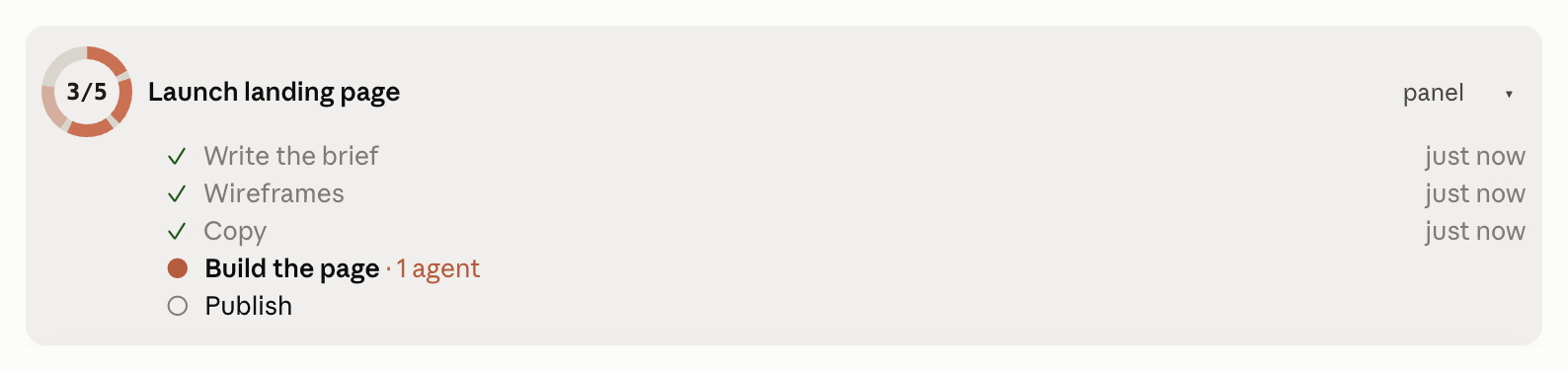
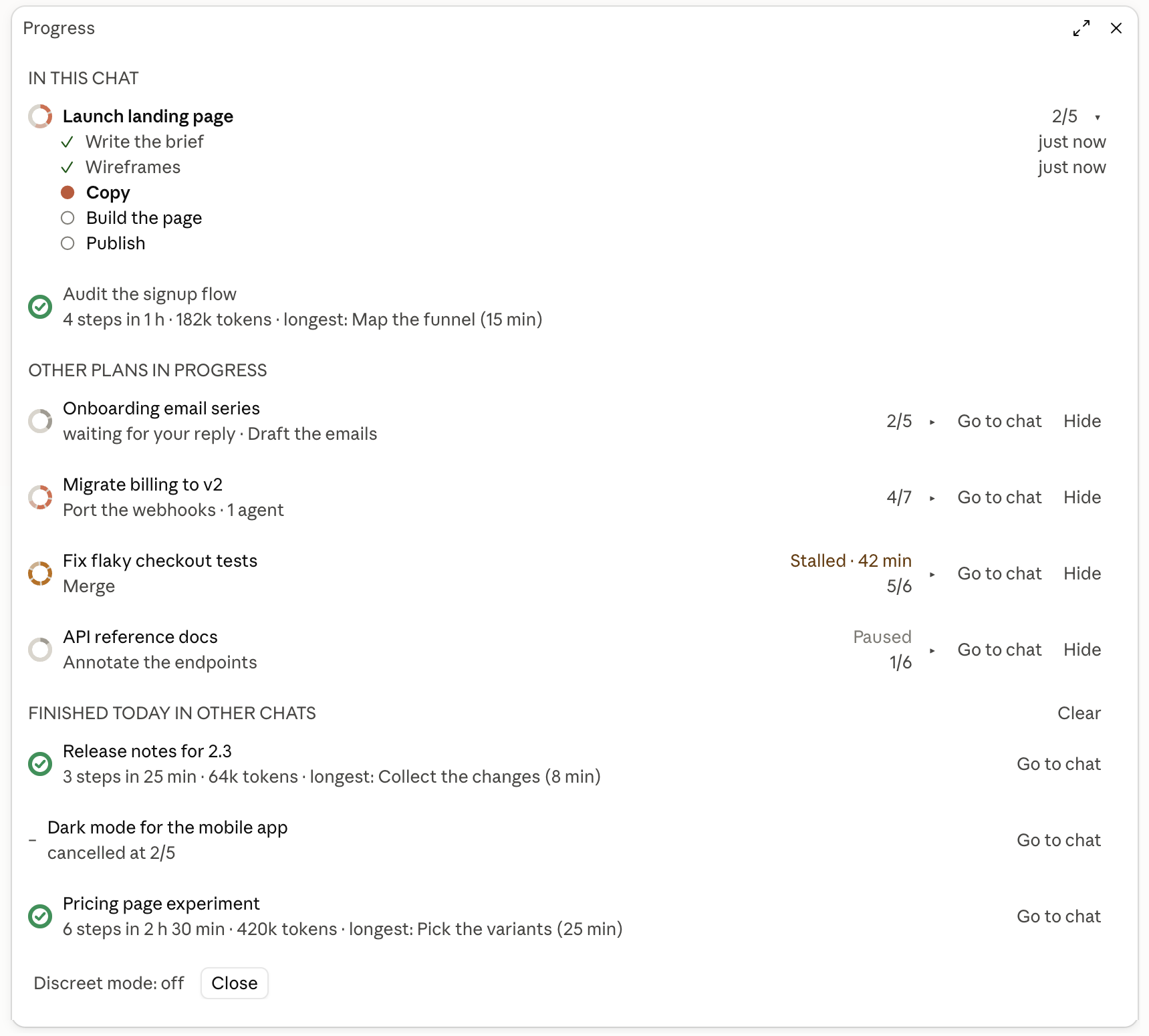
Screenshots use demo data (scripts/demo.py).
At the prompt of a Claude Code session:
/plugin install progress-ring --marketplace alvaro-hi/progress-ring
Answer y to add the marketplace and pick the user scope. Or from a shell:
claude plugin marketplace add alvaro-hi/progress-ring
claude plugin install progress-ring@progress-ring --scope user
Start a new session afterwards. Uninstall with claude plugin uninstall progress-ring@progress-ring.
Requirements: a Claude Code build with mods (hooks modules), tested on 2.1.287; macOS or Linux; python3 3.9 or later on the PATH.
Language: the interface follows your system language (Spanish or English). To force one, set the plugin's language option to en or es in /plugin → progress → configure.
| Piece | Where | What it does |
|---|---|---|
| CLI | bin/progress, bin/progresslib.py | Creates and updates the cards in ~/.claude/progress/<id>.json, with a lock per card |
| Hook | bin/progress_hook.py | Injects the active card's state into each prompt; registers subagents as rows; records turn start and end, the owning chat and tokens per step; closes a plan with every step done when the turn ends |
| Mod | hooks/register.tsx and the rest of hooks/ | Draws the band, the panel and the milestones; passes Claude Code's hook events to the Python hook; adds the usage rule to the system prompt |
The mod only reads cards: every write goes through the CLI. The hook never blocks a session: any error is logged to ~/.claude/progress/_hook-errors.log and the session goes on. Nothing leaves your machine.
bin/progress_hook.py on Claude Code's hook events (prompt sent, turn end, tool use, subagent start and stop, an Agent call about to run), and bin/progress when you press Hide, Clear, Discreet mode or Go to chat. To open a chat, progress chat runs open (macOS) or xdg-open (Linux) with a claude:// link.~/.claude/progress, the session's id and folder, the hook events' data (the transcript path included: the hook reads the transcript to add up the tokens spent per step) and, for Go to chat on older cards, the Claude desktop app's session list. It reads no credentials.~/.claude/progress./progress, draws the band, the panel and the milestone rows, and hides the result row of progress commands, which the milestone row already shows. It never allows, denies or asks for a permission.~/.claude/progress/_done/; nothing is deleted.Claude calls the CLI with its full path. To use it from your own shell:
alias progress="$(ls -dt ~/.claude/plugins/cache/progress-ring/progress-ring/*/ | head -1)bin/progress"
progress start release "Release 2.0" --total 5          # new card
progress plan release build="Build" qa="QA" ship="Ship"  # planned steps (the total follows the plan)
progress step release "Build is green" --key build       # close a step
progress plan release --add docs="Docs" --after qa       # replan
progress child accept release <cid>                      # accept a subagent's delivery
progress done release                                    # finish (or: cancel, pause)
progress hide release                                    # out of the list until it moves again
progress clear                                           # finished and cancelled → _done/
progress chat release                                    # open its last chat, or print `claude --resume <id>`
progress discreet toggle                                 # hide titles while sharing your screen
CLAUDE_PROGRESS_DIR moves the cards somewhere other than ~/.claude/progress.
python3 -m unittest discover tests
claude plugin test .
claude plugin validate .claude-plugin/plugin.json
scripts/demo.py runs a demo plan that moves on its own (for screenshots); --clean removes it.
To try local changes, add the repo folder as a marketplace (claude plugin marketplace add .) and install from it: Claude Code then reads the plugin straight from the folder and /reload-plugins picks up edits.
Designed by Álvaro del Pozo. MIT license. Not affiliated with Anthropic; "Claude" and "Claude Code" are trademarks of Anthropic.

文件產生、漂移偵測與 API 文件自動化外掛程式,同時作為 function-hook 防護,拒絕含有機密的文件寫入或 worker 派送。
Repowise 推出 Lens,這是一個能即時視覺化已建立索引之程式碼庫的 Claude Code 外掛:Claude 搜尋、讀取與編輯檔案時,檔案會亮起,匯入方與反向相依性也會高亮。它還包含顯示受影響檔案與覆蓋測試的 Flow 分頁,以及帶有健康度變化和執行建議測試按鈕的審查列。


Claude 桌面應用程式的狀態列。它顯示在提示列上方,呈現工作階段品質、內容脈絡填充量、快取倒數,以及 5 小時與每週限額,並讓 Clawd 演出工作階段正在做什麼。