Troepster@Troepster
Troepster/overalls

Troepster/overalls
一個 Claude Code mod,會在提示列上方繪製狀態帶:即時顯示上下文視窗的「天氣預報」、已用的使用量限制,以及 Ponytail 和 Caveman 目前執行的等級。

上下文超過 75%,而且 Claude 不在回合中時,狀態帶會出現 Compact 按鈕。
如果元件無法放在同一列,它們會整體換到第二列;Compact 和 ⚙ 仍留在第一列右側。
在 Claude Code 終端機中:
/plugin marketplace add Troepster/overalls
/plugin install overalls@overalls
/reload-plugins
也可以從任意 shell 執行,桌面應用程式也適用(新的工作階段會載入它):
claude plugin marketplace add Troepster/overalls
claude plugin install overalls@overalls
如果狀態帶沒有出現,請啟動新的工作階段或重新啟動 Claude Code。
更新:在 Claude Code 中執行 /plugin marketplace update overalls,或從 shell 執行:
claude plugin marketplace update overalls
claude plugin update overalls@overalls
Ponytail 和 Caveman 都是可選的。沒有 Caveman 時不會顯示它的元件;沒有 Ponytail 時,它的元件會顯示 not installed,直到你把它設定為 off。無論哪種情況,⚙ Config 方塊都會提供安裝選項。
mod 會在 Claude Code 中以與 Claude Code 相同的存取權限執行,因此安裝前請閱讀 hooks/register.tsx。
每項設定都會作為 Claude Code 設定選單中 overalls 下的一列出現;變更後會重新載入 mod。/overalls 指令可以從提示列設定它們,在無法使用 /config 的桌面應用程式中也有效:
/overalls weather minimal
/overalls ponytail off
/overalls            (shows the current values)

狀態帶右側的 ⚙ 會在上方開啟 Config 方塊,列出每項設定的所有選項並勾選目前值;按下一個選項即可設定,並會立即看到狀態帶的變化。再次按 ⚙ 關閉。將滑鼠停在 Config 方塊的設定名稱上,會看到一行說明。
按下天氣預報本身(Showers,或 minimal 下的 67%)會讓天氣詳情依序經過 minimal → normal → full,再循環回來;off 在 Config 方塊中設定。
終端機有 /config 列時,/overalls 會設定那一列。桌面應用程式沒有這一列時,會把選項儲存在 mod 自己的儲存區;在某個工作階段使用 /overalls 設定相同選項前,這個值會在每個工作階段中優先於 /config 的值。
| 設定 | 值 | 預設值 | 功能 |
|---|---|---|---|
| Weather detail | off · minimal · normal · full(輸入;其他內容都算作 full) | full | 顯示多少預報內容 |
| Ponytail level | off · icon · text(輸入;其他內容都算作 icon,舊的 on/off 值分別算作 icon/off) | icon | 在 logo 或 ponytail: 後顯示 Ponytail 是否安裝及其等級 |
| Caveman mode | off · icon · text(輸入;其他內容都算作 icon) | icon | 在已安裝 Caveman 的地方,在 🪨 或 caveman: 後顯示其模式 |
| Offer megacave | on · off | off | 在下拉式選單列出 Caveman 的文言文模式(megacave);在 Config 方塊中位於 Caveman 列 |
| Usage limits | on · off | on | 顯示 5 小時和每週限額已使用多少(僅限訂閱) |
| Limit resets | on · off | on | 顯示每個限額多久後重設(5h 42% ↻1h20m);在 Config 方塊中位於 Limits 列 |
| Limit run-out | off · warn · always(輸入;其他內容都算作 warn) | warn | 依照過去一小時的速度,警告限額會在重設前用盡:琥珀色顯示 ⚠1h40m,少於 30 分鐘變紅。always 還會為不會用盡的限額顯示 ✓ lasts。首先需要 10 分鐘的樣本和 2 個移動點。跟著每個限額顯示,或在關閉 limits 時單獨顯示(5h ⚠1h40m) |
| Session cost | on · off | off | 顯示這個工作階段目前的費用 |
| MCP warnings | on · off | on | MCP 伺服器或連接器失敗,或再次需要登入時發出警告 |
| Running agents | on · off | on | 子工作程式執行時顯示 ⧗ 2 agents;按下後列出它們(類型和任務) |
| Turns left | on · off | on | 顯示 ⌛ ~6 turns:按照最近 5 個有成長回合的平均成長量,估計還能容納多少回合(從 3 開始變紅) |
| Tool denials | on · off | on | 對被你、hook、權限規則或自動模式分類器拒絕的工具呼叫顯示 ⛔ 2 denied;按下後列出它們,並提供 Dismiss |
各天氣等級顯示的內容:
| 等級 | 狀態帶 |
|---|---|
| minimal | ☂ 67% |
| normal | ☂ Showers 67% · 134.4k / 200k |
| full | normal 加上最近 12 個回合的 sparkline 和與上一回合的變化 |
| off | 不顯示任何內容(啟用時 Ponytail 區段仍會顯示) |
enabledPlugins 中存在啟用的 ponytail@… 條目。否則狀態帶會在 logo 旁顯示 not installed。$PONYTAIL_DEFAULT_MODE,否則讀取 config.json 中的 defaultMode($XDG_CONFIG_HOME/ponytail/ 或 ~/.config/ponytail/),否則為 full/ponytail <level>(或 /ponytail:ponytail <level>)、/ponytail-review、stop ponytail 和 normal mode 會隨著操作改變它。
另一個工作階段的切換不會改變這條狀態帶。/ponytail <level> 指令完成。如果其中一個尚未安裝,它在 ⚙ Config 方塊中的列會有 Install 按鈕。mod 無法安裝外掛,因此會把要求輸入提示列,例如:
Install the caveman Claude Code plugin: run `claude plugin marketplace add JuliusBrussee/caveman` then `claude plugin install caveman@caveman`.
送出後 Claude 會執行這兩個指令,每個指令都會經過一般的權限提示。外掛的 hooks 會從下一個工作階段開始。
enabledPlugins 中存在啟用的 caveman@… 條目;否則不會顯示任何內容。.caveman-sessions/<session id>.mode 中儲存每個工作階段的模式,因此狀態帶會讀取它。沒有自己的檔案的工作階段(在安裝 Caveman 之前啟動的工作階段)顯示 off;儲存任何視窗最後設定模式的共用 .caveman-active 只有在沒有 session id 時才會讀取。/megacave、/ultracave、/caveman 和 /caveman off 指令完成。Claude Code 不會向 mod 提供 MCP 伺服器清單或狀態,因此狀態帶會從 Claude 自己的工具呼叫了解問題:
mcp__<server>__… 呼叫(參數錯誤不算),以及狀態帶接著顯示 ⚠ 2 MCP errors。按下它會在狀態帶上方開啟 MCP errors 方塊(和 Config 方塊相似;一次只開啟一個),每個伺服器一列:名稱、sign in 或 failed、Claude 看到的錯誤,以及:
claude://claude.ai/customize/connectors),從 CLI 或網頁開啟 https://claude.ai/customize/connectors。其他伺服器在終端機使用 /mcp;桌面應用程式的 /mcp 只會列出伺服器,因此它會提示你從終端機工作階段登入。伺服器下一次成功呼叫或被忽略後就會離開清單。它在第一次失敗時被捕捉,不會更早出現。
Overalls 不會發出網路要求,也不會向任何地方傳送內容。它所做的一切都留在你的 Claude Code 工作階段中:
$.session.usage())$.session.usage()),並讀取時鐘倒數每次重設$.agent.list():類型、任務、狀態)$.session.usage()),把最近一小時保存在工作階段記憶中,以判斷限額何時耗盡.caveman-sessions/<session id>.mode(沒有 session id 時為 .caveman-active)config.json(預設等級),以及 PONYTAIL_DEFAULT_MODE、XDG_CONFIG_HOME、CLAUDE_CONFIG_DIR 和 HOME 環境變數/ponytail …、stop ponytail、normal mode),除了等級之外不保留任何內容/ponytail <level>,或像你輸入一樣執行 Caveman 的模式指令(Claude 會讀取它,就像讀取你的輸入);如果無法執行,就把指令輸入提示列/mcpCLAUDE_CODE_ENTRYPOINT,用來區分桌面應用程式、CLI 和網頁;在桌面應用程式中對連接器按下 Reconnect 時,會把 claude://claude.ai/customize/connectors 交給系統開啟器(macOS 為 open、Linux 為 xdg-open、Windows 為 cmd /c start),它會在應用程式中開啟該頁面/compact,如果無法執行就把它輸入提示列/overalls weather … 或 /overalls ponytail …(以及其餘指令)、在狀態帶中選擇 on請先查看作者 README,確認 marketplace 與外掛名稱;指令可能隨儲存庫結構而變動。
claude plugin marketplace add Troepster/overalls
claude plugin install overalls@overalls
A Claude Code mod that draws a status band above the prompt: a live "weather forecast" of the context window, how much of your usage limits is spent, and the level Ponytail and Caveman are running at.
Once the context passes 75% (and Claude isn't mid-turn), a Compact button appears in the band.
Where the widgets don't fit on one row, they wrap whole onto a second, while Compact and ⚙ stay at the right of the first.
In the Claude Code terminal:
/plugin marketplace add Troepster/overalls
/plugin install overalls@overalls
/reload-plugins
Or from any shell, which also covers the desktop app (new sessions pick it up):
claude plugin marketplace add Troepster/overalls
claude plugin install overalls@overalls
If the band doesn't appear, start a new session or restart Claude Code.
To update: /plugin marketplace update overalls in Claude Code, or from a
shell:
claude plugin marketplace update overalls
claude plugin update overalls@overalls
Ponytail and Caveman are optional. Without Caveman its widget doesn't show;
without Ponytail its widget reads not installed until you set it to off.
Either way, the ⚙ Config box offers to install them.
A mod runs inside Claude Code with the same access Claude Code has, so read
hooks/register.tsx before installing.
Each appears as a row in the Claude Code config menu under overalls; changing
one reloads the mod. The /overalls command sets them from the prompt, which
also works in the desktop app, where /config isn't available:
/overalls weather minimal
/overalls ponytail off
/overalls            (shows the current values)
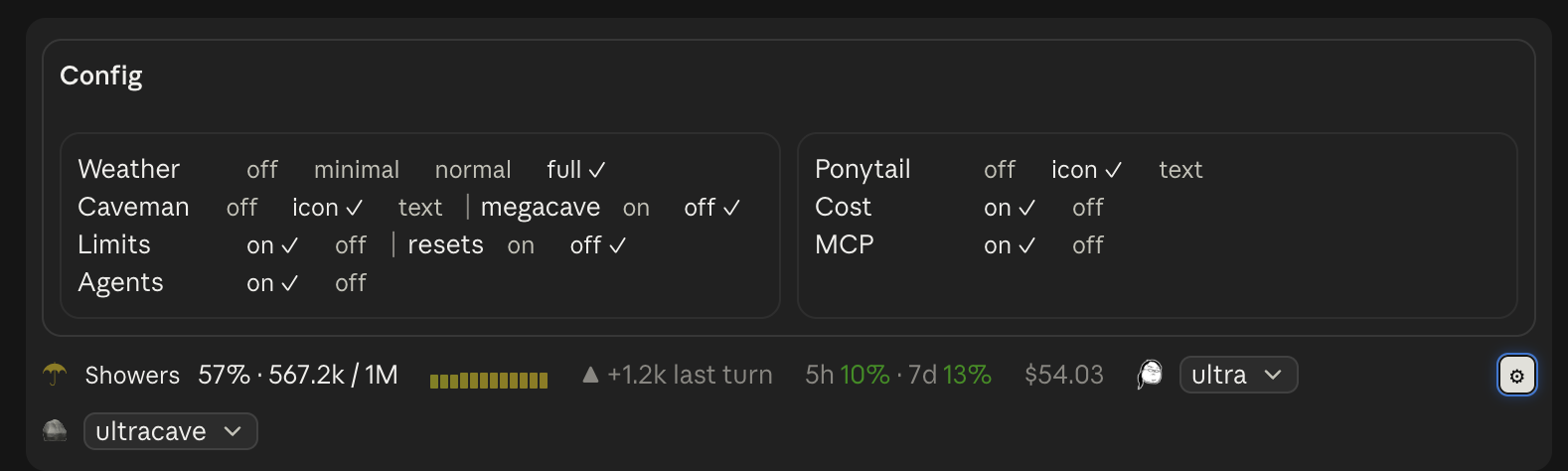
The ⚙ at the right of the band opens a Config box above it with every choice for every setting, the current one ticked; pressing one sets it, so you see the change in the band as you make it. Press ⚙ again to close it. Hover over a setting's name in the Config box for a line on what it is.
Pressing the forecast itself (Showers, or 67% at minimal) steps
the weather detail through minimal → normal → full and round again; off
is set in the Config box.
Where the mod has a /config row (the terminal), /overalls sets that row.
Where it has none (the desktop app), it keeps the choice in the mod's own store
instead, and that choice wins over the /config value in every session until
you set the same setting with /overalls in a session that has the row.
| Setting | Values | Default | What it does |
|---|---|---|---|
| Weather detail | off · minimal · normal · full (typed; anything else counts as full) | full | How much of the forecast to show |
| Ponytail level | off · icon · text (typed; anything else counts as icon, and an old on/off value as icon/off) | icon | Show whether Ponytail is installed and its level, after its logo or the word ponytail: |
| Caveman mode | off · icon · text (typed; anything else counts as icon) | icon | Show Caveman's mode where it's installed, after 🪨 or the word caveman: |
| Offer megacave | on · off | off | List Caveman's Classical Chinese mode (megacave) in its dropdown; in the Config box it sits on Caveman's row |
| Usage limits | on · off | on | Show how much of your 5-hour and weekly limits is spent (subscriptions only) |
| Limit resets | on · off | on | Show how long until each limit resets (5h 42% ↻1h20m); in the Config box it sits on the Limits row |
| Limit run-out | off · warn · always (typed; anything else counts as warn) | warn | Warn when a limit will run out before it resets, at your pace over the last hour: ⚠1h40m in amber, red under 30 minutes. always also shows ✓ lasts for a limit that won't. Needs 10 minutes of samples and 2 points of movement first. Follows each limit, or stands alone (5h ⚠1h40m) with the limits off |
| Session cost | on · off | off | Show what this session has cost so far |
| MCP warnings | on · off | on | Warn when an MCP server or connector fails or needs signing in again |
| Running agents | on · off | on | Show ⧗ 2 agents while subagents run; pressing it lists them (type and task) |
| Turns left | on · off | on | Show ⌛ ~6 turns: about how many more turns fit, at the average growth of the last five that grew (red from 3) |
| Tool denials | on · off | on | Show ⛔ 2 denied for tool calls refused by you, a hook, a permission rule or the auto-mode classifier; pressing it lists them, with Dismiss |
What each weather level shows:
| Level | Band |
|---|---|
| minimal | ☂ 67% |
| normal | ☂ Showers 67% · 134.4k / 200k |
| full | normal plus the last 12 turns as a sparkline and the change since last turn |
| off | nothing (the Ponytail segment still shows if enabled) |
ponytail@… entry in enabledPlugins. Otherwise the
band shows not installed beside the logo.$PONYTAIL_DEFAULT_MODE, else defaultMode in its
config.json ($XDG_CONFIG_HOME/ponytail/, or ~/.config/ponytail/), else
full/ponytail <level> (or /ponytail:ponytail <level>), /ponytail-review,
stop ponytail and normal mode change it as they go in.
Another session's switch doesn't change this band./ponytail <level> command.Where either isn't installed, its row in the ⚙ Config box has an Install button. A mod can't install plugins, so it types a request into the prompt box, for example:
Install the caveman Claude Code plugin: run `claude plugin marketplace add JuliusBrussee/caveman` then `claude plugin install caveman@caveman`.
Send it and Claude runs the two commands, each behind the usual permission prompt. A plugin's hooks start with the next session.
caveman@… entry in enabledPlugins; otherwise
nothing shows..caveman-sessions/<session id>.mode in your Claude config directory, so the
band reads that. A session with no file of its own (one started
before Caveman was installed) shows off; the shared .caveman-active, which
holds the last mode set in any window, is read only when there's no session id./megacave, /ultracave, /caveman and /caveman off commands.Claude Code gives a mod no list of MCP servers or their state, so the band learns of trouble from Claude's own tool calls:
mcp__<server>__… call that fails to sign in or connect (a bad-arguments
error doesn't count), andThe band then shows ⚠ 2 MCP errors. Pressing it opens an MCP errors box
above the band (like the Config box; one is open at a time) with a row per
server: its name, sign in or failed, the error as Claude saw it, and:
claude://claude.ai/customize/connectors), and
at https://claude.ai/customize/connectors from the CLI or the web. For any
other server, /mcp in the terminal; the desktop app's /mcp only lists
servers, so there it says to sign in from a terminal session.A server leaves the list on its next successful call, or when dismissed. It's caught on its first failure, not before.
Overalls makes no network requests and sends nothing anywhere. Everything it does stays inside your Claude Code session:
$.session.usage()) after each turn$.session.usage()) when those widgets are on, and the clock to count down
to each reset$.agent.list(): type, task, status)
when the agents widget is on$.session.usage()), keeping the last hour of them in session memory to
tell when a limit will run out.caveman-sessions/<session id>.mode (or .caveman-active when
there's no session id)config.json, for its default level, and the
PONYTAIL_DEFAULT_MODE, XDG_CONFIG_HOME, CLAUDE_CONFIG_DIR and HOME
environment variables/ponytail …,
stop ponytail, normal mode), keeping nothing of it but the level/ponytail <level>, or Caveman's command for the mode, as if you
had typed it (which Claude reads, as it
would your typing), or types it into the prompt box if it can't run it/mcp only when you press Reconnect in the terminalCLAUDE_CODE_ENTRYPOINT while the MCP errors box is open, to tell the
desktop app from the CLI and the web; in the desktop app, pressing
Reconnect on a connector hands claude://claude.ai/customize/connectors to
the system's opener (open on macOS, xdg-open on Linux, cmd /c start on
Windows), which opens that page in the app/compact for you, or types it into the prompt box if it can't run it/overalls weather … or
/overalls ponytail … (and the rest), pick one in the ⚙ Config box, or press the
forecast to step the weather detail: through the /config row where there is one (saved in
your Claude Code settings, as /config saves them), otherwise in the mod's own
store, a small JSON file Claude Code keeps for the plugin in your Claude config
directory.Apart from that store, it writes no files, and the only program it starts is that system opener, with that one fixed address, when you press Reconnect.
It hooks four events only to observe them, never changing what they carry:
tool.call (note an MCP server failing or answering again, and a refused call), turn.complete
(take a reading), session.compact (record the drop after a
compaction, and reset the Ponytail level to its default) and prompt.submit
(note a Ponytail switch once your prompt has gone in, so /ponytail lite shows
straight away). It also draws the band above
the prompt.
Load your clone directly instead of the installed copy, so saves hot-reload:
claude --plugin-dir ~/Projects/overalls
or for every session (including the desktop app), in ~/.claude/settings.json:
{ "env": { "CLAUDE_CODE_PLUGIN_DIRS": "~/Projects/overalls" } }
Don't also have the marketplace copy installed, or you'll get two bands.
claude plugin validate .
claude plugin test .
hooks/register.tsx is the module; types/index.d.ts declares the state it
keeps. To add a setting, declare a field under userConfig in
.claude-plugin/plugin.json and read it from options in register.
Ponytail and its logo are by
Dietrich Gebert, used under the MIT licence
(assets/PONYTAIL-LICENSE). Overalls only reads the
level Ponytail writes; it isn't affiliated with or endorsed by the Ponytail project.
Caveman is by Julius Brussee; "Caveman" is his trademark. Overalls only reads the mode Caveman writes and runs its commands, uses none of its logos (🪨 is a stock emoji), and isn't affiliated with or endorsed by the Caveman project.
這是你的專案嗎?把這個徽章放進 README 或網站,連回本頁。


Claude Code 成績單的皮膚:主題工具行、回复槽和旋轉文字。 /skin 即時交換它們。

完成你開始的事——持久的工作階段、會學習的 AI、能交付的功能。上下文工程 + Theory of Mind + Knowledge Graph + Loop Mode + Task Mode。包含專案知識圖譜、統一工作流程編排、工作階段開始時自動更新、ToM 驗證檢查點、雙向建模、品質偵測、強化上下文標記和迴圈模式。憑藉經過驗證的策略減少 92% token。根據 Riedl 與 Weidmann 2025 Human-AI Synergy 研究。

一個 Claude Code 模組,讓你加入中繼:由 haiku 生成的 40 詞卡片會描述你的工作階段內容,並與其他正在處理類似問題的開發者進行配對。

在 Claude 應用程式、Discord、Telegram 或自訂 Claude Code channel 中使用你自己的本機 Claude Tag。

Ruflo 記憶系統的基底層外掛:AgentDB 控制器橋接(15 個 agentdb_* MCP 工具)、RuVector ONNX 嵌入(10 個 embeddings_* 工具,包含 RaBitQ 32x 量化)和 WASM HNSW 模式路由器(3 個 ruvllm_hnsw_* 工具)。作為 mod(ADR-445):可選的安全召回會進入提示,寫入守衛會把機密排除在記憶之外,還提供 /agentdb 和控制台顯示的狀態檔。
Threads 貼文介紹開源專案 oil-oil/oil-ui,主打讓 Claude Code、Codex 等 AI Agent 用來探索不同 UI 設計方向、並排比較,並依據實際截圖反覆修正的設計 Skill。貼文僅附上 GitHub 連結與星數、授權資訊,未提供安裝步驟或示範素材。