
cjavdev@cjavdev
cjavdev/mods/tree/main/link-bar
cjavdev/mods/tree/main/link-bar
link-bar 會在提示列下方加入一列連結,顯示對話中最近提到的 3 個 claude.ai 工件與 5 個 GitHub pull request。連結會以 OSC 8 超連結呈現(在 iTerm2、Ghostty、kitty、WezTerm、VS Code 中使用 cmd/ctrl-click 開啟)。它使用單一 hooks 模組,透過 session.append 追蹤連結,並在 PromptHint 上用 ui.render 繪製這一列。可以透過 /config 設定 enabled、artifacts 和 pullRequests 數量。需要 Claude Code 2.1.287 或更新版本;可以複製儲存庫後使用 --plugin-dir 執行,或將路徑加入 CLAUDE_CODE_PLUGIN_DIRS。
請先查看作者 README,確認 marketplace 與外掛名稱;指令可能隨儲存庫結構而變動。
claude plugin marketplace add cjavdev/mods
claude plugin install link-bar
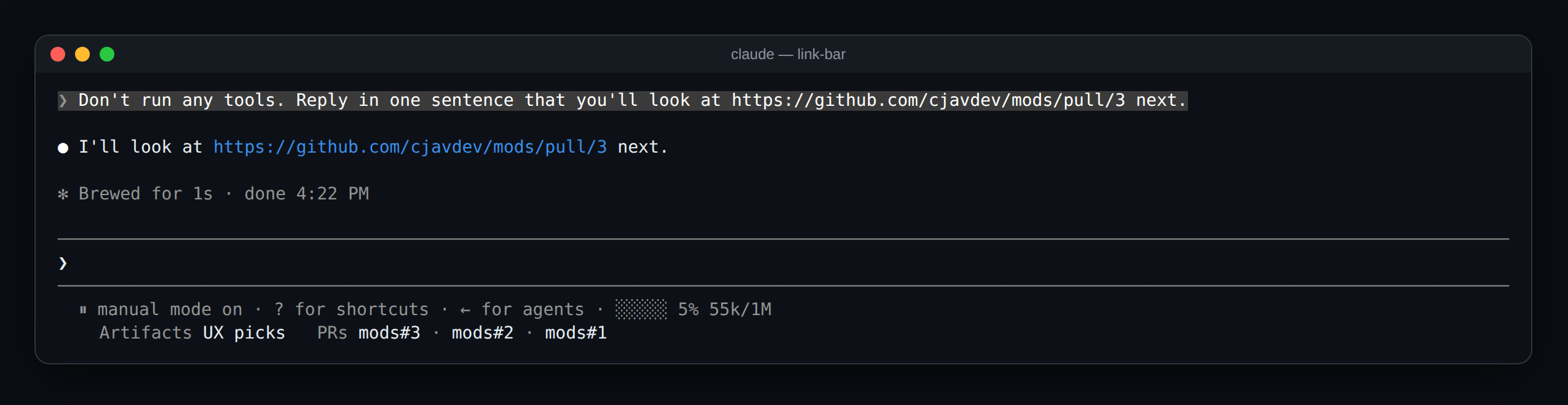
A Claude Code mod that keeps the artifacts and pull requests you've been talking about one click away. It adds a row of links under the prompt: the 3 claude.ai artifacts and the 5 GitHub pull requests mentioned most recently in the conversation.
  ⏸ manual mode on · ? for shortcuts · ← for agents
    Artifacts UX picks   PRs mods#3 · mods#2 · mods#1
claude.ai/artifact/… and claude.ai/code/artifact/… links. One written as a markdown link, like [UX picks](https://claude.ai/artifact/…), shows its label. A bare one shows the start of its id, like artifact DhK2K2.github.com/<owner>/<repo>/pull/<n> links, shown as repo#n.Only your prompts and Claude's replies count. Tool output (a gh pr list, say), system reminders and subagents' messages don't, so the row holds what the conversation was actually about. Nothing shows until the first link is mentioned.
You need Claude Code 2.1.287 or newer.
git clone https://github.com/cjavdev/mods.git ~/mods
claude --plugin-dir ~/mods/link-bar
Or add ~/mods/link-bar to CLAUDE_CODE_PLUGIN_DIRS in the env block of ~/.claude/settings.json.
It shares the space under the prompt with context-meter and cache-shot-clock: they stay at the end of the hint line, and the links get the row below it.
In /config, or under pluginConfigs["link-bar"].options in settings:
| Setting | Default | |
| --- | --- | --- |
| enabled | true | Turns the mod off without unloading it. |
| artifacts | 3 | How many of the most recently mentioned artifacts to link. 0 shows none. |
| pullRequests | 5 | How many of the most recently mentioned pull requests to link. 0 shows none. |
The mod is one hooks module, hooks/register.tsx, with the link finding in hooks/links.ts:
session.append hook sees every row the conversation keeps. For your prompts and Claude's replies on the main thread, it pulls out artifact and PR links and moves them to the front of two lists in session state ($.state, declared in types/index.d.ts). A change redraws the row.--resume and --continue load a conversation without appending it, so on a resume the mod reads the recent end of the transcript file and picks the links back up. /clear empties the lists.ui.render hook on the PromptHint component draws the engine's own hint line and adds a row under it with a Link element per entry. The hint line's tail is plain text cut at the row's end, which is why the links get a row of their own.claude plugin validate ~/mods/link-bar # manifest and hooks check
claude plugin test ~/mods/link-bar # runs tests/*.test.tsx
The screenshot is a real capture of Claude Code running the mod (with context-meter beside it) in tmux (tmux capture-pane -p -e), turned into a page with scripts/ansi2html.py and screenshotted.

文件產生、漂移偵測與 API 文件自動化外掛程式,同時作為 function-hook 防護,拒絕含有機密的文件寫入或 worker 派送。

Claude 桌面應用程式的狀態列。它顯示在提示列上方,呈現工作階段品質、內容脈絡填充量、快取倒數,以及 5 小時與每週限額,並讓 Clawd 演出工作階段正在做什麼。

一個 Claude Code 外掛 mod,提供 /databricks-pane:依照 databricks CLI,以樹狀結構呈現 Databricks 工作區、Unity Catalog、計算資源、工作、管線、應用程式和儀表板,並支援即時醒目顯示、設定檔切換和複製 CLI 參數。
