
eduardocruz@eduardocruz
eduardocruz/cc-kit/tree/main/mods/kit-sink
提供 [Claude Code](https://claude.com/claude-code) 模組的視覺化元件:迷你折線圖、儀表、KPI 磁貼、熱圖和即時代理可觀測性(工具時間軸、token 消耗、子代理樹、上下文地圖)。可繪製在終端機和桌面應用程式中。
eduardocruz/cc-kit/tree/main/mods/kit-sink
這是一個展示候選 UI 元件的 kitchen-sink Claude Code 模組面板:即時代理可觀測性(ToolTimeline、TokenBurn、SubagentTree、ContextMap、FileTouchMap、狀態列預設)、一般圖表(Sparkline、Gauge、StatTile/KpiRow、BarList、Heatmap),以及程式碼審查、決策/輸入、引擎槽位皮膚和版面/外框的模擬。使用 claude --plugin-dir /path/to/cc-kit/mods/kit-sink 安裝,然後執行 /kit sink [group]。已針對 Claude Code 2.1.288 測試,採用 MIT 授權。
請先查看作者 README,確認 marketplace 與外掛名稱;指令可能隨儲存庫結構而變動。
claude plugin marketplace add eduardocruz/cc-kit
claude plugin install kit-sink
Visual components for Claude Code mods: sparklines, gauges, KPI tiles, heatmaps, and live agent observability (tool timeline, token burn, subagent tree, context map). They draw in the terminal and the desktop app.
Early access. Claude Code's mod API is marked "EARLY ACCESS: this surface may change between releases without notice." cc-kit is tested against Claude Code 2.1.288. Expect breakage on newer releases until CI against the latest release lands.
Phase 0: a kitchen sink. Every candidate component is on one pane, so you can see what's possible and judge each one. The registry and /kit add come next. See the design spec.
Every screenshot is the kitchen-sink pane (/kit sink <group>) captured from a real Claude Code 2.1.288 session. Each component carries a tag:
[v1] means it is planned for the first release.[sink only] means it is a mock, drawn so it can be judged before anyone builds it properly.● live means it is drawing your session's real data; ○ mock means it is showing sample data until there is something real to show.The header row counts the components. The bracketed buttons are tabs, one per group; each one has a hotkey (0–6).
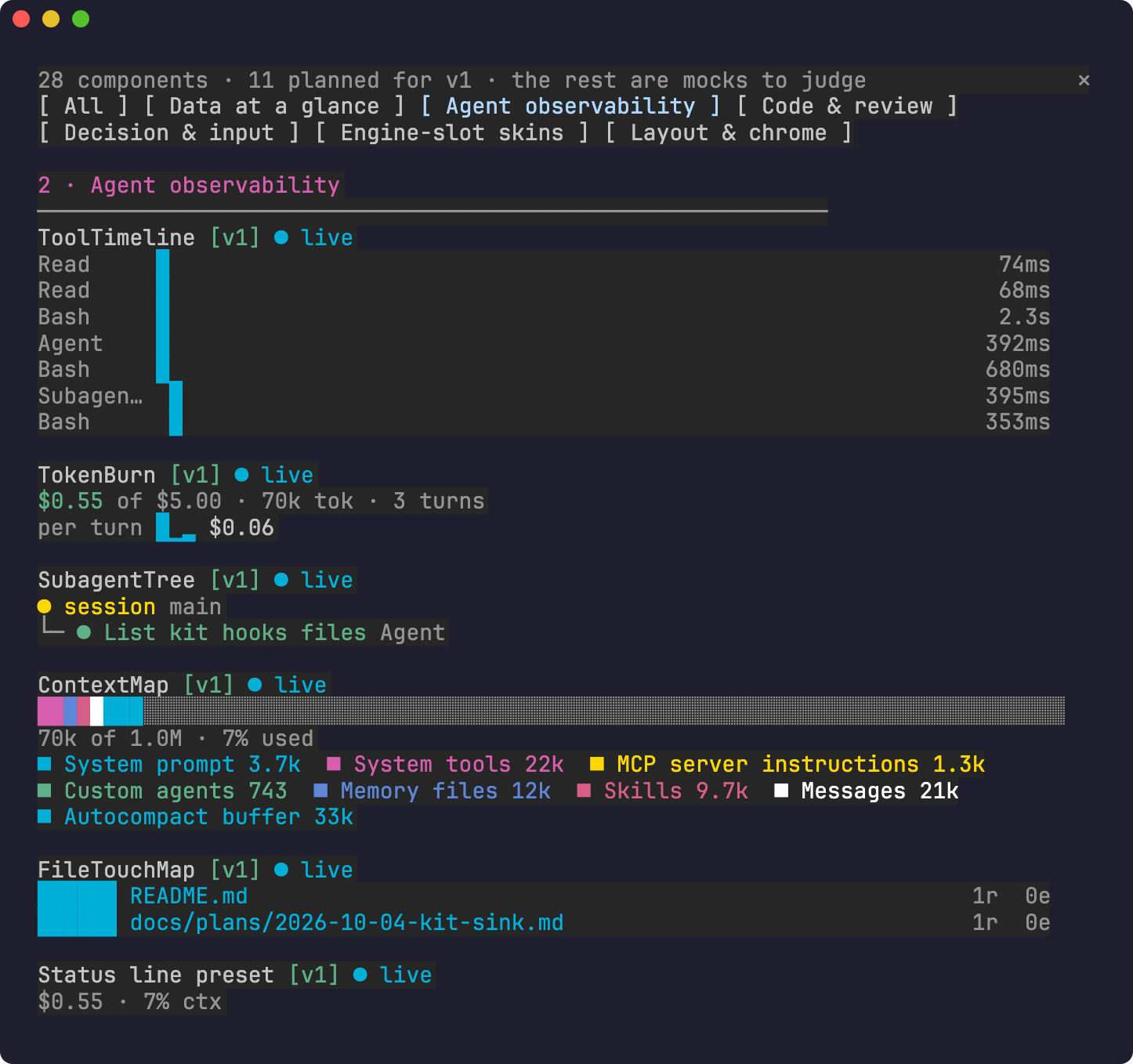
/kit sink observe)
These components can only exist as a mod, because only a mod sees the agent's tool calls as they happen. Everything in this shot is live.
| Component | What it shows |
|---|---|
| ToolTimeline | One row per tool call, laid out on a shared time axis, Gantt-style. Calls that overlap are stacked; the bar length is the duration (shown on the right). A running call is yellow ▸; a failed one is red. |
| TokenBurn | Session spend against a budget ($0.55 of $5.00), tokens and turn count. The sparkline shows the cost of each turn, so a costly turn stands out. The headline turns yellow, then red, as you approach the budget. |
| SubagentTree | The live tree of subagents this session spawned: ● yellow while running, green when done, red when failed. |
| ContextMap | What fills the context window, as one stacked bar (system prompt, tools, memory, skills, messages, autocompact buffer) plus a legend. Free space is the grey remainder. Data comes from $.session.usage. |
| FileTouchMap | The files the agent read (r) and edited (e) this session, hottest first. Edits weigh more than reads; paths are relative to the repo. |
| Status line preset | The same numbers squeezed into one line for $.ui.status: $0.55 · 7% ctx. |
/kit sink data)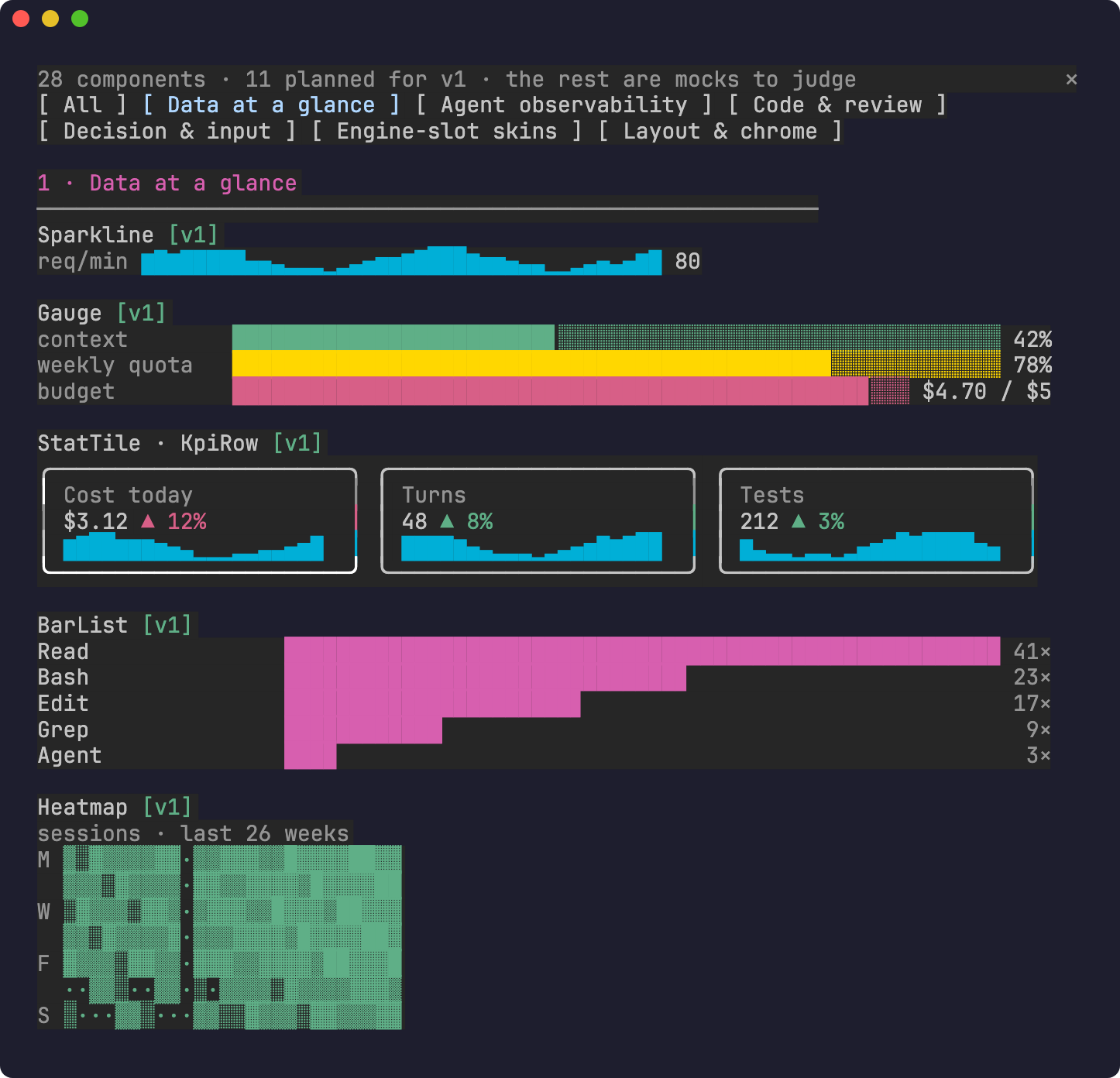
General-purpose charts, drawn with text glyphs so they work in any terminal; the desktop app draws the same tree. These are the building blocks the observability components are made of.
| Component | What it shows |
|---|---|
| Sparkline | A trend in one line of ▁▂▃▄▅▆▇█, with an optional label and last value. It resamples to whatever width it is given. |
| Gauge | Label, bar, value. Color follows thresholds (green < 70% ≤ yellow < 90% ≤ red), with eighth-cell precision. The right side can be a custom detail ($4.70 / $5). |
| StatTile · KpiRow | Bordered KPI cards: label, value, a ▲/▼ delta and a trend sparkline. Each delta knows whether "up" is good (Turns) or bad (Cost), and colors itself to match. KpiRow wraps the tiles to fit the pane width. |
| BarList | Ranked horizontal bars with right-aligned values, for top tools, top files or top errors. |
| Heatmap | A GitHub-style activity grid: 7 rows (days) × N weeks, intensity drawn as ·░▒▓█. |
/kit sink code) · mocks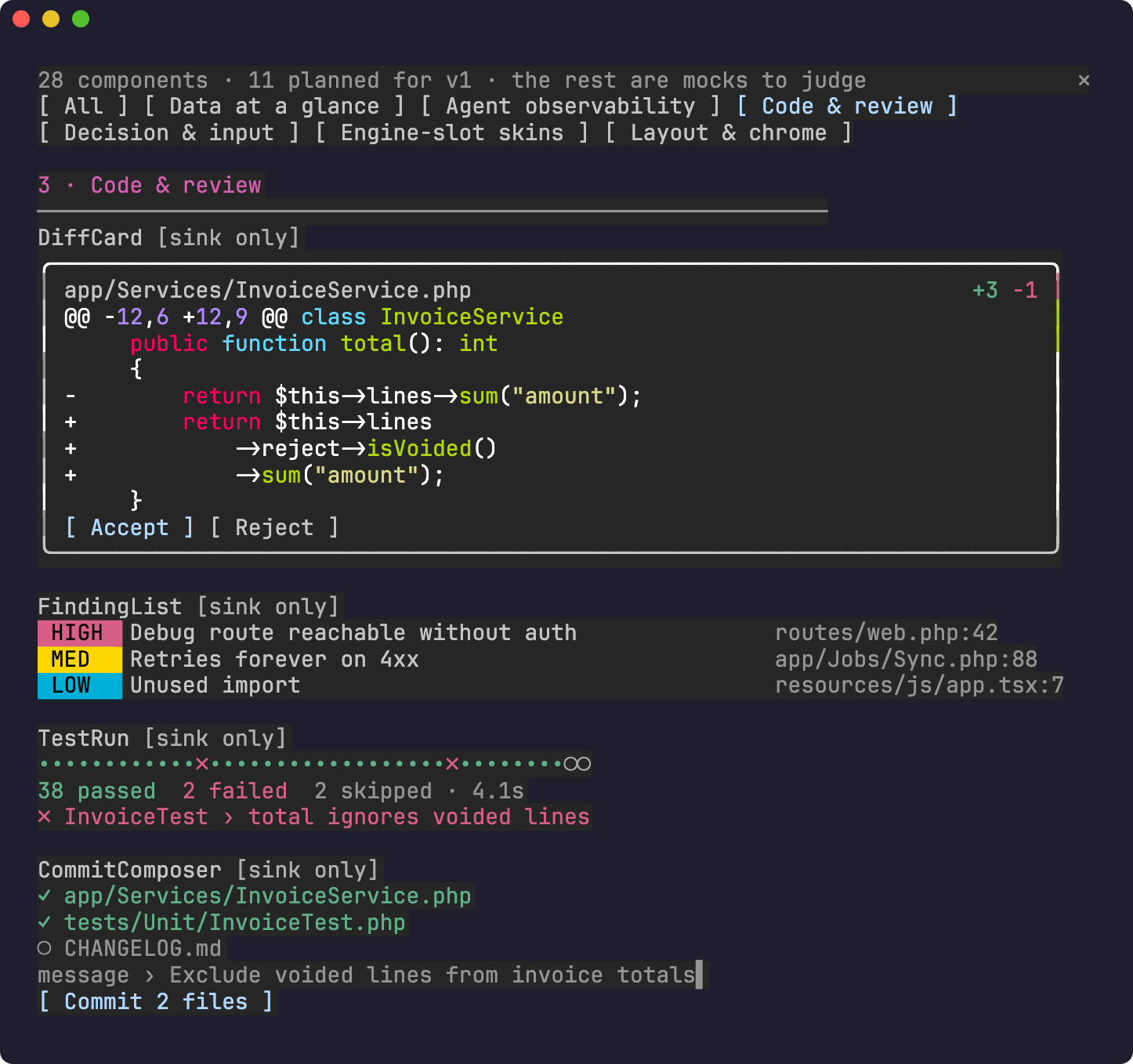
| Component | What it shows |
|---|---|
| DiffCard | A file header with +3 −1, the diff syntax-highlighted by Claude Code's own Code element, and Accept / Reject buttons. |
| FindingList | Review findings with HIGH / MED / LOW severity badges and a file:line for each. |
| TestRun | A dot per test (green pass, red × fail, grey ○ skipped), a summary line, and the first failure. |
| CommitComposer | Staged files (✓) versus unstaged ones (○), a draft message, and a Commit button. |
/kit sink decide) · mocks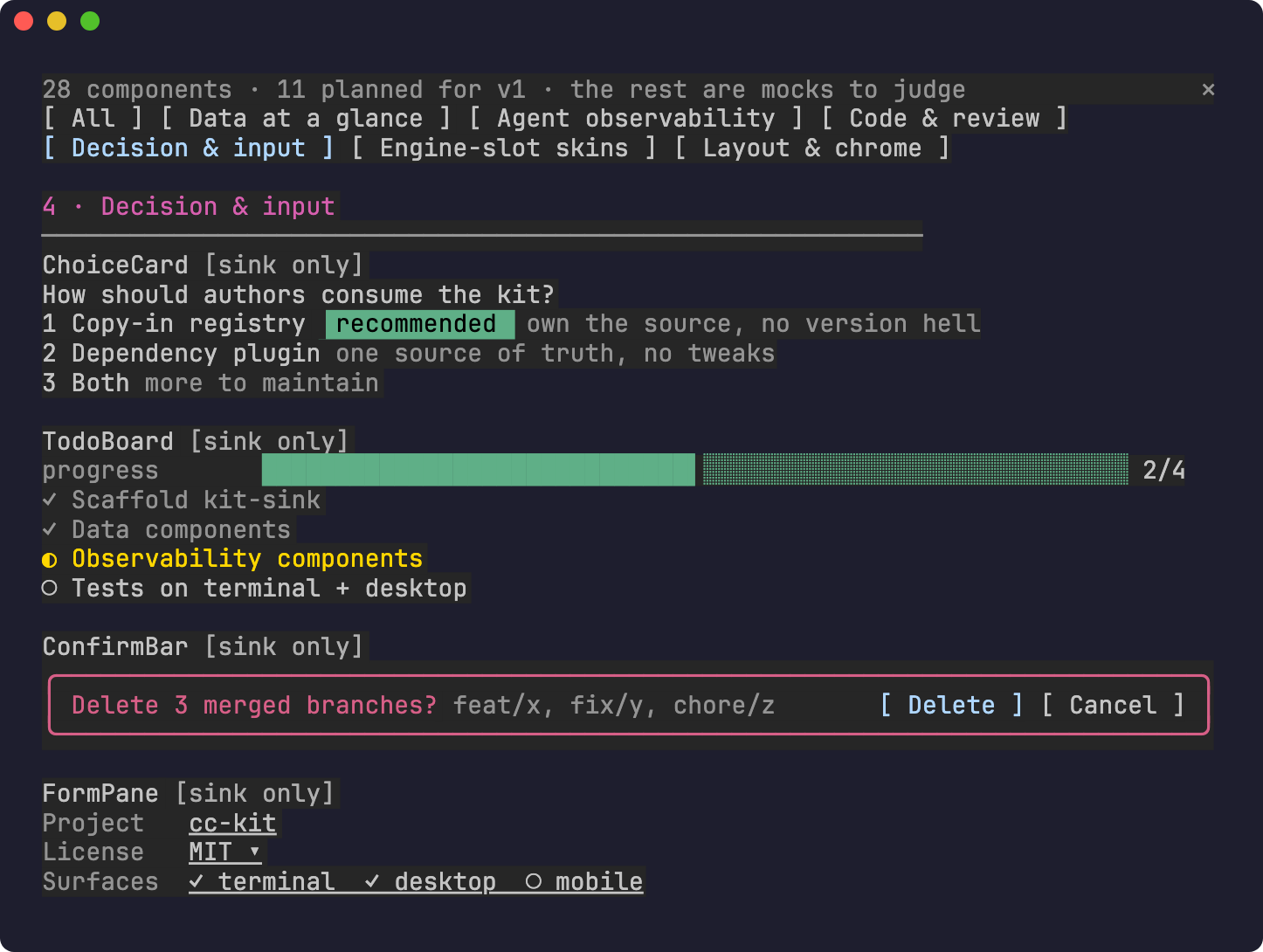
| Component | What it shows |
|---|---|
| ChoiceCard | A question with numbered options, a recommended badge and a one-line trade-off for each, as an alternative to a wall of chat text. |
| TodoBoard | A progress gauge over a checklist: done ✓ (dimmed), active ◐ (yellow), pending ○. |
| ConfirmBar | A red-bordered confirmation for a destructive action, listing exactly what it will touch, with Delete / Cancel buttons. |
| FormPane | Labeled fields: text, a select (MIT ▾) and multi-choice. |
/kit sink skins) · mocks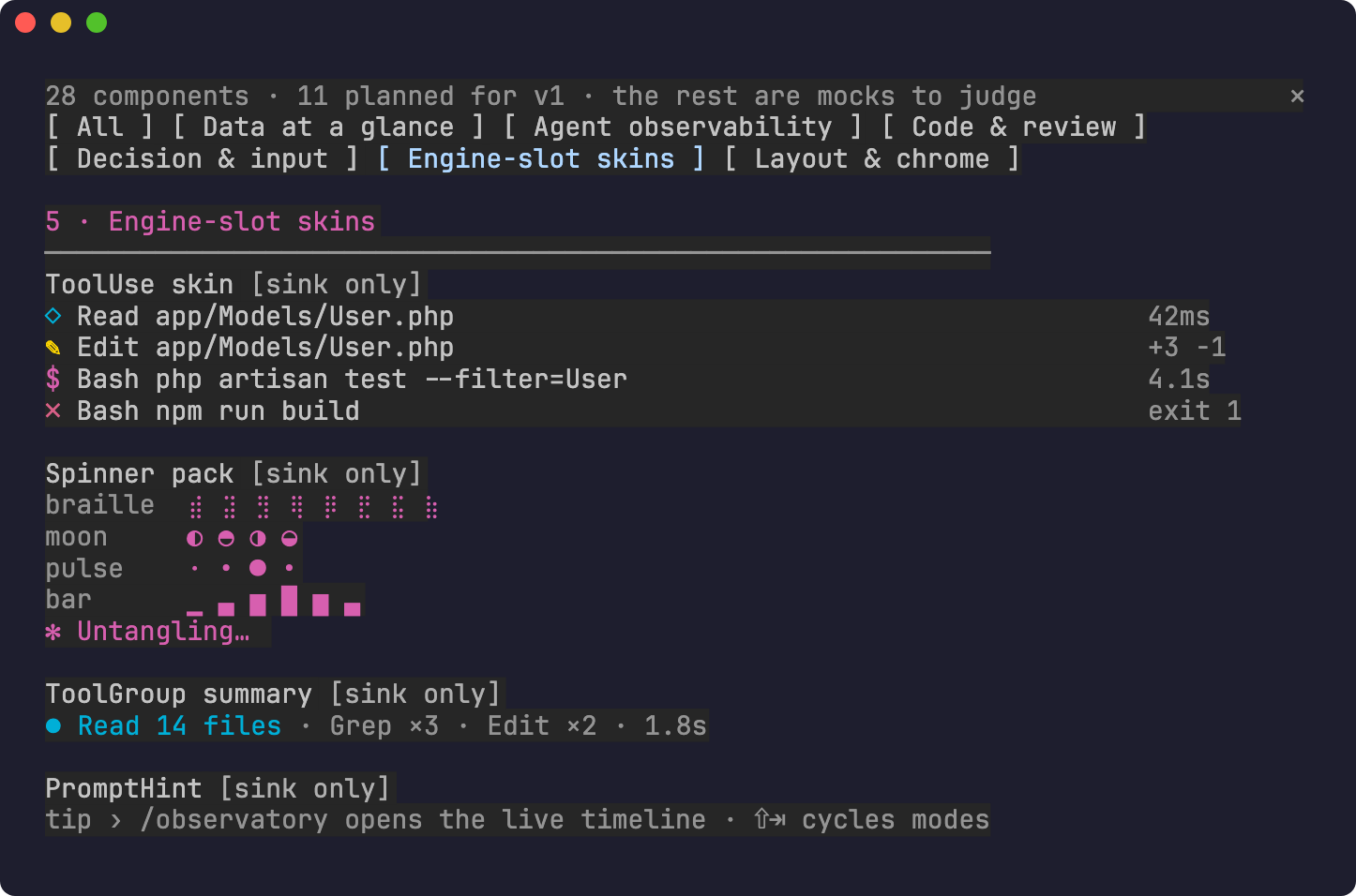
Claude Code lets a mod redraw its built-in rows. These mocks show what a theme pack could do.
| Component | What it shows |
|---|---|
| ToolUse skin | Compact one-line tool rows: an icon per tool, the argument, and the duration or result (+3 −1, exit 1 in red). |
| Spinner pack | Alternative spinner frame sets (braille, moon, pulse, bar) and a themed verb (✻ Untangling…). |
| ToolGroup summary | A burst of calls collapsed into one row: Read 14 files · Grep ×3 · Edit ×2 · 1.8s. |
| PromptHint | A contextual tip line under the prompt. |
/kit sink layout) · mocks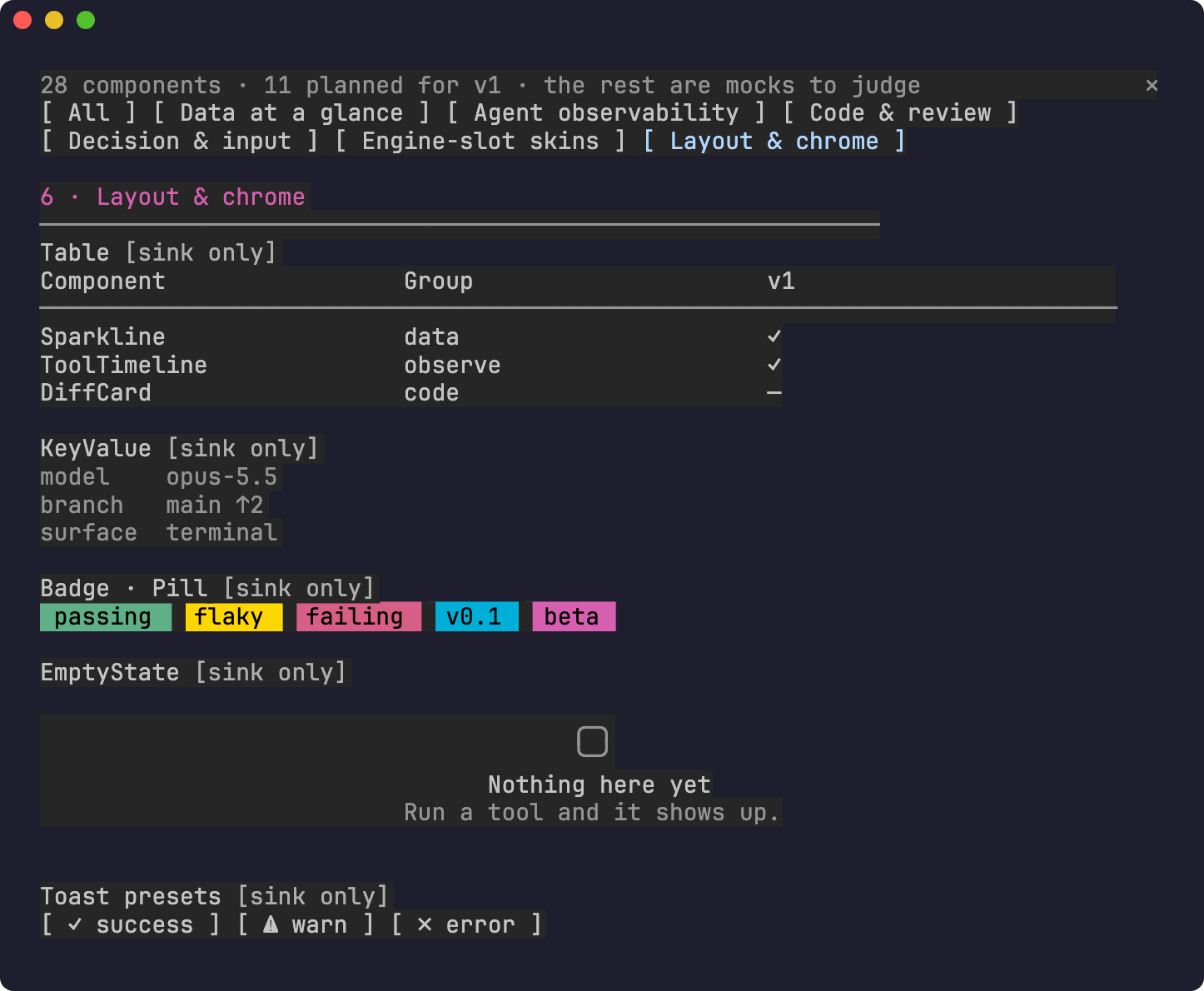
| Component | What it shows |
|---|---|
| Table | Header, rule and rows, with columns sized to the pane width. |
| KeyValue | Aligned label/value pairs. |
| Badge · Pill | Colored status tags using the kit's semantic tones (ok, warn, bad, info, accent). |
| EmptyState | What a component shows before it has any data. |
| Toast presets | Buttons that fire $.ui.toast in success / warn / error formats. |
claude --plugin-dir /path/to/cc-kit/mods/kit-sink
Then, inside Claude Code:
/kit sink            # all groups
/kit sink observe    # or: data, code, decide, skins, layout
The pane has a tab per group. Components tagged [v1] are planned for the first release; [sink only] ones are mocks shown to gather feedback. The observability components switch from ○ mock to ● live as soon as your session runs a tool.
claude plugin validate mods/kit-sink
claude plugin test mods/kit-sink
MIT

文件產生、漂移偵測與 API 文件自動化外掛程式,同時作為 function-hook 防護,拒絕含有機密的文件寫入或 worker 派送。

Claude 桌面應用程式的狀態列。它顯示在提示列上方,呈現工作階段品質、內容脈絡填充量、快取倒數,以及 5 小時與每週限額,並讓 Clawd 演出工作階段正在做什麼。

一個 Claude Code 外掛 mod,提供 /databricks-pane:依照 databricks CLI,以樹狀結構呈現 Databricks 工作區、Unity Catalog、計算資源、工作、管線、應用程式和儀表板,並支援即時醒目顯示、設定檔切換和複製 CLI 參數。
