
鹿野 壮 Takeshi Kano@tonkotsuboy_com
1/
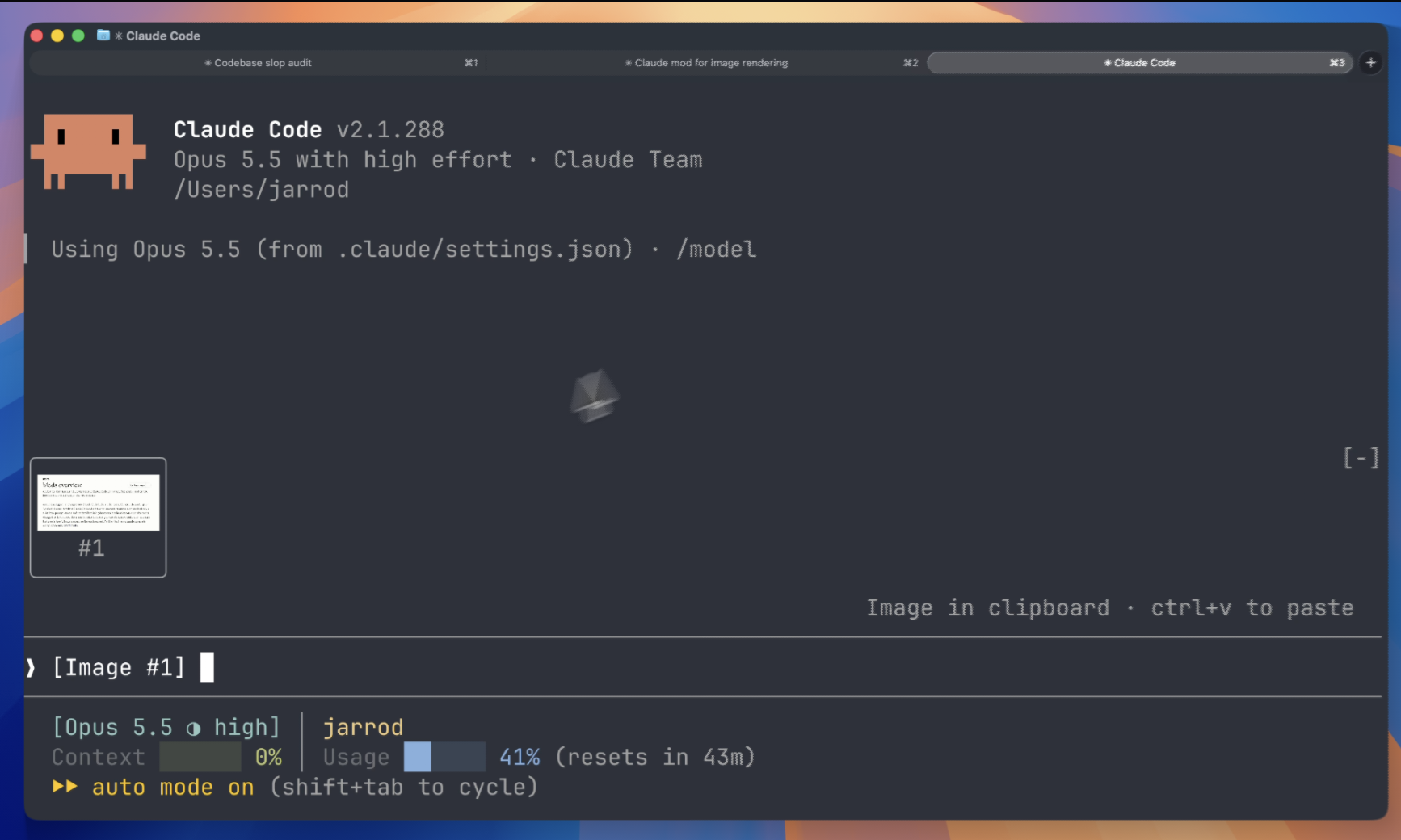
ペーストした画像をプレビューできるようになるClaude Code mod、便利すぎでしょ…🚃 標準機能に入れてほしい https://github.com/jarrodwatts/claude-image-view

ペーストした画像をプレビューできるようになるClaude Code mod、便利すぎでしょ…🚃 標準機能に入れてほしい https://github.com/jarrodwatts/claude-image-view
Claude Image View 是一個 Claude Code 模組,會在提示列上方的區域繪製貼上圖片的縮圖,取代單獨的 [Image #n] 標籤。它每 200ms 輪詢提示框中的 [Image #n] 標籤,找到工作階段快取的 PNG 檔案,從 PNG 標頭讀取尺寸,並使用 Claude Code 的 Image 元素繪製圖片,因此圖片資料不會經過這個模組。縮圖會在貼上後立即出現,保持長寬比,自動符合可用空間,並在送出時清除。它只在本機執行,不發出網路請求,也不寫入檔案;需要 Claude Code v2.1.287+、macOS 或 Linux,以及支援 kitty 圖形協定的終端機,例如 Ghostty 或 kitty。透過 /plugin marketplace add jarrodwatts/claude-image-view 安裝,接著執行 /plugin install image-view 與 /reload-plugins。
請先查看作者 README,確認 marketplace 與外掛名稱;指令可能隨儲存庫結構而變動。
claude plugin marketplace add jarrodwatts/claude-image-view
claude plugin install image-view
A Claude Code mod that shows the images you paste, so you see thumbnails above your prompt instead of bare [Image #1] tags.

Inside Claude Code, run:
/plugin marketplace add jarrodwatts/claude-image-view
/plugin install image-view
/reload-plugins
That's it. Paste an image into the prompt and its thumbnail appears above the input.
<details> <summary><strong>Prefer the terminal?</strong></summary>claude plugin marketplace add jarrodwatts/claude-image-view
claude plugin install image-view@claude-image-view
Then run /reload-plugins inside a session, or start a new one.
Paste one or more images and a row of thumbnails sits above the prompt, each labelled with the number of its tag:
╭────────────────────────╮ ╭────────────╮
│                        │ │            │
│      (screenshot)      │ │  (photo)   │
│                        │ │            │
│           #1           │ │     #2     │
╰────────────────────────╯ ╰────────────╯
❯ why is the header misaligned here [Image #1] vs [Image #2]
Claude Code saves every pasted image to a cache folder for the session, as <tmp>/<project>/<session>/images/<n>.png, and puts an [Image #n] tag in the prompt. Claude Image View is a mod:
[Image #n] tags. It checks on a timer because pasting an image doesn't raise an edit event.Image element. The terminal reads the file itself, so the image data never passes through the mod.Claude Image View is local-only. It makes no network requests and writes no files. It reads the prompt box, lists Claude Code's temp folder to find the current session's image cache, and reads the first bytes of each pasted image. If CLAUDE_CODE_TMPDIR isn't set, it runs id -u once to find the default temp folder.
Run claude plugin validate on the repo to see every event it hooks and every call it makes.
Other terminals show [Image #n] in each tile instead of the picture. The Claude Desktop app already previews pasted images, so the mod draws nothing there.
Nothing appears when I paste. Run /plugin and check the dim line under the tabs lists image-view as an active mod. If it isn't listed, run /reload-plugins.
The tile says "no preview". The mod couldn't find the cached file. Claude Code may have moved where it stores pasted images. Please open an issue with your Claude Code version.
The tile shows [Image #1] text instead of the picture. Your terminal doesn't support the kitty graphics protocol. See Requirements.
The tile shows [Image #1] text in agent view or a background session, even in Ghostty or kitty. Claude Code turns terminal images off for background sessions. If you attach from a terminal with the kitty graphics protocol, turn them back on in the env block of ~/.claude/settings.json, then start a new session:
"env": { "CLAUDE_CODE_FORCE_TERMINAL_IMAGES": "1" }
git clone https://github.com/jarrodwatts/claude-image-view
cd claude-image-view

# Load it for one session without installing
claude --plugin-dir .

# Check it and run the tests
claude plugin validate .
claude plugin test .
Claude Code writes the API types into .claude-plugin/types/ the first time it loads the mod, and tsc -p . type-checks it from then on.
MIT. See LICENSE.
Showcase: ペーストした画像をプレビューできるようになるClaude Code mod、便利すぎでしょ…🚃 標準機能に入れてほしい
https://github.com/jarrodwatts/claude-image-view 貼上圖片後可在 Claude Code 裡預覽

文件產生、漂移偵測與 API 文件自動化外掛程式,同時作為 function-hook 防護,拒絕含有機密的文件寫入或 worker 派送。

A status bar for the Claude desktop app. It draws above your prompt and shows session quality, context fill, cache countdown, and your 5-hour and weekly limits, with Clawd acting out what the session is doing.

一個 Claude Code 外掛 mod,提供 /databricks-pane:依照 databricks CLI,以樹狀結構呈現 Databricks 工作區、Unity Catalog、計算資源、工作、管線、應用程式和儀表板,並支援即時醒目顯示、設定檔切換和複製 CLI 參數。

