
sTomerG@sTomerG
sTomerG/agent-kit/tree/main/plugins/crab-cam
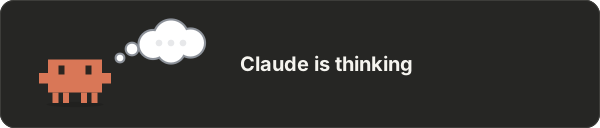
一個 Claude Code mod,會在提示列上方顯示一隻演示 Claude 正在做什麼的螃蟹,並以 shell 計量表顯示上下文視窗和速率限制的使用量。
sTomerG/agent-kit/tree/main/plugins/crab-cam
crab-cam 是一個 Claude Code 外掛(透過 sTomerG/agent-kit marketplace 發布),會在提示列上方顯示一隻小型動畫螃蟹,用來反映 Claude 目前的活動;終端機和桌面應用程式都支援。場景涵蓋思考、讀取、撰寫程式、搜尋、瀏覽網頁、執行命令、測試、git、安裝套件、子代理、計畫模式、技能、設計、編輯記憶、權限提示、背景工作、壓縮、錯誤和閒置。旁邊的 shell 計量表會顯示上下文視窗使用量(肋骨)、5 小時速率限制(五顆珍珠)和每週速率限制(七顆較小的珍珠),超過 85% 時會以紅色標示。命令包括 /crab-cam(切換螃蟹)、/crab-cam demo、/crab-cam meter、/crab-cam details 和 /crab-cam commands。需要 Claude Code v2.1.287+;先執行 claude plugin marketplace add sTomerG/agent-kit,再執行 claude plugin install crab-cam@agent-kit 安裝。這是非官方社群專案,與 Anthropic 沒有關係。
請先查看作者 README,確認 marketplace 與外掛名稱;指令可能隨儲存庫結構而變動。
claude plugin marketplace add sTomerG/agent-kit
claude plugin install crab-cam
A Claude Code mod: a small crab above the prompt acts out what Claude is doing, in the terminal and in the desktop app. Beside it, a shell shows how full the context window is and how much of your rate limits is used.
Optimised for the Claude Code desktop app.
claude plugin marketplace add sTomerG/agent-kit
claude plugin install crab-cam@agent-kit
Requires Claude Code v2.1.287 or later; tested with v2.1.288.
To get new versions, run claude plugin update crab-cam@agent-kit, or enable auto-update for the marketplace under /plugin → Marketplaces.
| Command | What it does |
| :- | :- |
| /crab-cam | Hide or show the crab |
| /crab-cam demo | Play every scene, three seconds each |
| /crab-cam meter | Hide or show the shell meter |
| /crab-cam details | Show or hide the meter's readings in figures beside the shell |
| /crab-cam commands | Show commands as typed, or go back to the description of what they do |
The scene follows the tool Claude calls. A shell command is read for what it does, so cat shows reading and cd repo && git status shows git.
| Scene | Shown when |
| :- | :- |
| thinking, writing a reply | Claude reasons or writes text |
| reading | Read, or cat, head, tail, sed -n, jq in a shell |
| writing code | Edit, Write, or sed -i, cat > file in a shell |
| searching | Grep, Glob, or grep, rg, find, ls in a shell |
| browsing the web | WebFetch, WebSearch, browser tools, curl, wget |
| running a command | any other shell command |
| running tests | pytest, vitest, jest, npm test, cargo test and the like |
| working with git | git and gh, also further on in a chain such as make build && git status |
| installing packages | npm install, pip install, uv add, brew install and the like |
| putting helpers to work | subagents and workflows, during the turn and while they run on after it; the line under it says how many are at work and what they are doing, such as 3 helpers: 2 reading, 1 running tests |
| making a plan | plan mode and task lists |
| loading a skill | Skill |
| writing text | an edit to a text file: .md, .txt, .rst, README, CHANGELOG and the like |
| designing | an edit to a stylesheet or an .svg, a design or Figma tool, a design or diagramming skill, the start of an artifact, and an edit to an .html page later in that same turn |
| remembering something | an edit to CLAUDE.md, MEMORY.md or a memory file |
| sharing something | artifacts and files sent to you |
| a question for you, waiting for permission | Claude asks, or a permission dialog is open |
| waiting on a background task | Claude polls a background command or timer, or the turn ended with a command still running |
| using a tool | any other tool |
| tidying up its memory | the conversation is compacted |
| oops | a tool call failed, or an API error or refusal ended the turn |
| done, resting | the turn ended |
Work inside a subagent is not shown; the crab stays on "putting helpers to work" until the helper returns.
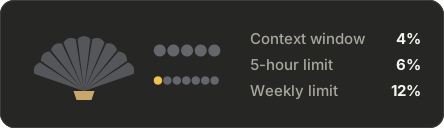
The shell fills as things are used:
The last two units of a gauge turn red above 85%. The pearls are left out on accounts without rate-limit windows.
The meter comes in two forms, and /crab-cam meter hides it altogether:
| Default | With details (/crab-cam details) |
| :- | :- |
|  |
|  |
|
claude --plugin-dir ./plugins/crab-cam   # load from disk, reload on save
claude plugin test plugins/crab-cam      # run the tests
claude plugin validate plugins/crab-cam  # check the manifest and hooks
npx tsx plugins/crab-cam/scripts/make-demo.mts  # redraw the animations in assets/
The editor types under .claude-plugin/types/ are generated and not committed. Claude Code writes them for your version when it loads the mod with --plugin-dir.
An unofficial community project, not affiliated with or endorsed by Anthropic.

文件產生、漂移偵測與 API 文件自動化外掛程式,同時作為 function-hook 防護,拒絕含有機密的文件寫入或 worker 派送。

Claude 桌面應用程式的狀態列。它顯示在提示列上方,呈現工作階段品質、內容脈絡填充量、快取倒數,以及 5 小時與每週限額,並讓 Clawd 演出工作階段正在做什麼。

一個 Claude Code 外掛 mod,提供 /databricks-pane:依照 databricks CLI,以樹狀結構呈現 Databricks 工作區、Unity Catalog、計算資源、工作、管線、應用程式和儀表板,並支援即時醒目顯示、設定檔切換和複製 CLI 參數。
