
VedantAndhale@VedantAndhale
VedantAndhale/claude-pro-kit/tree/main/plugins/context-xray
一個 Claude Code mod,提供 `/xray` 面板,顯示填滿脈絡視窗的內容精確拆解(系統提示詞、工具、MCP 工具、記憶檔案、技能、訊息),以及每次請求會載入哪些工具。
VedantAndhale/claude-pro-kit/tree/main/plugins/context-xray
context-xray 是 VedantAndhale 的 claude-pro-kit 市場中的十三個 mod 之一。/xray 會開啟面板,顯示 /context 算出的精確拆解:每次請求都會送出的內容(系統提示詞、工具、MCP 工具、記憶檔案、技能、訊息)、按需載入的內容、每次都會載入的 MCP 工具,以及每個記憶檔案的大小。它只在面板開啟和按下 Refresh(或 r)時測量,從不在背景測量,因為精確計數會為每個工具和記憶檔案送出一次 token 計數請求。透過 /plugin marketplace add VedantAndhale/claude-pro-kit 安裝,接著執行 /plugin install context-xray@claude-pro-kit。每個 mod 都是 plugins/<name>/hooks/ 下的單一檔案,且 mods 沒有沙箱隔離,因此安裝前應檢查程式碼。採用 MIT 授權。
請先查看作者 README,確認 marketplace 與外掛名稱;指令可能隨儲存庫結構而變動。
claude plugin marketplace add VedantAndhale/claude-pro-kit
claude plugin install context-xray

Make the $20 Claude Pro plan last longer in Claude Code.
Thirteen small mods that show you exactly where your usage goes and cut the waste. The mods themselves make no model calls and add nothing to the system prompt (read-cap adds one tool, which Claude Code lists by name only until Claude first uses it): every figure on screen is one Claude Code already reports, or a time the mod measured.
| Mod | What it does | Where |
| --- | --- | --- |
| tool-diet | Loads tools you have not used lately on demand instead of with every request | Everywhere |
| context-xray | /xray opens the exact breakdown of what fills your context window | Everywhere |
| pro-hud | Live meters above the prompt for your 5-hour session, your week and the context window, plus a per-turn receipt of tokens in, cached and out | Claude desktop app |
| output-diet | Trims long shell output before Claude reads it, keeping the head, the tail and the error lines; the untrimmed text is saved to a file Claude can open without a permission prompt | Everywhere |
| reread-guard | Skips Claude re-reading a file it already read when the file has not changed; a deliberate retry still goes through | Everywhere |
| cache-clock | Counts down until the prompt cache expires; once it has, shows exactly how many tokens your next message will re-send uncached | Everywhere |
| read-cap | Stops Claude reading a file over 1,000 lines whole and gives it an outline tool, so it reads only the lines it needs; a retry still reads the whole file | Everywhere |
| session-receipt | /receipt opens a pane with the exact tokens every turn of the session spent, and the costliest turns | Everywhere |
| budget-guard | Holds a prompt back once your 5-hour or weekly usage reaches your limit (90% by default); sending it again goes through | Everywhere |
| turn-budget | Asks before a single turn uses more than +5 session points, and stops that turn cleanly if you say so | Everywhere |
| collision-guard | Asks before Claude edits a file another chat on this machine changed in the last 30 minutes | Everywhere |
| answer-pane | Explanations as visual pages in a pane beside the chat, diagrams drawn in place | Desktop app (text in the terminal) |
| kit-updates | Tells you when an installed mod from this kit has a newer version or a new mod joins the kit; /kit-update installs it | Everywhere |
In Claude Code:
/plugin marketplace add VedantAndhale/claude-pro-kit
/plugin install tool-diet@claude-pro-kit
/plugin install context-xray@claude-pro-kit
/plugin install pro-hud@claude-pro-kit
/plugin install output-diet@claude-pro-kit
/plugin install reread-guard@claude-pro-kit
/plugin install cache-clock@claude-pro-kit
/plugin install read-cap@claude-pro-kit
/plugin install session-receipt@claude-pro-kit
/plugin install budget-guard@claude-pro-kit
/plugin install turn-budget@claude-pro-kit
/plugin install collision-guard@claude-pro-kit
/plugin install answer-pane@claude-pro-kit
/plugin install kit-updates@claude-pro-kit
Updates are off by default for marketplaces you add yourself. With kit-updates installed you are told when a fix ships and /kit-update installs it, from the desktop app or the terminal. Without it, turn on auto-update once: in a terminal, run claude, then /plugin → Marketplaces → claude-pro-kit → Enable auto-update; the desktop app has no toggle for it.
Install any one on its own; they do not depend on each other. Mods are not sandboxed, so read the code before installing: each mod is a single file under plugins/<name>/hooks/.
Every tool listed in front sends its whole description and schema with every request. A deferred tool is listed by name only, and Claude loads it through ToolSearch when it needs it; Claude Code already does this for most MCP tools. tool-diet does it for the rest of the tools you are not using: anything outside the core set (Bash, PowerShell, Read, Edit, Write, Glob, Grep, Agent, Skill, ToolSearch, TodoWrite, AskUserQuestion) that you have not used in your last five sessions.
Measured with one prompt, "Reply with just OK.", in a fresh session, as the API reported each request:
| | Prompt tokens per request | | --- | ---: | | Without tool-diet | 43,859 | | With tool-diet | 27,905 | | Change | −15,954 (−36%) |
On that setup, the largest tool moved was Artifact, whose description alone is 19,870 characters. What moves depends on your tools and your habits; /xray shows yours.
/tool-diet lists what is on demand this session, grouped by where each tool comes from; /tool-diet keep <tool> always loads one, unkeep undoes it, and /tool-diet off|on switches it. Answers are toasts, so they add nothing to the conversation. The status line keeps the count: 38 tools on demand.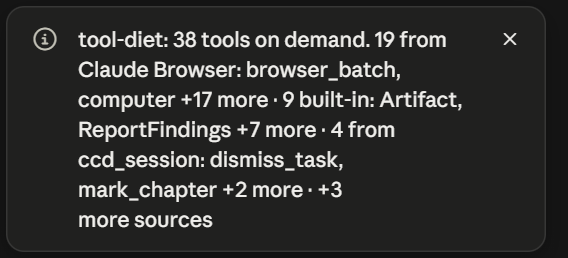
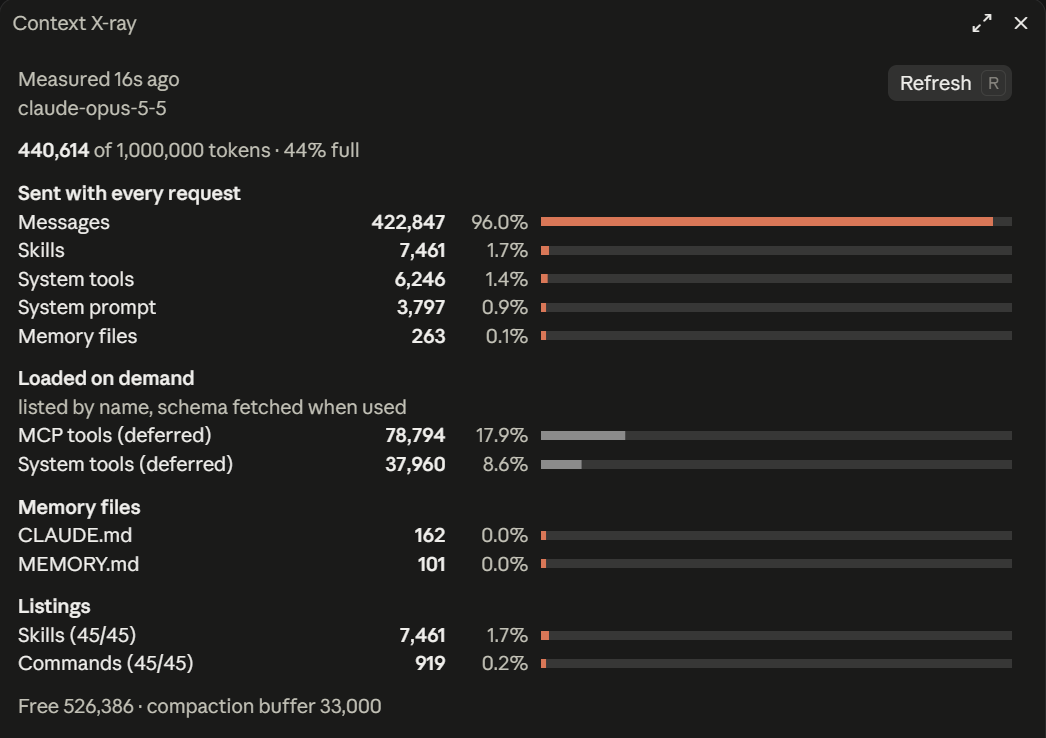
/xray opens a pane with the exact breakdown /context computes: what is sent with every request (system prompt, tools, MCP tools, memory files, skills, messages), what is loaded on demand, which MCP tools load every time, and each memory file's size. It measures when the pane opens and when you press Refresh (or r), never in the background, because the exact count sends one token-count request per tool and memory file.
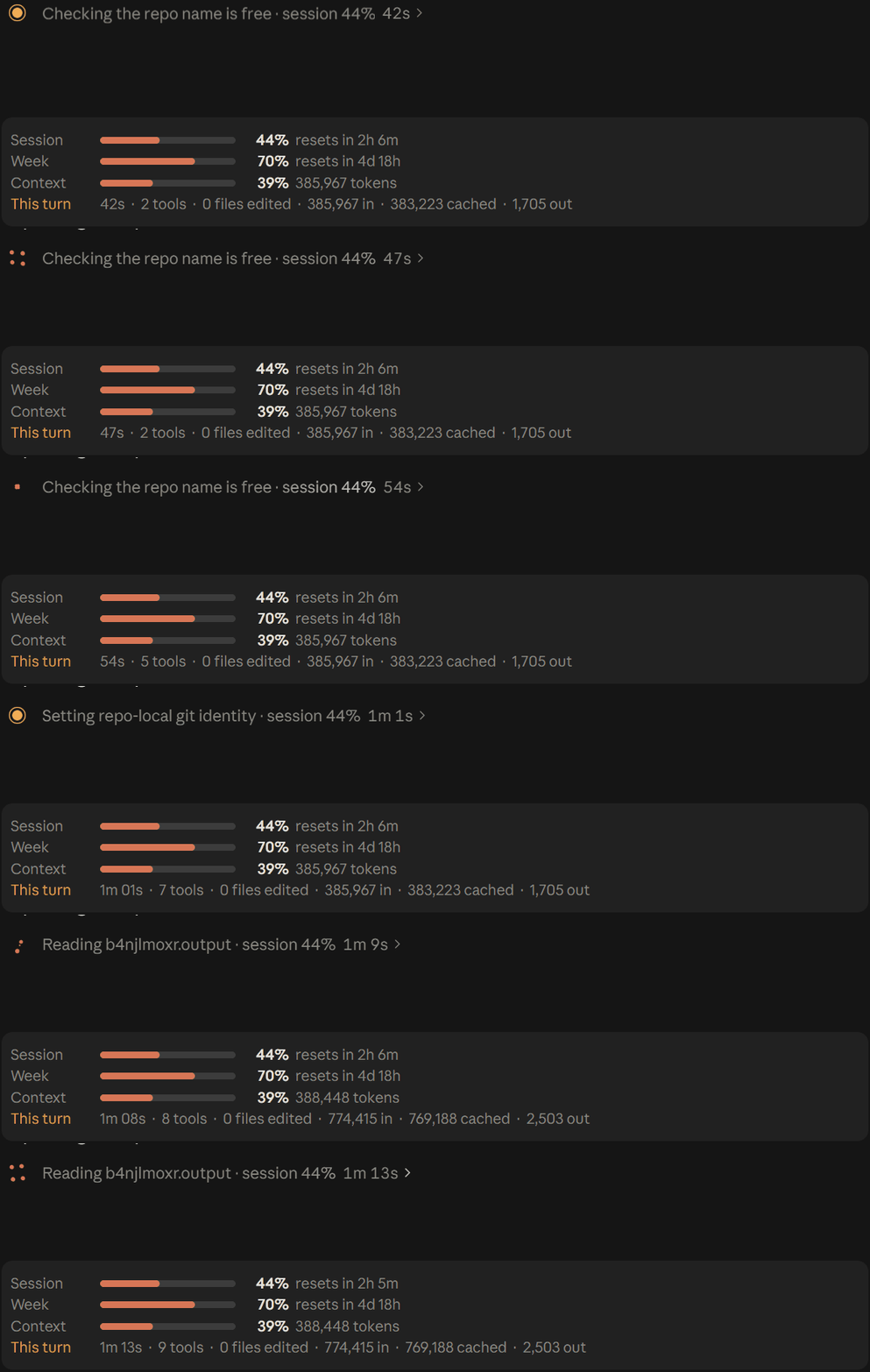
The recording at the top of this page is the band. In text:
Session    ━━━━━━━━━━━━━━──────   69%  resets in 32m
Week       ━━━━━━━━━━━━━━━─────   74%  resets in 4d 17h
Context    ━━━━━━━━────────────   44%  436,034 tokens
This turn  1m 35s · 1 tool · 0 files edited · 436,034 in · 431,260 cached · 580 out
On a wide window the three meters sit side by side on one row; on a narrow one each figure on the turn line wraps whole rather than being cut off.
/compact when it climbs.· session 20%, and finished tool calls draw as one line: status dot, tool, target, time./hud shows what is on; /hud all on|off, or /hud band|spinner|cards on|off. The answer is a toast, so toggling adds nothing to the conversation. It draws in the desktop app only and leaves the terminal as it is.
When a Bash or PowerShell result runs past 120 lines or 8,000 characters, Claude reads:
[output-diet: 82/500 lines shown; all 500 in ~/.claude/projects/<project>/<session>/tool-results/output-diet-<call>.txt]

<first 30 lines>
… [lines 31–450 omitted; error/warning lines from them:]
   250│ ERROR: build failed in src/app.ts
   300│ Warning: deprecated API
…
<last 50 lines>
3 trimmed · 41,200 chars saved.tool-results folder, beside the transcript, where Claude Code keeps the outputs it saves itself, so Claude can open it without a permission prompt. When that folder cannot be found, it goes under ~/.claude/output-diet/ (or CLAUDE_CONFIG_DIR).When Claude asks to Read the same range of the same file again in the same conversation, and the file's size and modification time have not changed, the read is skipped and Claude is told to use the copy it has. Any edit, a different range, or a subagent (which has its own context) reads freely. Claude Code can clear old tool results from context, so retrying the identical read straight after a skip always goes through. The record resets on /compact and /clear.
What Claude is told in place of the repeat read, kept to one line because the model reads it:
api.ts unchanged since you read it; use that copy. If it's gone from context, retry the same Read.
The status line counts them: 2 re-reads skipped.
Claude's prompt cache keeps your conversation for a fixed time after each request. Reply within it and the context is read from cache; reply after it and the whole context is sent again at full price. That message pays the cache-write price (1.25 times the input price for a 5-minute cache, 2 times for a 1-hour one) on every token instead of the cache-read price (0.1 times): 12.5 to 20 times more for the same context, and nothing on screen says so.
cache-clock puts the countdown in the status line, restarted by every response from the main conversation:
cache warm · 3m left
cache cold · next message re-sends 61,204 tokens
When the cache runs out, a toast says so once (after the lifetime is known, see below). The token figure is the previous response's input, cache and output tokens as the API reported them, which is exactly what the next request sends. After a message that did go out uncached, a dim transcript line confirms the real figure:
cache-clock: cache expired after 7m 12s idle; this message re-sent 61,204 tokens uncached.
Claude Code does not report the cache's lifetime on a turn, so cache-clock learns it. Until it knows, it assumes 5 minutes, says ≥3m left and likely cold, and shows no toast, since on a 1-hour cache a 5-minute alarm would be false. The first cache hit after more than 5 minutes idle proves a 1-hour cache, and a miss proves 5 minutes; the answer is kept across sessions. Subagents have their own cache and do not move the clock.
When Claude asks to Read a text file of more than 1,000 lines with no line range, the read is refused once, with the exact line count, and Claude is pointed at the outline tool:
big.ts has 3,000 lines. Call mcp__read-cap__outline to see its definitions with line numbers, then Read only the range you need (offset, limit). Retry the same Read to read it whole anyway.
The outline tool lists a file's functions, classes, types and Markdown headings with their line numbers. It is built from the file on disk with no model call, and covers JavaScript, TypeScript, Python, Go, Rust, Java, C#, Kotlin, Swift and Markdown. In a live run on a 3,000-line file, Claude called the outline, then read the 10 lines it needed instead of the whole file. Retrying the same whole-file Read always goes through, ranged reads, images and PDFs are never touched, and the status line counts the reads capped.
/receipt opens a pane listing every turn of the session with the tokens its requests reported, main thread and subagents together:
#3 61,000 new · 50,000 cached · 2,000 out (8,500 subagents) · 3 tools · 42s
new is input the prompt cache did not serve (uncached input plus cache writes) and out is output; both are full price. cached is input read from the cache, at a tenth of the price. The pane opens with the session totals and the five turns that spent the most new and output tokens, each with the first line of its prompt, so you can see which requests made a session expensive. Opening it adds nothing to the conversation, and /clear starts a fresh receipt.
Before a prompt starts a turn, budget-guard checks the 5-hour and weekly usage readings Claude Code reports (the same exact percentages pro-hud shows). If either is at or over your limit, the prompt is held back and you are told why:
budget-guard: 5-hour usage at 93%, resets in 1h 12m (your limit is 90%). Send the same message again to go ahead, or /budget off.
Sending the same message again goes through, so nothing is ever blocked for good. /budget shows the limit and the current readings, /budget 80 sets the limit (kept across sessions), and /budget on|off switches it. Until Claude Code has reported a reading in the session, nothing is held.
budget-guard looks at your session before a turn starts. turn-budget watches one turn while it runs, because a long agentic turn can quietly use a big share of your session between two of your messages. Before each model request in a turn, subagents' included, it checks what the turn has used. Once the turn crosses your limit, it asks before the next request is sent:
This turn has used 6 points of your session (20% → 26%, limit +5) over 14 requests. Keep going?
  Continue · Don't ask again · Stop here
-p run, or a dismissed dialog) never stops a turn; the status line notes it instead./turn-budget shows the limits, /turn-budget 8 sets the points, /turn-budget tokens 1000000 sets the token limit, and /turn-budget off|on switches it. Answers are toasts. While a turn runs, the status line reads turn budget 3/5 pts.Two Claude chats working in the same folder can edit the same file without knowing about each other. Before Claude edits a file (Edit, MultiEdit, Write, NotebookEdit), collision-guard checks whether another chat on this machine changed that file in the last 30 minutes, and asks first:
README.md was changed by another chat 4 min ago (chat 7dc9d8a1 in mods). Edit it anyway?
  Proceed · Proceed for this file · Cancel
~/.claude/collision-guard/, so two chats never write the same file. Records older than the window are skipped without being read. The same file spelled differently (D:/x and d:\x) counts as one.sed, a formatter, git checkout) isn't recorded. It only knows about chats that have the mod. A chat in its own git worktree has its own copy of the files, so it never clashes.-p run) lets the edit through./collisions lists the files other chats changed here recently, /collisions 15 sets the window in minutes, /collisions off|on switches it. Answers are toasts. The status line reads 1 other chat active here while another chat is editing in the same folder.When an answer needs a picture (a process, a comparison, a hierarchy, three or more linked ideas), Claude writes a short Markdown draft, and a bundled renderer turns it into a one-page explainer. The mod then shows that page in a pane beside the chat:
flow and sequence diagrams are drawn in the pane, in the page's own styles, light or dark. The other parts show as text. Open in browser (o) shows the full page./pages lists this session's pages. Pages are saved under ~/.claude/answer-pane/. Needs Node.js 20 or newer.vendor/ is MIT-licensed; its license is in vendor/.What it costs, measured with your setup's prompt for "Reply with just OK.":
| | Prompt tokens per request |
| --- | ---: |
| Without answer-pane | 24,285 |
| /pages auto on (default): Claude can choose a page on its own | 25,604 (+1,319) |
| /pages auto off: pages only when you ask for one | 25,066 (+781) |
The tool has to be listed for Claude to pick it unprompted. That's the default, and /pages auto off takes it out of every request from the next session. The mod itself makes no model calls: the draft is Claude's answer, and the rendering happens on your machine.
At the start of each session it downloads this repo's marketplace.json (about 2 KB, from GitHub) and compares it with the versions in your installed_plugins.json. When an installed mod is behind, a toast and a dim transcript line say so, with exact versions:
claude-pro-kit: 2 updates available (pro-hud 0.2.1 → 0.2.2, tool-diet 0.1.2 → 0.1.3). Run /kit-update.
/kit-update runs claude plugin marketplace update claude-pro-kit and then claude plugin update for each outdated mod. Restart Claude Code to load the new versions. Nothing is sent to the model, and it stays silent when everything is current or GitHub cannot be reached. When a new mod joins the kit, it says so once, with the install command; mods already in the kit when you installed kit-updates are not announced.
One task, three runs without the mods and three with, Claude Opus 5.5, as Claude Code reported each run:
| | Input tokens | Output tokens | Cost | Turns | | --- | ---: | ---: | ---: | ---: | | Without mods | 262,301 · 325,766 · 170,377 | 865 · 1,043 · 679 | $0.2137 · $0.3698 · $0.1890 | 8 · 8 · 6 | | With mods | 237,823 · 196,700 · 234,067 | 1,302 · 1,084 · 1,152 | $0.1799 · $0.1636 · $0.1702 | 8 · 7 · 7 | | Mean change | −12% (252,815 → 222,863) | +37% (862 → 1,179) | −33% ($0.2575 → $0.1713) | same (7.3) |
Every run with the mods cost less than every run without them, and every run fixed the bug. Claude wrote somewhat more with the mods on, and spent much less on context. Token counts vary a lot from run to run because Claude takes a different path each time, so read this as one task's result, not a promise. Cost is the API-equivalent figure claude -p reports; on a Pro plan it is a proxy for how fast the session meter moves. reread-guard had nothing to skip in this task, so the difference is output-diet's.
bench/run.sh runs one task twice through claude -p, without and then with the mods, each in a fresh copy of bench/fixture: run an 800-line test suite, find the one failure, fix it, re-run. It prints the tokens in, cached and out that Claude Code reports for each run. Both runs leave your user settings out, so the mods are the only difference. Each run spends plan usage.
bash bench/run.sh        # one run per side
bash bench/run.sh 3      # three per side
Each mod is a plugin folder under plugins/. To run them from a checkout, list the folders in CLAUDE_CODE_PLUGIN_DIRS (; between paths on Windows, : elsewhere), in your shell or in the env block of ~/.claude/settings.json, and restart Claude Code.
claude plugin validate plugins/pro-hud
claude plugin test plugins/pro-hud
Installed copies update only when a plugin's version changes, so bump version in its plugin.json (and its entry in .claude-plugin/marketplace.json) with every change you ship.
MIT

文件產生、漂移偵測與 API 文件自動化外掛程式,同時作為 function-hook 防護,拒絕含有機密的文件寫入或 worker 派送。

Claude 桌面應用程式的狀態列。它顯示在提示列上方,呈現工作階段品質、內容脈絡填充量、快取倒數,以及 5 小時與每週限額,並讓 Clawd 演出工作階段正在做什麼。

一個 Claude Code 外掛 mod,提供 /databricks-pane:依照 databricks CLI,以樹狀結構呈現 Databricks 工作區、Unity Catalog、計算資源、工作、管線、應用程式和儀表板,並支援即時醒目顯示、設定檔切換和複製 CLI 參數。
