
anantraghunath@anantraghunath
anantraghunath/claude-code-usage-quota-mod
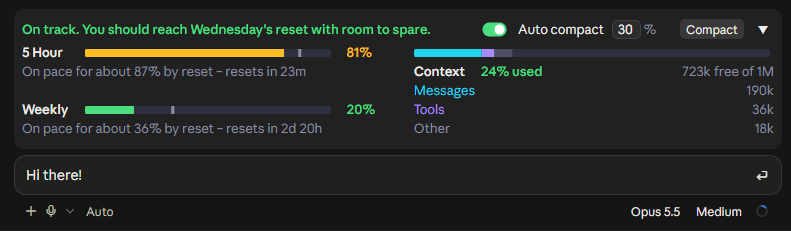
一個 Claude Code mod,會在提示框上方的即時資訊列顯示方案限額、重設時間與上下文視窗用量,並支援一鍵與自動壓縮。
anantraghunath/claude-code-usage-quota-mod
這是一個 Claude Code 外掛(v0.1.3,MIT),會在桌面版 Code 分頁與終端機的提示框上方繪製資訊列,顯示 5 小時與每週方案限額、重設時的預測,以及依 Messages、Tools 與 Other 拆分的上下文視窗用量。進度列達到 75% 時變成琥珀色,達到 90% 時變成紅色(如果照目前速度會耗盡,也可能更早變色)。它提供一鍵 Compact 按鈕,以及可依工作階段設定門檻的 Auto compact 模式(預設 30%,範圍 15-99),而且不會中斷回覆。使用 /quota 切換。可以透過 GitHub marketplace 使用 /plugin install 安裝,也可以使用 claude plugin marketplace add。除了定期(約每 2 分鐘)使用既有 Claude 登入呼叫 Anthropic 用量服務外,所有內容都在本機執行;它看不到認證資料,也不會將任何內容傳送到其他地方。需要較新的 Claude Code,以及 Pro 或 Max 方案。
請先查看作者 README,確認 marketplace 與外掛名稱;指令可能隨儲存庫結構而變動。
claude plugin marketplace add anantraghunath/claude-code-usage-quota-mod
claude plugin install claude-code-usage-quota







Know your Claude limits before they hit you. A live band above the Claude Code prompt that shows your plan limits, forecasts whether you'll run out before they reset, and shows how full your context window is. Compact in one click, or let it compact automatically.
The 5 Hour and Weekly limits are your whole Claude account's, including what you use in Claude chat and Cowork. The band itself shows in Claude Code: the desktop app and the terminal.
Type /quota to turn the band off and on.
One row that still shows the time left until each limit resets:

[!TIP] Never hit a full context again: Auto compact, on by one click. With Auto compact on, the band compacts your session once the context reaches 30% (the default; set 15 to 99). A long context costs more on every reply, so compacting early keeps replies cheaper and your limits lasting longer. Auto compact never interrupts a reply. Want to compact right now? The Compact button runs
/compactin one click.Each session keeps its own Auto compact setting, even after a restart, so you can run them differently side by side:
- Building something big? Set Auto compact higher (say 70%) or turn it off, so Claude keeps the whole picture. Press Compact yourself at a good stopping point. (With it off, Claude Code's built-in compaction still steps in when the context is nearly full.)
- Everyday sessions? One click turns Auto compact on at 30%. They stay lean, and your 5 Hour and Weekly limits last longer.
5 Hour and Weekly limits
On course to run out, it warns you and says when you'll hit the limit:


Context window
/context counts it, split into Messages, Tools and Other.Compacting
/compact in one click.If the session is already past your % when you turn it on, it asks first:
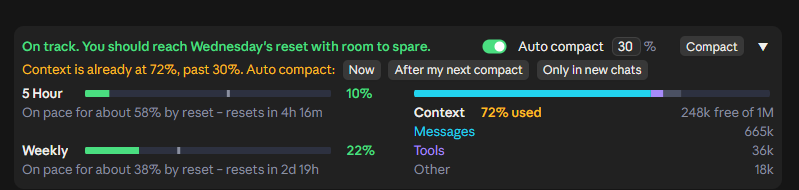

/compact, or Claude Code's own), then takes over.Works in light and dark themes and at every width down to the narrowest. Collapsed or expanded is shared across all sessions.
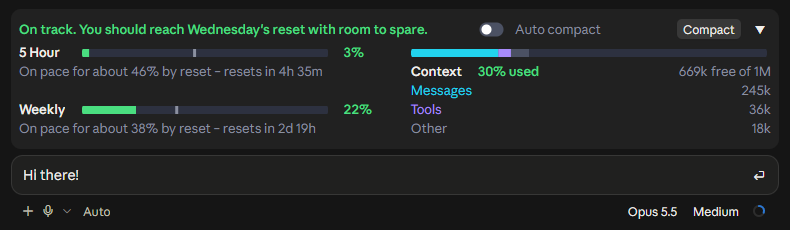
<details> <summary><b>MORE SCREENSHOTS</b></summary>Early in a 5 hour window:

Running out on the Weekly limit:


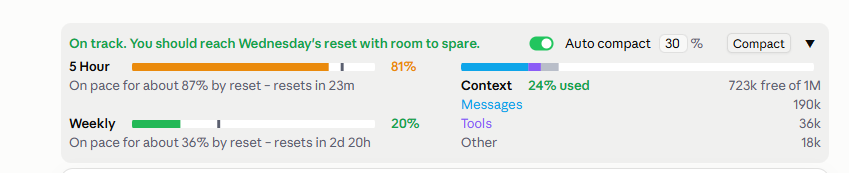
| Light theme | Narrowest window |
| --- | --- |
|  |
| 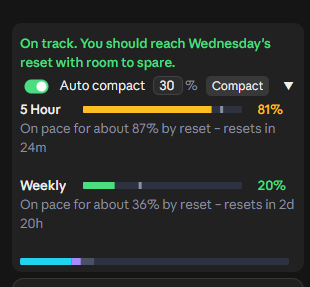 |
|
|
|  |
| 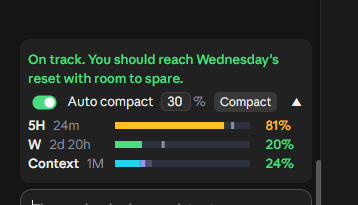 |
|
[!NOTE] In the desktop app, the band appears once a session has started. The brand-new Welcome back screen has no session yet, so no mod can draw there. Send your first message and it appears.
In the terminal, ▲/▼ expands and collapses it. The [-] next to it is Claude Code's own control and hides the band; ctrl+x ctrl+a brings it back.
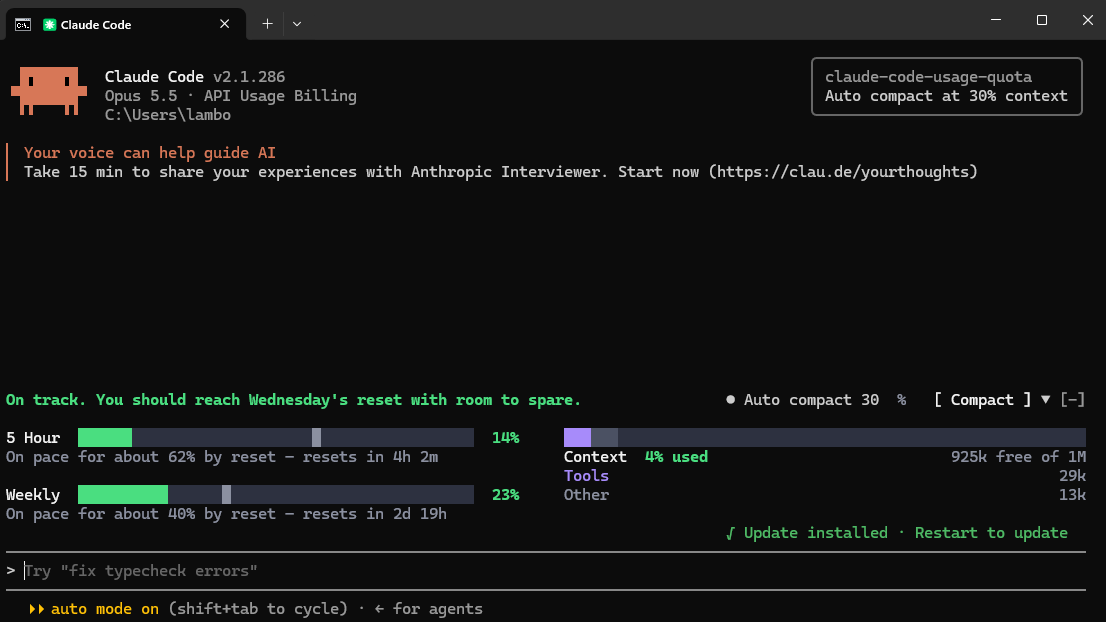
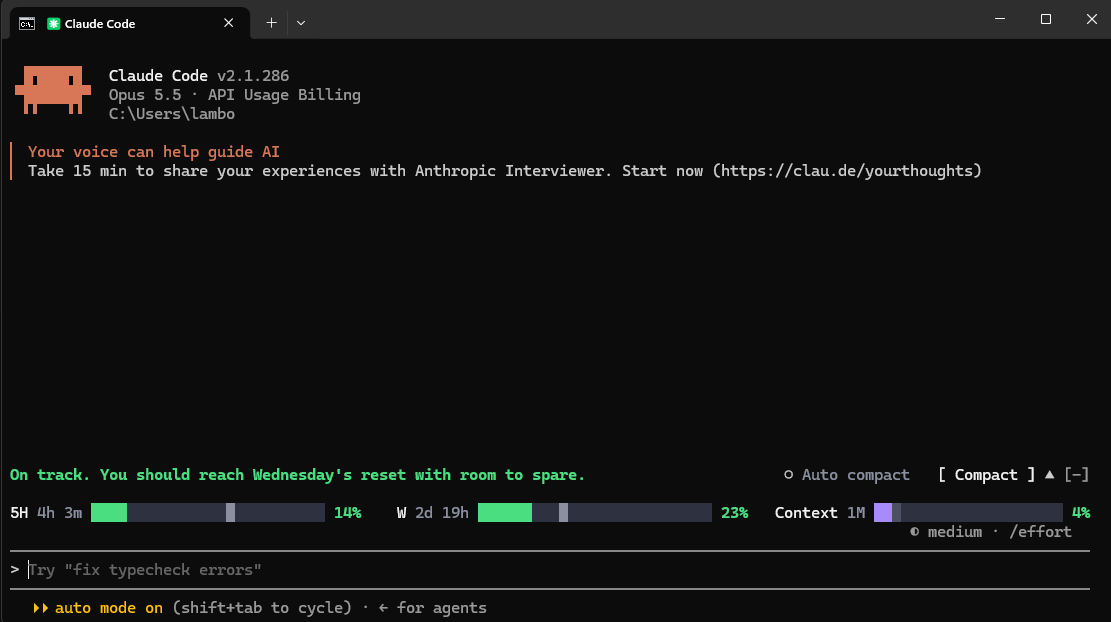
Needs a recent Claude Code, signed in with a Pro or Max plan.
Desktop app: in the Code tab, send this as a message, allow the claude plugin command if asked, then quit and reopen the app:
Install the claude-code-usage-quota plugin from the GitHub marketplace anantraghunath/claude-code-usage-quota-mod
Terminal: inside claude, run:
/plugin install claude-code-usage-quota --marketplace anantraghunath/claude-code-usage-quota-mod
Either way installs it for both the desktop app and the terminal.
Update: ask Claude, then restart:
Update the claude-code-usage-quota plugin from its marketplace
Uninstall: in the desktop app, ask Claude:
Remove the claude-code-usage-quota-mod plugin marketplace
or in the terminal:
/plugin marketplace remove claude-code-usage-quota-mod
then restart. This removes it from both. Just want it out of sight? /quota hides it without uninstalling.
claude plugin marketplace add anantraghunath/claude-code-usage-quota-mod; claude plugin install claude-code-usage-quota@claude-code-usage-quota-mod
To update:
claude plugin marketplace update claude-code-usage-quota-mod; claude plugin update claude-code-usage-quota@claude-code-usage-quota-mod
To uninstall:
claude plugin marketplace remove claude-code-usage-quota-mod
Everything runs on your machine. It reads what Claude Code already has (your context and the limits each reply carries), and about every 2 minutes asks Anthropic's usage service for your limits through your existing Claude login. It never sees your credentials and sends nothing anywhere else. In the desktop app it reads the app's theme setting to match light or dark.
First release: I'd love to hear how it works for you. Open an issue for bugs or ideas. Pull requests welcome.
To work on it, clone the repo, then load it from the folder, or run its tests:
claude --plugin-dir ./claude-code-usage-quota-mod
claude plugin test ./claude-code-usage-quota-mod
If you find it useful, a ⭐ helps others find it.
Inspired by I'm liking the new mods feature on r/ClaudeCode. Thanks to u/itsxzy for sharing the original prompt that started this project.
MIT © 2026 Anant Raghunath

文件產生、漂移偵測與 API 文件自動化外掛程式,同時作為 function-hook 防護,拒絕含有機密的文件寫入或 worker 派送。

A Claude Code plugin mod providing a /databricks-pane that presents Databricks workspace, Unity Catalog, compute, jobs, pipelines, apps and dashboards as a tree following the databricks CLI, with live highlights, profile switching, and CLI argument copy.


Claude Code 模組,會在提示列上方以縮圖預覽貼上的圖片,不只顯示 `[Image #n]` 標籤。
