
richard-parayno@richard-parayno
richard-parayno/ccsidebar
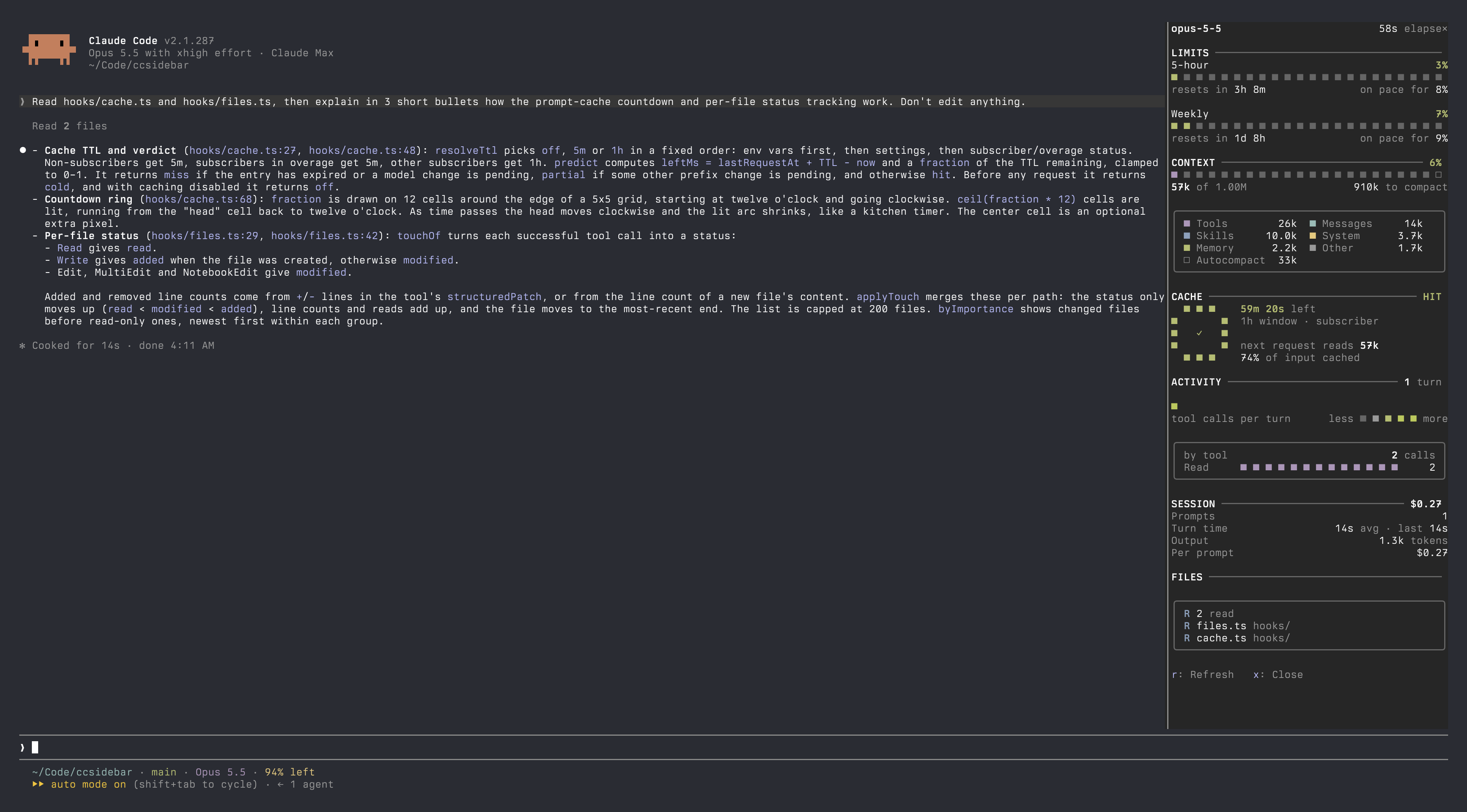
可切換的 Claude Code 右側邊欄外掛,顯示使用額度、上下文視窗、prompt 快取倒數、每回合活動、工作階段統計與異動檔案。
richard-parayno/ccsidebar
ccsidebar 是 Claude Code 的右側邊欄外掛,可用 /sidebar 切換顯示。它涵蓋使用額度、上下文視窗、prompt 快取倒數環、每回合活動、工作階段統計,以及異動檔案清單(包含 A/M/R 狀態與行數差異)。配色採用終端機的 16 色調色盤,並跟隨你的 shell 主題。使用 /plugin marketplace add richard-parayno/ccsidebar 加入,再執行 /plugin install ccsidebar@ccsidebar 安裝。本機開發時,可以把 repo 連結到 mods 資料夾並設定 CLAUDE_CODE_PLUGIN_DIRS;儲存檔案後就會立即重新載入。
請先查看作者 README,確認 marketplace 與外掛名稱;指令可能隨儲存庫結構而變動。
claude plugin marketplace add richard-parayno/ccsidebar
claude plugin install ccsidebar
A toggle-able right sidebar mod for Claude Code showing usage limits, context window, prompt-cache countdown, per-turn activity, session stats and touched files. Colors use your terminal's 16-color palette, so they follow your shell theme.
/sidebar toggles the pane. r refreshes, x closes while it has focus./plugin marketplace add richard-parayno/ccsidebar
/plugin install ccsidebar@ccsidebar
Link the repo into a mods folder and list it in CLAUDE_CODE_PLUGIN_DIRS (the
env block of ~/.claude/settings.json; separate several with :):
mkdir -p ~/.claude/mods && ln -s ~/Code/ccsidebar ~/.claude/mods/ccsidebar
{ "env": { "CLAUDE_CODE_PLUGIN_DIRS": "~/.claude/mods/ccsidebar" } }
The folder is watched: saving a file reloads the mod live. Don't also install it from the marketplace on the same machine, or two copies load.
claude plugin validate .
claude plugin test .
tsc -p .          # after one load, which lays the types in .claude-plugin/types/
| File | What |
| --- | --- |
| hooks/register.tsx | hooks and state: usage, context, turns, tools, cache timing |
| hooks/view.tsx | the drawing: sections, cards, type scale |
| hooks/pixels.ts | box grids and the terminal/theme palettes |
| hooks/cache.ts | prompt-cache TTL rule, hit/miss prediction, countdown ring |
| hooks/files.ts | per-file status (A/M/R) and line deltas |
| hooks/format.ts | numbers, durations, pace |
| types/index.d.ts | the $.state contract |

文件產生、漂移偵測與 API 文件自動化外掛程式,同時作為 function-hook 防護,拒絕含有機密的文件寫入或 worker 派送。

Claude 桌面應用程式的狀態列。它顯示在提示列上方,呈現工作階段品質、內容脈絡填充量、快取倒數,以及 5 小時與每週限額,並讓 Clawd 演出工作階段正在做什麼。

一個 Claude Code 外掛 mod,提供 /databricks-pane:依照 databricks CLI,以樹狀結構呈現 Databricks 工作區、Unity Catalog、計算資源、工作、管線、應用程式和儀表板,並支援即時醒目顯示、設定檔切換和複製 CLI 參數。
