
sebi75@sebi75
sebi75/agent-canvas
sebi75/agent-canvas
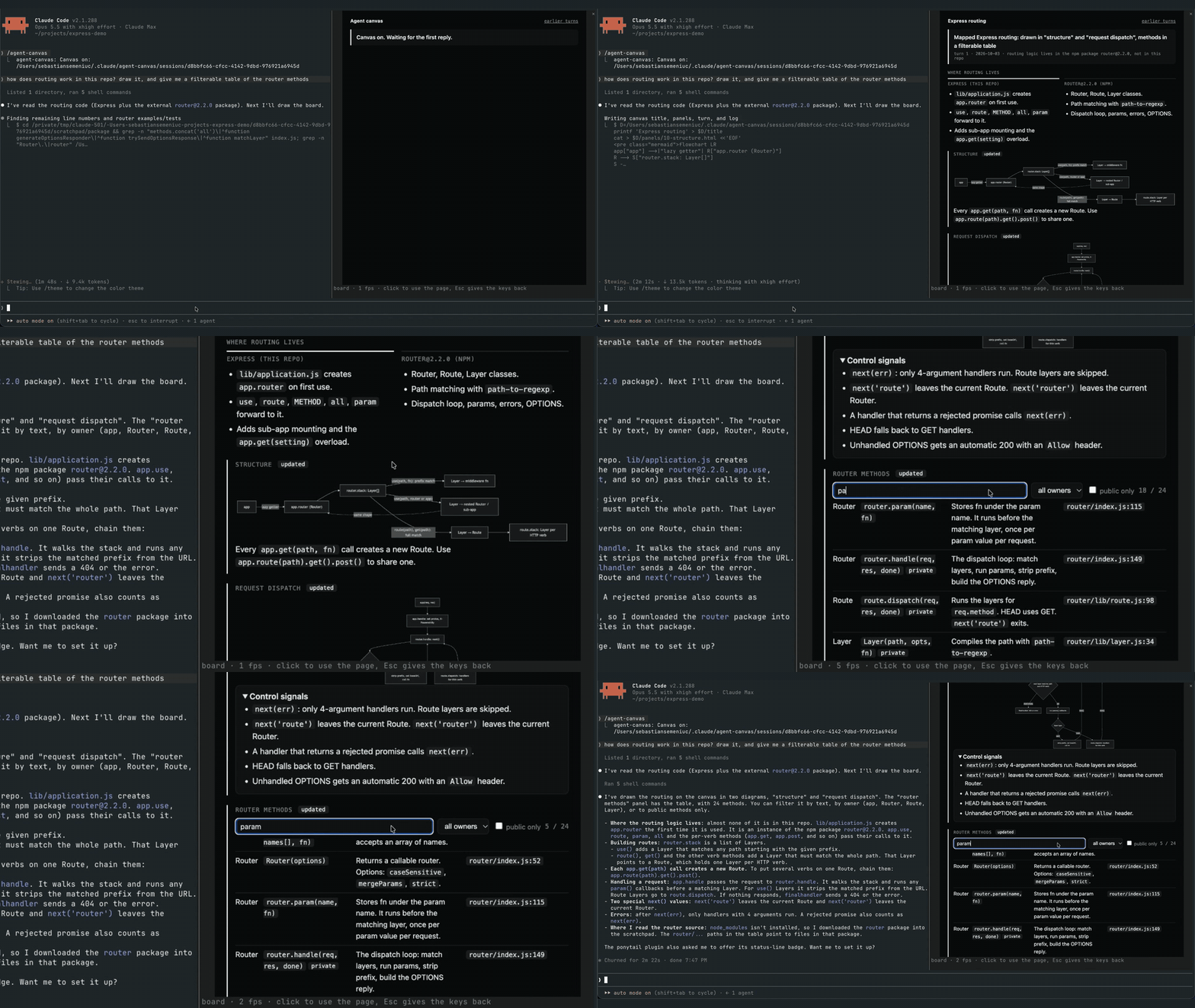
agent-canvas 是一個 Claude Code mod,會為每個工作階段在逐字稿旁的面板中提供即時看板。代理程式每次回覆都會重寫 turn.html、編輯 panels/<name>.html,並在 ~/.claude/agent-canvas/sessions/<session id>/ 下追加 log.txt,讓看板保持更新。如果代理程式結束一回合卻沒有寫入 turn.html,掛鉤會阻擋 Stop 事件。橋接程式(bridge/bridge.mjs)會建立 board.html,透過管線執行沒有開放連接埠的無頭 Chrome,並送出 PNG 畫格,讓 mod 用 Image 元素繪製,再透過 $.ui.blit 交換。Client 區域會將點擊、按鍵與面板大小轉送給 Chrome,滾輪則負責捲動。需要 Claude Code 2.1.287+、支援影像的終端機(Ghostty、kitty 或 WezTerm)、Chrome/Chromium 與 Node.js 18+。透過 /plugin marketplace add sebi75/agent-canvas 安裝。已知限制:頁面上的文字無法選取,Desktop 應用程式與 VS Code 擴充功能沒有 Image 元素。
請先查看作者 README,確認 marketplace 與外掛名稱;指令可能隨儲存庫結構而變動。
claude plugin marketplace add sebi75/agent-canvas
claude plugin install agent-canvas
A live board for each Claude Code session, in a pane beside the transcript. The agent keeps it current every reply, with diagrams, tables, charts and the state of the work. The board is a real web page drawn by headless Chrome, so you can click, type, hover and scroll in it. Nothing opens in a browser tab, and the board belongs to the session that made it.
It is a Claude Code mod: a plugin whose hooks run inside Claude Code.
turn.html (this reply's news), edits the panels that changed (panels/<name>.html, kept across turns) and appends a line to log.txt. The files live in ~/.claude/agent-canvas/sessions/<session id>/.turn.html after its last tool call, the mod blocks the Stop event and tells it why.bridge/bridge.mjs builds board.html from those files, runs headless Chrome on it over a pipe (no open port), and writes each frame as a PNG. Panels written this turn come first, marked "updated". Every turn keeps a snapshot, linked from "earlier turns".Image element and swaps each new one in with $.ui.blit. A Client region laid over the picture sends clicks, keys and the pane size back to Chrome, and the mouse wheel scrolls the page.From a Claude Code session:
/plugin marketplace add sebi75/agent-canvas
/plugin install agent-canvas@agent-canvas
Or clone the repository and load the folder in every session by adding CLAUDE_CODE_PLUGIN_DIRS with the clone's path to the env block of ~/.claude/settings.json.
| command | what it does |
|---|---|
| /agent-canvas | turns the board on and opens its pane; when it shows another page, goes back to the board |
| /agent-canvas off | turns the board off and closes the pane |
| /agent-canvas <url or path> | shows that page instead, for example a local dev server |
Click the page to type into it. Esc gives the keyboard back to Claude Code. The board stays on across a plugin reload, and AGENT_CANVAS_OPEN=1 turns it on when a session starts.
Claude Code turns images off when the terminal reports itself as "libghostty", which Herdr does. Its own switch turns them back on: set CLAUDE_CODE_FORCE_TERMINAL_IMAGES=1 in the shell that starts claude inside Herdr, for example in ~/.zshrc when HERDR_ENV is set.
Use Herdr 0.9 or later. On Herdr 0.9.3 an animated page measured about 42 frames per second on screen, against about 53 in plain Ghostty. Herdr 0.7 drew about 3; there, set AGENT_CANVAS_FPS=4 so frames do not queue up.
| variable | default |
|---|---|
| AGENT_CANVAS_FPS | 60 |
| AGENT_CANVAS_SCALE | 2 device pixels per CSS pixel |
| AGENT_CANVAS_CHROME | the first Chrome or Chromium found |
| AGENT_CANVAS_OPEN | unset; 1 turns the board on at session start |
Image element. The pane says so there.agent-canvas started as herdr-canvas, which rendered the same kind of board to a static image in a Herdr pane next to the agent. Claude Code mods made it possible to put a live, clickable page inside Claude Code itself.
node test/board.test.mjs
MIT

文件產生、漂移偵測與 API 文件自動化外掛程式,同時作為 function-hook 防護,拒絕含有機密的文件寫入或 worker 派送。

Claude 桌面應用程式的狀態列。它顯示在提示列上方,呈現工作階段品質、內容脈絡填充量、快取倒數,以及 5 小時與每週限額,並讓 Clawd 演出工作階段正在做什麼。

一個 Claude Code 外掛 mod,提供 /databricks-pane:依照 databricks CLI,以樹狀結構呈現 Databricks 工作區、Unity Catalog、計算資源、工作、管線、應用程式和儀表板,並支援即時醒目顯示、設定檔切換和複製 CLI 參數。
