
simplecore-inc@simplecore-inc
simplecore-inc/claude-mods/tree/main/mods/accounts
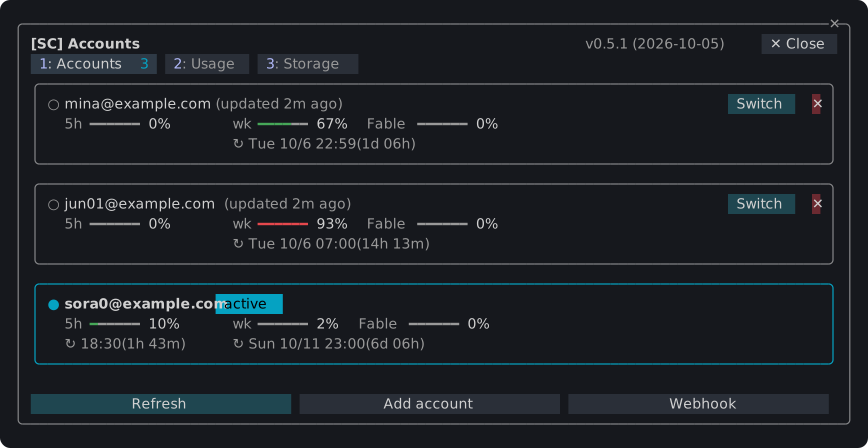
SimpleCORE Claude Mods 的 Accounts 外掛,可在多個 Claude 帳號間切換、顯示用量與儲存空間,並在提示列上方提供狀態列。
simplecore-inc/claude-mods/tree/main/mods/accounts
此為 simplecore-inc/claude-mods 中的 sc-accounts 外掛,屬於 sc 外掛組合的一部分。提供 /sc:accounts 指令,可保存多個 Claude 登入並一鍵切換執行中的工作階段,顯示各帳號的五小時、每週與各模型用量及重置時間,統計本機每日、各模型與各專案的 token 使用量,檢視並清理 ~/.claude 內容,並在提示列上方顯示帳號、模型、任務、分支與變更行數的狀態列。另可選用 webhook 將狀態送至外部系統(預設關閉)。安裝方式:claude plugin marketplace add simplecore-inc/claude-mods,再執行 claude plugin install sc@simplecore-mods。
请先查看作者 README 确认 marketplace 和插件名称;命令可能随仓库结构改变。
claude plugin marketplace add simplecore-inc/claude-mods
claude plugin install sc-accounts




Plugins for Claude Code that add panes, a status band and slash commands to the terminal: switch between several Claude accounts, watch their usage limits and token use, see and clean up what Claude Code keeps on the machine, and keep agents, worktrees, checkpoints, diffs and memory files in one pane. Install one plugin, sc, and you get them all.
/sc:accounts

~/.claude holds by kind and project, and a cleanup of idle sessions confirmed by typing a word./sc:workspace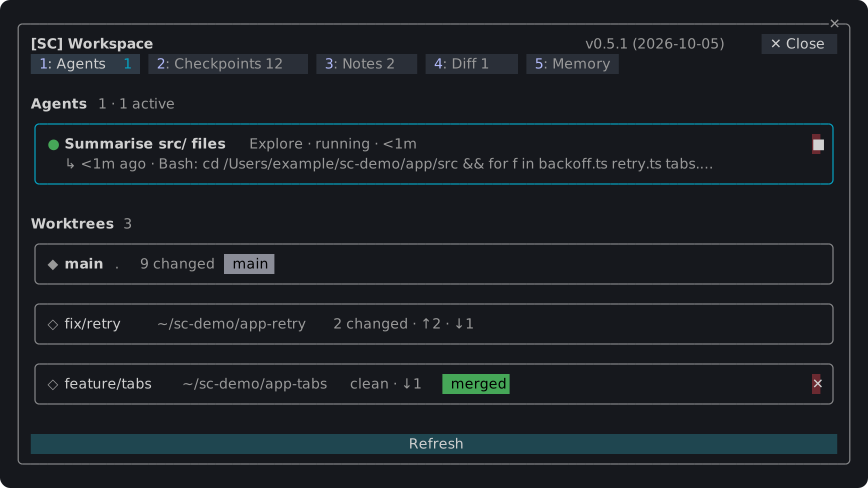
Anything that cannot be taken back asks in a dialog first; Esc cancels.
claude plugin marketplace add simplecore-inc/claude-mods
claude plugin install sc@simplecore-mods
sc installs sc-accounts and sc-workspace with it. The plugins are installed for your user, so they run in every session. Run /reload-plugins in a session that was already open.
To use a local clone instead, add its folder as the marketplace:
git clone https://github.com/simplecore-inc/claude-mods.git
claude plugin marketplace add ./claude-mods
claude plugin install sc@simplecore-mods
claude plugin marketplace update simplecore-mods
claude plugin update sc@simplecore-mods
claude plugin update sc-accounts@simplecore-mods
claude plugin update sc-workspace@simplecore-mods
Then run /reload-plugins in each open session. With a local clone, git pull in the clone and /reload-plugins are enough: a plugin from a folder marketplace is read from that folder.
claude plugin uninstall sc@simplecore-mods
claude plugin prune
claude plugin marketplace remove simplecore-mods
prune removes sc-accounts and sc-workspace, which were installed as dependencies of sc; uninstall them by name instead if you installed them yourself. marketplace remove is only needed when you will not install from it again.
The mods leave some data behind, which you can delete by hand:
| What | Where |
| --- | --- |
| Saved logins | macOS: keychain items of the service account-switch. Elsewhere: ~/.claude/account-switch/ |
| Webhook token | macOS: the keychain item of the service sc-webhook. Elsewhere: ~/.claude/sc-accounts/webhook-token |
| Webhook template | ~/.claude/sc-accounts/ |
| Settings, account index, notes, checkpoint lists | ~/.claude/plugins/store/sc-*.json |
| Checkpoints | in each repository: the refs under refs/sc/ and the files .git/sc-snapshot-*.index |
~/.claude is CLAUDE_CONFIG_DIR when that is set. To delete a repository's checkpoints:
git for-each-ref --format='%(refname)' refs/sc/ | xargs -n 1 git update-ref -d
rm -f "$(git rev-parse --git-dir)"/sc-snapshot-*.index
The account you are logged in with stays logged in; only the saved copies go.
The mods show English, and Korean where Claude Code's language setting is Korean; any other language falls back to English. Without that setting, LC_ALL, LC_MESSAGES and LANG decide, in that order.
Developing a mod covers the layout, the rules the engine enforces, the checks and how to release.

Cache-aware /loop workers and CronCreate background automation. Substrate plugin for every recurring task in the ruflo family.

A shared Kanban board for a project, with a live one-line summary of it above the prompt.

显示当前会话是否有 Playwright 浏览器、浏览器由谁占用,并可通过 /browser clean 关闭残留浏览器的 Claude Code mod。

