
meganemura@meganemura
meganemura/pull-request-pane/tree/main/plugin
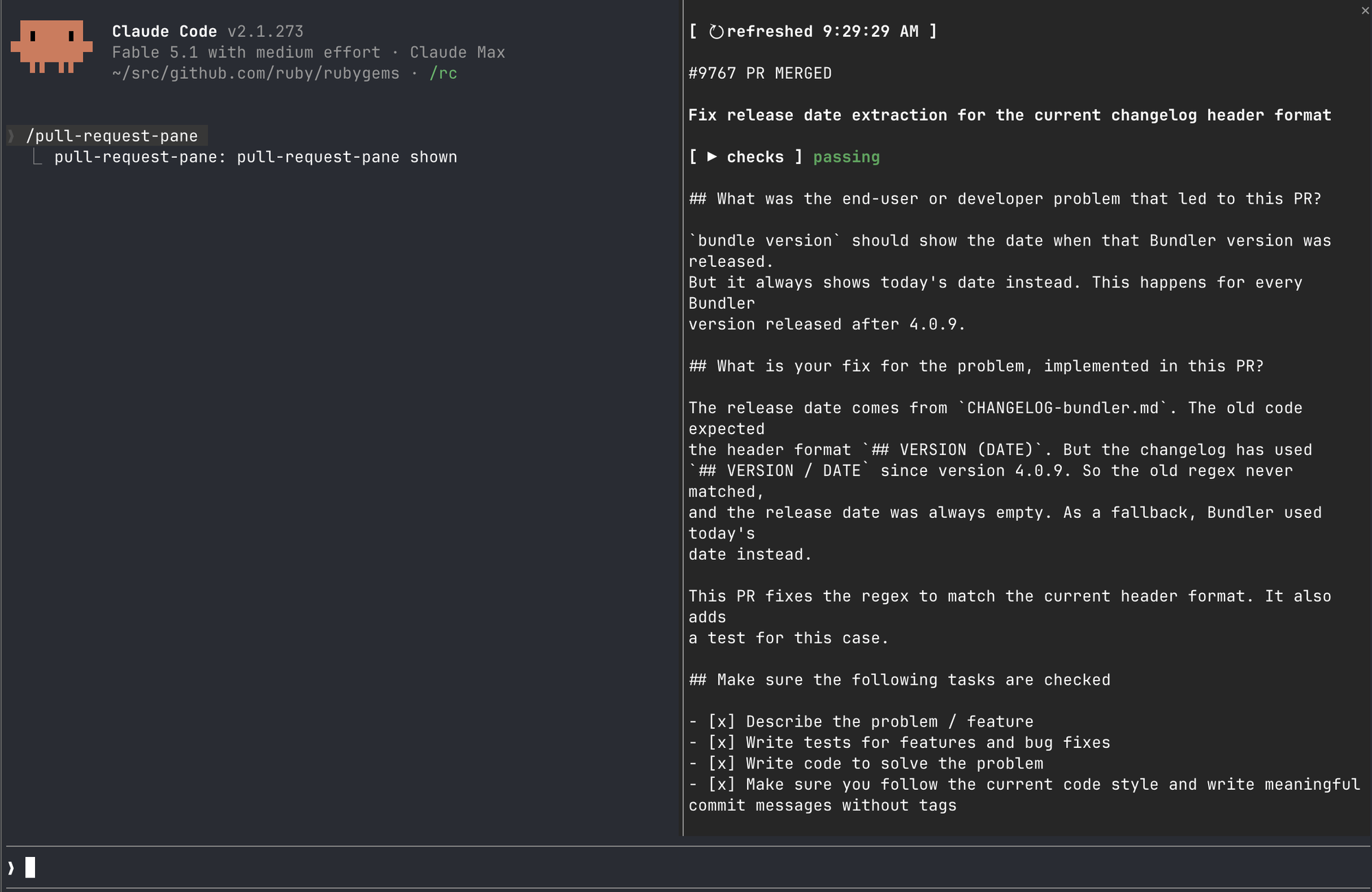
一个 Claude Code 插件(Claude Mod),在转录旁边的窗格中显示与当前会话相关的 GitHub 拉取请求。
meganemura/pull-request-pane/tree/main/plugin
转录旁边的窗格中显示与当前会话相关的 GitHub 拉取请求和议题:拖动标题或描述即可对其留下评论,添加任意数量的评论,然后点击提交将它们作为一条提示发送。通过定时器观察每个拉取请求的检查、审查决定和可合并性的更新。
请先查看作者 README 确认 marketplace 和插件名称;命令可能随仓库结构改变。
claude plugin marketplace add meganemura/pull-request-pane
claude plugin install pull-request-pane@pull-request-pane

A Claude Code plugin (a Claude Mod) that shows the GitHub pull requests related to the current session in a pane beside the transcript.
Issues that a pull request closes, and issues the transcript mentions, appear as entries too, with a line between a run of pull requests and a run of issues so the two do not read as one list of the same kind of thing.
CLAUDE_CODE_ENABLE_FUNCTION_HOOKS=1gh logged in to GitHubclaude plugin marketplace add meganemura/pull-request-pane
claude plugin install pull-request-pane@pull-request-pane
Set CLAUDE_CODE_ENABLE_FUNCTION_HOOKS=1 for every session, instead of prefixing each claude
invocation, by adding it to settings.json's env:
{
  "env": {
    "CLAUDE_CODE_ENABLE_FUNCTION_HOOKS": "1"
  }
}
Type /pull-request-pane to show or hide the pane.
To develop against a checkout instead, run the plugin straight from its working tree:
CLAUDE_CODE_ENABLE_FUNCTION_HOOKS=1 claude --plugin-dir /path/to/pull-request-pane/plugin
A ↻ refreshed <time> button sits above the entries (↻ reading… before the first one lands).
Press it to refetch every entry's title, description and checks right now, instead of waiting
for the next automatic refresh or the 60-second poll — the poll's own schedule restarts from the
press. An entry with review activity in progress (see below) is protected from this, the same
way it is protected from the automatic refresh a turn or a gh command triggers.
Each entry shows its identifier (#<n> PR <state> for a pull request, #<n> Issue <state> for
an issue) as a link to it on GitHub — hover it and it highlights — then a blank line, its
bold title, another blank line, its checks (a pull request only, its status word bold too),
another blank line, then its full description. Drag over the title or the description to open a
comment box for that span: the covered text highlights as you drag, and releasing opens a
comment field under the entry with the span quoted above it. Type a comment and press Enter to
add it — the field is dropped, and the comment appears in a list under the entry, with an x
button to remove it. Press Enter with an empty field to drop the span with no comment. Repeat as
many times as you like, over either field; an always-present overall field takes one comment
on the entry as a whole, the same way.
Press Submit to send every comment for that entry as one prompt: a header naming the entry, then each comment with the text it was about quoted above it, the overall comment last. Submit refuses — the status line says why — while a comment field still holds text Enter has not added, or with nothing to send at all.
An entry's title and description stop refreshing while it has any review activity (a pending selection, a committed comment, or unsent text in a comment field), so nothing a comment quotes changes out from under it before you press Submit. Checks, review decision and mergeability keep updating live on their own 60-second poll regardless — they have nothing to do with the text.
Each pull request's status is fetched once as soon as the pane opens, and every 60 seconds
after that while it stays open. A pull request with no status yet shows fetching checks…;
the footer below the entries reads status updating… while a fetch is in flight, status <time> once it lands. Once fetched, it draws as a ▶ checks toggle and one coloured word —
failing (red), running (yellow), passing (green), or no checks — so you can tell at a
glance whether to look further. Press the toggle for the detail: a summary line (✓<pass> ✗<fail> …<pending> · <review decision> · <mergeable>), then each check by name, coloured by
its own outcome and linked to its run (GitHub Actions, CircleCI, whatever produced it) where
one exists — hover a linked check and it highlights, so it reads as clickable. Issues have no
status.
Each entry's description is drawn in full below its title and status. A line wider than the pane wraps onto as many screen rows as it needs, and a drag's position still matches the right character across the wrap.
Opening the pane, or the pane's own data changing, is saved to this plugin's own store, so a
reload of this file (developing against it under --plugin-dir, or any other reload the engine
does on its own) shows the last known entries right away instead of reading… — a background
refresh catches up from there once you next interact with the session.
Early access. The function-hooks API can change between Claude Code releases without notice.

高级 git 工作流,提供 diff 分析、风险评分、变更分类和审阅者建议,并为 PR 操作提供 function-hook 防护 mod。
讓 bg session 在 git worktree 裡做完的分支,由你在面板按一顆按鈕快轉進 main:交接單只帶參數,步驟由 mod 推導,執行前檢查、執行後驗證


在每轮结束时列出未提交文件,并提醒模型提交已完成工作的 Claude Code 插件。