
ohosgor@ohosgor
ohosgor/podside
ohosgor/podside
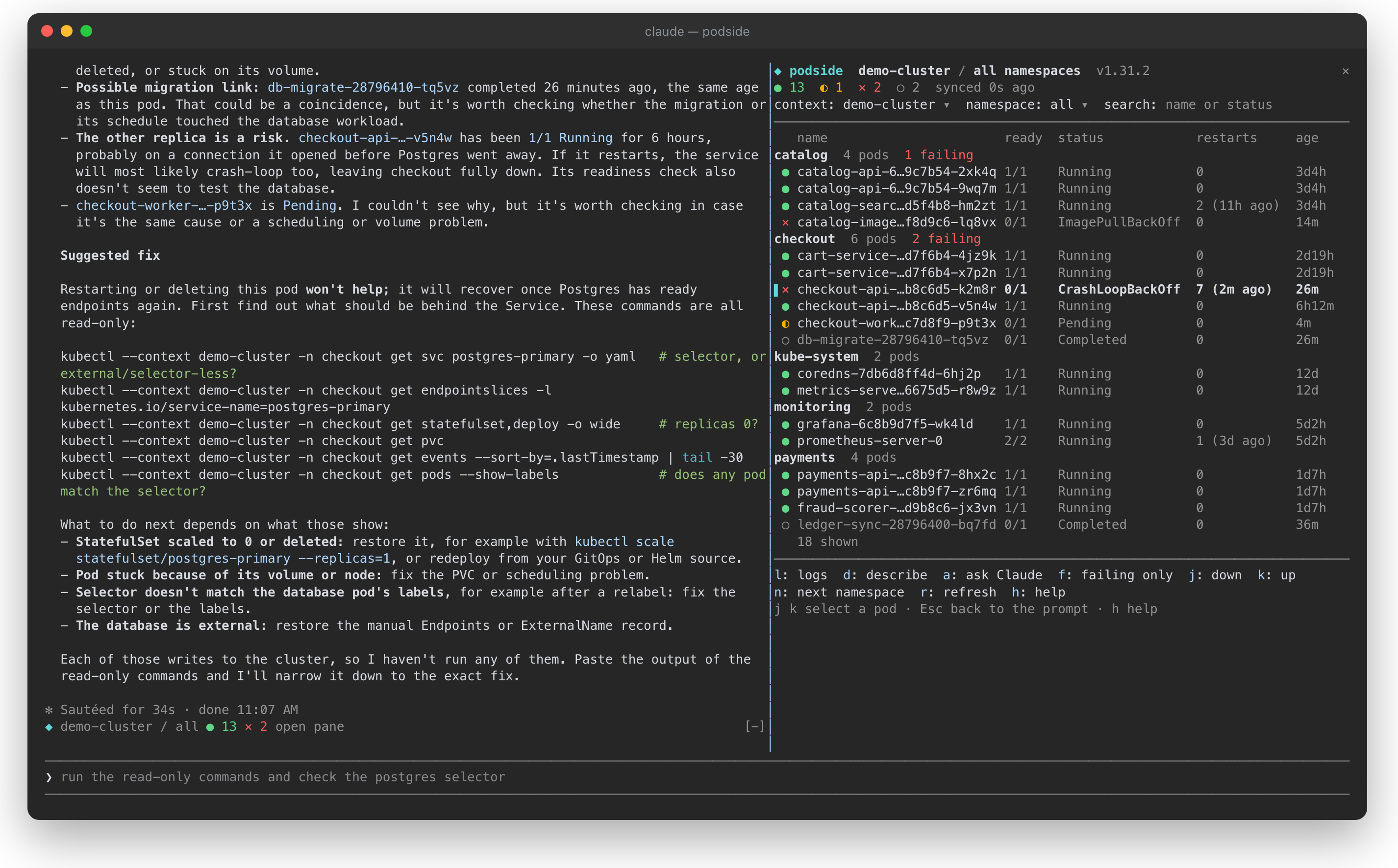
podside 是一个 Claude Code mod,会在你的对话旁边绘制实时、按命名空间分组的 Kubernetes pod 列表。它让你一眼查看 pod 健康状况,用单键读取日志和 describe 输出,还能通过 Ask Claude 将所选 pod 的 describe 输出与最近日志发送给 Claude 进行诊断。窗格打开时,所选 pod 会作为上下文附加到每个提示。它从设计上就是只读的,只使用你自己的 kubeconfig 执行 kubectl get、logs、describe、version 和 config 读取,不发出其他网络请求,只保存你是否隐藏了内置帮助。需要 Claude Code v2.1.287+ 和 PATH 中的 kubectl;可通过 /plugin marketplace add ohosgor/podside 和 /plugin install podside@podside 安装。
请先查看作者 README 确认 marketplace 和插件名称;命令可能随仓库结构改变。
claude plugin marketplace add ohosgor/podside
claude plugin install podside
A Kubernetes pod pane that lives beside Claude Code.
podside is a Claude Code mod: it draws a live pod list next to your conversation, lets you read logs and describe output with one key, and tells Claude which pod you are looking at, so you can just ask "why is this pod failing?".
It is inspired by the keyboard-first flow of k9s, but it is a separate project with no affiliation to k9s.
<sub>A demo cluster. Pressing <code>a</code> on the crash-looping <code>checkout-api</code> pod sent its describe output and logs to Claude, which traced the crash to a database Service with no ready endpoints and suggested read-only commands to confirm it.</sub>
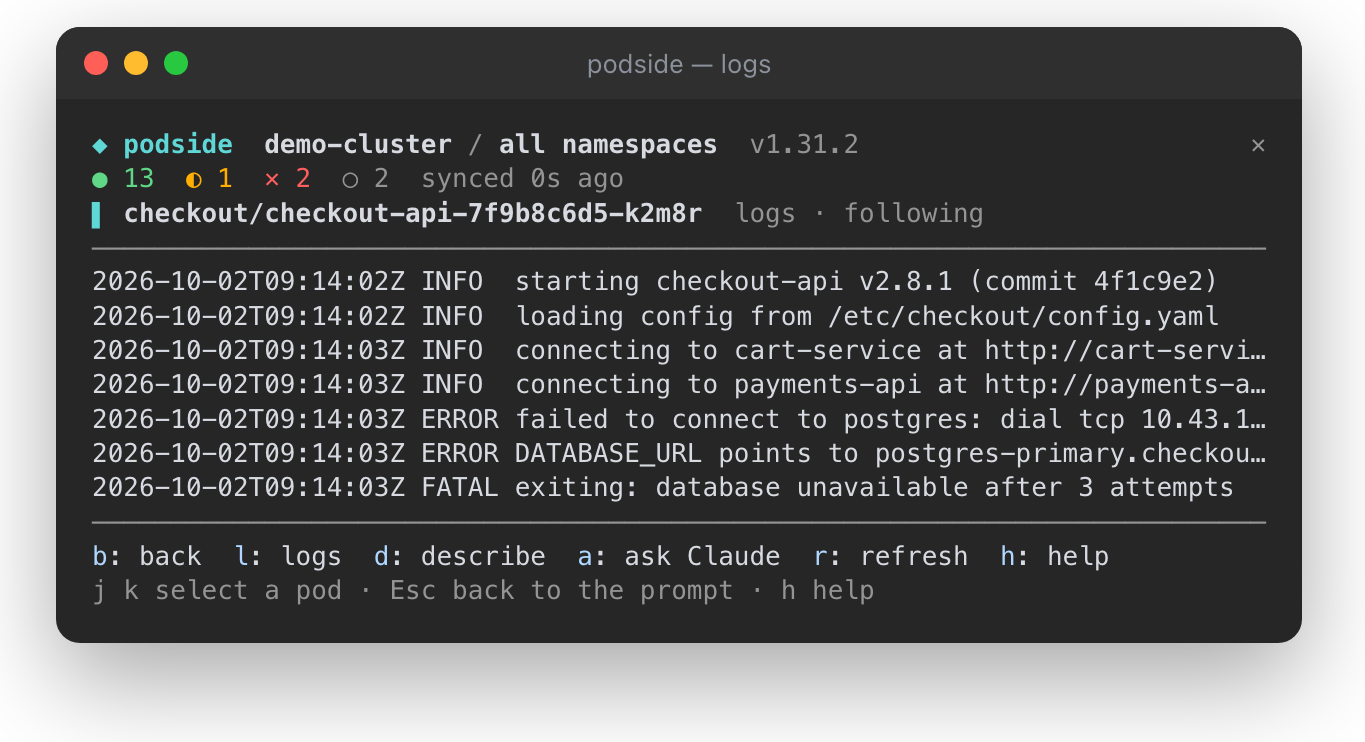
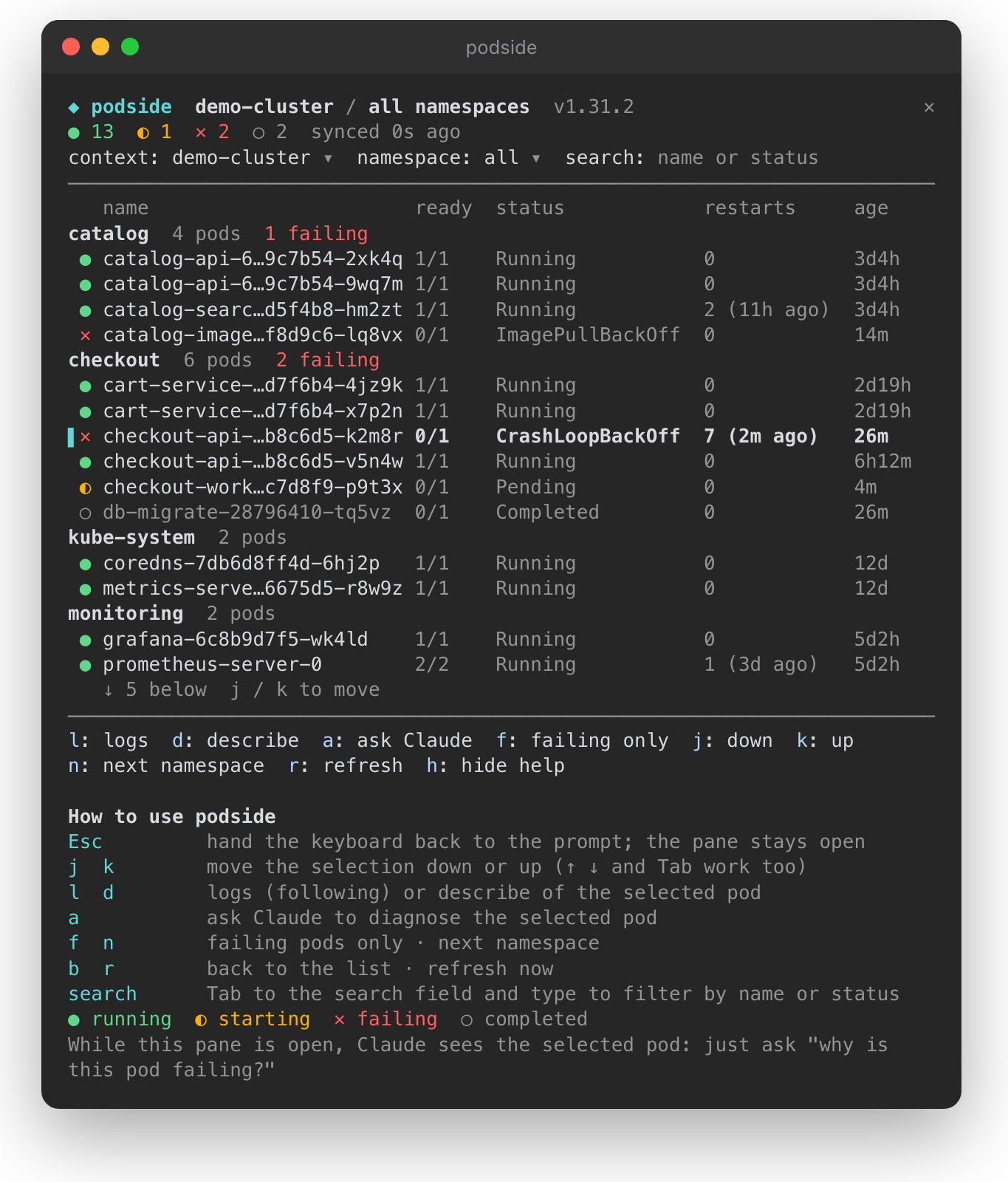
● running, ◐ starting, ✕ failing, ○ completed, with totals in the top bardescribe output and recent logs to Claude for a diagnosiskubectl get, logs, describe, version and config reads. It never writes to your cluster, and its context switcher passes --context instead of touching your kubeconfig.| Logs of the selected pod, following | The pane with its built-in help |
| --- | --- |
|  |
|  |
|
Requires Claude Code v2.1.287 or later and kubectl on your PATH.
/plugin marketplace add ohosgor/podside
/plugin install podside@podside
Or from your shell:
claude plugin marketplace add ohosgor/podside
claude plugin install podside@podside
/podside              # all namespaces
/podside my-namespace # one namespace
The pane takes the keyboard when it opens. Esc hands it back to the prompt; click the pane or press ctrl+x then Tab to return.
| Key | Action |
| --- | --- |
| j k | Move the selection down / up (↑ ↓ and Tab work too) |
| l | Logs of the selected pod |
| d | Describe the selected pod |
| a | Ask Claude about the selected pod |
| b | Back to the list |
| f | Toggle failing pods only |
| n | Next namespace |
| r | Refresh now |
| h | Show or hide the built-in help |
The context, namespace and search fields at the top are reachable with Tab. A short guide sits at the bottom of the pane on first use; h hides it and podside remembers that.
git clone https://github.com/ohosgor/podside
claude --plugin-dir ./podside   # hot-reloads on save
claude plugin validate ./podside
claude plugin test ./podside
The hooks module is hooks/register.tsx; its tests are in register.test.tsx and run against a stubbed kubectl.
A mod runs inside Claude Code with your permissions. podside's own calls are limited to the kubectl reads listed above, $.prompt.submit for "Ask Claude", and drawing its pane. You can list everything it hooks and calls without running it:
claude plugin validate .
kubectl, with your own kubeconfig: config get-contexts, config current-context, config view --minify, version, get ns, get pods, logs and describe pod. It talks to your cluster through kubectl and makes no other network requests.a, the pod's describe output and its last 120 log lines are sent as a prompt. Nothing is sent while the pane is closed or no pod is selected.h), in Claude Code's local plugin store. Pod data lives only in the session's memory.
由 neural-trader(v2.7+)驱动的神经交易策略:自学习 LSTM/Transformer/N-BEATS 模型、Rust/NAPI 回测、112+ 个 MCP 工具、群体协作和投资组合优化。

claude-seo 的可选 mods companion。它在 Claude Code 内作为 mod(function-hook 外挂)运行,因此能强制执行 skill 只能请求的事项。

Repowise Plugin for Claude Code — 提供 Graph、Git、Docs、Decisions、Code Health 五層程式碼智慧,透過 MCP 工具、slash commands 與自動 skills 讓 Claude 理解架構、擁有者、熱點與缺陷風險。含 Lens 這個 Claude Code mod,提供 spinner 提示、margin notes、變更審查與 /lens 面板。