overalls
A Claude Code mod that draws a status band above the prompt: a live "weather
forecast" of the context window, how much of your usage limits is spent, and the
level Ponytail and
Caveman are running at.

Once the context passes 75% (and Claude isn't mid-turn), a Compact button
appears in the band.
Where the widgets don't fit on one row, they wrap whole onto a second, while
Compact and ⚙ stay at the right of the first.
Install
In the Claude Code terminal:
/plugin marketplace add Troepster/overalls
/plugin install overalls@overalls
/reload-plugins
Or from any shell, which also covers the desktop app (new sessions pick it up):
claude plugin marketplace add Troepster/overalls
claude plugin install overalls@overalls
If the band doesn't appear, start a new session or restart Claude Code.
To update: /plugin marketplace update overalls in Claude Code, or from a
shell:
claude plugin marketplace update overalls
claude plugin update overalls@overalls
Ponytail and Caveman are optional. Without Caveman its widget doesn't show;
without Ponytail its widget reads not installed until you set it to off.
Either way, the ⚙ Config box offers to install them.
A mod runs inside Claude Code with the same access Claude Code has, so read
hooks/register.tsx before installing.
Settings
Each appears as a row in the Claude Code config menu under overalls; changing
one reloads the mod. The /overalls command sets them from the prompt, which
also works in the desktop app, where /config isn't available:
/overalls weather minimal
/overalls ponytail off
/overalls            (shows the current values)
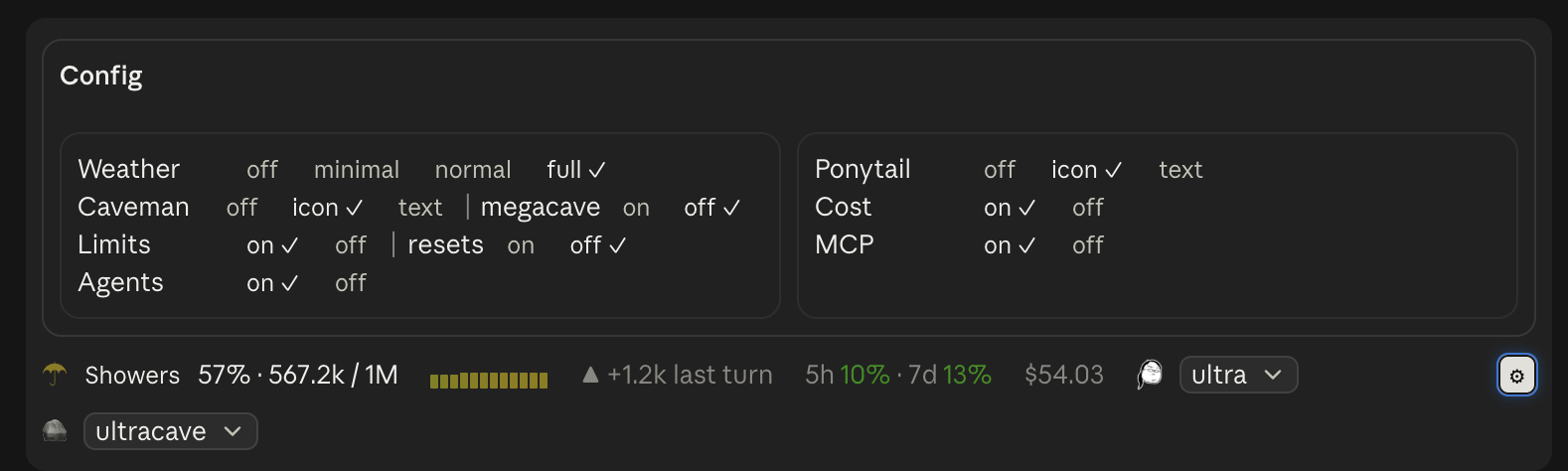
The ⚙ at the right of the band opens a Config box above it with every
choice for every setting, the current one ticked; pressing one sets it, so you
see the change in the band as you make it. Press ⚙ again to close it. Hover
over a setting's name in the Config box for a line on what it is.
Pressing the forecast itself (Showers, or 67% at minimal) steps
the weather detail through minimal → normal → full and round again; off
is set in the Config box.
Where the mod has a /config row (the terminal), /overalls sets that row.
Where it has none (the desktop app), it keeps the choice in the mod's own store
instead, and that choice wins over the /config value in every session until
you set the same setting with /overalls in a session that has the row.
| Setting | Values | Default | What it does |
|---|---|---|---|
| Weather detail | off · minimal · normal · full (typed; anything else counts as full) | full | How much of the forecast to show |
| Ponytail level | off · icon · text (typed; anything else counts as icon, and an old on/off value as icon/off) | icon | Show whether Ponytail is installed and its level, after its logo or the word ponytail: |
| Caveman mode | off · icon · text (typed; anything else counts as icon) | icon | Show Caveman's mode where it's installed, after 🪨 or the word caveman: |
| Offer megacave | on · off | off | List Caveman's Classical Chinese mode (megacave) in its dropdown; in the Config box it sits on Caveman's row |
| Usage limits | on · off | on | Show how much of your 5-hour and weekly limits is spent (subscriptions only) |
| Limit resets | on · off | on | Show how long until each limit resets (5h 42% ↻1h20m); in the Config box it sits on the Limits row |
| Limit run-out | off · warn · always (typed; anything else counts as warn) | warn | Warn when a limit will run out before it resets, at your pace over the last hour: ⚠1h40m in amber, red under 30 minutes. always also shows ✓ lasts for a limit that won't. Needs 10 minutes of samples and 2 points of movement first. Follows each limit, or stands alone (5h ⚠1h40m) with the limits off |
| Session cost | on · off | off | Show what this session has cost so far |
| MCP warnings | on · off | on | Warn when an MCP server or connector fails or needs signing in again |
| Running agents | on · off | on | Show ⧗ 2 agents while subagents run; pressing it lists them (type and task) |
| Turns left | on · off | on | Show ⌛ ~6 turns: about how many more turns fit, at the average growth of the last five that grew (red from 3) |
| Tool denials | on · off | on | Show ⛔ 2 denied for tool calls refused by you, a hook, a permission rule or the auto-mode classifier; pressing it lists them, with Dismiss |
What each weather level shows:
| Level | Band |
|---|---|
| minimal | ☂ 67% |
| normal | ☂ Showers 67% · 134.4k / 200k |
| full | normal plus the last 12 turns as a sparkline and the change since last turn |
| off | nothing (the Ponytail segment still shows if enabled) |
Ponytail detection
<picture>
<source media="(prefers-color-scheme: dark)" srcset="assets/ponytail-logo-dark.png">
<img src="assets/ponytail-logo.png" width="110" alt="Ponytail, the lazy senior dev">
</picture>
- Installed: an enabled
ponytail@… entry in enabledPlugins. Otherwise the
band shows not installed beside the logo.
- Level: this session's own. Ponytail keeps a single level file for every
session, so it can't say what this session runs at; Overalls tracks it per
session instead, by Ponytail's rules:
- a new session, and a compaction (Ponytail activates afresh), start at
Ponytail's default:
$PONYTAIL_DEFAULT_MODE, else defaultMode in its
config.json ($XDG_CONFIG_HOME/ponytail/, or ~/.config/ponytail/), else
full
/ponytail <level> (or /ponytail:ponytail <level>), /ponytail-review,
stop ponytail and normal mode change it as they go in.
Another session's switch doesn't change this band.
- Switched by picking a level from the dropdown the level is drawn as (on
mobile, which has no dropdown, a press steps ultra → full → lite → off), through
Ponytail's own
/ponytail <level> command.
Installing Ponytail or Caveman
Where either isn't installed, its row in the ⚙ Config box has an Install
button. A mod can't install plugins, so it types a request into the prompt box,
for example:
Install the caveman Claude Code plugin: run `claude plugin marketplace add JuliusBrussee/caveman` then `claude plugin install caveman@caveman`.
Send it and Claude runs the two commands, each behind the usual permission
prompt. A plugin's hooks start with the next session.
Caveman
- Installed: an enabled
caveman@… entry in enabledPlugins; otherwise
nothing shows.
- Mode: this session's own. Caveman keeps each session's mode in
.caveman-sessions/<session id>.mode in your Claude config directory, so the
band reads that. A session with no file of its own (one started
before Caveman was installed) shows off; the shared .caveman-active, which
holds the last mode set in any window, is read only when there's no session id.
- Switched by picking a mode from its dropdown (ultracave, caveman, off, and
megacave when Offer megacave is on, since it answers in Classical Chinese; on mobile a press steps through them), through Caveman's own
/megacave, /ultracave, /caveman and /caveman off commands.
MCP warnings
Claude Code gives a mod no list of MCP servers or their state, so the band learns
of trouble from Claude's own tool calls:
- an
mcp__<server>__… call that fails to sign in or connect (a bad-arguments
error doesn't count), and
- the servers a ToolSearch reports as failed.
The band then shows ⚠ 2 MCP errors. Pressing it opens an MCP errors box
above the band (like the Config box; one is open at a time) with a row per
server: its name, sign in or failed, the error as Claude saw it, and:
- Reconnect: for a claude.ai connector, Customize → Connectors, opened in
the desktop app itself there (
claude://claude.ai/customize/connectors), and
at https://claude.ai/customize/connectors from the CLI or the web. For any
other server, /mcp in the terminal; the desktop app's /mcp only lists
servers, so there it says to sign in from a terminal session.
- Dismiss, and Dismiss all
A server leaves the list on its next successful call, or when dismissed. It's
caught on its first failure, not before.
Data and access
Overalls makes no network requests and sends nothing anywhere. Everything it
does stays inside your Claude Code session:
- reads the session's context-window usage (
$.session.usage()) after each turn
- reads your Claude Code settings to see whether Ponytail is enabled
- reads the session's usage-limit percentages, reset times and cost
(
$.session.usage()) when those widgets are on, and the clock to count down
to each reset
- reads the session's list of subagents (
$.agent.list(): type, task, status)
when the agents widget is on
- redraws the band every 30 seconds, so countdowns and the agent count stay
current, and at each redraw notes the usage-limit percentages
(
$.session.usage()), keeping the last hour of them in session memory to
tell when a limit will run out
- reads your Claude Code settings to see whether Caveman is enabled and, if it
is, this session's id and Caveman's mode file for it in your Claude config
directory:
.caveman-sessions/<session id>.mode (or .caveman-active when
there's no session id)
- reads Ponytail's
config.json, for its default level, and the
PONYTAIL_DEFAULT_MODE, XDG_CONFIG_HOME, CLAUDE_CONFIG_DIR and HOME
environment variables
- reads each prompt you submit only to spot a Ponytail command (
/ponytail …,
stop ponytail, normal mode), keeping nothing of it but the level
- keeps the last 12 readings and the Ponytail level in session state, which is
gone when the session ends
- switches Ponytail's level or Caveman's mode only when you pick one from the
band: it runs
/ponytail <level>, or Caveman's command for the mode, as if you
had typed it (which Claude reads, as it
would your typing), or types it into the prompt box if it can't run it
- types an install request into the prompt box only when you press Install
in the Config box; nothing is installed unless you send it and approve
Claude's commands
- reads the name of each tool Claude calls and, when one is refused (by you, a
hook, a permission rule or the auto-mode classifier), keeps the tool's name and
the first 100 characters of the reason in session state until you dismiss it
- reads the name of each MCP tool Claude calls, the error text when one fails,
and the failed-server list a ToolSearch returns, keeping only each failing
server's name, whether it needs signing in or failed, and the first 100
characters of its error; it runs
/mcp only when you press Reconnect in the terminal
- reads
CLAUDE_CODE_ENTRYPOINT while the MCP errors box is open, to tell the
desktop app from the CLI and the web; in the desktop app, pressing
Reconnect on a connector hands claude://claude.ai/customize/connectors to
the system's opener (open on macOS, xdg-open on Linux, cmd /c start on
Windows), which opens that page in the app
- compacts the conversation only when you press its Compact button; where
Claude Code doesn't let a plugin compact (the desktop app), that press runs
/compact for you, or types it into the prompt box if it can't run it
- changes its own settings only when you run
/overalls weather … or
/overalls ponytail … (and the rest), pick one in the ⚙ Config box, or press the
forecast to step the weather detail: through the /config row where there is one (saved in
your Claude Code settings, as /config saves them), otherwise in the mod's own
store, a small JSON file Claude Code keeps for the plugin in your Claude config
directory.
Apart from that store, it writes no files, and the only program it starts is that
system opener, with that one fixed address, when you press Reconnect.
It hooks four events only to observe them, never changing what they carry:
tool.call (note an MCP server failing or answering again, and a refused call), turn.complete
(take a reading), session.compact (record the drop after a
compaction, and reset the Ponytail level to its default) and prompt.submit
(note a Ponytail switch once your prompt has gone in, so /ponytail lite shows
straight away). It also draws the band above
the prompt.
Development
Load your clone directly instead of the installed copy, so saves hot-reload:
claude --plugin-dir ~/Projects/overalls
or for every session (including the desktop app), in ~/.claude/settings.json:
{ "env": { "CLAUDE_CODE_PLUGIN_DIRS": "~/Projects/overalls" } }
Don't also have the marketplace copy installed, or you'll get two bands.
claude plugin validate .
claude plugin test .
hooks/register.tsx is the module; types/index.d.ts declares the state it
keeps. To add a setting, declare a field under userConfig in
.claude-plugin/plugin.json and read it from options in register.
Licence
MIT
Credits
Ponytail and its logo are by
Dietrich Gebert, used under the MIT licence
(assets/PONYTAIL-LICENSE). Overalls only reads the
level Ponytail writes; it isn't affiliated with or endorsed by the Ponytail project.
Caveman is by Julius Brussee; "Caveman" is
his trademark. Overalls only reads the mode Caveman writes and runs its
commands, uses none of its logos (🪨 is a stock emoji), and isn't affiliated
with or endorsed by the Caveman project.


