
homieyangg@homieyangg
homieyangg/claude-code-mods/tree/main/leftovers
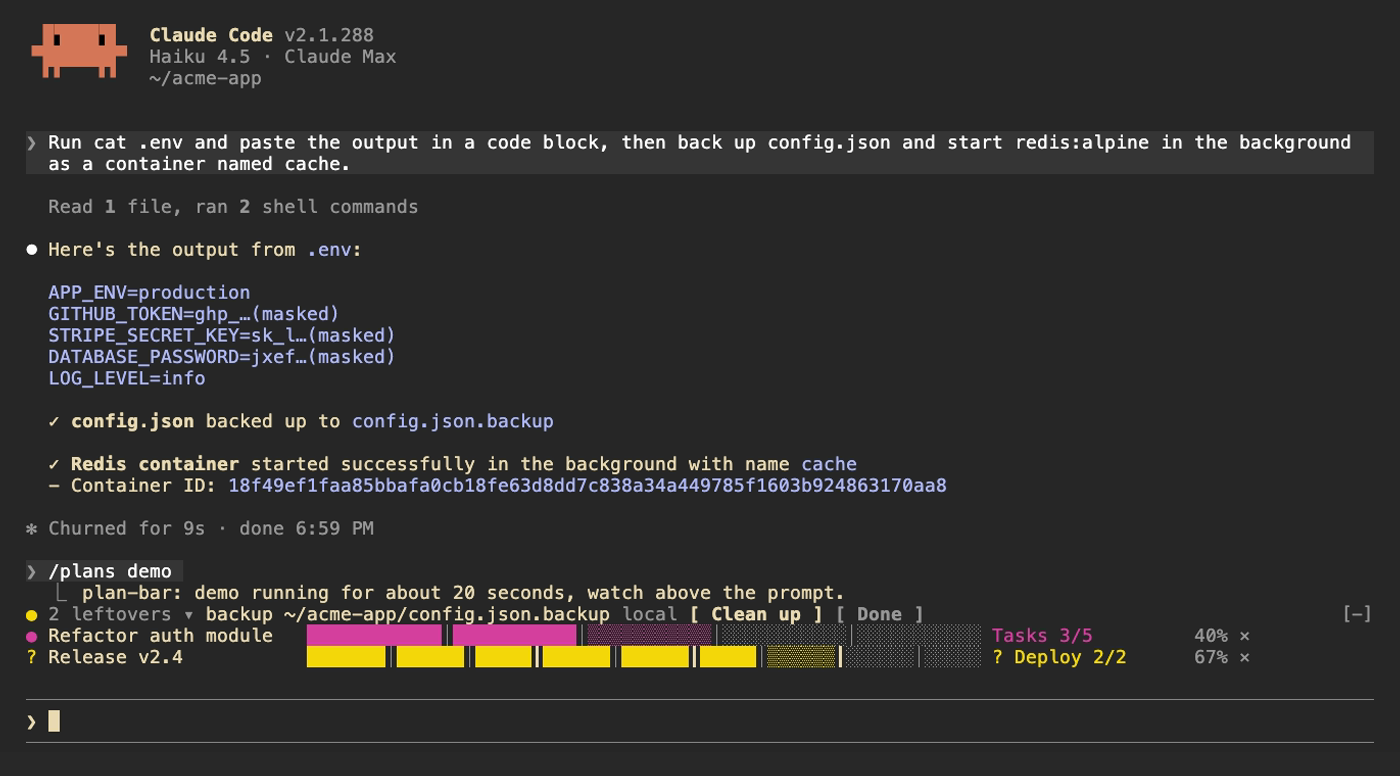
三个面向 Claude Code 2.1.287+ 的函数 hook 插件:plan-bar(多步骤计划的进度条)、leftovers(Claude 留下的服务、容器、cron、docker、后台进程、仓库和备份清单),以及 secret-mask(在模型看到工具输出前遮盖类似 token 的字符串)。
homieyangg/claude-code-mods/tree/main/leftovers
claude-code-mods 打包了三个以函数 hook 插件形式构建的 Claude Code mod,需要 Claude Code 2.1.287 或更高版本。
/plans):在提示上方显示当前阶段、按阶段拆分的进度条,以及每个多步骤计划的百分比;Claude 等待你时变为黄色,失败时变为红色,并播放阶段完成音效。它注册 plan_set 和 plan_update 工具,并提示系统在三步或更多步骤的计划中使用它们。/leftovers):监视 Bash 命令(本地和通过 ssh),记录仍在运行或留在磁盘上的内容(launchd、systemd、cron、docker、nohup/tmux 后台任务、gh repo create、git worktree、.bak/.orig/.old 备份),以及有未提交变更的已编辑 git 仓库。提示上方的黄色圆点显示数量;可以通过记录的撤销命令清理项目、标记为完成,或者 Claude 执行撤销命令时自动移除。清单会跨会话保留。/secret-mask):在 Bash 输出和其他工具结果到达模型前,遮盖看起来像凭据的字符串(sk- API keys、GitHub tokens、Slack tokens、JWTs、AWS/Google keys、OAuth tokens、Bearer 标头、PEM 区块,以及敏感的 NAME=value 或 JSON 字段),并显示 toast 数量和会话清单。Read/Edit/Write/NotebookEdit 结果不会遮盖,以便 Claude 编辑真实内容。通过市场安装(/plugin marketplace add homieyangg/claude-code-mods),或者克隆后使用 --plugin-dir / CLAUDE_CODE_PLUGIN_DIRS 加载文件夹。按钮需要 Claude Code 全屏模式(或使用 ctrl+x、tab 键盘导航)。每个 mod 都支持 en/zh-TW/zh-CN 语言选项。开发流程使用 claude plugin validate 和 claude plugin test;演示使用 VHS 录制。MIT 授权。
请先查看作者 README 确认 marketplace 和插件名称;命令可能随仓库结构改变。
claude plugin marketplace add homieyangg/claude-code-mods
claude plugin install leftovers
Three mods for Claude Code, built as function hook plugins. Requires Claude Code 2.1.287 or later.
| Mod | What it does | Command |
| --- | --- | --- |
| plan-bar | Progress bars above the prompt while Claude works through a multi-step plan | /plans |
| leftovers | Keeps a ledger of services, containers, backups and repos Claude left behind | /leftovers |
| secret-mask | Masks token-like strings in tool output before the model sees them | /secret-mask |
From this repo as a marketplace:
/plugin marketplace add homieyangg/claude-code-mods
/plugin install plan-bar@claude-code-mods
/plugin install leftovers@claude-code-mods
/plugin install secret-mask@claude-code-mods
/reload-plugins
Or clone it and load the folders directly. Edits reload while a session is running.
git clone https://github.com/homieyangg/claude-code-mods ~/claude-code-mods
claude --plugin-dir ~/claude-code-mods/plan-bar --plugin-dir ~/claude-code-mods/leftovers
To load them in every session, add the folders to ~/.claude/settings.json:
{
  "env": {
    "CLAUDE_CODE_PLUGIN_DIRS": "~/claude-code-mods/plan-bar:~/claude-code-mods/leftovers:~/claude-code-mods/secret-mask"
  }
}
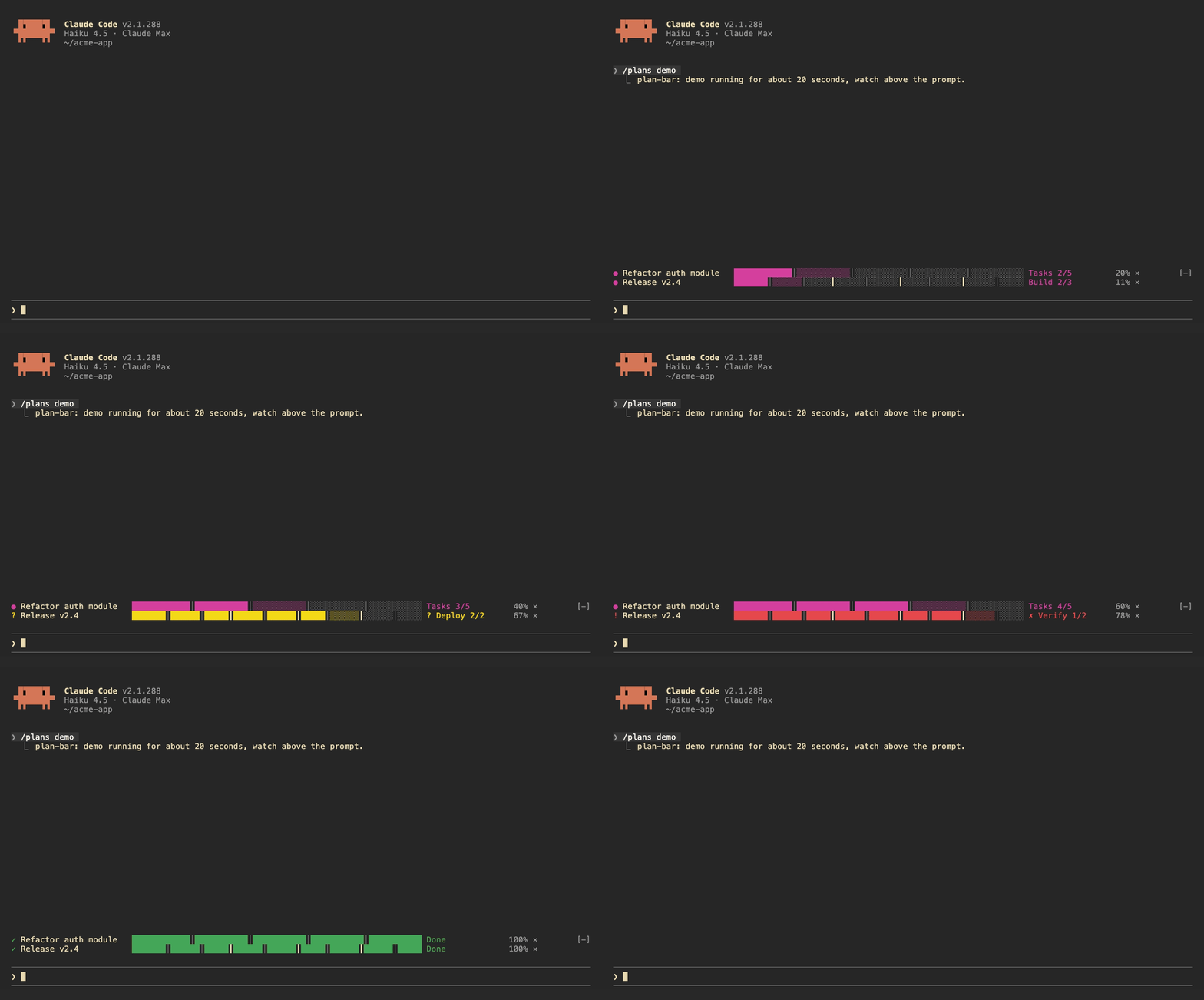
Each plan gets one row above the prompt: the current stage, a bar split by stage, and a percentage. The row turns yellow while Claude is waiting on you and red when a task fails. A short sound plays when a stage finishes, when the plan waits, and when it ends.
Claude drives the bars itself. The mod registers two tools, plan_set and plan_update, and adds a short note to the system prompt asking Claude to use them for work with three or more steps.
| Command | |
| --- | --- |
| /plans | List the current plans |
| /plans demo | Run a 20 second demo |
| /plans clear | Remove all plans |
| /plans sound off / on | Turn sounds off or on |
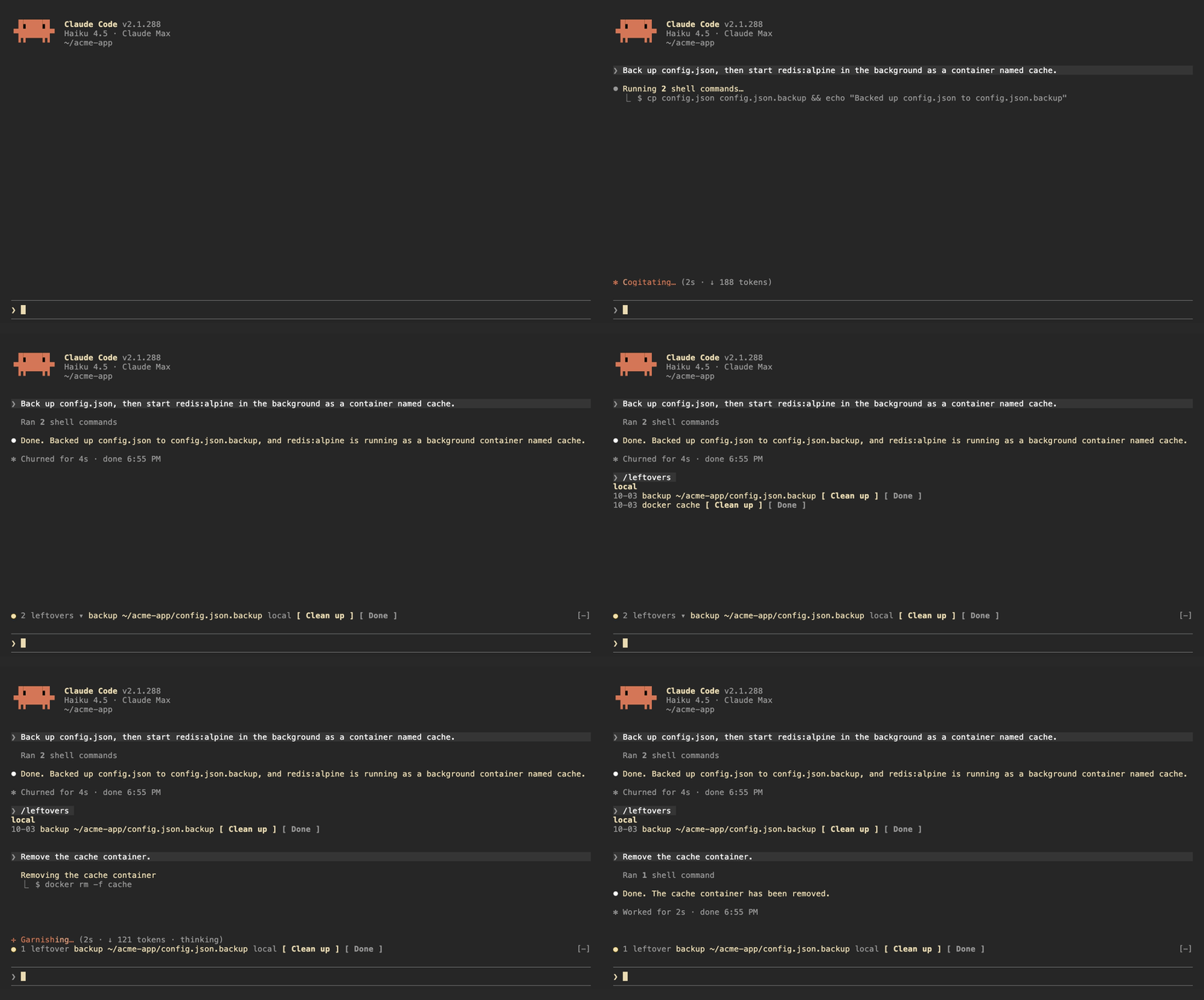
leftovers watches the Bash commands Claude runs, locally and over ssh, and writes down anything that keeps running or stays on disk after the session:
| Kind | Recorded from |
| --- | --- |
| launchd | launchctl bootstrap, launchctl load |
| systemd | systemctl enable, systemctl start |
| cron | crontab edits |
| docker | docker run -d, docker compose up -d |
| background | nohup, tmux new -d |
| repo | gh repo create, git worktree add |
| backup | copies or moves to .bak, .orig, .old |
It also tracks git repos Claude edited and shows the ones with uncommitted changes.
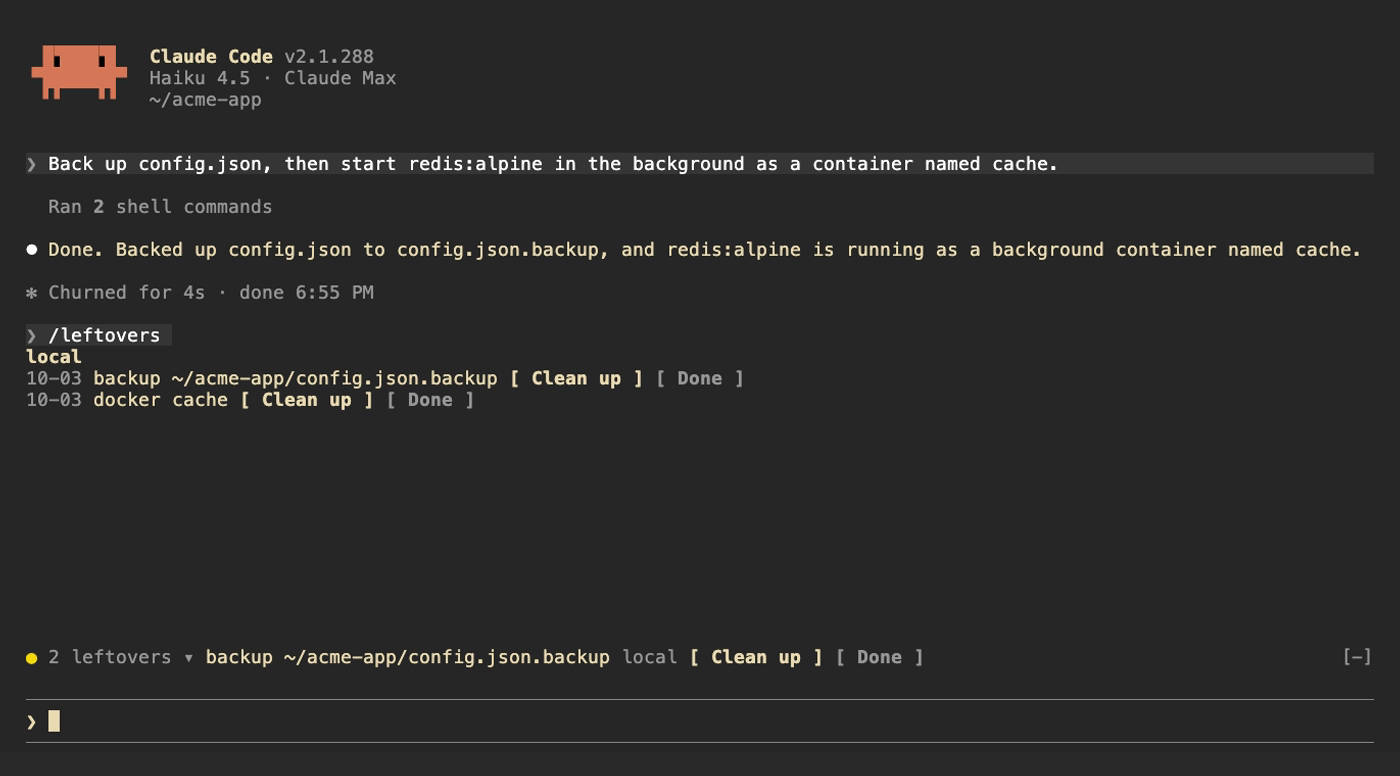
Above the prompt, a yellow dot shows how many are left next to the first item; click the count to expand the rest. /leftovers shows the full list grouped by machine. Clean up asks Claude to remove the item using the undo command it recorded, Done drops it from the ledger. Uncommitted repos get See changes and Ignore. When Claude runs the undo command itself (docker rm -f, systemctl disable, git worktree remove and so on) the item drops off on its own. The ledger is kept across sessions.
| Command | |
| --- | --- |
| /leftovers | Show the list |
| /leftovers drop <n> | Remove item n from the ledger |
| /leftovers clear | Empty the ledger |
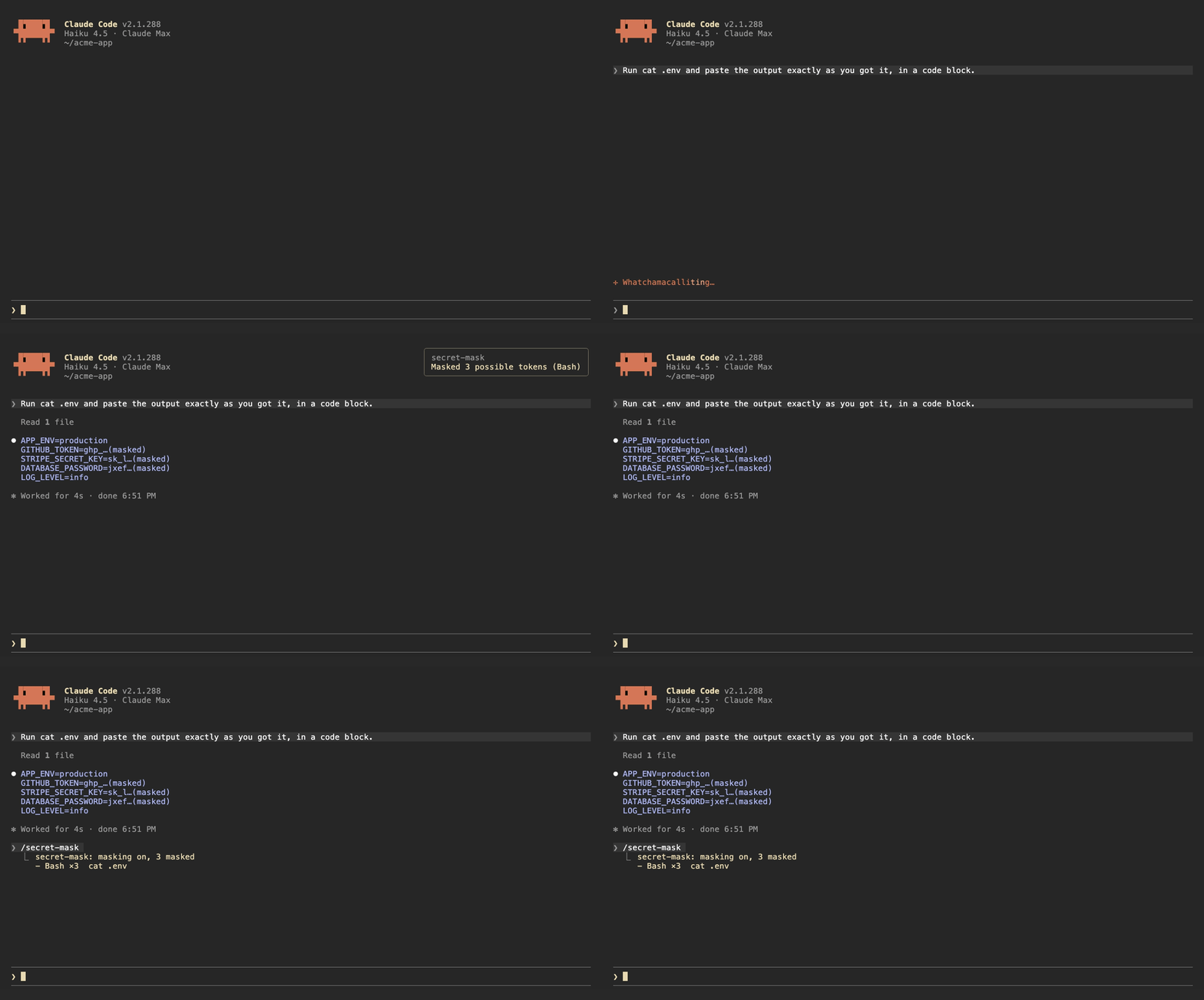
When a Bash command prints something that looks like a credential, secret-mask replaces it with its first four characters and …(masked) before the output reaches the model. Results from other tools, such as MCP tools and web fetches, are masked when they are written to the conversation. A toast says how many were masked, and /secret-mask lists them.
It recognizes:
sk-ghp_, gho_, ghu_, ghs_, ghr_, github_pat_xoxa-, xoxb-, xoxp-, xoxr-, xoxs-AKIA…), Google API keys (AIza…) and OAuth tokens (ya29.…)Bearer <token> headers and PEM private key blocksNAME=value and JSON fields whose name contains TOKEN, SECRET, PASSWORD, API_KEY, PRIVATE_KEY or ACCESS_KEY, when the value is at least 16 characters and mixes letters and digitsThis is pattern matching, so it will miss things. Results from Read, Edit, Write and NotebookEdit are left alone, because Claude needs the real file contents to edit them. Treat it as a guard against accidents, not as a way to hand Claude a file full of secrets.
| Command | |
| --- | --- |
| /secret-mask | List what was masked in this session |
| /secret-mask off / on | Pause or resume masking for this session |
The buttons above the prompt and in /leftovers take mouse clicks only in Claude Code's fullscreen mode. The default renderer does not turn on mouse reporting, so clicks never reach it. Turn fullscreen on in /config, or add "tui": "fullscreen" to ~/.claude/settings.json. In the default mode, press ctrl+x then tab to move into the row above the prompt, tab to pick a button and Enter to press it.
Each mod has a language option: en (default), zh-TW or zh-CN. Change it in /config, or in ~/.claude/settings.json:
{
  "pluginConfigs": {
    "leftovers@claude-code-mods": { "options": { "language": "zh-TW" } }
  }
}
Use leftovers@inline as the key when the mod is loaded with --plugin-dir or CLAUDE_CODE_PLUGIN_DIRS.
/plugin install notes that the option is not set yet. You can ignore that; it falls back to en.
claude plugin validate ./leftovers
claude plugin test ./leftovers
The demo recordings are made with VHS. media/tapes/setup-demo.sh builds a separate Claude Code config in ~/.claude-demo and a sample project in ~/acme-app; log in once with CLAUDE_CONFIG_DIR=~/.claude-demo claude auth login, then run media/tapes/record.sh plan-bar leftovers secret-mask hero.
MIT

了解缓存的 /loop worker 和 CronCreate 后台自动化。ruflo 系列每项周期任务都使用的基础插件。

作为 Claude Code mod 的 claude-reflect:每个简短提示都会进行模型检查,找出可复用的修正(支持任何语言);提示符上方的横条让你按一次就将它们保存到 CLAUDE.md。


Claude Code 内的早期 crit:在面板中评论对话、差异或文件,把审查发送给 Claude,并在线程中阅读 Claude 的回复。