ClaudeModsClaude Code 模组目录
☰
● 0 人在线 · 浏览 0 次
+ 提交作品
← 返回作品集
X 帖子 · 多智能体与编排 / 开发与调试 / 仪表盘与 HUD / 工作流与 CI

Claude Code 搜索效率计量器 — Claude Code 插件 · ClaudeMods

回报这个作品这是你的作品?认领

在 ClaudeMods 了解这款 Claude Code 插件,查看原始来源与所需权限。 作者自建首个 Claude Code Mod:一个显示 Claude 在代码库中查找难易程度的计量条,并配有按钮让下次搜索更快。

JJJ Englert@JJEnglert

1/

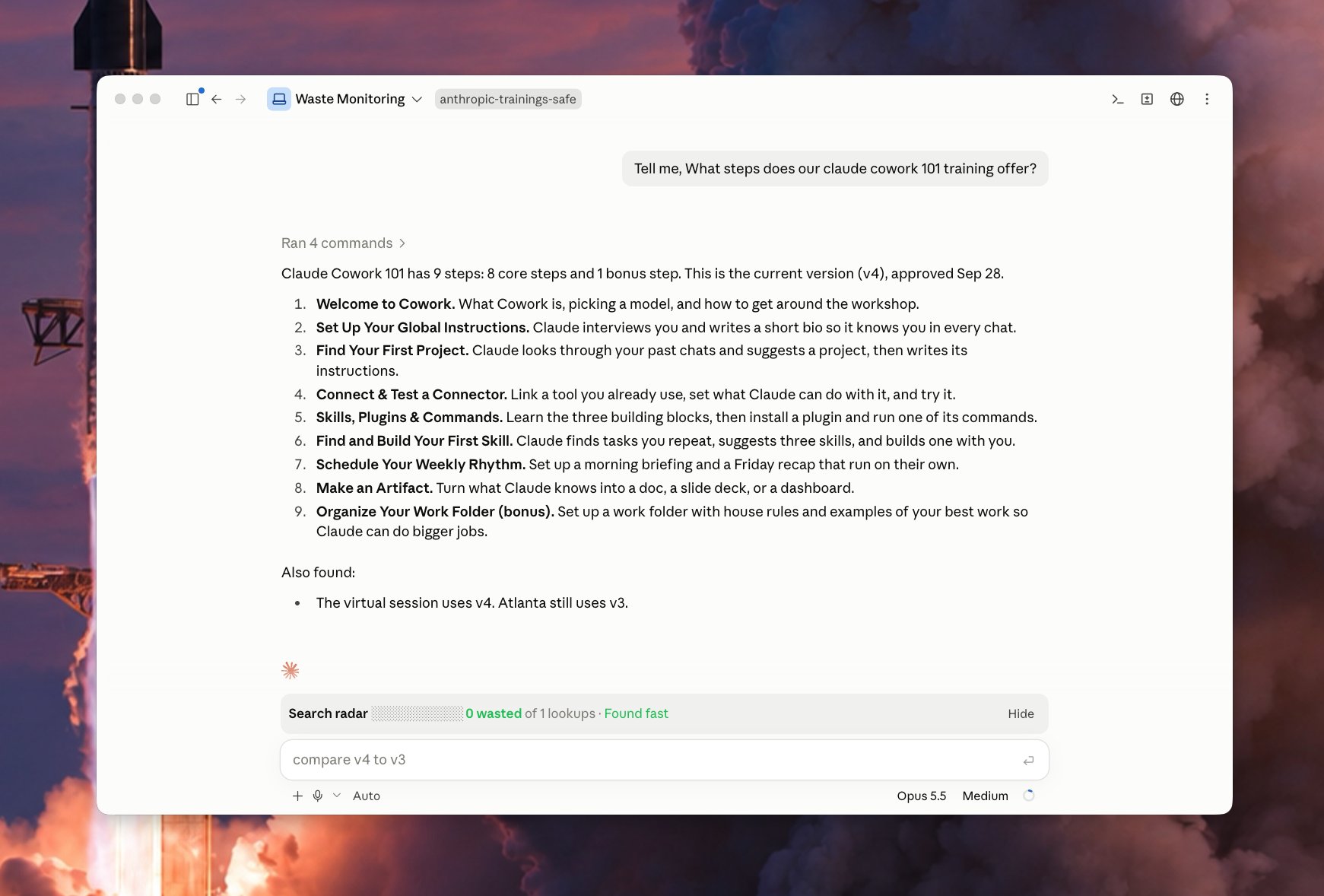
I just built my first Claude Code Mod! 🔥 I built a meter that shows how easily Claude finds things in my code. It comes with a button that makes the next search faster. What it does Every time you ask Claude something, the bar watches Claude look through your files. It counts the wasted searches: a) searches that found nothing b) the same search done twice c) files Claude opened but didn't need Green means Claude found it fast. Yellow means some waste. Red means Claude got lost. It also tells you which folder caused the most trouble. The fix button Click Patch the waste and a helper Claude starts in the background. It writes a short note in your project that says "the thing you need is here." Next time, Claude reads that note and goes straight to the right spot. The helper only writes notes. It never changes your code. It works on its own, so your main chat stays clean. Why it matters Think of your codebase as a library. The bar shows when Claude wandered the shelves. The button adds a sign to the shelf, so the next visit is quick. Over time, the bar shows which parts of your code need better notes.

原帖图片1
已翻译

关于这个 mod

作者发布首个 Claude Code Mod:一个实时计量条,在每次提问时观察 Claude 遍历文件的过程,统计三类浪费搜索——什么都没找到的搜索、重复执行的同一搜索、打开了却不需要的文件。绿色表示快速定位,黄色表示有浪费,红色表示 Claude 迷路,并指出哪个文件夹最麻烦。另有“Patch the waste”按钮,点击后在后台启动一个辅助 Claude,只在项目中写入“你需要的东西在这里”这类简短提示,绝不修改代码,且独立运行不影响主对话。随着时间推移,计量条能显示哪些代码区域需要更好的注释。

安装

安装方法请查看原始来源。

原文 / README

I just built my first Claude Code Mod! 🔥

I built a meter that shows how easily Claude finds things in my code. It comes with a button that makes the next search faster.

What it does

Every time you ask Claude something, the bar watches Claude look through your files. It counts the wasted searches: a) searches that found nothing b) the same search done twice c) files Claude opened but didn't need

Green means Claude found it fast.

Yellow means some waste.

Red means Claude got lost.

It also tells you which folder caused the most trouble.

The fix button

Click Patch the waste and a helper Claude starts in the background.

It writes a short note in your project that says "the thing you need is here."

Next time, Claude reads that note and goes straight to the right spot.

The helper only writes notes. It never changes your code.

It works on its own, so your main chat stays clean.

Why it matters

Think of your codebase as a library. The bar shows when Claude wandered the shelves.

The button adds a sign to the shelf, so the next visit is quick.

Over time, the bar shows which parts of your code need better notes.
查看原始来源 ↗

更多类似作品

