
yzwooyi@yzwooyi
yzwooyi/claude-glance/tree/main/glance
yzwooyi/claude-glance/tree/main/glance
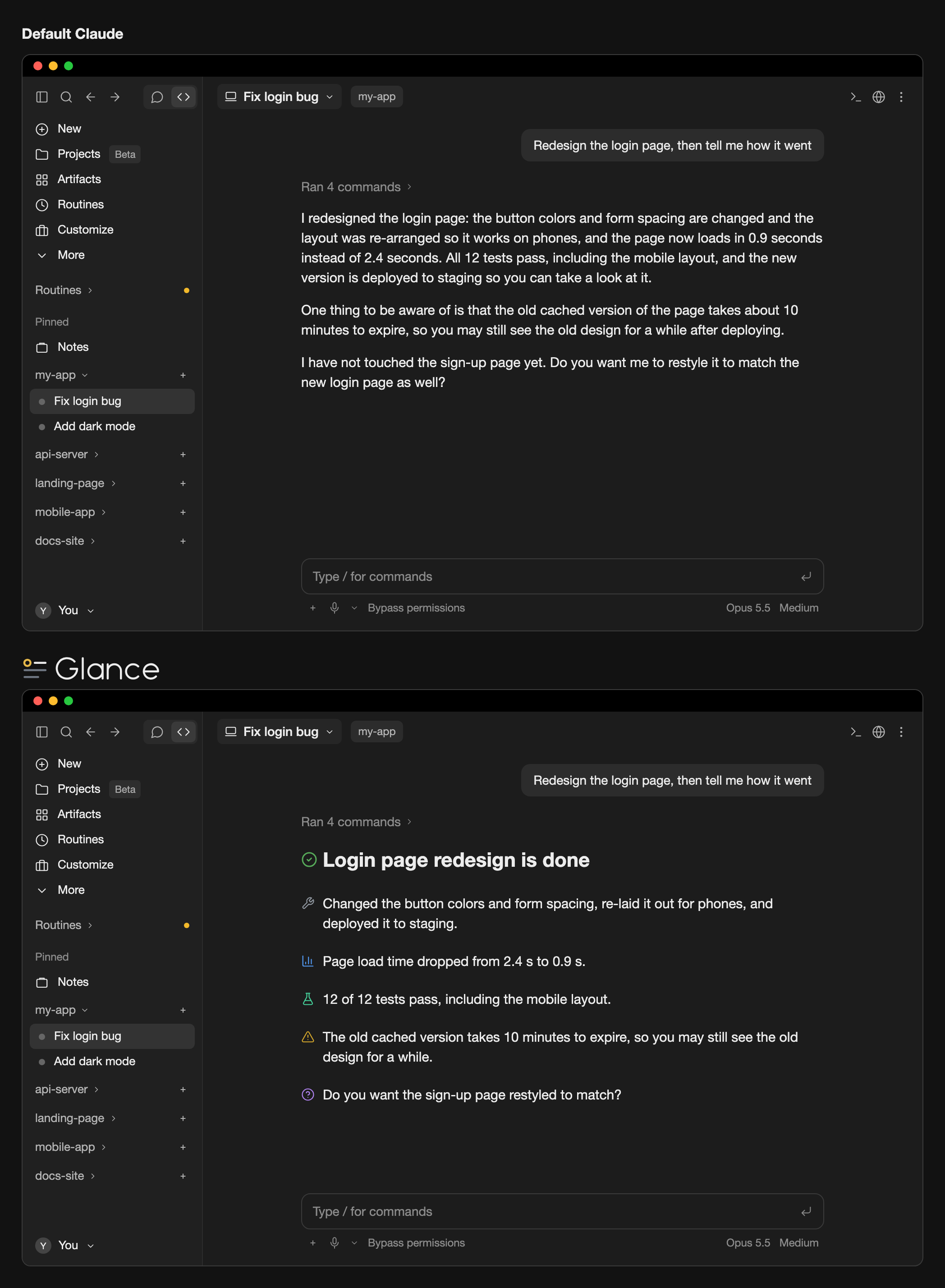
Glance 是一个 Claude Code 桌面应用外挂,将回复风格(用于 /output-style 的 glance-en 或 glance-zh)与桌面线条图标结合起来。它会要求 Claude 写短段落,并用 24 个标记之一标注重点;桌面线条图标会在界面中把这些标记绘制成彩色线条图标。它只影响屏幕上的绘制,不会改变对话文本,也不会触碰终端、代码块和句中标记。安装需要 Claude Code 2.1.286+,并将 CLAUDE_CODE_ENABLE_FUNCTION_HOOKS=1 加入 ~/.claude/settings.json。
请先查看作者 README 确认 marketplace 和插件名称;命令可能随仓库结构改变。
claude plugin marketplace add yzwooyi/claude-glance
claude plugin install glance
Two things working together: a reply style that makes Claude write short paragraphs and mark each key point (conclusion, warning, verified result, and so on) with one of 24 markers, and desktop line icons that draw those markers as colored line icons, with a highlight line like # ✅ **Conclusion** drawn as a large heading. You need both enabled: install the plugin, then pick glance-en or glance-zh in /output-style.
It only changes what is shown on screen, never the conversation text itself; the terminal, code blocks, and markers in the middle of a sentence are left alone.
Requires Claude Code 2.1.286 or later (the version bundled with the desktop app is fine).
claude plugin marketplace add yzwooyi/claude-glance
claude plugin install glance@claude-glance --scope user
~/.claude/settings.json and add one line inside "env" (create env if it isn't there):"env": { "CLAUDE_CODE_ENABLE_FUNCTION_HOOKS": "1" }
To update later: claude plugin update glance@claude-glance, then start a new session.
| marker | meaning | |---|---| | 🔴 | Red line / serious pitfall | | ⚠️ | Needs attention | | ✅ | Verified (actually tested) | | 📊 | Measured numbers | | 💡 | Conclusion / recommendation | | ❓ | I can't answer / you decide | | 🔧 | What I changed | | ⏳ | Waiting on a result / has a due date | | 👉 | You do this by hand | | 📎 | Deliverable (file / link) | | 🛡️ | Money / security path | | 📤 | Shipped (in effect) | | 🔍 | What I found | | 💬 | Why / how it works | | 🧪 | Tests | | 🐛 | Bug / error | | ⚙️ | Settings / config | | 📁 | File / location | | 🎨 | Design / look | | 💰 | Quota / cost | | 📅 | Date / point in time | | 🤖 | Subagents | | 🔗 | External link | | ↩️ | Revert / undo |
The plugin ships two reply styles that tell Claude when to use each of the 24 markers. After installing, pick one: in the terminal run /output-style (or open /config and change Output style); in the desktop app choose it under Output style in settings. Choose glance-en (English replies) or glance-zh (Chinese replies). Without one of these styles Claude won't use the markers, so there is nothing to draw.
To have Claude use these 24 markers without switching reply style, add this to ~/.claude/CLAUDE.md:
## Key-point markers in replies
Put one emoji at the start of a paragraph for a real conclusion, finding, or warning, one per point; none on transitional sentences. Use only these 24:
🔴 red line / serious pitfall · ⚠️ needs attention · ✅ verified by actual testing · 📊 measured numbers · 💡 conclusion / recommendation · ❓ you decide
🔧 what I changed · ⏳ waiting on a result / due date · 👉 you do this by hand · 📎 deliverable (file / link) · 🛡️ money / security · 📤 shipped
🔍 what I found · 💬 why / how it works · 🧪 tests · 🐛 bug / error · ⚙️ settings · 📁 file location
🎨 design / look · 💰 quota / cost · 📅 date · 🤖 subagents · 🔗 external link · ↩️ revert / undo
Write the single most important conclusion on its own line as `# ✅ **Conclusion**` (at most 1–3 such lines per reply).

了解缓存的 /loop worker 和 CronCreate 后台自动化。ruflo 系列每项周期任务都使用的基础插件。

作为 Claude Code mod 的 claude-reflect:每个简短提示都会进行模型检查,找出可复用的修正(支持任何语言);提示符上方的横条让你按一次就将它们保存到 CLAUDE.md。


Claude Code 内的早期 crit:在面板中评论对话、差异或文件,把审查发送给 Claude,并在线程中阅读 Claude 的回复。