
nogu66@nogu66
nogu66/claude-code/tree/main/git-ops
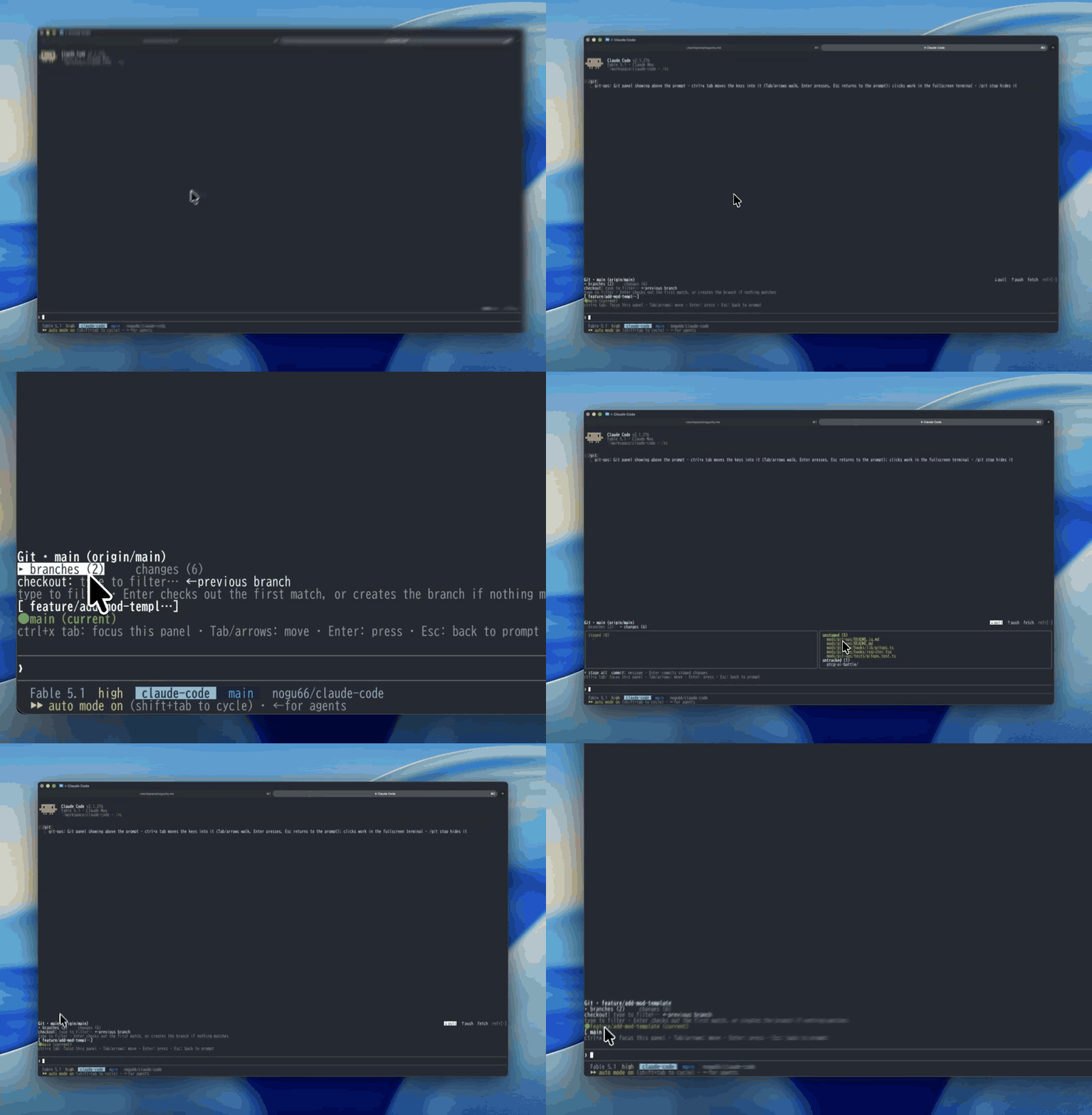
一个 Claude Mod(Claude Code 函数钩子插件):/git 会在提示符上方绘制可点击面板,用于日常 git 操作——用按钮选择分支(也可筛选后按 Enter,或按数字键),确认后即可切换;拉取/推送/获取、全部暂存和提交也都有按钮。不提供强制推送、重置或变基操作。
nogu66/claude-code/tree/main/git-ops
这是一个 Claude Mod(基于函数钩子构建的 Claude Code 插件):/git 会在提示符上方的区域绘制可点击的 git 面板。用按钮选择分支,确认后即可切换——还可以执行 pull / push / fetch、全部暂存和提交,不必输入 git 命令。

Git · main (origin/main, ahead 4)              ↓ pull  ↑ push  fetch  refresh
▸ branches (12)     changes (13)
checkout: type to filter…            ← previous branch
[ feat/sandbox-rewrite ]       [ feature/seo-optimization ]
[ fix/sandbox-trailing-slash ] ● main (current)
[ feat/github-link-card ]      [ pensive-lamport ]
它通过 $.process.run 调用普通的 git(传入 argv 数组,绝不用 shell 字符串),因此不需要自己的身份验证或配置:当前工作目录中 git 已经解析到的远程仓库、凭据和上游跟踪设置,都会直接生效。
**有意限制在安全的日常操作:**查看状态、列出分支、切换分支(已有分支或新分支)、pull、push、fetch、全部暂存和提交。不提供强制推送、重置、变基或清理——面板按钮不应该让破坏性操作变得一键可用。
CLAUDE_CODE_ENABLE_FUNCTION_HOOKS=1 的 Claude Code 构建版本。函数钩子目前处于 early-access 阶段,API 可能变化;不支持函数钩子的构建版本会直接忽略此插件的 hooks 模块。git 位于 PATH 中,并且工作目录是一个 git 仓库。/plugin marketplace add nogu66/claude-code
/plugin install git-ops@nogu-marketplace
也可以不安装,直接试用:
git clone https://github.com/nogu66/claude-code.git
cd claude-code/git-ops
claude --plugin-dir .        # .claude/settings.json here turns function hooks on
然后在任意 git 仓库中运行 /git。
/git(或 /git show)显示面板;/git stop 将其隐藏。
**先把焦点移到面板。**打开面板后,你的按键仍会交给普通提示符——本来要输入筛选框的文字或数字快捷键,不会送到面板。按 ctrl+x tab 聚焦面板;然后用 Tab/方向键移动,Enter 执行,Esc 返回提示符。只有终端报告支持鼠标点击的位置才能点击(也就是全屏布局)。
↓ pull、↑ push、fetch 和 refresh。它们作用于当前分支已有的上游。branches (n) 和 changes (n)。一次只绘制一个主体,因此这一栏不会太长。branches 标签页——用于快速切换到其他分支:
● name (current) 标签;1–9,前九个可切换分支);/ 段前缀、子字符串匹配),下方一行会说明按 Enter 的结果——Enter → checkout <best match>,没有匹配项时则为 Enter → create new branch <name>;← previous branch——执行 git checkout -;Check out <branch>? · [ OK ] / [ cancel ],快捷键 y / n);存在未提交更改时还会显示警告。changes 标签页——左侧是已暂存(绿色),右侧是未暂存(黄色)和未跟踪;下方有 + stage all(git add -A)以及提交输入框(按 Enter 执行 git commit -m)。切换分支会先询问。其他操作——pull、push、fetch、全部暂存、提交——会在你点击或按下 Enter 的瞬间执行,效果完全等同于输入 git 命令。push 会访问你的机器之外的远程端。
使用同一套 argv 构建器,不打开面板:
| Command | Runs |
|---|---|
| /git status | git status |
| /git branch | git branch |
| /git checkout <branch> | git checkout <branch> |
| /git checkout -b <branch> | git checkout -b <branch> |
| /git back | git checkout - |
| /git pull · /git push · /git fetch | the same, no flags |
| /git stage | git add -A |
| /git commit <message> | git commit -m <message> |
| /git help | prints this list |
文本子命令会立即运行,不经过确认步骤。
refresh 后刷新——其他地方运行 git 时不会刷新(例如在 Bash 工具调用中运行)。- 和空白字符(这样名称不会被当成 git 标志);其余无效内容由 git 自己拒绝。next(e) 串接它们,因此可以叠加显示,但这种组合未经测试。bun test # pure logic in hooks/lib/gitops.ts — no $ or UI to mock
claude plugin validate . # lists the hooked events and $ calls
hooks/register.tsx——唯一接触 $ 的文件:注册 /git、运行 git、绘制 AbovePrompt 面板,并保存内存中的 UI 状态。hooks/lib/gitops.ts——纯函数:命令解析、git argv 构建器、分支/状态输出解析、分支筛选、Enter 目标决策以及列布局。tests/gitops.test.ts——上述功能的测试。如需确切类型,请在启用了函数钩子的工作阶段中运行 /plugin-types;它会写入 .claude/types/claude-code.d.ts。
MIT
请先查看作者 README 确认 marketplace 和插件名称;命令可能随仓库结构改变。
claude plugin marketplace add nogu66/claude-code
claude plugin install git-ops
A Claude Mod (a Claude Code plugin built on function hooks): /git draws a clickable git
panel in the band above the prompt. Pick a branch with a button, confirm, and it checks out —
plus pull / push / fetch, stage-all and commit, without typing a git command.
Git · main (origin/main, ahead 4)              ↓ pull  ↑ push  fetch  refresh
▸ branches (12)     changes (13)
checkout: type to filter…            ← previous branch
[ feat/sandbox-rewrite ]       [ feature/seo-optimization ]
[ fix/sandbox-trailing-slash ] ● main (current)
[ feat/github-link-card ]      [ pensive-lamport ]
It shells out to plain git through $.process.run (an argv array, never a shell string), so
it needs no auth or config of its own: whatever git already resolves in the current working
directory — remotes, credentials, upstream tracking — is what runs.
Deliberately limited to safe, everyday operations: status, branch listing, checkout (existing or new branch), pull, push, fetch, stage-all, commit. No force-push, reset, rebase or clean — a panel button shouldn't put a destructive operation one click away.
CLAUDE_CODE_ENABLE_FUNCTION_HOOKS=1.
Function hooks are early-access and their API can change; builds without them simply ignore
this plugin's hooks module.git on PATH, and a git repository as the working directory./plugin marketplace add nogu66/claude-code
/plugin install git-ops@nogu-marketplace
Or try it without installing:
git clone https://github.com/nogu66/claude-code.git
cd claude-code/git-ops
claude --plugin-dir .        # .claude/settings.json here turns function hooks on
Then run /git inside any git repository.
/git (or /git show) shows the panel; /git stop hides it.
Move the keys into the panel first. Opening the panel leaves your keystrokes with the normal
prompt — text meant for the filter box, or a digit hotkey, never reaches the panel. Press
ctrl+x tab to focus it; then Tab/arrows move, Enter presses, Esc returns to the prompt.
Mouse clicks only work where the terminal reports them (the fullscreen layout).
↓ pull, ↑ push,
fetch, refresh on the right. They act on the current branch's existing upstream.branches (n) and changes (n). Only one body is drawn at a time, which keeps the
band short.branches tab — built for getting to another branch quickly:
● name (current) label instead;1–9, the
first nine switchable branches);/-segment
prefix, then substring), and the line beneath says what Enter will do —
Enter → checkout <best match>, or Enter → create new branch <name> when nothing matches;← previous branch — git checkout -;Check out <branch>? · [ OK ] / [ cancel ], hotkeys y / n), with a warning when
there are uncommitted changes.changes tab — staged (green) on the left, unstaged (yellow) and untracked on the right;
below them + stage all (git add -A) and a commit box (Enter runs git commit -m).Checkout asks first. Everything else — pull, push, fetch, stage all, commit — runs the moment
you click or press Enter, exactly as if you had typed the git command. push reaches outside
your machine.
The same argv builders, without the panel:
| Command | Runs |
|---|---|
| /git status | git status |
| /git branch | git branch |
| /git checkout <branch> | git checkout <branch> |
| /git checkout -b <branch> | git checkout -b <branch> |
| /git back | git checkout - |
| /git pull · /git push · /git fetch | the same, no flags |
| /git stage | git add -A |
| /git commit <message> | git commit -m <message> |
| /git help | prints this list |
Text subcommands run immediately, without the confirmation step.
refresh click — not when git runs elsewhere
(for instance in a Bash tool call).- and whitespace
(so a name can't be read as a git flag); git itself rejects anything else invalid.next(e) so
they stack, but that combination isn't tested.bun test # pure logic in hooks/lib/gitops.ts — no $ or UI to mock
claude plugin validate . # lists the hooked events and $ calls
hooks/register.tsx — the only file that touches $: registers /git, runs git, draws the
AbovePrompt panel, and holds its in-memory UI state.hooks/lib/gitops.ts — pure functions: command parsing, git argv builders, branch/status
output parsing, branch filtering and the Enter-target decision, column layout.tests/gitops.test.ts — tests for the above.For exact types, run /plugin-types in a session with function hooks on; it writes
.claude/types/claude-code.d.ts.
MIT

了解缓存的 /loop worker 和 CronCreate 后台自动化。ruflo 系列每项周期任务都使用的基础插件。

作为 Claude Code mod 的 claude-reflect:每个简短提示都会进行模型检查,找出可复用的修正(支持任何语言);提示符上方的横条让你按一次就将它们保存到 CLAUDE.md。


Claude Code 内的早期 crit:在面板中评论对话、差异或文件,把审查发送给 Claude,并在线程中阅读 Claude 的回复。