
mireabot@mireabot
mireabot/Clauisc/tree/main/plugins/clauisc
mireabot/Clauisc/tree/main/plugins/clauisc
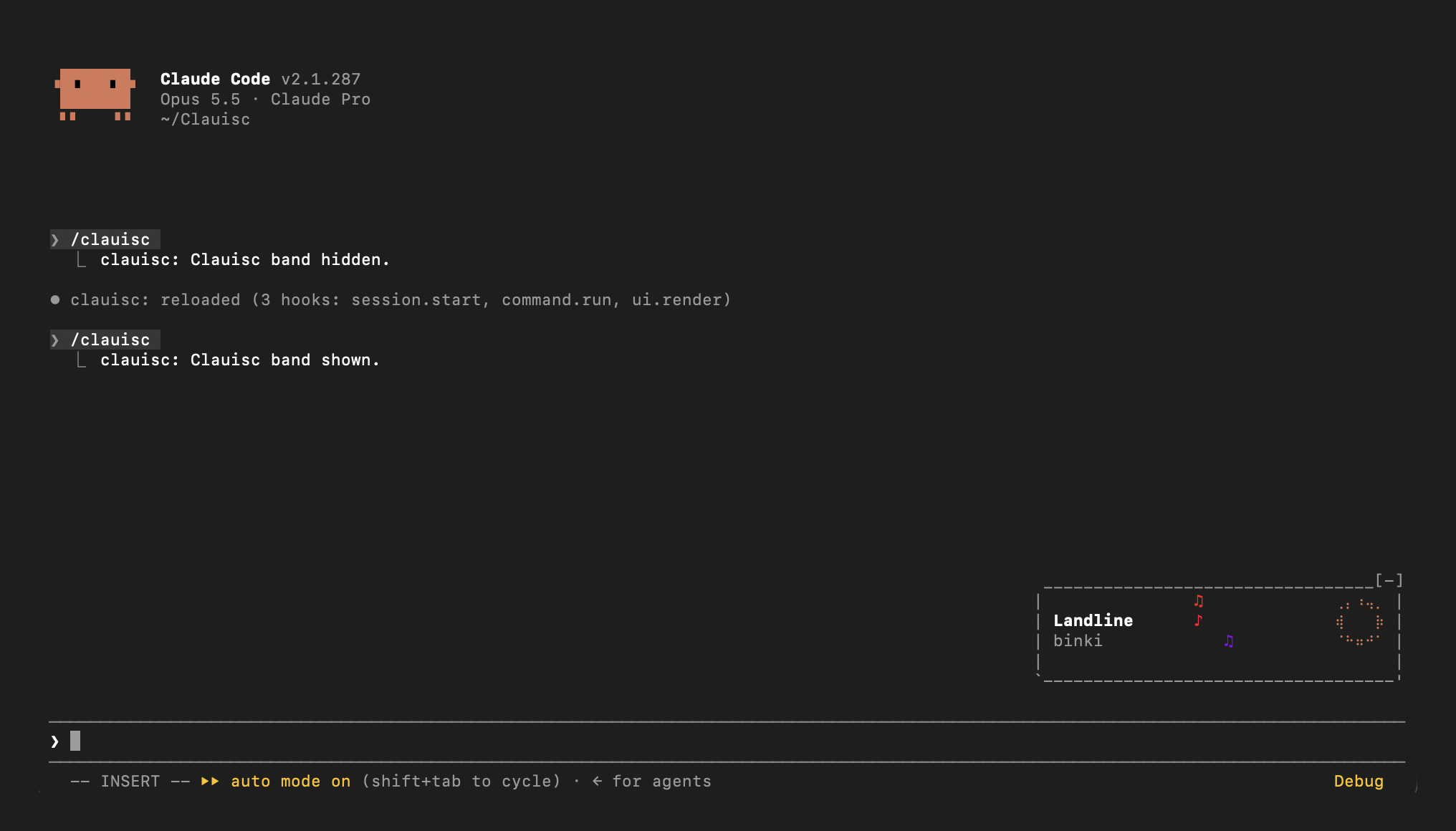
提示栏上方的 Apple Music 正在播放状态带:像素专辑封面、标题、艺术家和会蹦跳的 Claude 毛绒玩偶
请先查看作者 README 确认 marketplace 和插件名称;命令可能随仓库结构改变。
claude plugin marketplace add mireabot/Clauisc
claude plugin install clauisc
Apple Music, live in your Claude Code prompt. Clauisc is a Claude Code plugin that sits right-aligned just above your input line: the track, a progress ring, and music notes rising to the beat, framed like a little boombox.
Status: early. Running on macOS 26 with Apple Music. Reports and screenshots are welcome in Issues.
osascript.git clone https://github.com/mireabot/Clauisc.git ~/Clauisc
Try it in one session
claude --plugin-dir ~/Clauisc/plugins/clauisc
Load it in every session
~/Clauisc/install.sh            # adds the plugin to CLAUDE_CODE_PLUGIN_DIRS in ~/.claude/settings.json
~/Clauisc/install.sh --remove   # removes it again
install.sh backs up ~/.claude/settings.json to settings.json.bak before
changing it.
Update: git pull. A running session reloads the plugin when its files
change. If you installed before the plugin folder was renamed to
plugins/clauisc, run install.sh again.
Play something in Music and the band appears above your prompt.
| Command | Effect |
| --- | --- |
| /clauisc | Hide or show the band |
| /clauisc status | Report what Clauisc sees: which source answered, osascript's output, the track, timers, and whether the band was drawn |
| /clauisc width <n> | Set the frame's inside width (29–200 columns); remembered across sessions |
| /clauisc width | Show the current width |
| /clauisc width reset | Back to the default, 48 |
Run /clauisc status first; it checks Music right away and reports what it
found.
/clauisc status. timer ticks should climb by about one every 2 seconds; if it doesn't, backup polls shows the beat timer covering for it.band drawn: 0 times: Claude Code isn't loading the plugin. Check
claude --version, run claude plugin validate ~/Clauisc/plugins/clauisc,
and start with claude --debug --plugin-dir ~/Clauisc/plugins/clauisc to
see why.osascript -e 'tell application "Music" to get name of current track'Raster elements.
On each beat the ring and notes are repainted in place, without
redrawing the band.The frame width can be changed live: /clauisc width 40 narrows it, wider
values give the title more room. Each 2 columns moves both sides of the
notes by one.
Layout lives in plugins/clauisc/hooks/register.tsx,
drawing in plugins/clauisc/hooks/lib.ts:
| Name | What it controls |
| --- | --- |
| GAP | Columns between components |
| TEXT_PAD | Columns left of the title/artist stack |
| BAR_INNER | Default inside width of the frame (/clauisc width overrides it); the notes sit in its middle and the title stack fills the space to their left |
| RING_COLS, NOTES_COLS, BAND_ROWS | Component sizes |
| noteColor | How each note's color is picked |
| riseNotes | How notes start and rise |
| beatMs | How BPM maps to the beat |
Start Claude Code on the plugin folder:
claude --debug --plugin-dir ~/Clauisc/plugins/clauisc
An interactive session watches that folder: save a file and the plugin
reloads in place (its hooks run again, the band redraws), with no restart.
If a hook throws or a drawing is refused, the transcript shows one dim line
naming the hook and the reason; --debug writes every occurrence to the
debug log. /clauisc status shows the plugin's own view at any time.
You can also ask Claude in that same session to change the plugin: edits it makes reload when its turn ends.
cd ~/Clauisc/plugins/clauisc
claude plugin validate .   # what the engine will load, and anything it would refuse
claude plugin test .       # the tests; they mock osascript, so they run on any OS
Once the plugin has loaded, Claude Code writes its API types to
plugins/clauisc/.claude-plugin/types/ (git-ignored), so an editor or
tsc -p plugins/clauisc type-checks it.
.claude-plugin/marketplace.json   marketplace manifest
plugins/clauisc/
  .claude-plugin/plugin.json      plugin manifest
  hooks/register.tsx              hooks: polling, beat, band layout, /clauisc
  hooks/lib.ts                    AppleScript/JXA, parsing, ring and notes cells
  types/index.d.ts                state contract
  tests/band.test.tsx             tests
install.sh                        local install for every session
osascript, but Apple has restricted it before and a macOS
update could again; Clauisc then falls back to Music's AppleScript, which
only sees library songs.
通过 Cognitum Music(cogmusic MCP)进行 AI 音乐生成:使用你自己的 music.cognitum.one 账号创作歌词/提示词、生成音轨、分离 stem、提取 MIDI 并进行母带处理。作为 mod(ADR-445),它还提供仅收紧的工具防护、/music-mod,以及在控制台显示的状态文件。

让这个 Claude Code 会话接入全双工语音通话。你可以边说边让它编程,随时打断,并听到朗读结果。口头说“yes”从不会批准任何事项:权限提示仍需在键盘上操作。仅限 macOS。

在提示栏上方显示当前播放的 Apple Music 或 Spotify 曲目的同步歌词,可选跳舞吉祥物,使用 osascript 获取 LRCLIB 数据。