
davideiffert@davideiffert
davideiffert/check-it
davideiffert/check-it
Check it 会按项目保存 Claude 做出的可见变更清单,每项都有可查看位置的链接、应当在那里看到的内容和勾选框。提示上方的一行会显示还剩多少项待审查,并提供打开清单或询问 Claude 要检查什么的按钮。项目可以标记为已检查、忽略,或标记为“不正确”;后者会在提示末尾放入一则备注供你发送。它添加一个工具和一段简短指令,让 Claude 为每个可见变更记录一项,等到本轮结束后才显示;对于不可见的变更或没有地址的情况不会列出任何内容。通过带有 siteAddress 配置选项的插件市场安装,也可使用 --plugin-dir 在本地运行。它面向浏览器,已在 Claude Code 2.1.288 上测试,目前不再积极维护。
请先查看作者 README 确认 marketplace 和插件名称;命令可能随仓库结构改变。
claude plugin marketplace add davideiffert/check-it
claude plugin install check-it
Claude Code tells you what it changed. Check it tells you where to look.
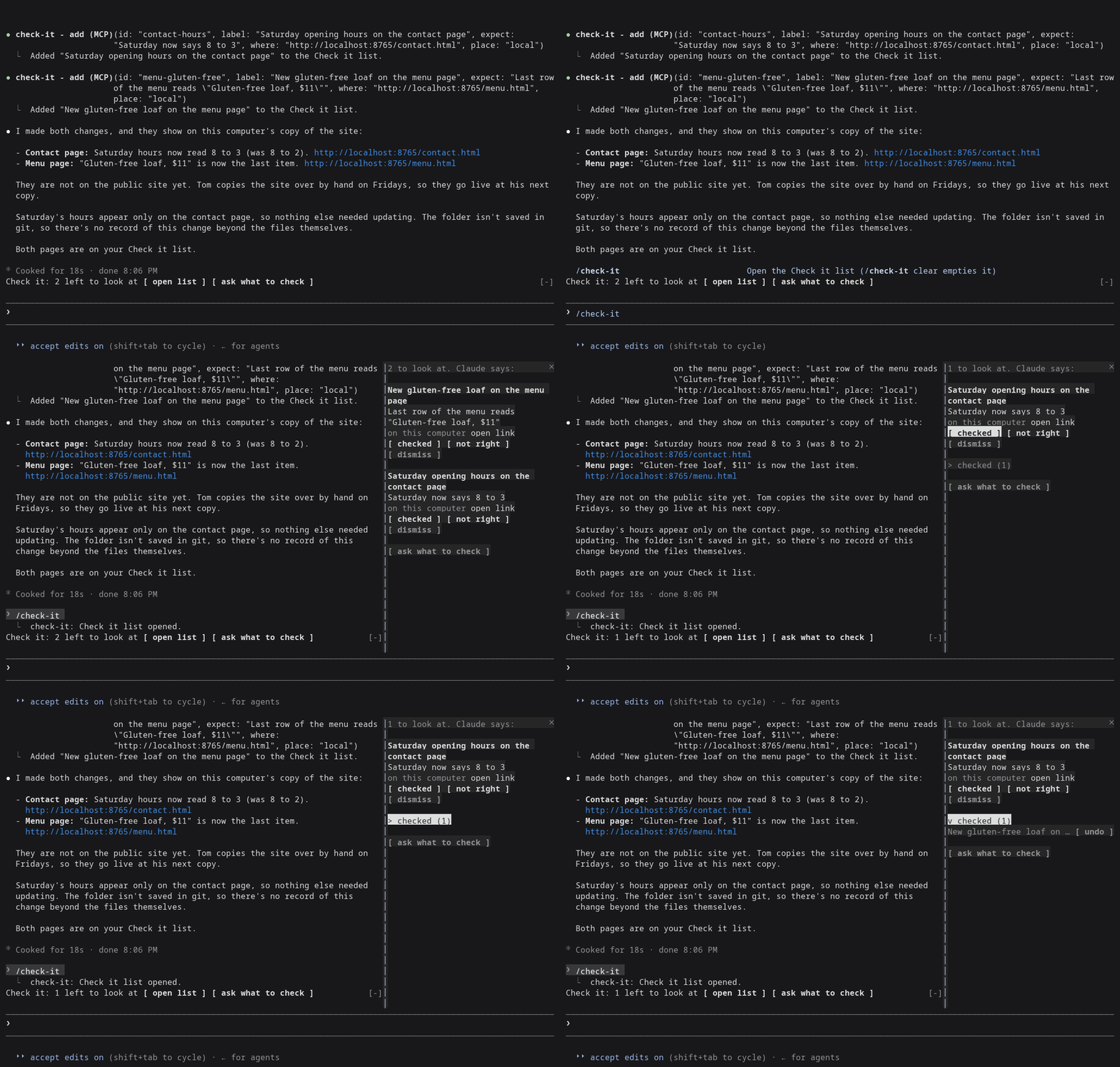
After a long session, Claude says it's done. It changed six things. Which ones can you actually see, and where do you click? Check it keeps the list for you: every change you can see in a browser, with a link, what you should find there, and a box to tick. If something's off, one button tells Claude which one.
For the person checking the result, not the diff.
Build checks · Changelog · MIT license
Claude Code 2.1.288, right after Claude changed the Saturday hours and the menu of a made-up bakery site from demo/.
Needs Claude Code 2.1.288 or later (claude --version shows yours).
claude plugin marketplace add davideiffert/check-it && claude plugin install check-it@check-it --config siteAddress=http://localhost:3000
Swap http://localhost:3000 for wherever your app or site runs right now,
on this computer or online. The command only installs Check it. It doesn't
start your app for you. Then start Claude Code as usual.
open list and ask what to check buttons. It stays hidden until the
first item arrives.open link opens the page in your browser.checked ticks it. Ticked items fold into one checked (N) row, where
you can undo a tick.not right puts Not right: <item> (<address>). at the end of your
prompt, after anything you already typed. Add a sentence and send it.
It never sends anything by itself.dismiss removes the item./check-it opens the list. /check-it clear empties it.ask what to check puts a request at the end of your prompt asking
Claude what you should look at. You decide whether to send it.Claude fills it. The plugin gives Claude one tool for adding an item and one short instruction: when a change alters what someone sees or does on a page, add one item per change, with the address where it shows right now. Changes nobody can see (tidying code, tests, settings) get no items. Something every page shares, like the footer, gets one item.
New items wait until Claude's turn ends, so nothing shows up while Claude is still halfway through the change. That's a delay, not a check: the list doesn't confirm the change exists. If you stop a turn, its items are dropped. Only the main conversation adds items. Helper agents Claude starts cannot.
If Claude can't name an address where a change shows (nothing is running, or it isn't built yet), it adds nothing and says so in its reply, naming what it needs.
The list is Claude's word for it. The tick is yours.
The list is kept per project and survives restarts. It holds 50 items, and the oldest ticked ones go first.
Measured on two demo sites, a plain one and one with a build step: 51 recorded sessions (31 and 20) using Claude Opus and Sonnet, plus 3 interactive ones.
127.0.0.1; since 0.1.2 that opens as
a link.Details are in docs/measurement-v0.md.
siteAddress
setting, the one setting worth filling in. Without it, and with nothing
running, Claude often has no address to give you and the list stays
empty. Set it with --config as above, or later in /config under
check-it./tui fullscreen the list
docks beside the conversation. On the normal screen it opens above the
prompt instead./theme.open link is a plain link, and
it only works for https: and http://localhost addresses. Other
addresses show as text.Almost nothing outside its own list. No network access, no model calls of
its own, no files. It runs one command, and only when you press open link in the terminal: your system's own opener (open on macOS,
xdg-open on Linux), with an http:// or https:// address the plugin
has already checked, to show the page in your browser. It adds one tool,
one short section of Claude's instructions, the line above the prompt, the
list and the /check-it command.
From the marketplace, as above. To try a local copy without installing:
git clone https://github.com/davideiffert/check-it
claude --plugin-dir ./check-it
Issues and pull requests are welcome. Before sending a change, run:
claude plugin validate .
claude plugin test .
For the type check, start Claude Code once with --plugin-dir . (it writes
the type declarations into .claude-plugin/types), then run
npx -p typescript@5 tsc -p ..
MIT. Made by David Eiffert.

了解缓存的 /loop worker 和 CronCreate 后台自动化。ruflo 系列每项周期任务都使用的基础插件。

作为 Claude Code mod 的 claude-reflect:每个简短提示都会进行模型检查,找出可复用的修正(支持任何语言);提示符上方的横条让你按一次就将它们保存到 CLAUDE.md。


Claude Code 内的早期 crit:在面板中评论对话、差异或文件,把审查发送给 Claude,并在线程中阅读 Claude 的回复。