
jamubc@jamubc
jamubc/toolbox/tree/main/plugins/channel
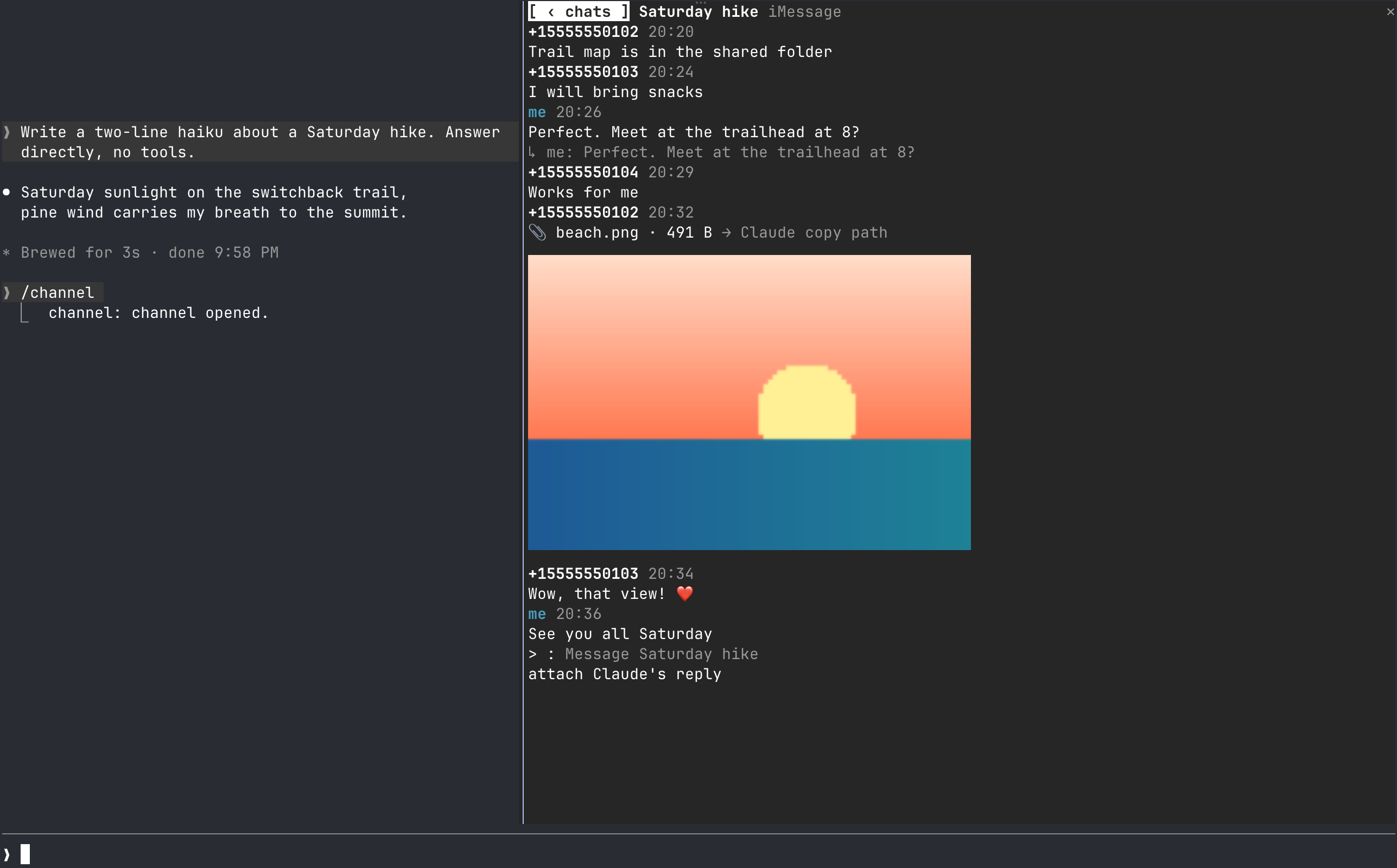
把聊天带到 Claude Code 旁的窗格中:阅读、回复、附加文件并接收 toast,无需离开终端。当前支持 iMessage,并提供可扩展到更多服务的 provider framework。
jamubc/toolbox/tree/main/plugins/channel
一个 Claude Code 插件,会在会话旁停靠聊天窗格。阅读对话、回复、附加 Claude 处理过的文件、内嵌预览图片,并接收新消息的安静聚合 toast。当前支持 iMessage(macOS 13+,读取需要 Full Disk Access,发送使用 osascript),并采用基于契约的 provider 架构来添加更多服务。通过 /plugin marketplace add jamubc/toolbox,然后 /plugin install channel@toolbox 安装,并用 /channel 打开窗格。
请先查看作者 README 确认 marketplace 和插件名称;命令可能随仓库结构改变。
claude plugin marketplace add jamubc/toolbox
claude plugin install channel
Your favourite chat, directly in Claude Code. Read, reply, get notified and more, without leaving the terminal.
It can all be done, inside Claude Code
Add the marketplace:
/plugin marketplace add jamubc/toolbox
Install the plugin:
/plugin install channel@toolbox
| Command | What it does |
| --- | --- |
| /channel | Opens the chat pane: a tab per service, and your twenty most recent conversations in each. |
In the pane:
All tab shows every conversation together.1 to 9 open the first nine./config → How picture previews are drawn forces one, or turns previews off.Notifications stay quiet: only one of your Claude sessions toasts, several messages in one chat fold into one toast, and a chat toasts at most once every 10 seconds. Every session still shows the unread count in its status line.
| Connection | Platform | Setup | What it can do | | --- | --- | --- | --- | | iMessage | macOS 13 or later, terminal | Full Disk Access | Read and send text and files; show replies, tapbacks, edits, unsends and members |
Turn a service off in /config under channel.
sqlite3 -readonly on ~/Library/Messages/chat.db, which requires Full Disk Access for your terminal. The pane lists the steps and names your terminal app.osascript. On your first send, macOS asks you to let your terminal control Messages.A service can start only the programs and call only the hosts listed here. Anything else is refused in hooks/core/fence.ts.
| Service | Programs it starts | Hosts it calls |
| --- | --- | --- |
| iMessage | /usr/bin/sqlite3, /usr/bin/osascript | none |
The pane itself starts /usr/bin/open when you press a file, and /usr/bin/sips to make a picture's or a PDF's preview. Previews are at most twelve temporary files in your TMPDIR, each overwritten in turn. The cells of a preview are averaged from the pixels they cover and encoded once per size, so redrawing the pane costs nothing more.
hooks/core/contract.ts is what every service implements: a small required core, plus optional capabilities (attachments, threads, reactions, edits, read state, typing, members, search). The pane offers only what a service has.hooks/core/registry.ts lists the services. Adding one is a folder under hooks/providers/ and a line there.hooks/core/account.ts runs one service with its own loop and backoff; inbox.ts merges them; notify.ts decides what toasts; hub.ts ties them together.hooks/ui/ draws the pane: list.tsx the conversations, conversation.tsx one chat, picture.ts thumbnails as pixels or cells, format.ts labels, colors and days. hooks/register.tsx is wiring only.tests/kit/ has a scriptable fake service and the conformance checks every provider must pass.claude --plugin-dir plugins/channel # load it; edits hot-reload
claude plugin validate plugins/channel
claude plugin test plugins/channel
tsc -p plugins/channel # after one load writes .claude-plugin/types/

一个 Claude Code mod,收集会话中等待你处理的事项:代理的问题、Claude 记下的问题,以及你的 PR 检查和评审。它会在提示列上方和 `/inbox` 面板中显示这些内容,并标明会话当前状态。

当问题或计划等待你的回答,以及一轮对话结束或失败时发送桌面通知。

一个 Claude Code 外挂,把同步的提醒堆栈停靠在记录旁的面板中,并提供共享同一账号的 CLI、Codex 技能和终端 UI。