
theonly1me@theonly1me
theonly1me/claude-code-mods/tree/main/plugins/change-journal
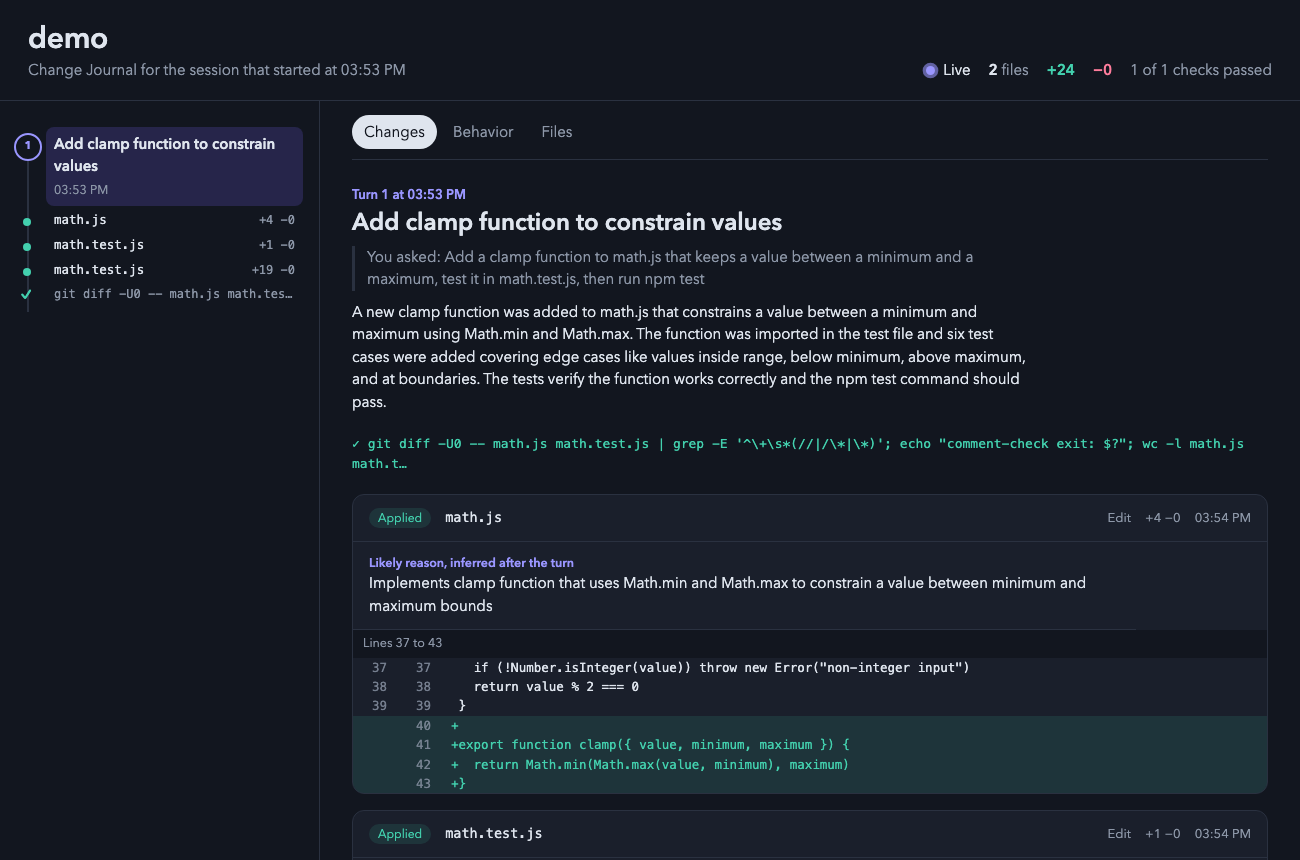
一个 Claude Code 插件,打开一个实时本地 HTML 页面,显示 Claude 所做的每一个变化,包括差异、编辑原因、检查和前后行为流。
theonly1me/claude-code-mods/tree/main/plugins/change-journal
一个你浏览器中的实时页面,显示 Claude 工作时所做的每一个变化:差异、每次编辑的原因、它运行的检查,以及每个转折前后的代码行为。

claude plugin marketplace add theonly1me/claude-code-mods
claude plugin install change-journal@claude-code-mods
注册市场一次。安装后在打开的会话中运行 /reload-plugins。需要 Claude Code 2.1.289 或更高版本;无需构建步骤或运行时依赖。
页面在会话的首次编辑时在浏览器中打开,每 1.5 秒自动更新。它不需要服务器。
页面随着新变化发生而跟随。当你选择某个东西时,它停止跟随直到你按下"跟随新变化"。
在 Edit 和 Write 之外进行的更改(sed 命令、格式化程序或你自己的编辑)在每个转折后显示为外部更改。测试命令显示通过或失败标记。
✎ 3 files +40 −12。/changes 在终端中查看最新的四个转折及其编辑。窗格打开并显示键。o 打开页面。命令:
/changes:打开包含最新四个转折及其编辑的窗格。/changes open:在浏览器中打开页面。/changes path:打印页面所在的位置。
标题下的提示行总是命名现在有效的键。
| 键 | 它做什么 |
| --- | --- |
| 1 到 9 | 显示列表下的该编辑:其原因和第一个改变的行。再次按数字隐藏它。 |
| o | 打开页面。显示编辑时,页面打开该编辑的转折。 |
| c | 复制页面路径。 |
| x | 关闭窗格。 |
| Tab、Enter | 移至下一行或按钮并按下。 |
| Esc | 将键返回给提示符。窗格保持打开。 |
| ctrl+x tab | 再次将键返回给窗格。 |
在页面上,点击轨道上的圆环或点跳转到一个转折或编辑。按"跟随新变化"返回最新变化。
在 /plugin 中更改这些:
autoOpen(开启):在会话的首次编辑时打开页面。liveSummaries(开启):在每个有编辑的转折后,询问辅助模型标题、解释、行为流和缺失的原因。这会使用额外的令牌。helperModel(claude-sonnet-5-5):用于这些摘要的模型。helperEffort(medium):辅助模型的思考方式(low、medium 或 high)。页面及其数据保留在你的机器上 ~/.claude/change-journal/<project>/<session>/。看起来像秘密的文件(.env、密钥、凭证)列出而无其内容,差异中的令牌被编辑。启用摘要时,每个差异的简短摘录发送到你配置的 Claude 提供商。
请参阅 marketplace README 了解配置、隐私、更新和删除。
请先查看作者 README 确认 marketplace 和插件名称;命令可能随仓库结构改变。
claude plugin marketplace add theonly1me/claude-code-mods
claude plugin install change-journal
A live page in your browser that shows every change Claude makes while it works: the diff, the reason for each edit, the checks it ran, and how the code behaved before and after each turn.
claude plugin marketplace add theonly1me/claude-code-mods
claude plugin install change-journal@claude-code-mods
Register the marketplace once. Run /reload-plugins in an open session after installing. Requires Claude Code 2.1.289 or later; no build step or runtime dependencies.
The page opens in your browser on the first edit of a session and updates itself every second and a half. It needs no server.
The page follows new changes as they happen. When you select something, it stops following until you press "Follow new changes".
Changes made outside Edit and Write (a sed command, a formatter, or your own edits) show up after each turn as outside changes. Test commands appear with a pass or fail mark.
✎ 3 files +40 −12./changes to see the latest turns in the terminal. The pane opens with the keys.o to open the page.Commands:
/changes: open the pane with the latest four turns and their edits./changes open: open the page in your browser./changes path: print where the page lives.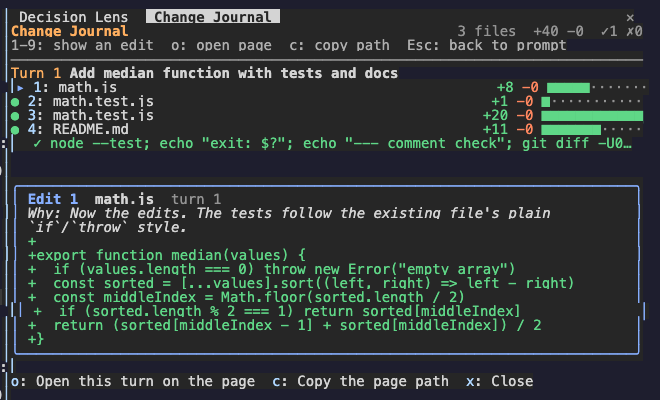
The hint row under the title always names the keys that work now.
| Key | What it does |
| --- | --- |
| 1 to 9 | Show that edit under the list: its reason and its first changed lines. Press the number again to hide it. |
| o | Open the page. With an edit shown, the page opens on that edit's turn. |
| c | Copy the page path. |
| x | Close the pane. |
| Tab, Enter | Move to the next row or button, and press it. |
| Esc | Give the keys back to the prompt. The pane stays open. |
| ctrl+x tab | Give the keys to the pane again. |
On the page, click a ring or a dot on the rail to jump to a turn or an edit. Press "Follow new changes" to go back to the newest change.
Change these in /plugin:
autoOpen (on): open the page on the first edit of a session.liveSummaries (on): after each turn with edits, ask the helper model for a title, an explanation, the behavior flows, and missing reasons. This uses extra tokens.helperModel (claude-sonnet-5-5): the model for those summaries.helperEffort (medium): how hard the helper model thinks (low, medium, or high).The page and its data stay on your machine in ~/.claude/change-journal/<project>/<session>/. Files that look like secrets (.env, keys, credentials) are listed without their content, and tokens in diffs are redacted. When summaries are on, a short excerpt of each diff goes to your configured Claude provider.
See the marketplace README for configuration, privacy, updates, and removal.

thimble thimble 在普通 Claude Code 工作階段中的分析指导,作为一个 [mod](https://code.claude.com/docs/en/plugins/mods/overview)。

克劳德代码模块,可以对工作树进行指纹识别,并记住同一代码上通过和失败的测试,因此该模型会重新运行不稳定的测试,而不是更改工作代码。

像黑匣子一样记录工具调用的 Claude Code mod:通过 /blackbox 在错误或拒绝前重放最近操作,并在日志中遮盖 token 和密码。