
jamubc@jamubc
jamubc/toolbox/tree/main/plugins/browse
jamubc/toolbox/tree/main/plugins/browse
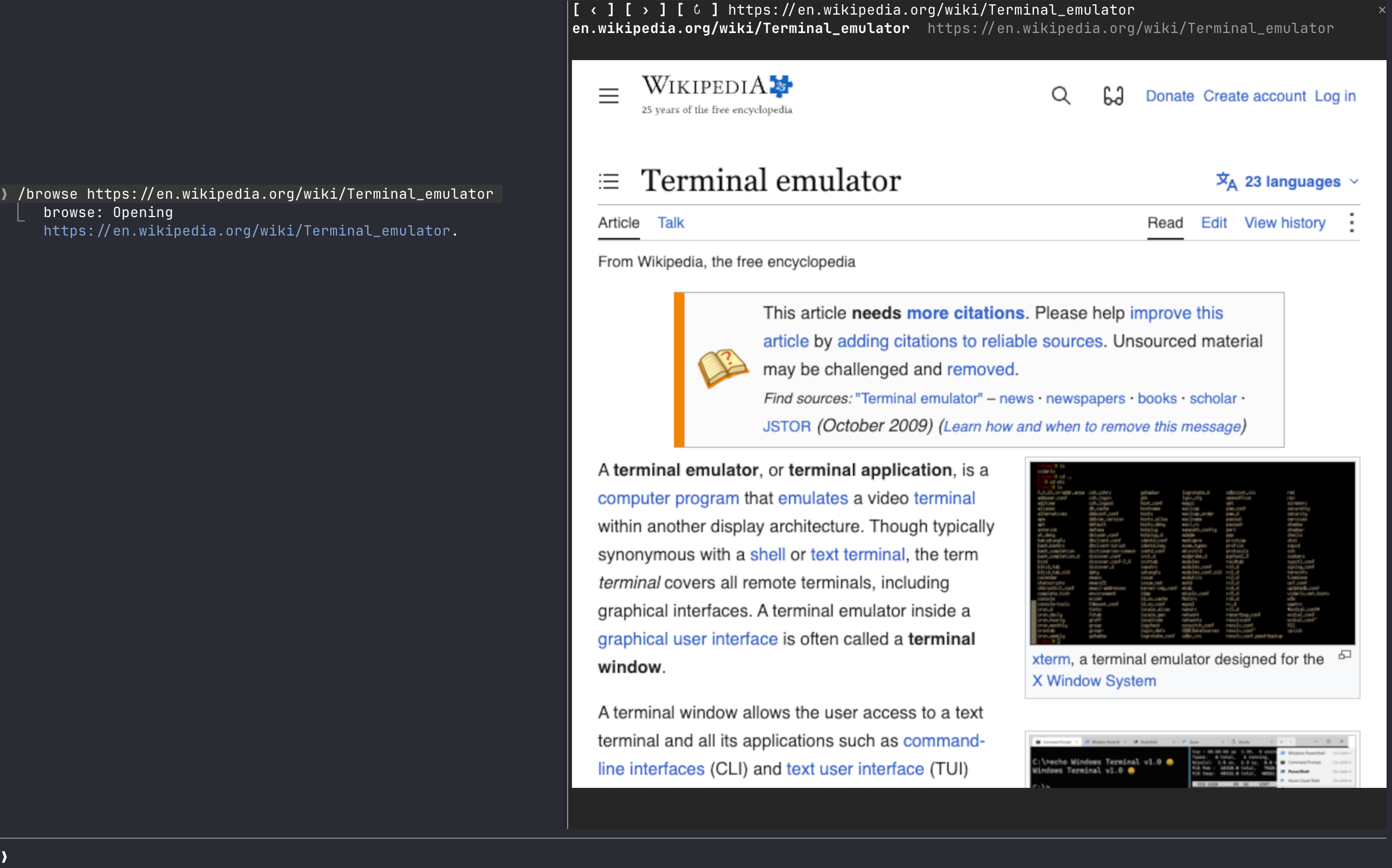
browse 是一个 Claude Code 插件(来自 jamubc/toolbox marketplace),会在提示列旁的窗格中打开 Web 浏览器。使用 /plugin marketplace add jamubc/toolbox,然后 /plugin install browse@toolbox 安装。使用 /browse 打开起始页,使用 /browse <address or words> 导航或搜索 DuckDuckGo,使用 /browse close 停止。真实像素渲染使用 kitty graphics protocol(kitty 或 Ghostty);其他终端会退回彩色半区块,Claude 桌面应用、VS Code 扩展和移动端不会显示任何内容。需要 Chrome/Chromium/Brave/Edge 和 PATH 中的 Node.js 18+,支持 macOS(已测试)和 Linux(未测试),尚不支持 Windows,并将自己的 Chrome 配置文件保存在 ~/.cache/claude-browse/chrome-profile。
请先查看作者 README 确认 marketplace 和插件名称;命令可能随仓库结构改变。
claude plugin marketplace add jamubc/toolbox
claude plugin install browse
A Claude Code web browser.
Add the marketplace:
/plugin marketplace add jamubc/toolbox
Install the plugin:
/plugin install browse@toolbox
| Command | What it does |
| --- | --- |
| /browse | Opens the browser on a start page: type an address or a search and press Enter, or pick YouTube, DuckDuckGo, Wikipedia, Hacker News or GitHub. |
| /browse <address or words> | Opens the address, or searches DuckDuckGo. |
| /browse close, or the pane's ✕ | Closes the pane and stops the browser and its sound. |
| The address bar | Type an address or words and press Enter. It has the keys when the start page opens. |
| Click the page | Clicks there. Your keys then go to the page; Esc gives them back to the prompt. |
| Mouse wheel over the page | Scrolls the page. |
| /config → How the page is drawn | auto, always real pixels (kitty or Ghostty only) or always colored blocks (any terminal). |
| Where you run Claude Code | Picture | Sound | | --- | --- | --- | | kitty, Ghostty | Real pixels (kitty graphics protocol). Untested so far. | Yes | | Any other terminal: Terminal.app, iTerm2, Zed, VS Code's terminal, WezTerm, tmux, or over ssh | Colored half-blocks, two pixels per character. Video is recognizable but chunky, and small text cannot be read. | Yes, on the machine running Claude Code | | Claude desktop app, VS Code extension, mobile | Nothing. The pane says the browser only draws in the terminal, and no browser starts. | No |
| System | Status | | --- | --- | | macOS | Tested: YouTube with sound, clicks, keys, the wheel, closing. | | Linux | Should work; untested. Chrome is looked up on your PATH. | | Windows | Not supported yet. The pane says so. |
/config → Browser to draw in and Node.js 18+ to run it./config → How the page is drawn back to auto or colored blocks./browse says so.browser/browser.mjs runs Chrome headless and drives it over the DevTools protocol, with no dependencies.
hooks/register.tsx draws the pane, answers /browse, and forwards the wheel.hooks/pointer.tsx lies over the picture and passes on clicks and keys./clear and /compact leave the page up: /clear starts a new session in the same process, so the pane keeps what it was showing and writes it into the new one./browse <address> shows in the conversation as the command's reply, so Claude can read it. Pages, frames and what you type into the page stay between the pane and the local Chrome.~/.cache/claude-browse/chrome-profile: cookies and logins persist there between sessions, apart from your everyday Chrome profile. Delete that folder to forget them.
由 neural-trader(v2.7+)驱动的神经交易策略:自学习 LSTM/Transformer/N-BEATS 模型、Rust/NAPI 回测、112+ 个 MCP 工具、群体协作和投资组合优化。

claude-seo 的可选 mods companion。它在 Claude Code 内作为 mod(function-hook 外挂)运行,因此能强制执行 skill 只能请求的事项。

Repowise Plugin for Claude Code — 提供 Graph、Git、Docs、Decisions、Code Health 五層程式碼智慧,透過 MCP 工具、slash commands 與自動 skills 讓 Claude 理解架構、擁有者、熱點與缺陷風險。含 Lens 這個 Claude Code mod,提供 spinner 提示、margin notes、變更審查與 /lens 面板。