
alexknowshtml@alexknowshtml
alexknowshtml/claude-auto-handoff
一款 Claude Code 模组,可在上下文填满之前将长时间的会话切换为新的会话。它取代了 auto-compact。
alexknowshtml/claude-auto-handoff
在上下文阈值处,Haiku 将结构化的移交摘要写入磁盘,mod 运行 /clear,并且新会话通过指向摘要的单行进行播种。简报具有固定的、可编辑的结构(正在进行的工作、决策、假设、死胡同、最后的请求和状态、下一步),其中包含从代码记录中提取的文件、提交和问题。包括拒绝超过阈值的新工具调用的工具门、循环防护、提示上方的进度面板、Tailscale(或本地主机)上提供的 per-brief 查看器页面、可选的状态行链接和可配置模板。通过 git clone 加上 claude --plugin-dir 安装,并在 /config 下进行设置。
请先查看作者 README 确认 marketplace 和插件名称;命令可能随仓库结构改变。
claude plugin marketplace add alexknowshtml/claude-auto-handoff
claude plugin install auto-handoff
A Claude Code mod that hands a long session off to a fresh one before the context fills up. It replaces auto-compact.
At the threshold, Haiku writes a structured handoff brief to disk. Then the mod runs /clear and seeds the new session with one line that points at the brief. The fresh session reads the brief and keeps working.
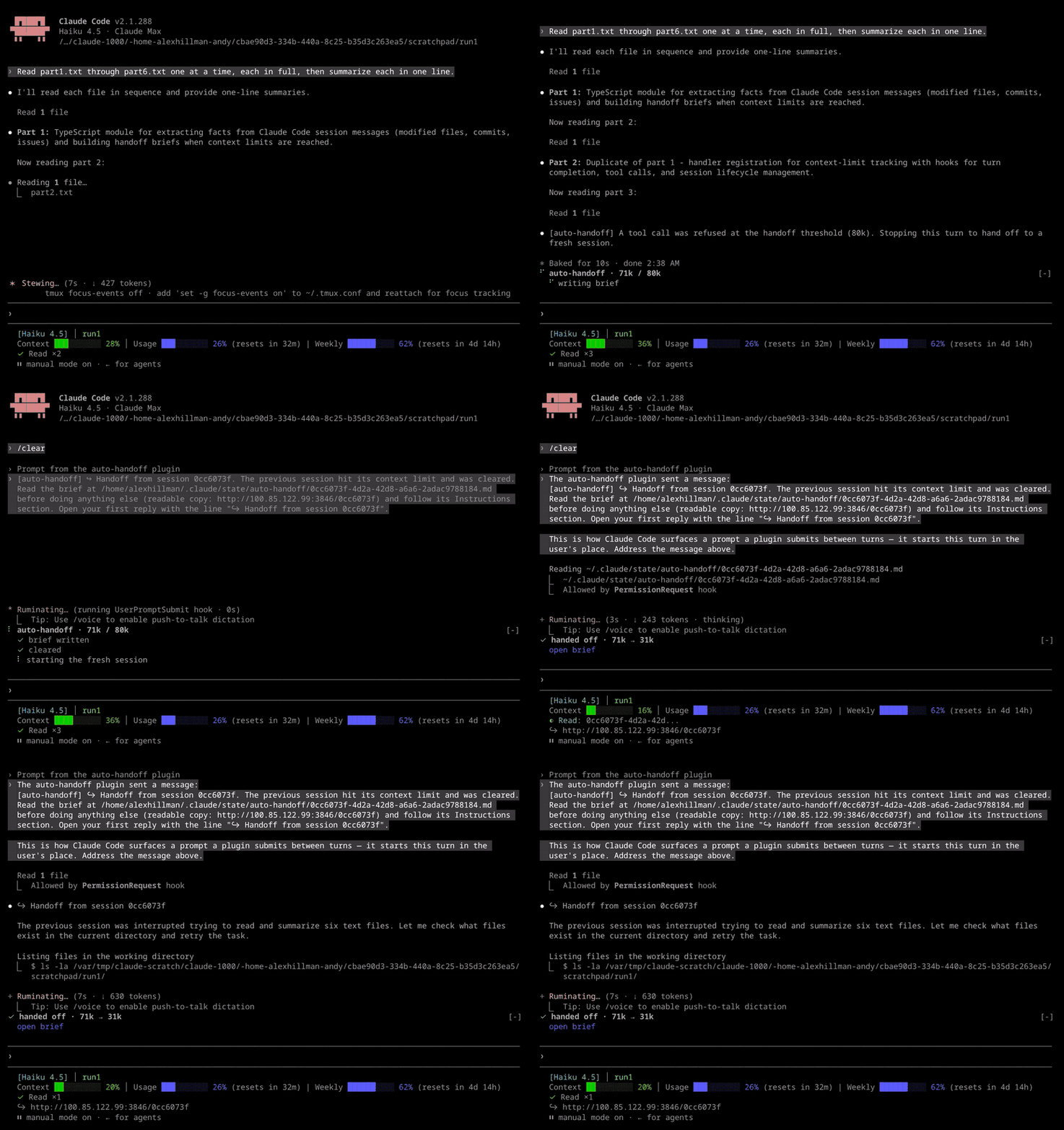
A live run on Haiku with the threshold at 80k. The mod refuses a read at the threshold, writes the brief, clears, and the fresh session is back at work about 7 seconds later at 31k. (video)
Auto-compact summarizes in place, and you can't control what it keeps. A handoff brief has a fixed structure that you can edit. It covers work in progress, decisions, assumptions to verify, dead ends, your last request and whether it was answered, and the next step. The files, commits and issues sections come from the transcript in code, so they don't depend on the model's memory.
Threshold. The mod checks the context size after each turn and before each model request, including tool output that hasn't been measured yet. Once it's past the threshold, the mod refuses new tool calls, so one burst of reads can't overflow the window. Unmeasured tool output is an estimate that can run high, so the real size sometimes comes in under the threshold. A refused call still ends in a handoff, at the next request or the end of the turn.
Brief. Haiku writes the brief from the transcript. If Haiku fails, a facts-only brief stands in. Briefs go to ~/.claude/state/auto-handoff/<session-id>.md.
Clear and seed. The mod runs /clear and sends the fresh session one line: read the brief and follow its Instructions section. In the transcript, that line's brief path and viewer URL are drawn as links. Claude Code makes them clickable only when it detects a terminal that supports links. Over plain SSH it usually doesn't, so set FORCE_HYPERLINK=1 if your terminal handles links, or use the status line link below.
A panel above the prompt. It shows each step with a braille spinner on the one still running: writing the brief, clearing, starting the fresh session. Once the new session is measured it reads ✓ handed off · 162k → 45k with an open brief link, then collapses after 10 seconds. Failures, the loop-guard pause, a facts-only brief and a too-tight threshold stay up until you press Dismiss. Typing /clear yourself closes the panel, including one waiting for Dismiss, unless a handoff is running. The panel steps aside while a survey holds that band. The band is drawn on the terminal and desktop only, so on the mobile app or in VS Code the threshold, the result, and anything that stays up also arrive as a toast.
Viewer. Each brief also gets a readable page in ~/.claude/state/auto-handoff/pages/. The page shows the brief and every handoff in the same run, linked in order. The served link is short, like http://100.x.y.z:3846/1a2b3c4d, so it fits on one line on a phone. By default the mod serves these pages on your Tailscale IP at port 3846, so you can open them from any device on your tailnet. Devices off your tailnet can't reach them. The server starts with the first session that loads the mod and runs while that session is open; if it stops, including when the mod reloads, the next session to finish a turn starts it again. A session that finds the port already taken logs one line and leaves the running server alone, since it serves the same pages. Without Tailscale, the mod serves on 127.0.0.1 instead, so the link opens only on this machine. If Tailscale comes up later, a session already serving on localhost keeps using it; the next new session can serve on the Tailscale IP.
Status line link (optional). statusline/handoff-link.sh wraps your status line command and adds a ↪ <link> line when the session came from a handoff. Set it as the statusLine command in ~/.claude/settings.json, with your existing command after it:
"statusLine": { "type": "command", "command": "~/claude-auto-handoff/statusline/handoff-link.sh ~/.claude/my-statusline.sh" }
It needs jq. It finds the link in the previous brief's header, which names this session in to: and the page in viewer:.
Loop guards stop a fresh session that starts large from handing off again right away. They also cap how many handoffs run in a row before you type something.
Requires a Claude Code build with mods (function-hook plugins).
git clone https://github.com/alexknowshtml/claude-auto-handoff.git ~/claude-auto-handoff
claude --plugin-dir ~/claude-auto-handoff
To load it in every session, set CLAUDE_CODE_PLUGIN_DIRS to the folder in your shell environment, or in the env block of ~/.claude/settings.json:
{ "env": { "CLAUDE_CODE_PLUGIN_DIRS": "~/claude-auto-handoff" } }
Every setting is a row in /config under auto-handoff. They're stored in ~/.claude/settings.json under pluginConfigs.
| Setting | Default | What it does |
|---|---|---|
| threshold | 160000 | Context tokens that trigger a handoff. Sized for a 200k window: it leaves room for the brief and the turn in flight. A seeded session hands off no sooner than 40k past its own starting size, whatever this says; set it lower than that and the panel tells you where the line actually is |
| maxConsecutiveHandoffs | 2 | Handoffs allowed before you type a prompt; past this, the mod pauses until you do |
| briefTemplate | ~/.claude/auto-handoff/brief.md | Your copy of the sections Haiku writes |
| instructionsTemplate | ~/.claude/auto-handoff/instructions.md | Your copy of what the fresh session is told to do |
| ignoreFiles | blank | Regex for edited files to leave out of the brief, such as caches or synced state |
| viewer | tailscale:3846 | Where to serve the brief pages, as host:port. tailscale as the host means this machine's Tailscale IP, or 127.0.0.1 when Tailscale isn't set up. Leave blank for no server; the link is then the local file |
Environment variables:
AUTO_HANDOFF_TOKENS=60000 overrides the threshold for one run, so you can watch a handoff without filling 160k first. It stays set in that shell after the test. Seeded sessions start near 45k, so a value under about 85k leaves them less than 40k of room: the mod then hands off at start + 40k instead and the panel shows threshold 60k (AUTO_HANDOFF_TOKENS) leaves 15k ... so you know the override is still live.AUTO_HANDOFF_DISABLE=1 turns the mod off for one session, viewer server included.DISABLE_AUTO_COMPACT also turns it off. When something else manages the context limit, such as a wrapper that pipes the session, /clear would break that pipe. The viewer server still runs there.The brief is shaped by two markdown files. The defaults live in this repo's templates/ folder:
templates/brief.md is the prompt Haiku gets after the transcript. Each ## heading is a section of the brief.templates/instructions.md goes at the top of the brief and tells the fresh session what to do with it.On a session's first start, the mod copies both files to ~/.claude/auto-handoff/ if they aren't there yet. Edit those copies, not the ones in the repo, so a git pull never overwrites your changes. The next handoff uses your version.
To get the current default back, delete your copy. The next start copies it fresh. To keep your files somewhere else, point briefTemplate or instructionsTemplate in /config at them.
brief.mdAdd, remove, rename or reorder ## sections. The text under each heading tells Haiku what to put there. A Haiku reply counts as valid if it contains at least one of your headings. Otherwise the mod falls back to a facts-only brief.
Leave out files and commits sections. The mod adds them from the transcript in code.
instructions.mdIt has one switch:
{{#priority}}Shown when the last request is not fully answered.{{/priority}}
{{^priority}}Shown when it is.{{/priority}}
The switch reads the brief's ## Last Request from the User section and its Status: line. Keep both in brief.md if you want it to work.
Everything the mod does is logged to ~/.claude/state/auto-handoff/auto-handoff.log.
claude plugin validate .
claude plugin test .
The mod hot-reloads when you save while it's loaded with --plugin-dir.
sh (Windows), the brief page is still written, and the link opens it as a local file instead of a server that never started. The viewer no longer shells out to mkdir.USERPROFILE when HOME is unset, so briefs no longer land in <project>/undefined/. Where there is no sh, the log is written through $.fs. The tests pass on Windows. The viewer server still needs a POSIX shell.[unverified: not in Handoff Numbers] and logged. The figure is marked, not removed./clear closes the panel. A second session that finds the viewer port taken exits quietly instead of logging a stack trace.open brief link.127.0.0.1 when Tailscale isn't available./clear and a seed prompt. It includes the tool gate, the check before each request, auto-compact replaced by a handoff, and the loop guards.MIT

了解缓存的 /loop worker 和 CronCreate 后台自动化。ruflo 系列每项周期任务都使用的基础插件。

作为 Claude Code mod 的 claude-reflect:每个简短提示都会进行模型检查,找出可复用的修正(支持任何语言);提示符上方的横条让你按一次就将它们保存到 CLAUDE.md。


Claude Code 内的早期 crit:在面板中评论对话、差异或文件,把审查发送给 Claude,并在线程中阅读 Claude 的回复。