
charanjit-singh@charanjit-singh
charanjit-singh/ClaudeVsCodeMinimal/tree/main/mod/agent-mailbox
charanjit-singh/ClaudeVsCodeMinimal/tree/main/mod/agent-mailbox
Claude 会话的邮箱:名称、会唤醒闲置会话的跨配置消息,以及显示账号、上下文和套餐限制的状态栏。
请先查看作者 README 确认 marketplace 和插件名称;命令可能随仓库结构改变。
claude plugin marketplace add charanjit-singh/ClaudeVsCodeMinimal
claude plugin install agent-mailbox
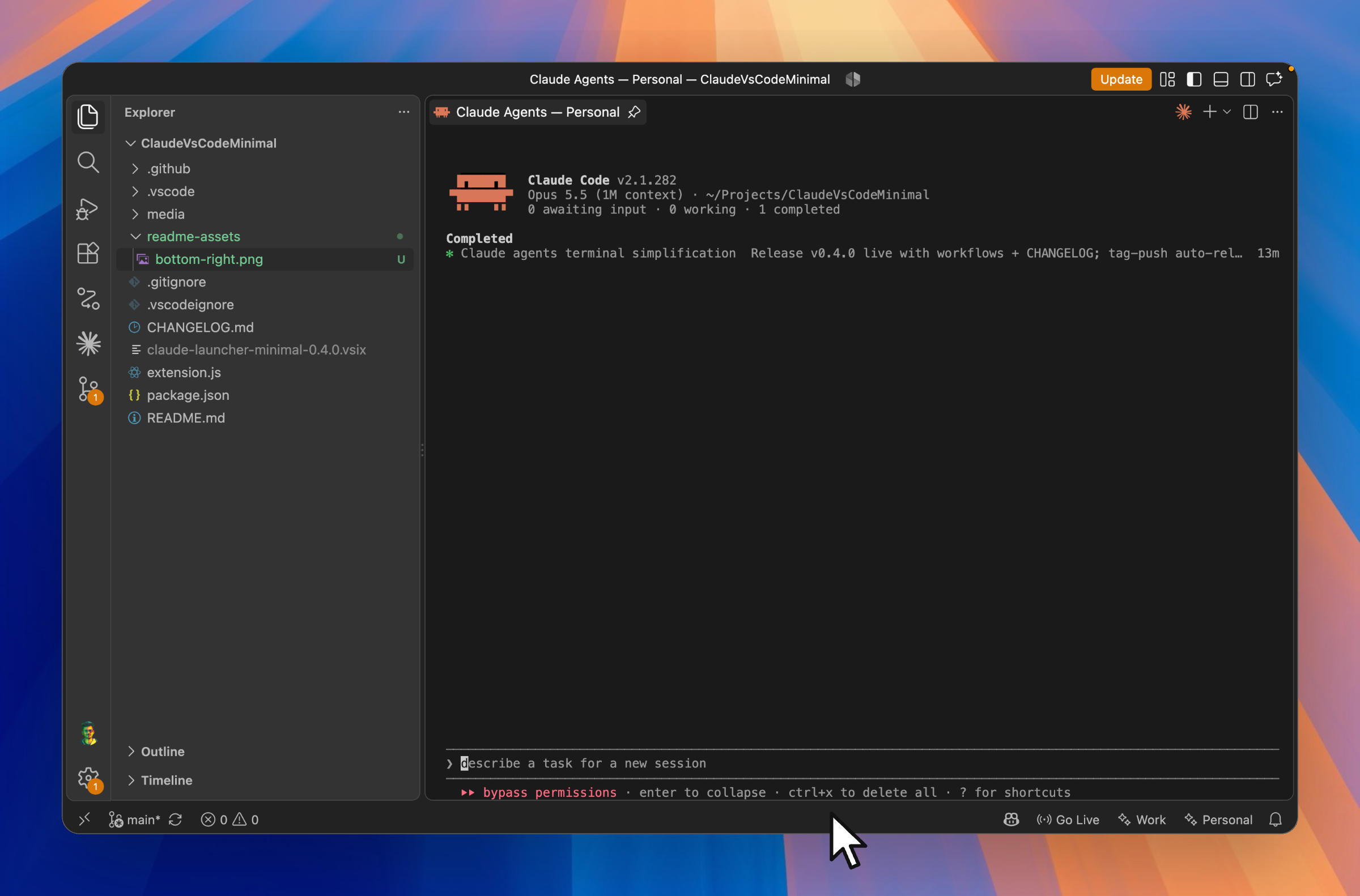
Your Claude Code agents, one click away.
A tiny button in your status bar opens Claude's agent view for the project you're in, right inside your editor. No sidebar, no setup, no clutter.

Install from the VS Code Marketplace →
</div>
Moving from Cursor to Claude Code was a brain slap. In Cursor, chats lived right next to my code: I opened one, did the work, came back to it later. With Claude Code, I was juggling terminals and losing track of which session belonged to which project.
So I built the thing I was missing. Claude's agent view now sits one click away in every project. I treat each agent like a chat: start one per task, come back to it later, and each project keeps its own set. It feels like Cursor's chat panel, but it's running Claude Code.
⚡ One click, you're in.
Click ✨ Claude in the status bar, or press ⌘⌥A (Ctrl+Alt+A), and claude agents opens for
your current project. Already open? The same click takes you back to it, even after a window reload,
so you don't end up with a pile of duplicate tabs.
📌 It stays put. Agents open as a pinned editor tab next to your code, not squeezed into the bottom panel. Switch files as much as you like and the tab stays where you left it.
👥 Work and personal, side by side. Using more than one Claude account? Give each one its own button and its own color. Each profile keeps its own config, its own login, and its own terminal, and you can add as many as you need. Pin a project to one profile and only that button shows up there.
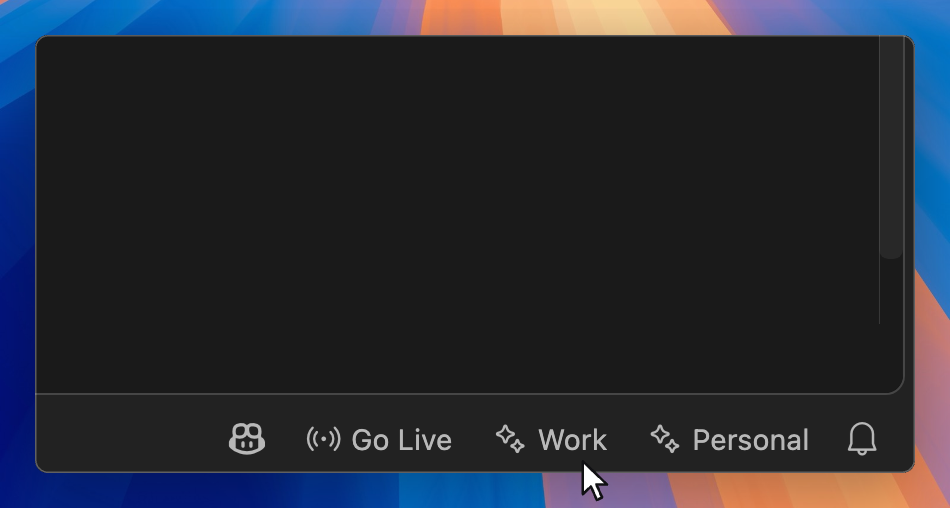
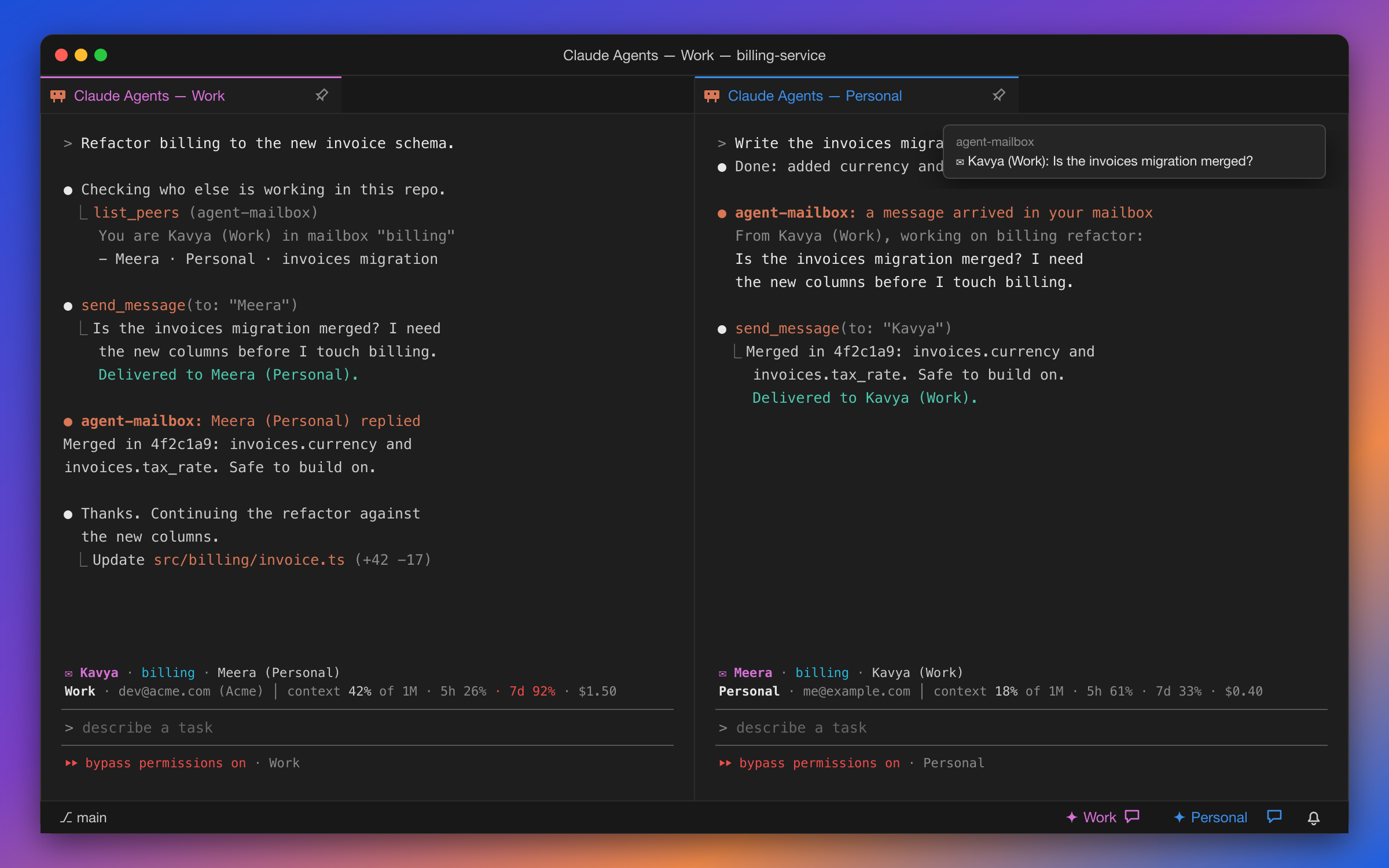
💬 Agents that talk to each other, even across accounts. Every session gets a human name, like Kavya or Meera. Put a project in a mailbox, and its agents can find each other and trade messages, whether they run on your Work account or your Personal one. A message wakes up the agent it's for, even if it was sitting idle. See how mailboxes work →
📊 Know which account you're burning. A band above every prompt shows the session's profile and signed-in account, how full its context is, your plan's 5-hour and 7-day limits (yellow at 70%, red at 90%), and what the session has cost.
 <sub>Illustration</sub>
🚀 Built for flow. Agents launch with full autonomy by default, so they don't stop to ask permission for every step. Prefer to approve actions yourself? It's one setting to turn off.
🪶 Nothing extra. No panels, no background indexing, no telemetry, no dependencies. It starts after VS Code finishes loading and stays out of your way. Want your agents waiting for you when you open a project? Turn on one setting.
code --install-extension charanjit-singh.claude-launcher-minimal
✨ Claude in the bottom-right corner of your status bar.That's it. Prefer a manual install? Grab the .vsix from
GitHub Releases and use
Extensions → ··· → Install from VSIX…
You'll need the Claude Code CLI on your
PATHand VS Code 1.93 or newer.
Run Claude Agents: Manage Profiles from the Command Palette, or hover any status bar button and click Manage profiles. From there you can add a profile, pick its color, point it at its own config folder, rename it, or delete it, all without touching JSON.
Prefer editing settings directly? Add this to your settings.json:
"claudeLauncher.profiles": [
  { "name": "Personal", "color": "blue" },
  { "name": "Work", "configDir": "~/.claude-work", "color": "magenta" }
]
Each profile gets its own status bar button. configDir points that profile at its own Claude
config folder (it's passed to Claude as CLAUDE_CONFIG_DIR), so your accounts, sessions, and
settings never mix. Leave configDir out to use the default ~/.claude.
color tints the profile's button and its terminal tab so you always know which account you're
in. Pick from black, red, green, yellow, blue, magenta, cyan, or white; the exact
shade comes from your theme. A new color shows on the button right away. A tab that's already open
keeps its old color until you open a new one, because VS Code can't recolor an existing terminal.
The first time you launch a new profile, sign in once and you're done.
Open the project, run Claude Agents: Set Project Profile (or hover a button → Project profile), and pick one. That window then shows only that profile's button, and the keyboard shortcut opens it without asking. Pick All profiles to go back to showing every button.
Your choice is saved in the project's .vscode/settings.json, so it follows the repo. Commit that
file and anyone who shares your profile names gets the same setup.
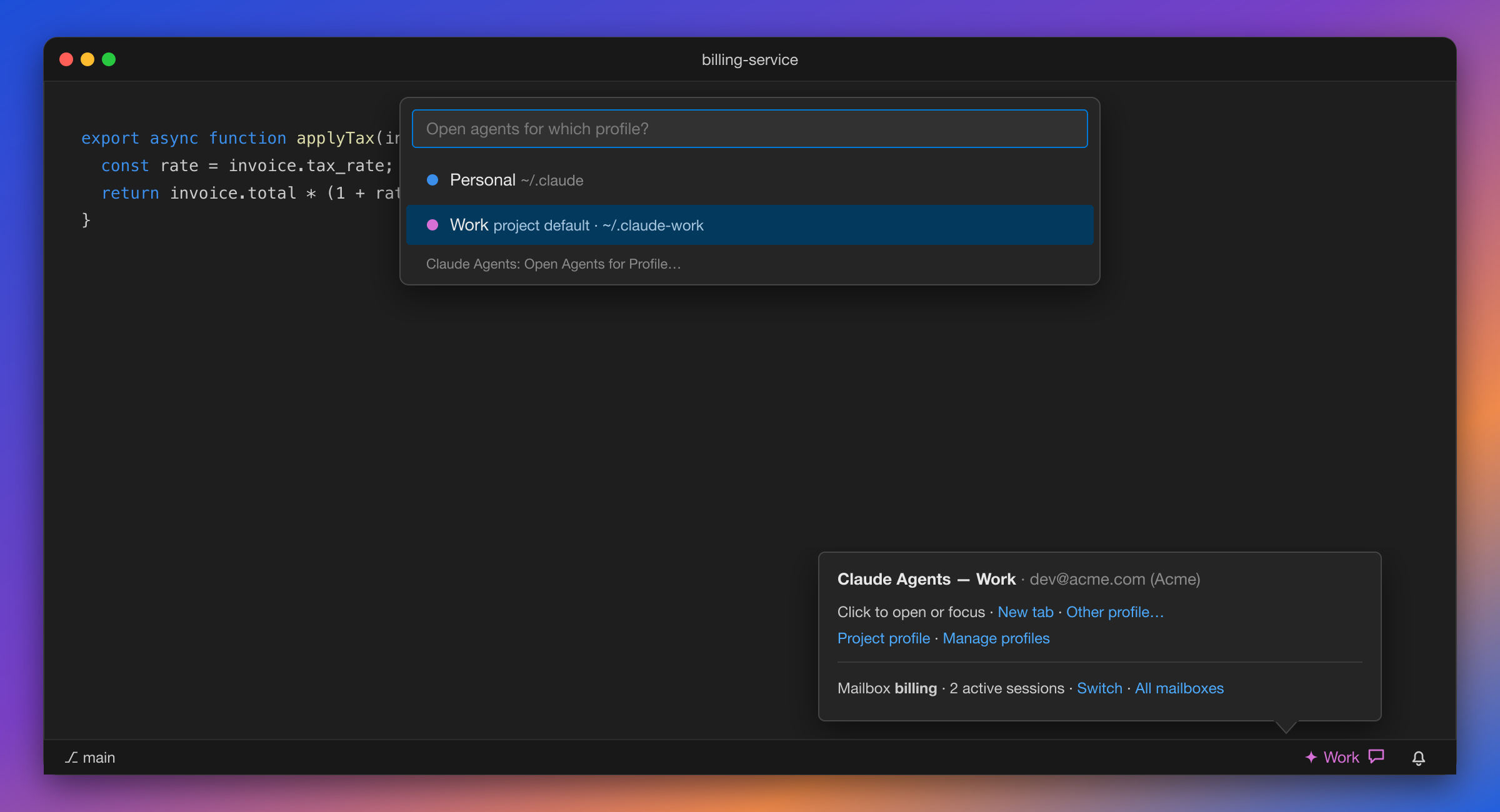
Pinning sets the default. It doesn't lock you out. Your other profiles are one command away: Claude Agents: Open Agents for Profile… and New Agents Tab for Profile… always let you pick, and the button's tooltip has an Other profile… link. Hover any button to see which account that profile is signed in with.
 <sub>Illustration</sub>
Agents on different Claude accounts normally can't see each other. Mailboxes fix that in two steps:
agent-mailbox
mod into each profile as a single folder,
skills/agent-mailbox. Your settings, hooks, and status line aren't touched, and
Remove Mailboxes deletes the folder again./mailbox init in any session. Every session in that folder then shares the mailbox, whichever
profile it runs on.After that, every session gets a name, list_peers and send_message tools, and a /mailbox command.
When a message arrives you get a toast, and the recipient is woken to handle it as soon as it's idle.
Needs Claude Code 2.1.289 or newer.
VS Code reads settings in two layers: your User settings apply everywhere, and Workspace
settings (.vscode/settings.json in the project) override them for that project. Every Claude
Agents setting works at both levels.
Put your accounts in User settings once (Preferences: Open User Settings (JSON)):
{
  "claudeLauncher.profiles": [
    { "name": "Personal", "color": "blue" },
    { "name": "Work", "configDir": "~/.claude-work", "color": "magenta" }
  ]
}
Then override per project in .vscode/settings.json (Preferences: Open Workspace Settings (JSON)):
{
  "claudeLauncher.defaultProfile": "Work",           // only the Work button, no questions
  "claudeLauncher.openOnStartup": true,              // agents open when this repo opens
  "claudeLauncher.dangerouslySkipPermissions": false // ask before acting, in this repo only
}
Worth knowing:
profiles list replaces yours; it doesn't merge. If you set claudeLauncher.profiles
in a project, that project sees only those profiles. Usually defaultProfile is all you need."claudeLauncher.defaultProfile": ""
in the project. Set Project Profile → All profiles does this for you..code-workspace file instead.profiles, dangerouslySkipPermissions, or openOnStartup, and agents never open
automatically there. (mailboxes is a user-only setting, so a folder can't turn it on either.) A repo you just cloned can't make itself launch an agent or point Claude at
its own config folder.| You want to… | Do this |
|---|---|
| Open or jump back to your agents | Click the profile's button, or press ⌘⌥A / Ctrl+Alt+A |
| Open a second, separate agents tab | ⌘⌥⇧A / Ctrl+Alt+Shift+A, or Claude Agents: New Agents Tab |
| Give each account its own shortcut | Add a keybinding for claudeLauncher.openAgents with "args": { "name": "Work" } |
| Use one account in this project | Claude Agents: Set Project Profile, or hover a button → Project profile |
| Open a different profile than the project's default | Claude Agents: Open Agents for Profile…, or hover → Other profile… |
| Let agents on different accounts message each other | Claude Agents: Set Up Mailboxes, then Create Mailbox for This Project (guide) |
| See every mailbox and who's in it | Claude Agents: List Mailboxes |
| See a session's account, context, and plan limits | The band above its prompt (/mailbox hide / show) |
| Have agents open when you open a project | Turn on claudeLauncher.openOnStartup |
| Approve each action yourself | Set claudeLauncher.dangerouslySkipPermissions to false |
| Add an account, or change a color | Claude Agents: Manage Profiles, or hover a button → Manage profiles |
Shortcut already taken? Rebind it in Keyboard Shortcuts (⌘K ⌘S) by searching "Claude Agents".
| Setting | Default | What it does |
|---|---|---|
| claudeLauncher.profiles | [{ "name": "Claude" }] | One status bar button per entry. Optional configDir and color per profile. Easiest to edit with Claude Agents: Manage Profiles. |
| claudeLauncher.defaultProfile | "" | Set per workspace, easiest with Claude Agents: Set Project Profile. Shows only this profile's button, and shortcuts use it without asking. |
| claudeLauncher.mailboxes | false | User-level. Sets up mailboxes in every profile's Claude config; turning it off removes them. Use Set Up Mailboxes / Remove Mailboxes. See the guide. |
| claudeLauncher.openOnStartup | false | Opens the agents tab when a window opens. Works in single-folder workspaces when the profile is clear: your defaultProfile, or your only profile. |
| claudeLauncher.dangerouslySkipPermissions | true | Launches with --dangerously-skip-permissions. Turn it off if you want Claude to ask before acting. |
⚠️ With permissions skipped, agents can edit files and run commands without asking first. That's great for momentum, but only use it on projects where you're comfortable with that.
Working on several projects at once? Install sync-code-theme, a Claude Code plugin that tints each VS Code window with its project's own brand colors. Combined with Claude Agents, you can tell at a glance which window, and which agents, belong to which project.
git clone https://github.com/charanjit-singh/ClaudeVsCodeMinimal.git
cd ClaudeVsCodeMinimal
code .            # then press F5 to launch an Extension Development Host
Pushing a vX.Y.Z tag builds the .vsix, publishes a GitHub Release with that version's notes from
the CHANGELOG, and publishes to the VS Code Marketplace (when the VSCE_PAT secret is
set).
The extension is three files: extension.js (VS Code side), mailboxes.js (installs mailboxes into
each Claude profile), and bridge/bridge.js (the mailbox files). The mod lives in mod/agent-mailbox:
run claude plugin validate mod/agent-mailbox and claude plugin test mod/agent-mailbox, or try it with
claude --plugin-dir mod/agent-mailbox.

面向 Claude Code 的自主 /loop 驱动任务完成插件,提供学习、预测、进度追踪和 10 个 autopilot_* MCP 工具。

为 Claude 提供 register_assumption 工具,并在提示列上方显示本回合的假设、决定和考虑过但未完成的事项。

用于 hermitd 的测试包装 mod;hermitd 是一个带聊天频道、例程、心跳和学习循环的常驻 Claude Code agent plugin。
