
Vortitron@Vortitron
Vortitron/home-assistant-mcp/tree/main/claude-plugin/vome-health
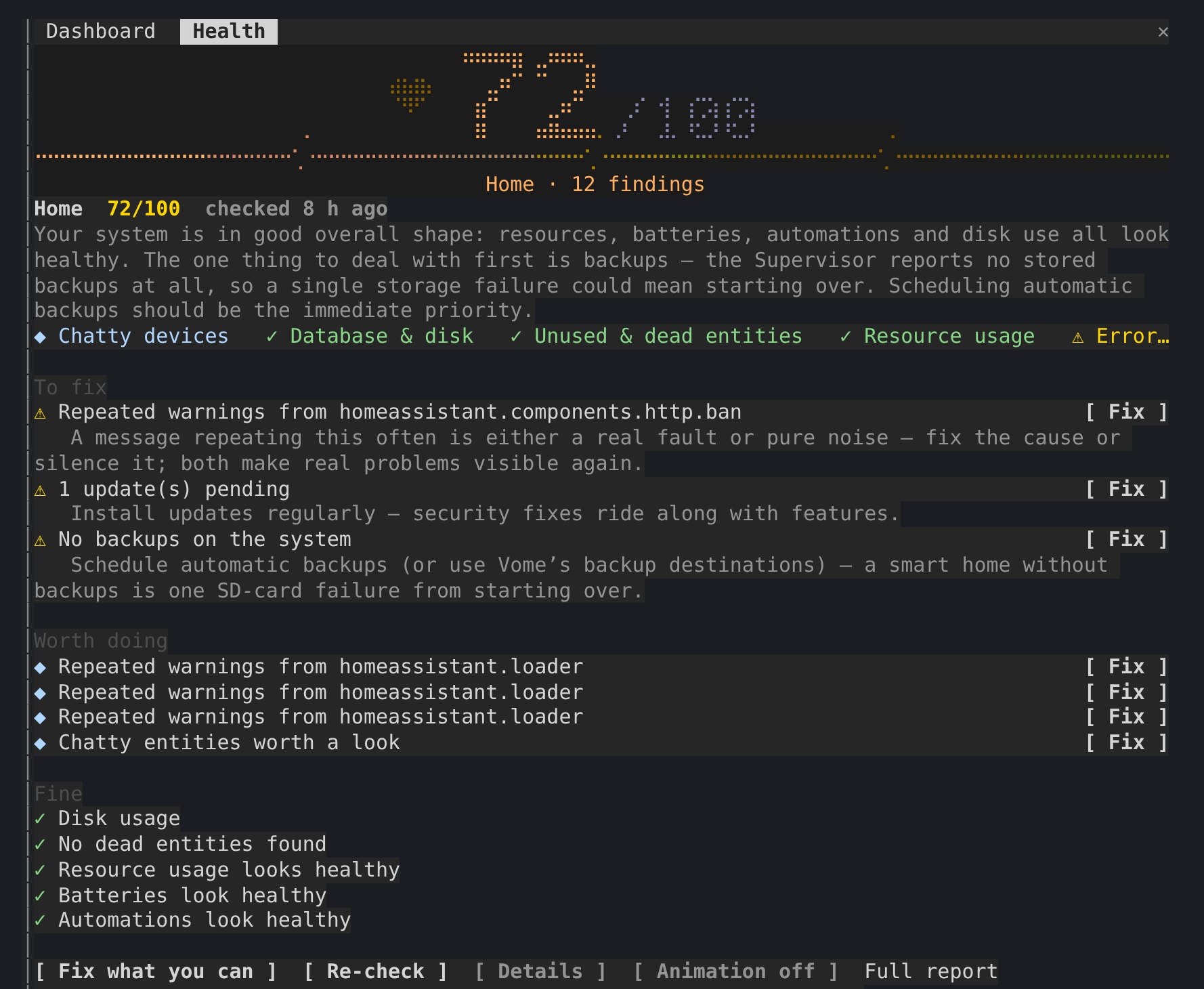
Home Assistant의 건강 점수를 100점 만점으로 보여 주고, Claude가 처리하는 동안 검사에서 찾은 모든 내용을 대화 옆에 유지하는 사이드 패널입니다.
Vortitron/home-assistant-mcp/tree/main/claude-plugin/vome-health
Home Assistant의 건강 점수를 100점 만점으로 보여 주는 사이드 패널입니다. Claude가 작업하는 동안 검사에서 찾은 모든 내용도 대화 옆에 유지합니다.
/plugin install vome-health --marketplace Vortitron/home-assistant-mcp로 설치합니다.
먼저 작성자의 README에서 marketplace와 플러그인 이름을 확인하세요. 저장소 구조에 따라 명령어가 달라질 수 있습니다.
claude plugin marketplace add Vortitron/home-assistant-mcp
claude plugin install vome-health
A side pane with Vome's health score for your Home Assistant, out of 100, and everything its check found, kept beside the conversation while Claude works through it.
The pane never fixes anything itself: Claude does, with its own tool calls, which you approve as usual. r only asks Vome for a fresh check.
1. Add the Vome app to Home Assistant, then get a key from it. No sign-up needed.

The button opens your own Home Assistant and adds the app's repository. Pick Vome and Install, open it, and on the Agent tab create a key.
2. Paste these into Claude Code, in a terminal (version 2.1.275 or newer):
/plugin install vome-connect --marketplace Vortitron/home-assistant-mcp
It asks for the key from step 1. Then:
/plugin install vome-health --marketplace Vortitron/home-assistant-mcp
/reload-plugins
Or all four Vome panes at once (automations, ESPHome, health and a working dashboard):
/plugin install vome-panes --marketplace Vortitron/home-assistant-mcp.
3. Ask Claude "How healthy is my Home Assistant? Fix what you can." The pane opens with the score. No score yet? Claude runs the first check, which takes a couple of minutes.
The pane reads the report in the background while a check runs, with the
MCP's read-only vome_health_report; r calls vome_health_check. In auto
mode, Claude Code refuses background calls that no request of yours is behind
unless they're allowed by name, and the pane then shows the exact line. With
vome-connect:
{ "permissions": { "allow": ["mcp__plugin_vome-connect_vome__vome_health_report"] } }
| | |
| --- | --- |
| /health | open the pane and read the latest report |
| r | run a fresh check |
| d | each finding's evidence, not just its title |
| b | the animation off or on (remembered) |
The report is Vome's health check of your own Home Assistant, read from the
sensor the Vome integration keeps it on (sensor.vome_health_score or
similar). The pane reads it through the connection Claude Code already has;
nothing is sent anywhere else.

문서 생성, 드리프트 감지, API 문서 자동화 플러그인이며 비밀이 포함된 문서 쓰기나 worker 디스패치를 거부하는 function-hook 가드로도 동작합니다.

Claude 데스크톱 앱용 상태 표시줄입니다. 프롬프트 위에 나타나 세션 품질, 컨텍스트 사용량, 캐시 카운트다운, 5시간 및 주간 한도를 보여 주고 Clawd가 세션의 동작을 연출합니다.

databricks CLI를 따라 Databricks 작업 공간, Unity Catalog, 컴퓨팅, 작업, 파이프라인, 앱, 대시보드를 트리로 보여 주는 /databricks-pane을 제공하는 Claude Code 플러그인 mod입니다. 실시간 강조, 프로필 전환, CLI 인수 복사도 지원합니다.
