
alexgreensh@alexgreensh
alexgreensh/token-optimizer/tree/main/desktop/token-optimizer-desktop
Claude 데스크톱 앱용 상태 표시줄입니다. 프롬프트 위에 나타나 세션 품질, 컨텍스트 사용량, 캐시 카운트다운, 5시간 및 주간 한도를 보여 주고 Clawd가 세션의 동작을 연출합니다.
alexgreensh/token-optimizer/tree/main/desktop/token-optimizer-desktop
Claude 데스크톱 앱용 상태 표시줄입니다. 프롬프트 위에 나타나 세션 품질, 컨텍스트 사용량, 캐시 카운트다운, 5시간 및 주간 한도를 보여 주고 Clawd가 세션의 동작을 연출합니다.
Token Optimizer plugin에 포함되어 있으므로(hooks/hooks.json이 modules 아래에서 이 폴더의 hooks/register.tsx를 지정함) 따로 설치할 것이 없습니다. 이 폴더에 자체 manifest가 있는 것은 claude plugin test로 테스트를 따로 실행하기 위해서입니다.
Claude Code 2.1.287 이상과 Anthropic의 mods 기능이 필요합니다. Anthropic은 원격으로 mods를 끌 수 있습니다. 꺼져도 아무것도 고장 나지 않고 표시줄만 나타나지 않습니다. 터미널에는 기존 상태 줄이 유지됩니다. VS Code는 지원하지 않습니다.
캐시 카운트다운은 추정치입니다. Claude 플랜에서는 1시간, API에서는 5분이며, 가능하면 세션 자체를 기준으로 측정합니다.
~/.claude/settings.json의 env 블록에서 TOKEN_OPTIMIZER_STATUS_BAR=0을 설정하면 표시줄을 숨기고, TOKEN_OPTIMIZER_STATUS_BAR_ANIMATE=0을 설정하면 Clawd를 움직이지 않게 합니다.
Token Optimizer README와 문서 사이트의 「Claude desktop app」 페이지를 참조하세요.
먼저 작성자의 README에서 marketplace와 플러그인 이름을 확인하세요. 저장소 구조에 따라 명령어가 달라질 수 있습니다.
claude plugin marketplace add alexgreensh/token-optimizer
claude plugin install token-optimizer
A status bar for the Claude desktop app. It draws above your prompt and shows session quality, context fill, cache countdown, and your 5-hour and weekly limits, with Clawd acting out what the session is doing.
It ships inside the Token Optimizer plugin (hooks/hooks.json names this folder's hooks/register.tsx under modules), so there is nothing extra to install. This folder keeps its own manifest only so its tests run on their own with claude plugin test.
Needs Claude Code 2.1.287 or newer and Anthropic's mods feature. Anthropic can switch mods off remotely; when off, nothing breaks and the bar just does not appear. The terminal keeps its existing status line. VS Code is not supported.
The cache countdown is an estimate: 1 hour on Claude plans, 5 minutes on the API, measured from the session itself when possible.
TOKEN_OPTIMIZER_STATUS_BAR=0 hides the bar and TOKEN_OPTIMIZER_STATUS_BAR_ANIMATE=0 keeps Clawd still, set in the env block of ~/.claude/settings.json.
See the Token Optimizer README and the docs site page "Claude desktop app".

문서 생성, 드리프트 감지, API 문서 자동화 플러그인이며 비밀이 포함된 문서 쓰기나 worker 디스패치를 거부하는 function-hook 가드로도 동작합니다.

databricks CLI를 따라 Databricks 작업 공간, Unity Catalog, 컴퓨팅, 작업, 파이프라인, 앱, 대시보드를 트리로 보여 주는 /databricks-pane을 제공하는 Claude Code 플러그인 mod입니다. 실시간 강조, 프로필 전환, CLI 인수 복사도 지원합니다.


# RemCTL 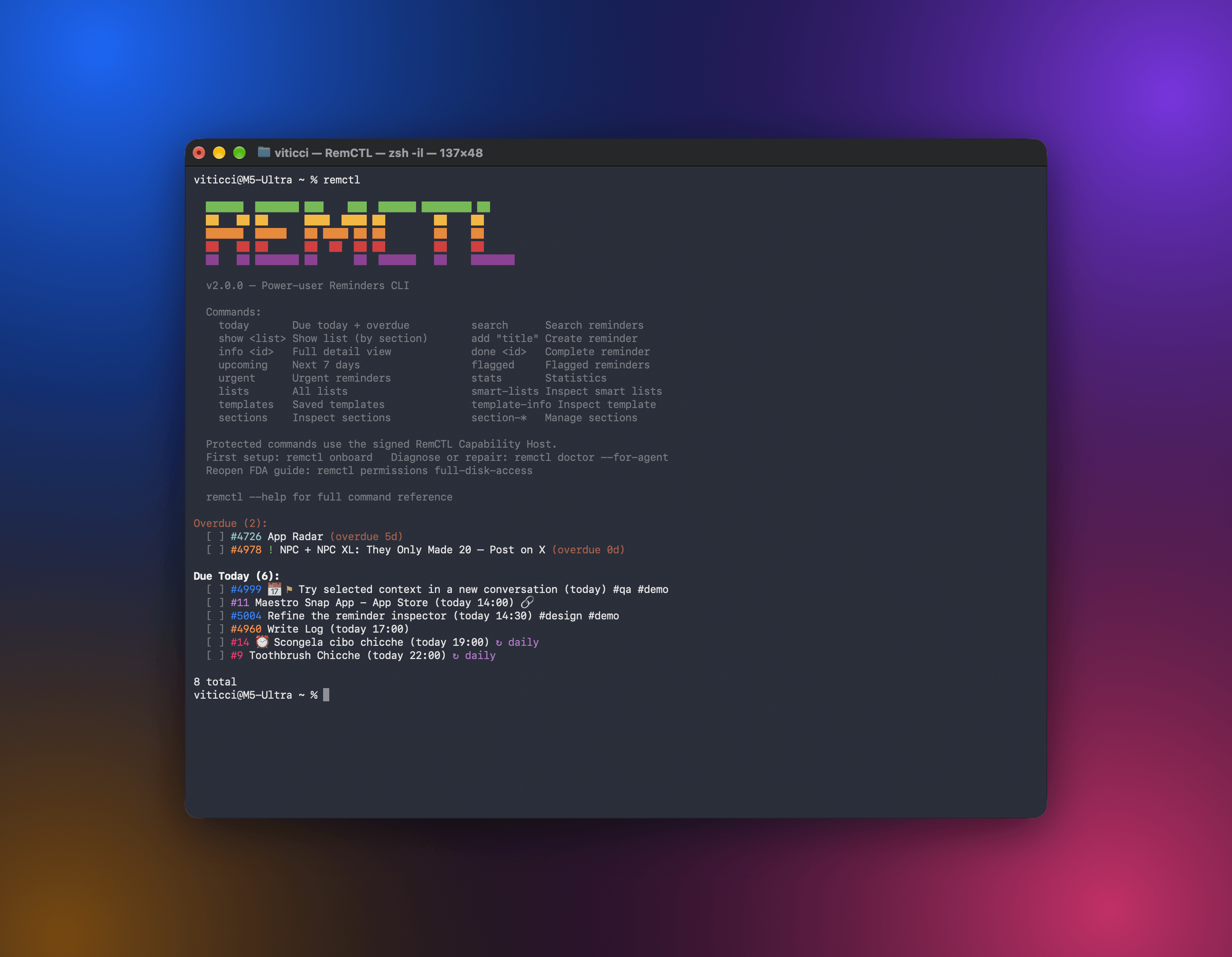 RemCTL은 터미널, AI 앱, Codex 안의 Reminders 작업 공간, Claude Code의 Today 밴드에서 Apple Reminders를 완전히 제어합니다. 미리 알림, 목록, 마감일, 플래그, 검색 같은 기본 기능뿐 아니라 Apple이 다른 앱에 공개하지 않는 sections, tags, subtasks, smart lists, templates도 지원합니다.
