
Vortitron@Vortitron
Vortitron/home-assistant-mcp/tree/main/claude-plugin/vome-dash
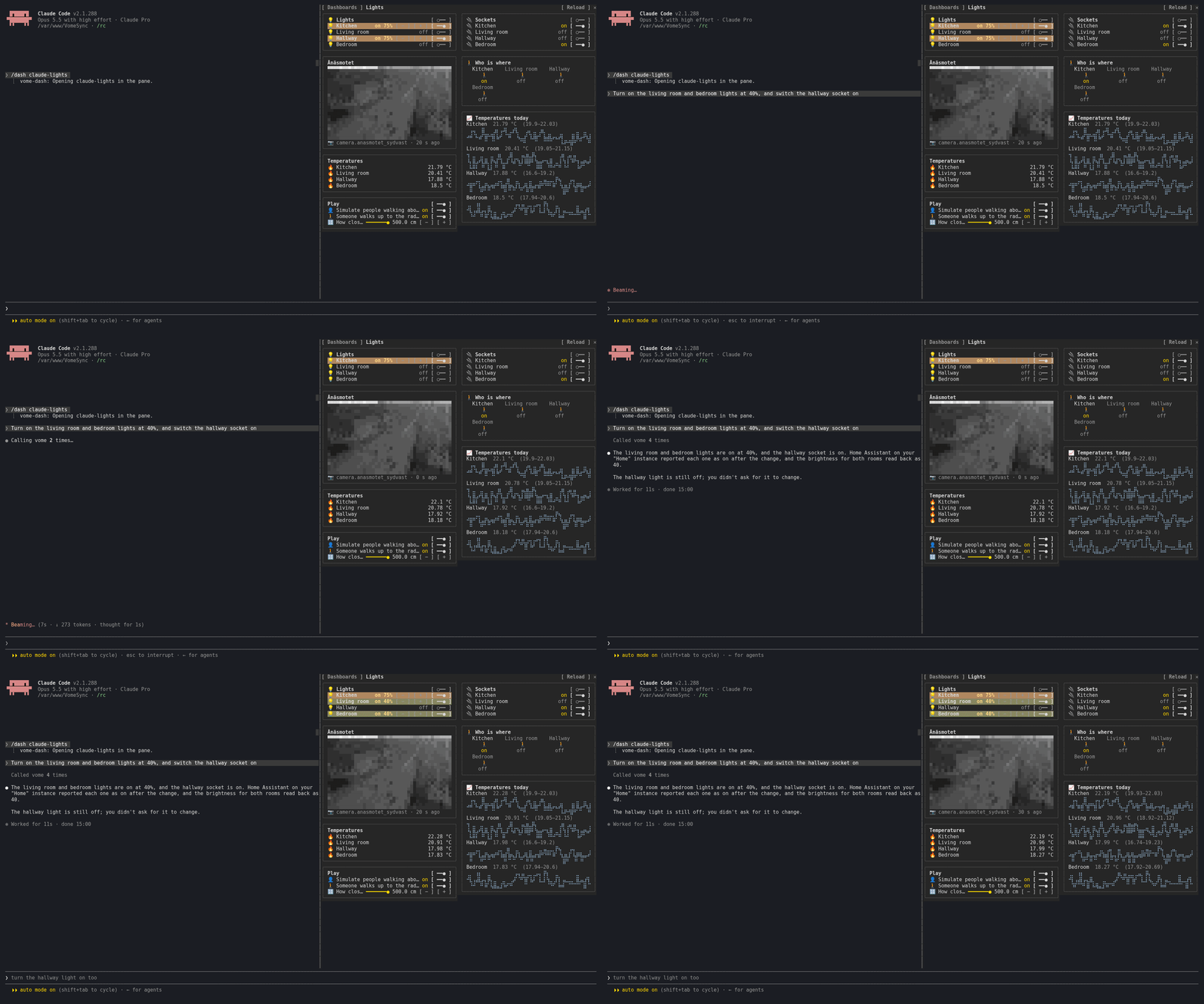
작동하는 Home Assistant 대시보드를 사이드 창에 띄우고 실시간 상태와 대화형 제어를 제공하는 Claude Code 플러그인입니다.
Vortitron/home-assistant-mcp/tree/main/claude-plugin/vome-dash
vome-dash는 Claude Code에 사이드 창을 추가해 실제로 작동하는 Home Assistant 대시보드를 보여 줍니다. Claude가 작업 중인 대시보드나 내가 가진 어느 대시보드든 표시할 수 있습니다. 실시간 상태를 보여 주고(폴링 없이 1초 안에 업데이트)실제 제어(스위치, 조광기, 슬라이더, 온도 조절기, 장면, 스크립트, 카드 버튼)를 지원하며, 기록 그래프와 카메라 프레임을 포함해 Home Assistant와 같은 방식으로 카드를 렌더링합니다. Claude가 바꾼 카드는 잠시 밝아집니다. /plugin install vome-connect --marketplace Vortitron/home-assistant-mcp로 설치한 다음 /plugin install vome-dash --marketplace Vortitron/home-assistant-mcp와 /reload-plugins를 실행하세요. /dash로 창을 엽니다. Vome Home Assistant 앱과 키가 필요합니다.
먼저 작성자의 README에서 marketplace와 플러그인 이름을 확인하세요. 저장소 구조에 따라 명령어가 달라질 수 있습니다.
claude plugin marketplace add Vortitron/home-assistant-mcp
claude plugin install vome-dash
A side pane with a Home Assistant dashboard in it: the one Claude is working on, or any of yours. Not a picture of one: it works.
Presses are yours: Claude never presses anything in the pane.
1. Add the Vome app to Home Assistant, then get a key from it. No sign-up needed.

The button opens your own Home Assistant and adds the app's repository. Pick Vome and Install, open it, and on the Agent tab create a key. Live states need the Vome app 0.3.52 or newer.
2. Paste these into Claude Code, in a terminal (version 2.1.275 or newer):
/plugin install vome-connect --marketplace Vortitron/home-assistant-mcp
It asks for the key from step 1. Then:
/plugin install vome-dash --marketplace Vortitron/home-assistant-mcp
/reload-plugins
Or all four Vome panes at once (automations, ESPHome, health and this one):
/plugin install vome-panes --marketplace Vortitron/home-assistant-mcp.
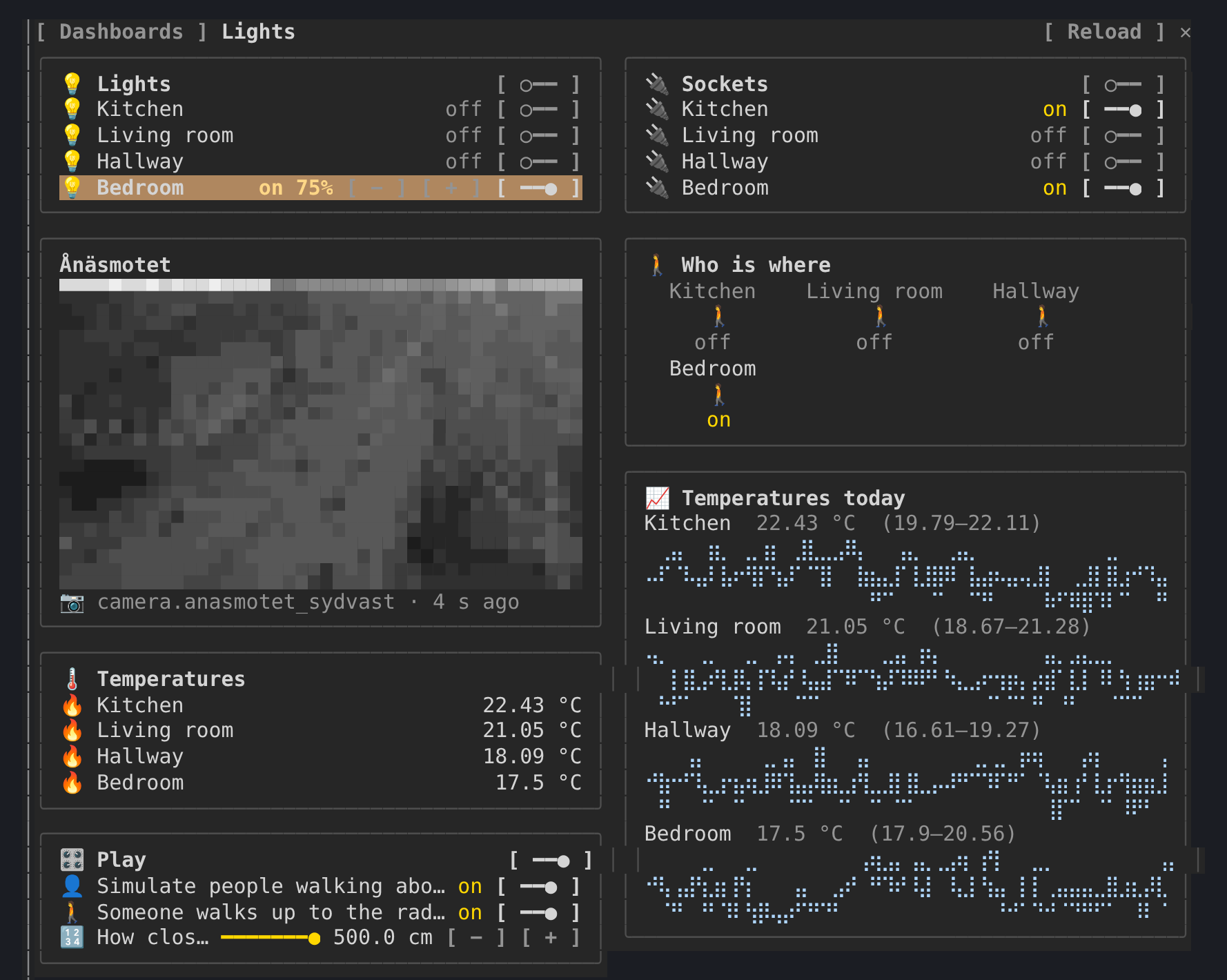
3. Run /dash, pick a dashboard, or ask Claude to build one: "Make me a
dashboard for the lights and the temperatures".
The pane reads in the background (states, the live watch, templates,
history, camera frames), all read-only. In auto mode Claude Code refuses
background calls nobody asked for unless they are allowed by name; the pane
shows the exact lines and where they go. With vome-connect:
"mcp__plugin_vome-connect_vome__ha_view_snapshot",
"mcp__plugin_vome-connect_vome__ha_watch_states",
"mcp__plugin_vome-connect_vome__ha_camera_frame",
"mcp__plugin_vome-connect_vome__ha_get_state",
"mcp__plugin_vome-connect_vome__ha_render_template",
"mcp__plugin_vome-connect_vome__ha_get_history",
"mcp__plugin_vome-connect_vome__ha_get_dashboard",
"mcp__plugin_vome-connect_vome__ha_list_dashboards"
A press calls ha_call_service. Allowing that by name would let Claude change
things without asking too, so the pane leaves that choice to you: use the
controls with auto mode off, or allow it if you are happy to.
| | |
| --- | --- |
| /dash | open the pane and pick a dashboard (/dash <url_path> opens one) |
| m | the dashboards sidebar |
| r | reload the dashboard |
The pane reads through the connection Claude Code already has. A live watch needs a key that may read the home, follows only the entities on show, reports states and never changes anything, and its access expires within minutes unless the key is still allowed. Camera pictures need the key's Cameras tick.

문서 생성, 드리프트 감지, API 문서 자동화 플러그인이며 비밀이 포함된 문서 쓰기나 worker 디스패치를 거부하는 function-hook 가드로도 동작합니다.

Claude 데스크톱 앱용 상태 표시줄입니다. 프롬프트 위에 나타나 세션 품질, 컨텍스트 사용량, 캐시 카운트다운, 5시간 및 주간 한도를 보여 주고 Clawd가 세션의 동작을 연출합니다.

databricks CLI를 따라 Databricks 작업 공간, Unity Catalog, 컴퓨팅, 작업, 파이프라인, 앱, 대시보드를 트리로 보여 주는 /databricks-pane을 제공하는 Claude Code 플러그인 mod입니다. 실시간 강조, 프로필 전환, CLI 인수 복사도 지원합니다.
