
purplecofe@purplecofe
purplecofe/usage-inspector
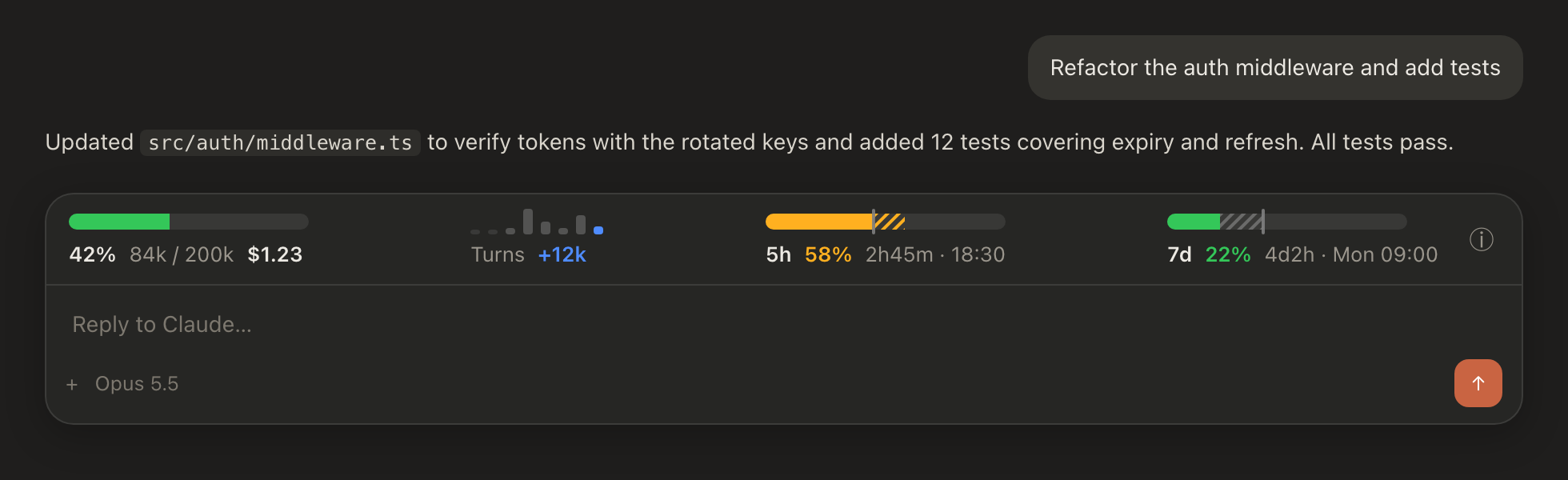
A Claude Code plugin that pins a one-line usage band above the prompt showing context usage, cost, tokens added per prompt, and 5-hour / 7-day limit pace, plus a context breakdown pane. Works in the terminal, desktop app, and VS Code.
purplecofe/usage-inspector
usage-inspector 在提示列上方固定顯示一行用量狀態列,內容包含脈絡使用百分比、tokens / 視窗與工作階段花費,顏色依用量由綠轉黃再轉紅。Turns 區塊顯示最近 8 次提示各自新增的 token,最新一根長條會隨 Claude 回應即時成長。5h / 7d 區塊顯示各額度已用百分比、視窗已過時間標記、剩餘時間與重置時間。
點擊狀態列末端的 ⓘ 或執行 /context-detail 可開啟脈絡面板,顯示模型、自動壓縮門檻與剩餘空間、快取命中率、各類別 token、前 5 大 MCP 伺服器與記憶檔案用量,以及技能、代理與斜線指令所耗 token,面板開啟時每回合會自動更新。
安裝方式:
/plugin marketplace add purplecofe/usage-inspector
/plugin install usage-inspector@usage-inspector
Turn 歷史儲存在外掛儲存區,新工作階段仍能還原最近 8 回合。支援終端機、桌面應用程式與 VS Code。
먼저 작성자의 README에서 marketplace와 플러그인 이름을 확인하세요. 저장소 구조에 따라 명령어가 달라질 수 있습니다.
claude plugin marketplace add purplecofe/usage-inspector
claude plugin install usage-inspector
English | 繁體中文
A Claude Code plugin that pins a one-line usage band above the prompt. Context usage, cost, tokens added per prompt, and 5-hour / 7-day limit pace stay in view without running /context or /usage. Works in the terminal, the desktop app, and VS Code.
<sub>Mockup: the bars and turns graph are drawn by the plugin's own rendering code; the surrounding app UI is illustrative.</sub>
Usage band
tokens / window, and session cost. Green below 60%, yellow from 60% to 84%, red at 85% and above.+12k. It grows live while Claude is responding.Context pane
Click ⓘ at the end of the band, or run /context-detail, to open a pane with:
While the pane is open it refreshes after every turn.
Turn history is kept in the plugin store, so the last 8 turns come back in a new session.
/plugin marketplace add purplecofe/usage-inspector
/plugin install usage-inspector@usage-inspector
.claude-plugin/
  plugin.json        plugin metadata
  marketplace.json   marketplace entry
hooks/
  hooks.json         registers register.tsx
  register.tsx       usage band, context pane, /context-detail command
  register.test.tsx  render tests for the band and the pane
types/index.d.ts     plugin state types
promo/               15-second promo animation (Canvas, no dependencies)

문서 생성, 드리프트 감지, API 문서 자동화 플러그인이며 비밀이 포함된 문서 쓰기나 worker 디스패치를 거부하는 function-hook 가드로도 동작합니다.

Claude 데스크톱 앱용 상태 표시줄입니다. 프롬프트 위에 나타나 세션 품질, 컨텍스트 사용량, 캐시 카운트다운, 5시간 및 주간 한도를 보여 주고 Clawd가 세션의 동작을 연출합니다.

databricks CLI를 따라 Databricks 작업 공간, Unity Catalog, 컴퓨팅, 작업, 파이프라인, 앱, 대시보드를 트리로 보여 주는 /databricks-pane을 제공하는 Claude Code 플러그인 mod입니다. 실시간 강조, 프로필 전환, CLI 인수 복사도 지원합니다.
